





bally12345
Members
-
Joined
-
Last visited
Everything posted by bally12345
-
Just got worrying notification! Unraid Parity 2 error: 16-01-2023 21:11 Alert [sERVER] - Parity 2 in error state (disk dsbl) WDC_WD120EDAZ-11F3RA0_2AHLUH3Y (sdl) This is the same 12tb disk which was assigned as disk4 and moved to different bay. I think it is best to remove to disk. Go back to 1 parity. Disk4 has already been removed. What should I do? Stop parity Stop array Remove parity 2 Create new config (preserve all) Start array Start parity rebuild with the original parity drive?server-diagnostics-20230116-2113.zip Sent from my SM-G991B using Tapatalk
-
Thanks that's all started Unraid Parity disk message: 16-01-2023 16:04 Notice [SERVER] - Parity disk, parity-sync in progress WDC_WD120EFAX-68UNTN0_8CKD5M3E (sdf) Unraid Parity 2 message: 16-01-2023 16:04 Notice [SERVER] - Parity 2, is being reconstructed and is available for normal operation WDC_WD120EDAZ-11F3RA0_2AHLUH3Y (sdl) Unraid Parity-Sync: 16-01-2023 16:04 Notice [SERVER] - Parity-Sync started Size: 12.0 TB As im out of drive bays I will next swap another 4tb drive with another 12tb but glad I know have dual parity or will have once this has completed
-
Remove original disk. Start array. Stop array. Assign disk to parity Start array? Sent from my SM-G991B using Tapatalk
-
Reseated all the connections and took all the caddies out and put them back. Seeing as I already moved files off disk4. I might as well set that to no disk and assign it to dual parity. Then I will have 2x12tb disks for parity. When it comes to replacing another 4tb disk in future i will add another 12tb drive. Anything I need to know before doing this other than I reduce my array size? Sent from my SM-G991B using Tapatalk
-
Stopped the array and that disk is no longer available in main tab to select. Think it has dropped off. I will open it all up and check all the connections. Sent from my SM-G991B using Tapatalk
-
Will have to shut it down and check as no ipmi connected... But using a lsi card in it mode. I think best thing to do is shut server down and check all the connections. Sent from my SM-G991B using Tapatalk
-
I wonder if all this time it was connection issue and not drive error. Not been inside the case just got 12 bays at front in cages Diagnostic attached server-diagnostics-20230115-2225.zip Also think all drives are automatically set to xfs Sent from my SM-G991B using Tapatalk
-
The replacement 12tb for disk4 got to 90.3% and errored Unraid Disk 4 error: 15-01-2023 21:05 Alert [sERVER] - Disk 4 in error state (disk dsbl) WDC_WD120EDAZ-11F3RA0_2AHLUH3Y (sdp) This is a brand new drive... Guessing RMA is in order? The disk has been disabled what should I do next.? Sent from my SM-G991B using Tapatalk
-
No problem, that's fine as the files are backed up on another disk just incase. Will wait for rebuild to complete. Thanks Sent from my SM-G991B using Tapatalk
-
Removed from UD and formatted, assigned disk and started array. Rebuilding has started but confused because there shouldn't be anything on disk4 as I moved everything off before removing from array. Can't remember if this is normal. Server: Notice [sERVER] - Disk 4, is being reconstructed and is available for normal operation WDC_WD120EDAZ-11F3RA0_2AHLUH3Y (sdp) Sent from my SM-G991B using Tapatalk
-
Really confused, added 12tb and it's showing unassigned dirve and not allowing to add to array? Sent from my SM-G991B using Tapatalk
-
DIsk4 (4TB) in my array has started showing reads errors and I have started moving the data off to another drive that has space so I can replace it with a 12TB drive. Just want to know whether the drive is ready to be trashed or can it still safely be used but not in my array? Smart report attached WDC_WD40EFRX-68WT0N0_WD-WCC4E1DNXP34-20230112-1817.txt Could this be re-used for another purpose such as a bitcoin node?
-
Any recommendation for a motherboard to go with? This wont work will a server board would it? I have a spare 2u chassis that I want to upgrade internals and migrate from my dual x5690 setup.
-
Excellent, there's a deal on 14TB drive which means it cheaper than 12tb! So will get the 14TB and add it as second parity
-
Hi All, Just have a quick question regarding dual parity... I currently have single 12TB parity drive if I wanted to added 2nd parity does it have to be 12tb or can I add a 14tb drive? The largest disk in my array is 12tb. So both parity drives will be equal or larger just not sure if they have to the same size?
-
I think I have come up with plan to start moving some data and freeing up a disk slot. For now I am moving stuff away from a 4TB to add the 12TB I have. Will then move all data from disk1 which has been running for about 7-8 years without issue to the new 12TB. Then order a another 12TB to replace disk1 and then assign that as parity2! After all that is all done I still need to decide if I should move away from the dual X5690 setup or Ryzen?
-
So EPYC looks like it's out the picture but seen a few posts on reddit about Ryzen over the x5690 This seems to be a good post Willl look at what current pricing looks like.
-
I have a spare 2U Supermicro chassis and looking to find a Motherboard + CPU + RAM for a budget of around £600 ish (used or refurbished) looking on ebay and UK market is pretty poor. There are some bundles for supermicro + EPYC from china but dont want to risk the import duty. Current system in use is in my SIG but essentially a DUAL XEON X5690 setup with DDR3 memory. Looking for something I can just put straight into existing chassis and the migrate all disks over to new system. 10gb networking would be nice but not essential and lower power consumption is always a bonus.
-
Im in the UK [emoji636] Sent from my SM-G991B using Tapatalk
-
By the sounds of things I would probably be better getting hold of another 12TB in that case and start planning on moving some data of the 4TBs.
-
I am in very similar position. I have a spare 12 bay 2u supermicro chassis with a damaged CPU1 socket on a X8DT3 motherboard. Can run perfectly fine with single cpu but want to upgrade it to something like Ryzen or EPYC but at the same time dont want to spend a fortune. Power consumption is big issue so looking for something more efficient than the Xeon X5690s I am currently running.
-
Correct its 2U supermicro chassis with 12bays. All bays are populated and I have 1TB ssd connected to on board sata for cache drive.
-
I will run smart against all the disk and pop it into excel for future reference too. None of the drives have any warnings against them and all showing as healthy. I think you are right, I didnt even consider a 2nd parity tbh. Either way will still need to pull a drive from the array. server-diagnostics-20220704-1618.zip
-
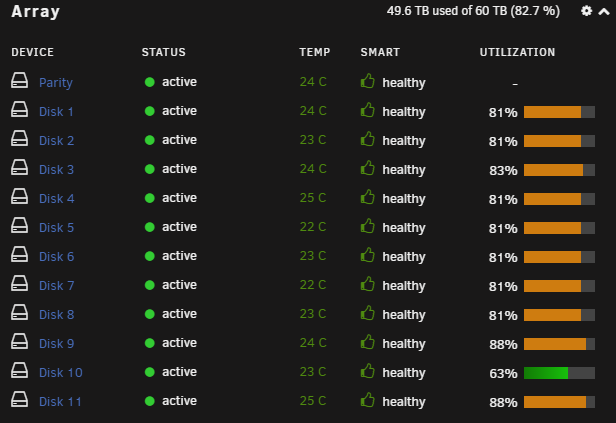
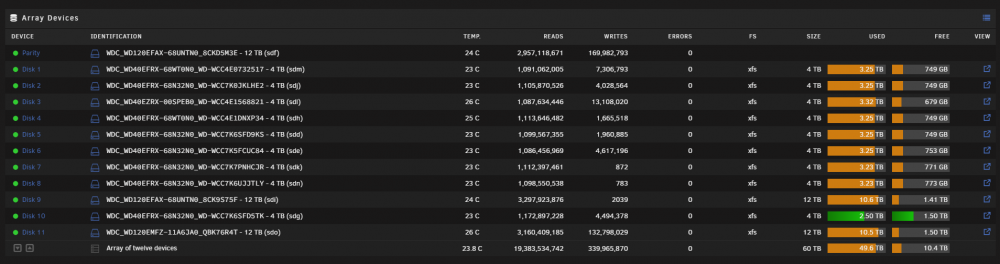
So I have 12 bays and all full now, mixture of 4TBs and 12TB. I got another 12TB to replace a 4TB but not sure which one to replace. Just replace at random or is there a way to check which is oldest? All the 4TB drives are WD Reds but think 1 is a WD Green so maybe take that out?
-
Luckily the container has been stopped for a long time. Will look up setting up reverse proxy but stopped getting alerts as soon as I disabled those ports and set unifi to detect and block. Sent from my SM-G991B using Tapatalk
