





Benni-chan
Members
-
Joined
-
Last visited
-
Sure, this sounds fine. I have two GPUs passed to the container drwxr-xr-x 2 root root 120 Jun 19 04:15 . drwxr-xr-x 6 root root 360 Jun 19 04:15 .. crwxrwxrwx 1 root 18 226, 0 Jun 19 04:15 card0 crw-rw---- 1 root 18 226, 1 Jun 19 04:15 card1 crwxrwxrwx 1 root 18 226, 128 Jun 19 04:15 renderD128 crwxrwxrwx 1 root 18 226, 129 Jun 19 04:15 renderD129I can help to debug and test, if necessary.
-
I have problems getting my Arc A380 to work when detecting available encoders, i get this error: { "level": 40, "time": 1781724151719, "pid": 7, "hostname": "9e99d1499c2b", "action": "encoder_probe_broken", "encoder": "qsv", "rawStderr": "Input #0, lavfi, from 'testsrc=size=320x240:rate=1:duration=1':\n Duration: N/A, start: 0.000000, bitrate: N/A\n Stream #0:0: Video: wrapped_avframe, rgb24, 320x240 [SAR 1:1 DAR 4:3], 1 fps, 1 tbr, 1 tbn\nStream mapping:\n Stream #0:0 -> #0:0 (wrapped_avframe (native) -> hevc (hevc_qsv))\nPress [q] to stop, [?] for help\nlibva info: VA-API version 1.22.0\nlibva info: User environment variable requested driver 'iHD'\nlibva info: Trying to open /usr/lib/x86_64-linux-gnu/dri/iHD_drv_video.so\nlibva info: Found init function __vaDriverInit_1_22\nlibva info: va_openDriver() returns 0\nlibva info: VA-API version 1.22.0\nlibva info: User environment variable requested driver 'iHD'\nlibva info: Trying to open /usr/lib/x86_64-linux-gnu/dri/iHD_drv_video.so\nlibva info: Found init function __vaDriverInit_1_22\nlibva info: va_openDriver() returns 0\nlibva info: VA-API version 1.22.0\nlibva info: User environment variable requested driver 'iHD'\nlibva info: Trying to open /usr/lib/x86_64-linux-gnu/dri/iHD_drv_video.so\nlibva info: Found init function __vaDriverInit_1_22\nlibva info: va_openDriver() returns 0\nlibva info: VA-API version 1.22.0\nlibva info: User environment variable requested driver 'iHD'\nlibva info: Trying to open /usr/lib/x86_64-linux-gnu/dri/iHD_drv_video.so\nlibva info: Found init function __vaDriverInit_1_22\nlibva info: va_openDriver() returns 0\n[hevc_qsv @ 0x55dfa3f88280] Current pixel format is unsupported\n[hevc_qsv @ 0x55dfa3f88280] some encoding parameters are not supported by the QSV runtime. Please double check the input parameters.\n[vost#0:0/hevc_qsv @ 0x55dfa3f87dc0] [enc:hevc_qsv @ 0x55dfa3f88200] Error while opening encoder - maybe incorrect parameters such as bit_rate, rate, width or height.\n[vf#0:0 @ 0x55dfa3f890c0] Error sending frames to consumers: Function not implemented\n[vf#0:0 @ 0x55dfa3f890c0] Task finished with error code: -38 (Function not implemented)\n[vf#0:0 @ 0x55dfa3f890c0] Terminating thread with return code -38 (Function not implemented)\n[vost#0:0/hevc_qsv @ 0x55dfa3f87dc0] [enc:hevc_qsv @ 0x55dfa3f88200] Could not open encoder before EOF\n[vost#0:0/hevc_qsv @ 0x55dfa3f87dc0] Task finished with error code: -22 (Invalid argument)\n[vost#0:0/hevc_qsv @ 0x55dfa3f87dc0] Terminating thread with return code -22 (Invalid argument)\n[out#0/null @ 0x55dfa3f87a40] Nothing was written into output file, because at least one of its streams received no packets.\nframe= 0 fps=0.0 q=0.0 Lsize= 0KiB time=N/A bitrate=N/A speed=N/A elapsed=0:00:00.05 \nConversion failed!\n", "excerpt": "v @ 0x55dfa3f88200] Could not open encoder before EOF [vost#0:0/hevc_qsv @ 0x55dfa3f87dc0] Task finished with error code: -22 (Invalid argument) [vost#0:0/hevc_qsv @ 0x55dfa3f87dc0] Terminating thread with return code -22 (Invalid argument)", "msg": "encoder probe-encode failed (raw stderr captured for forensics)" } { "level": 30, "time": 1781724151817, "pid": 7, "hostname": "9e99d1499c2b", "action": "encoder_detection_complete", "detected": [ "qsv", "vaapi", "libx265" ], "activeFromAuto": "qsv", "vaapiDevice": "/dev/dri/renderD128", "warningCount": 0, "outcome": { "nvenc": "missing", "qsv": "functional", "vaapi": "functional", "libx265": "functional" }, "probeEncodeDisabled": false, "qsvRateControl": "cqp", "probeDurationMs": 170, "durationMs": 181, "msg": "encoder detection complete" }The iGPU of the CPU is detected and is working, but I'd like to use the Arc, since it's a lot more performant.
-
maybe it hasn't to do with the samba share but how UD mounts the rootshare. using the UD rootshare, any exclusive share is missing. using my own rootshare defined in smb-extra, it worked (but I use /mnt/user directly) I just checked the mount under /mnt/rootshare/ and I can't go to any exclusive share in there. attached is a screenshot from both exclusive shares, once listed in the rootshare folder and once in /mnt/user. inside the rootshare folder any symlink is displayed red and not working.
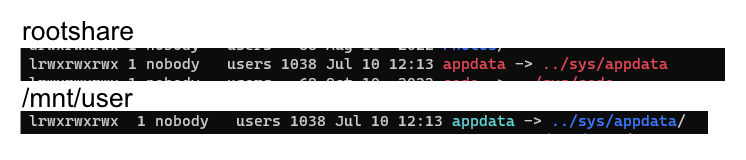
-
rootshares don't work with exlusive shares active. the rootshare won't follow the symlinks used for exclusive shares would it be possible, to add these lines to the smb config for root shares, if exclusive shares are enabled? follow symlinks = yes wide links = yes
-
@Dyon can you update to the latest sabnzbd version?
-
since the domain is linked to my external ip-address, the router is asked for the correct route. and since <external-ip>:443 is forwarded to <unraid>:8062, i get the correct connection. pretty sure this works only if the dns-rebind protection is disabled for the domain. i don't leave my LAN, but the connection is done via the router all my dockers use the same ip as my unraid box. the reverse proxy config is pretty easy: server { listen 443 ssl; server_name plexpy.mydomain; include /config/nginx/ssl.conf; location / { client_max_body_size 10m; client_body_buffer_size 128k; #Timeout if the real server is dead proxy_next_upstream error timeout invalid_header http_500 http_502 http_503; # Advanced Proxy Config send_timeout 5m; proxy_read_timeout 240; proxy_send_timeout 240; proxy_connect_timeout 240; # Basic Proxy Config proxy_set_header Host $host:$server_port; proxy_set_header X-Real-IP $remote_addr; proxy_set_header X-Forwarded-For $proxy_add_x_forwarded_for; proxy_set_header X-Forwarded-Proto https; proxy_redirect http:// $scheme://; proxy_http_version 1.1; proxy_set_header Connection ""; proxy_cache_bypass $cookie_session; proxy_no_cache $cookie_session; proxy_buffers 32 4k; proxy_pass http://192.168.0.xxx:8181; } }
-
If you are using the domain as URL, it should work from local Network too. Example: I configured plexpy.mydomain to connect to my plexpy docker via the reverse proxy. The port forwardings are as described in my previous post. I can connect via https://plexpy.mydomain in my local network and from remote locations. Not sure, if necessary, but I deactivated DNS rebind protection in my router for mydomain. plexpy.mydomain points to my WAN IP address.
-
an other way would be, to assign some other port number to your letsencrypt container (for example: container port 443 -> host port 8062). then change the port forwarding in your router to incoming port 443 -> 8062 on your unraid machine then the reverse proxy should work as before
-
#!/bin/bash echo "This may take a while" echo "Searching for (and deleting) Apple Netatalk Files/Directories" find /mnt/user -maxdepth 9999 -noleaf \( -type f \( -name ".DS_Store" -o -name "._.DS_Store" \) -o -type d \( -name ".AppleDB" -o -name ".AppleDesktop" -o -name ".AppleDouble" -o -name ".TemporaryItems" \) \) -exec rm -r "{}" \; this should be much quicker. (only has to search one time through all directories.) after deleting a directory, there can be an error message (because the find wants to search inside the directory but it doesn't exist anymore...
-
Benni-chan changed their profile photo
-
for me the download was only very very slow (took about 30-40 minutes). i'd guess, there are or were some server problems.
-
is it possible to configure snmp to not log every single connection it gets? after 10 days, the snmp log file is about 40MB...
-
maybe I misunderstood you in your first post on my system, i have every season of a show on the same disk and not only the files of one season. for the first case, you can use the same command as with the movies. for the second case (i thought, you wanted to do this), use the other command I posted above (with mindepth and maxdepth set to 2). try to use the command with -t at the end instead of -f first, to see, if it does, what you want... case 1 (move every season of a show to the same disk): disk1/TV/show1/season 01/... disk1/TV/show1/season 02/... disk1/TV/show1/season 03/... disk2/TV/show2/season 01/... disk2/TV/show2/season 02/... case 2 (consolidate on a season level, so all files of a season are on the same disk, but seasons of a show could be on different disks): disk1/TV/show1/season 01/... disk3/TV/show1/season 02/... disk2/TV/show1/season 03/... disk1/TV/show2/season 01/... disk4/TV/show2/season 02/...
-
@markswift: i've used consld8 recently for my Movies Collection for the same reason you wish. Since I have a few thousand movie folders, i used following command: (USE AT OWN RISK) find "/mnt/user/Media/Movies" -mindepth 1 -maxdepth 1 -type d -print0 | xargs -0 -n 1 consld8 -f the find command goes through the submitted path (in this case /mnt/user/Media/Movies) and only lists directories (-type d). with help of maxdepth, i tell find to not include any subdirectories in the listing. mindepth 1 tells find to not include the parent directory. it could be modified for your season problem (i used the same script for my tv shows, so every season of a show is on the same disk). if you want to have it consolidate on a season and not show level, you could use this command: find "/mnt/user/Media/TV" -mindepth 2 -maxdepth 2 -type d -print0 | xargs -0 -n 1 consld8 -f (not tested, but should work. mindepth and maxdepth are modified, so only the subdirectories of the shows (season folders) are seen. If you want to test it without moving anything, replace the -f at the end with -t. (of course you have to change the path at the beginning, pointing to the correct user share) this runs consld8 in auto mode, so the script will try to determine the best target disk.
-
someone posted a shell script for this, probably it's similar or even the same as you used from unmenu. i'm simply running it in a telnet session. but someone could probably write a plugin to include it into the gui #!/bin/bash # Version .1 - remove .DS_Store files and ._* files # ========================================================================== # # Program Body # # ========================================================================== # echo "Removing .DS_Store and ._ files" find /mnt/ -name .DS_Store -or -name "._*" -print -delete
-
just tried to install the plugin. it tries to download net-smp-5.7.3, but only 5.7.2 is available. plugin: downloading: http://slackbuilds.org/mirror/slackware/slackware64-14.1/slackware64/n/net-snmp-5.7.3-x86_64-1.txz ... done plugin: bad file MD5: /boot/packages/net-snmp-5.7.3-x86_64-1.txz


