





ken-ji
Members
-
Joined
-
Last visited
Everything posted by ken-ji
-
Well, because Dropbox app needs to be updated against their own schdule, I've made sure the docker can upgrade itself as it wants. If it fails to upgrade for a while, eventually Dropbox will complain and refuse to sync. I'm not sure why you guys are getting the tornado access issues. I'm fairly sure it has to do with permissions and the fact that dropbox needs to be able to access the files as a specific user, which by default is nobody.
-
Just a quick guess, as I'm not using the plugin myself, but this is indicative of SSH rejecting connections from unwanted / unknown IPs... though after checking the SSH server docs, I can't find any config option that allows the server to deny/accept connections by IP so I'm also stumped. Do you have the denyhosts plugin installed too? That may have something to do with this.
-
@Zangief I'm sorry but I am now totally lost as too what is wrong with your setup. You are the first to have this kind of issue and I can't seem to figure out why. Have you tried nuking /mnt/user/appdata/dropbox /mnt/user/Dropbox and starting over? Everybody else: I've been away from my system for a while and will be for the foreseeable future. I'm going to keep this the dropbox issue with the account link in mind and try to determine the exact issue, but I'm not making any promises.
-
I have no idea why this happens... and I only noticed it now as well (after upgrading to 6.3.2) I'll run some tests and observe this.
-
I see the problem (I think) - you've mistakenly set the USERID to 100. The default value is 99 - which maps to the nobody user in unRAID. try this chown -R nobody:users /mnt/user/appdata/dropbox /mnt/user/Dropbox Then modify the template to set the USERID to 99 Then startup the docker. or You can blow away /mnt/user/appdata/dropbox and /mnt/user/Dropbox (taking car to delete and recreate this share) then delete the saved template /boot/config/plugins/dockerMan/templates-user/my-Dropbox.xml then reinstall the docker and accept the defaults.
-
I'm a bit stumped. Can you issue # docker inpect Dropbox then paste the entire output of the command here? Use the insert code "<>" so it doesn't get messed up and is easier to read. Attaching it is also ok. I'm not seeing what's wrong, but that error message is definitely due to incorrect permissions.
-
Hmm. only issue I can see is that .dropbox and .dropbox.cache files have the wrong permission. Try this. Stop the docker SSH into the server and execute chown -R nobody:users /mnt/user/Dropbox This should reset every single file in the Dropbox share back to the correct permissions Then restart the docker and see if the problem has been solved.
-
That doesn't work and is a bad idea if it did. Are you able to SSH into unRAID (Do you know what this means?) and do this root@MediaStore:~# ls -al /mnt/user/Dropbox/ total 178200 drwxrwxrwx 1 nobody users 4096 Feb 10 01:44 ./ drwxrws--- 1 nobody users 146 Feb 27 02:00 ../ -rwxr-xr-x 1 nobody users 34 Nov 23 23:30 .dropbox* drwxr-sr-x 1 nobody users 56 Feb 13 04:47 .dropbox.cache/ ... root@MediaStore:~# The head error messages is about some files in the Dropbox share being not read/writable by the nobody user used by Dropbox. Also, drop in a new file and return the line for it so I can see what kind of permissions are assigned when you create files.
-
Hi Zangief, the plain vanilla install of this Dropbox docker uses the nobody user. This matches the default Public setting of the shares. If you any other setting (Secure, Private), you need to map the Dropbox container to the user accessing the share. See below for how to get the userid
-
I'm wondering if you are using anything else which uses inotify - like the Ransomware Plugin by Squid?
-
Configure another container (instance) of this docker image, giving it: a different name ie DropBox2 different appdata directories, ie /mnt/user/appdata/DropBox2 Delete the conflicting LAN port assignment (only one Dropbox container can use LAN syncing) Fire it up and have the wife login It should be good then.
-
I think its permanent (as long as the docker.img is intact) since that's where all the docker related meta data is persisted. 6.3.0 used docker 1.12 which is when the macvlan plugin was released as stable Probably these: https://github.com/docker/libnetwork/blob/master/docs/macvlan.md https://docs.docker.com/engine/userguide/networking/get-started-macvlan/
-
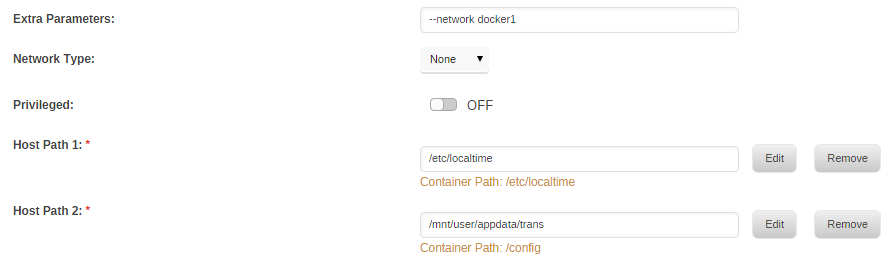
How to setup Dockers to have own IP address without sharing the host IP address: This is only valid in unRAID 6.3 series going forward. 6.4.0 has this built into the GUI but currently have a limitation of needing extra IP addresses for each of your interfaces and needs to delete all manually created docker networks. If you don't like that, you can opt to create the network manually like here and disable the docker network auto cleanup. 6.4.1 is now more intelligent about this and presents a relatively powerful UI that covers most simple cases. You don't need to assign unnecessary IP address to additional interfaces anymore. refer to https://lime-technology.com/forums/topic/62107-network-isolation-in-unraid-64/ for more details Single NIC only: Some assumptions: We'll be using a shared interface br0 (This allows us to use the same nic with virtual machines, otherwise its alright to use eth0) The IP address details are: unRAID = 192.168.1.2 Gateway/router = 192.168.1.1 Subnet = 192.168.1.0/24 Docker IP pool = 192.168.1.128/25 (192.168.1.128-254) A new docker network will be established called homenet Login via SSH and execute this: # docker network create \ -o parent=br0 \ --driver macvlan \ --subnet 192.168.1.0/24 \ --ip-range 192.168.1.128/25 \ --gateway 192.168.1.1 \ homenet Modify any Docker via the WebUI in Advanced mode Set Network to None Remove any port mappings Fill in the Extra Parameters with: --network homenet Apply and start the docker The docker is assigned an IP from the pool 192.168.1.128 - 192.168.1.254; typically the first docker gets the first IP address # docker inspect container | grep IPAddress "SecondaryIPAddresses": null, "IPAddress": "", "IPAddress": "192.168.1.128", # docker exec container ping www.google.com PING www.google.com (122.2.129.167): 56 data bytes 64 bytes from 122.2.129.167: seq=0 ttl=57 time=36.842 ms 64 bytes from 122.2.129.167: seq=1 ttl=57 time=36.496 ms ^C # docker exec container ping 192.168.1.2 PING 192.168.1.2 (192.168.1.2): 56 data bytes ^C # At this point, your gateway/router will have a first class network citizen with the specified IP address An additional Extra Parameter can be specified to fix the IP address: --ip 192.168.1.128 The container will not be allowed to talk to unRAID host due to the underlying security implementation with the macvlan driver used by Docker. This is by design That's it. Secondary NIC is available: Some assumptions: We'll be using a dedicated interface br1 (the native eth1 interface can used here too) There is no IP address assigned to the interface The IP address details are: Gateway/router = 10.0.3.1 Subnet = 10.0.3.0/24 Docker IP pool = 10.0.3.128/25 (10.0.3.128-254) A new docker network will be established called docker1 unRAID has an ip of 10.0.3.2 Login via SSH and execute this: # docker network create \ -o parent=br1 \ --driver macvlan \ --subnet 10.0.3.0/24 \ --ip-range 10.0.3.128/25 \ --gateway 10.0.3.1 \ docker1 Modify any Docker via the WebUI in Advanced mode Set Network to None Remove any port mappings Fill in the Extra Parameters with: --network docker1 Apply and start the docker The docker is assigned an IP from the pool 10.0.3.128 - 10.0.3.254; typically the first docker gets the first IP address # docker inspect container | grep IPAddress "SecondaryIPAddresses": null, "IPAddress": "", "IPAddress": "10.0.3.128", # docker exec container ping www.google.com PING www.google.com (122.2.129.167): 56 data bytes 64 bytes from 122.2.129.167: seq=0 ttl=57 time=36.842 ms 64 bytes from 122.2.129.167: seq=1 ttl=57 time=36.496 ms ^C # docker exec container ping 10.0.3.2 PING 10.0.3.2 (10.0.3.2): 56 data bytes 64 bytes from 10.0.3.2: seq=0 ttl=64 time=0.102 ms 64 bytes from 10.0.3.2: seq=1 ttl=64 time=0.075 ms 64 bytes from 10.0.3.2: seq=2 ttl=64 time=0.065 ms 64 bytes from 10.0.3.2: seq=3 ttl=64 time=0.069 ms ^C --- 10.0.3.2 ping statistics --- 4 packets transmitted, 4 packets received, 0% packet loss round-trip min/avg/max = 0.065/0.077/0.102 ms At this point, your gateway/router will have a first class network citizen with the specified IP address An additional Extra Parameter can be specified to fix the IP address: --ip 10.0.3.128 The container can happily talk to unRAID as the packets go out via br1 and talk to the host on br0 That's it. Some caveats: With only a single NIC, and no VLAN support on your network, it is impossible for the host unRAID to talk to the containers and vice versa; the macvlan driver specifically prohibits this. This situation prevents a reverse proxy docker from proxying unRAID, but will work with all other containers on the new docker network. We can only have one network defined per gateway. So if you already have docker network br0 on your main LAN (gateway 192.168.1.1), docker will not allow you to create another network referencing the same gateway. I cannot confirm yet what happens in the case of two or more NICs bridged/bonded together (but it should be the same as a single NIC) unRAID 6.4.0 We need to disable the docker network auto generation and cleanup if we want these settings to remain (until the auto cleanup is made more intelligent). The code below should be inserted into the go file before /usr/local/sbin/emhttp is started. The code below will disable docker network auto creation too, so it will behave like 6.3.5. It seems that the docker page will happily show any docker network you have defined, so you can just use them as normal and no longer need to set Extra Parameters. Again not needed with 6.4.1 going forward. # stop docker network creation and pruning sed -i -e '/# cleanup/,+3s/^/## /;s/^ custom_networks/## custom_networks/' /etc/rc.d/rc.docker
-
I did. In the negative sense.
-
just my 2bits here. Hot swapping really depends on the SATA/SAS chipset involved (not the CPU) and the Linux driver involved. For anything in the IDE category (you really need to change that) - support is practically zero For anything in the AHCI category - the driver supports it as per spec, but your hardware and the current state of Schroedinger's cat will determine if it will work. In short, it should work, but Murphy might be paying attention and give you a loop. For anything else (MPTSAS2/3) - the driver supports it, and again same can of worms with your hardware. My experience on the hardware is that you really should have hotplug bays (as in the manufacturer stated they were for hotplugging, versus ease of access). But SATA/SAS ports are actually hotplug by design so YMMV That said, while the array is stopped, unRAID seems to scan the ports repeatedly for disks and changes. But if the array is started, the manual echo '- - -' to scan the specific controller is needed.
-
Yes, you would need to change the mapping of the Data files volume mount: container: /dropbox/Dropbox -> host: /mnt/user/Media This allows the contents of the share Media to to be used as your Dropbox data folder. The docker actually by default uses /mnt/user/Dropbox as the shared share. Please be advised that the share settings for Use Cache cannot be YES or PREFFER. It must be set to ONLY or NO, otherwise Dropbox will delete your files as soons as the mover runs
-
Sorry, but I'm stumped as to what the problem is. You're the first to report this issue.
-
Yes, well the problem is that your data is owned by the user matt and not nobody. This tells me your shares are secured and that you created a user matt for access. Separate appdata and data directories are fine and is the only way its going to work if you want to access the Dropbox directory from the LAN. Post a screenshot of the configuration for Dropbox docker. (hmm seems I forgot to update the template to 6.2) Refer to the previous posts on how to setup the Dropbox user id to match that of your user matt Read and make sure you understand it. Then nuke all the dropbox folders and start over.
-
By default, all access to unRaid shares over SMB are as the user nobody, so all the files and directories created via SMB will be owned by nobody My Dropbox docker runs dropbox as the user nobody, so you don't need to set the userid under default unRaid settings. Don't be concerned by the login via the Terminal or the Web UI as root as that's the only way you can. Now if you are having tornado errors, it usually means the dropbox docker is failing to access some of the files. Can you post the volume mappings you've set for Dropbox docker, as well the directory listing for the appdata dir and the Dropbox data dir? following the default mappings, the following commands should do it # ls -al /mnt/user/appdata/Dropbox # ls -al /mnt/user/Dropbox
-
i think its the 1st number... that's how it is in my case. But it won't hurt to run that command against all the hosts ... unless you have a broken/flaky host/device.
-
Well judging from lsscsi ouput above, I'd say you should have been scanning against host1, not host7. But yesa a reboot will definite work out the kinks
-
Personally, I think its better if unRAID could use iSCSI targets as array members. Providing iSCSI target support is only useful if your entire array has decent random R/W speeds (without using cache for writes)
-
Refering to this: http://lime-technology.com/forum/index.php?topic=51874.msg497876#msg497876
-
The /rpc location is odd. I understand that the web and rpc endpoints are both under /transmission/ ie http://transmissionip:9091/transmission/web and http://transmissionip:9091/transmission/rpc Thus mine is like this location /transmission { satisfy any; allow 192.168.2.0/24; auth_basic "Transmission Remote Web Client"; auth_basic_user_file /config/transmission.passwd; proxy_pass http://192.168.2.5:9091; access_log off; } With the bonus of allowing my LAN to access transmission without needing a password. (All of this is under HTTPS block)
-
As somebody with a hot swap cage, some work needs be done by the user to properly detect new drives (or removed drives) echo "- - -" > /sys/class/scsi_host/host0/scan host0 kinda depends on your system though (its probably host0 or host1) you'll notice that your scsi devices list list the drives without the /dev/sdX names, meaning linux is not aware they exist. until linux is aware, restarting the array is not going to work.


