





ken-ji
Members
-
Joined
-
Last visited
Everything posted by ken-ji
-
@bonienl I'm thinking the docker network support should have a more I-know-what-I'm-doing-so-let-me mode. Or at least have an option to create the network for interfaces without IP addresses to allow people with more complex networks to use most of the UI without having to do really ugly workarounds like blowing away docker networks to get what they want. My particular use case is that I do macvlan networks on another vlan, but unraid is not allowed to have an IP on that vlan. Which increases security and control.
-
6.4 is supposed to auto create docker networks for any interface that has an IP upon docker startup. I think this is what is altering your settings. I'm not on 6.4 yet. Maybe @bonienl can enlighten us.
-
Yeah, docker networks currently do not communicate with an external DHCP server - there was some talk about somebody writing a docker engine plugin to do that, but that has yet to materialize - so the need to specify a subnet for docker containers to use outside of the DHCP server allocation range is necessary.
-
Post your network details and what you want the container ip to be. Post the output of docker network ls and docker network inspect <network> where network is any network listed by the ls command other than bridge, host and none I'll see what you need to run and change
-
Its not a true vlan. So the use of a different subnet puts two logical networks on the same broadcast domain, allowing spying on each other but no true communication, as subnet 1 has no idea how to route to subnet 2 (the gateway has in all likelihood a single ip on subnet1 and nothing on subnet two)
-
Ok, did a bit of research. Assume the following: local network gateway: 192.168.1.1 local network: 192.168.1.0/24 DHCP range: 192.168.1.64/26 (64-127) unRAID server IP: 192.168.1.5 unRAID interface: br0 Docker network: localnet Docker network range: 192.168.1.128/26 (128-191) Then we'll need another IP for unRAID server to use with the docker network unRAID server IP2: 192.168.1.6 So in this case after you'll need to run the following commands: ip link add br0.host link br0 type macvlan mode bridge ip addr a 192.168.1.6/24 dev br0.host ip link set up dev br0.host The last line is very important, as by default, the interface would be down (not connected)
-
Wait, in 6.4, an IP must be assigned to Docker VLAN for it to function with the GUI? Hmm... Dunno if that will break things for me...
-
* Yes, you can run multiple docker networks. what is important and not allowed is to have multiple docker networks with the same gateway address * --parent is mandatory as it tells docker where to attach the macvlan network.
-
#1 is a known fault of the unRAID Web UI as it has some (braindead) rules on how the docker webui should be configured #2 is because the dockers can't reach unRAID anymore. You're best solution is to either #1 setup a new VLAN (seeing as you have switch support) and route them together (you have a L3 router right?) This will require resetting up just about everything and your SMB paths might still not work right. - Blame the protocol for this. #2 use two NIC ports like I specified above, and migrate your docker network to the 2nd NIC: Take note to assign unRAID an ip to eth0/br0 and DO NOT assign an ip to eth1/br1 shutdown all involved dockers (do not stop the docker service) execute docker network rm ~docker-network-name-here~ docker network create ... --parent eth1/br1 to regenerate the docker network on the other NIC
-
It shouldn't cause any problems, especially take note of the settings I just posted here. The containers on this new network will happily coexist with your real network and you can migrate slowly, rather than needing to do an all or nothing approach. That said, I'm currently using all my containers in another subnet (another VLAN actually)
-
Bridging is just a sample (and a recommended setup since you typically want VMs to use the same physical NICs without having to NAT - the default vmbr0 is a NAT bridge). You can use eth1 just the same as long as its not bridged or bonded. I'm sorry I wasn't clear about using the second NIC to attach to same network. (I though it was clear by the fact the unRAID and gateways were defined to be in the same network) You should only assign one IP to unRAID per logical network or VLAN. Having more will cause you some weird problems down the line. We'll be using a dedicated interface br1 with only eth1 slaved to it (the native eth1 interface can used instead if its not bridged or bonded) There is no need to assign an IP address to the interface We only have one network (ie we have a simple plain router), no VLANs, no other subnets The IP address details are: Network: 192.168.1.0/24 Router: 192.168.1.1 unRAID: 192.168.1.2 (on eth0/br0) DHCP range: 192.168.1.64-192.168.1.127 (this just simplifies some of the math) Docker container range: 192.168.1.128-192.168.1.192 Running on the terminal: # docker network create \ -o parent=br1 \ --driver macvlan \ --subnet 192.168.1.0/24 \ --ip-range 192.168.1.128/26 \ --gateway 192.168.1.1 \ localnetwork Modify any Docker via the WebUI in Advanced mode Set Network to None Remove any port mappings Fill in the Extra Parameters with: --network localnetwork Apply and start the docker The docker is assigned an IP from the pool 192.168.1.128 - 192.168.1.192; typically the first docker gets the first IP address The important point is that this docker network will now allow dockers with dedicated local network IP addresses, that can can talk with unRAID. Please do not forget to leave the IP address for br1/eth1 as unassigned so as to avoid issues later on (unless you really really know what you are doing)
-
@sevenz no need to include the hash mark '#' as that's illustrative of the root shell prompt otherwise the script will contain only a comment. Also you need to start the script with this #!/bin/bash hash mark included, otherwise the script will fail to run (I think)
-
You are running out of file descriptors.... this is usually solved by running some commands before the docker is started # sysctl -w fs.file-max=1616812 You can place this in the go file. I don't know if the Tips and Tweaks Plugin can set that for you. Caveat: The number is the default max on my system and I never had to override it and I run Transmission with a bunch of seeds. Tou can get the current value with # sysctl fs.file-max
-
Not sure what's causing the errors. What I do know is the linking issue and I have yet to figure out why its occurring, because AFAIK, docker wrongly assumes that the dropbox is now running on new hardware the server is restarted. the Docker link should survive container restarts, just not host (unRAID) restarts
-
AFAIK, bridging is optional for dockers with the macvlan support, but for me its easier to keep bridging turned on.
-
hmm. run "docker network ls" - you should have only 3 networks bridge host none run "docker rm name" on all the others I'm guessing dm-ba57b5a60b33 is autogenerated docker network in 6.4 series. Docker will persist the network settings in the docker.img file across unraid upgrades. Also, telling docker to use br0.1 when it has not been configured will make docker create it anyway, but how its setup is not clear - which can cause problems that will be hard to debug. (AFAIK it will try to do a macvlan subinterface, which makes the containers use a subinterface of a subinterface)
-
Something is wrong with your setup right now... How did you create the br0.1 interface? The one in your ip commands is created as a VLAN subinterface. You can reconfigure the pihole container back, delete the homenet docker network with "docker network rm homenet", and stop the array and disable the VLAN network. Then try again.
-
Then my answer stands. * you can't use VLANs unless you have a VLAN supported switch. * with only a single NIC, dockers with dedicated IPs can not talk to the host and vice versa.
-
ok. Your dockers are on a macvlan subinterface br0.1, which seems to be a VLAN id 1 under br0. By design, macvlan subinterfaces cannot talk to the host on the parent interface. Also, as you are trying to use VLAN id 1, does your switch have VLAN support? I ask because VLANs can't see each other unless you have a L3 router (or some VLAN bridge) in your network. In a nutshell, Packets on a VLAN subinterface (br0.x) get tagged when they exit the host (br0), the tag is standardized (802.11q) but makes the packet look like garbage to devices without VLAN support. This is the reason my samples gave the simple case of using br0 and br1 directly. When you use a subinterface, this assumes VLAN support and therefore some understanding of what you are trying to achieve. EDIT: Upon re-checking, your not using VLANs. Since your dockers cannot access the main network, can you run "ip -d link show"? I need a little more detail to understand why its not working. also "docker inspect pi_hole"
-
Just going to add my 2 bits: When you shrink, you should ensure that the size you give in the filesystem shrink command is a bit smaller than the resulting size from your DD command. otherwise, you run the risk of truncating the filesystem and destroying it. I've had to redo vm image copies over a WAN before when we did some shrinking and we ended up with disks/partitions that were truncated by a few sectors at the end. ugh.
-
Can you post your /boot/config/network.cfg file (or the diagnostics) the output of "docker network inspect homenet" the output of "ip addr" and "ip link"
-
If I Remember Correctly, the drive number limit is a technical one. unRAID was kinda stuck for a long time with 26 Drives max including the flash drive simply because LT was a one man operation and weren't ready to support the case where the drive names under the hood exceeded the sda-sdz naming (it wrapped around to sdaa) There is no such thing as a custom distro underneath. unRAID is primarily based on Slackware - one of the oldest surviving distro's which is rock stable and simple. Of course some components are bumped up to meet user needs and demands, the but the core principles of the distro are all there.
-
Yep. Unfortunately I've already left the server behind for the week (This is at my relative's place and I have access during the weekends) I can try to see if it can be replicated on my server.
-
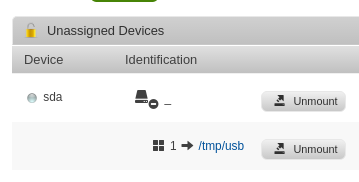
Hey got a USB flash drive giving this in the UI. Its a Samsung Flash Drive Fit 128GB. exFAT formatted, (I manually mounted it in /tmp/usb as UD was going to try to mount it to /) Any logs or command outputs you need? UD's log says: Tools - System Devices has this:
-
I'm curious - which unraid partitioning scheme are we referring to? the "old" start at 63 MBR? the "new" start at 64 MBR? (AFAIK gpt always starts at 64)



