





ken-ji
Members
-
Joined
-
Last visited
Everything posted by ken-ji
-
I don't think dropbox (even natively under windows) was meant to work like this... But some options I can think of * You can run this docker in multiple instances - and with docker custom IP support, you can even use it with LAN sync turned on, just in case you want a mobile device (like laptop) to run its own dropbox * You can make a new "shared" account, then share stuff with it from each user with the appropriate read/write permissions. Then you would publicly share this share. But I guess this won't give proper/limited access
-
No fix unfortunately. I'm about ready to give up on this...
-
that's really weird. Can you show your network settings? and the docker network settings? There should be no difference between the OpenVPN-AS container vs other containers. are VPN clients assigned to a different subnet? please include that too...
-
Besides plugging it in, you need to go to the docker settings, delete the docker network on eth0 and enable it on br1 (AFAIK bridging is not a factor and can be left on for VMs to use if needed).
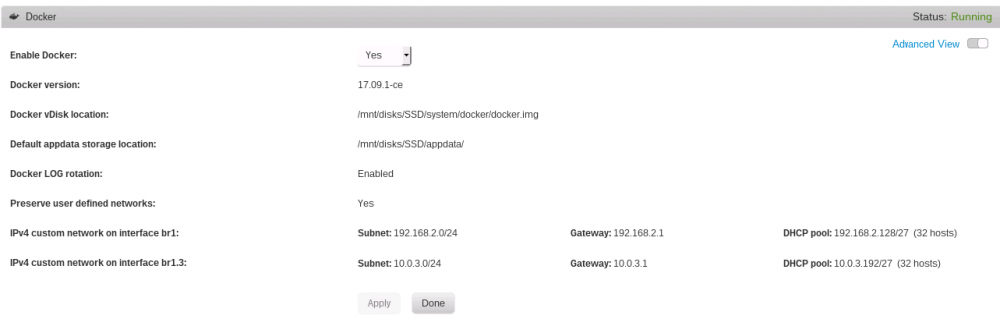
-
You should not have needed to do any of this on the command line anymore. All of it is GUI supported.
-
I haven't tested this setup my self since I'm mostly remoting my server and it is running headless, so its such a pain to hook up a monitor when I need it. but the docker application itself notes this workaround for host to container communication on a single NIC. @bonienl also suggested it at some point, but I don't know how it would interact with the GUI. Commands to issue from the actual console and not an ssh terminal (probably put this in the go file so that it works on reboot) assuming bridging is enabled and bonding is not, the the interface device is br0; unraid ip is 192.168.1.5; gateway is 192.168.1.254 ip address flush dev br0 ip link add link br0 mac0 type macvlan mode bridge ip addr addr add 192.168.1.5/24 dev mac0 ip route add default via 192.168.1.1 dev mac0 To the best of my knowledge nobody has tried this (or at least reported back if it works or not)
-
There are at least two ways around this depending on your server hardware. (fully supported) Best solution: at least 2 network interfaces. Do not bond the interfaces. Do not assign an IP to the 2nd interface (eth1/br1) Delete the docker custom network on eth0/br0 Setup the docker custom network on eth1/br1 Move all containers there. Done - you've side stepped the security feature/limitation ov mcvlan networks Alternate solution: have VLAN support on your network Create a VLAN subinterface (eth0.1/br0.1) Do not assign an IP to the VLAN subinterface Create a docker custom network on it Move containers there Done - you've side stepped the security feature/limitation ov mcvlan networks Alternate solution (not sure if supported by the GUI) in the go file, add code to create a macvlan subinterface (mac0) remove unRAID IP from eth0/br0 assign unRAID IP to macvlan subinterface (reset network gateway) Done - unRAID should be able to use the macvlan subinterface to work as if nothing has changed. conainters on docker custom networks should be able to talk to unRAID via the macvlan subinterface which does no trigger the security feature limitation.
-
This is by design. What you should do is to not assign an IP to br0.5 interface under unRAID Network Settings, then proceed to setup the interface for docker custom network. It will then work, but must cross the router for unRAID and the docker to talk to each other.
-
This is not strictly true. But you do need to have an extra NIC to place the custom docker network on and let it talk to the bridge/unRAID.
-
A NFS share of a user share /mnt/user/Test 192.168.2.0/24(rw,async,wdelay,hide,no_subtree_check,fsid=110,sec=sys,secure,root_squash,no_all_squash) can be mounted by a client for rw access, but completely ignores the permissions. [root@centos user]# mount mediastore:/mnt/user/Test /mnt/user/Test [root@centos user]# ls -ld Test drwxrwx---. 1 nobody users 20 Jun 20 08:27 Test [root@centos user]# cd Test [root@centos Test]# touch a [root@centos user]# ls -l a -rw-r--r--. 1 nfsnobody nfsnobody 0 Jun 20 08:27 a [root@centos Test]#
-
GID_LIST is other group (ids) that the running emby process will be a member of, so its used to grant additional access to iGPU for transcoding, and maybe the DVB tuners (if your using the DVB build) without having to muck with the device node permissions and ownership. The reason is that the docker image itself is a general use image, it's not specifically for unRAID, so the template has to provide some overrides and the defaults might not make sense.
-
Did anybody notice the bug with the icon names for certain docker image tags? Docker image tag -> resulting icon file openhab/openhab:latest -> openhab-openhab-latest-icon.png openhab/openhab:2.3.0-amd64-debian -> --icon.png emby/emby:3.4.0 -> --icon.png I've created a PR: https://github.com/limetech/webgui/pull/346 for the fix
-
Try: #!/bin/bash if [[ ! -e /root/keyfile ]]; then scp -i /path/to/ssh-private-key [email protected]:/path/to/keyfile /root/keyfile fi Just remember, the ssh-private-key should have permissions 600 as well as the directory its in, so you can't use the private key directly from the USB flash drive
-
The docker registry image is for running your own registry. What I meant is that the tar image, once installed to your local docker system, can be pushed to a public (or private) repo. But yeah - we should get the devs OK before we attempt such a thing. was @jbear actually allowed to share the download links? But for those who really want it, they can work out the docker run command and share that.
-
Well, not really, as you can push the docker image to the public repo. (hub.docker.com) and you can create a template file, stick it in the USB and have it refer to the local docker image (at least I don't think there are checks in the WebUI) but even then, you can run the docker image from the CLI and then you'd be golden... but yeah, its all up to yourself if you want it need it.
-
This is the "binary" way of publishing docker images without providing a Dockerfile(source) or the registry (hub.docker.com) - the tar is actually just the entire filesystem and some control metadata files for entrypoint, exposed ports, volumes, etc. Its almost similar to a repo in hub.docker.com where you manually do docker push mydocker/docker:latest So if the devs gave you this tarball, that usually means the stuff they put in is not yet published (will not be published) for public use/reuse. Its like you created an emby/embyserver container (let's call it Emby) with docker run then you stop the container, and then export a tarball with docker export Emby -o Emby.tar
-
I forgot about checking that... ?
-
Download the tarball Then # docker import mymedia_docker-1.3.75.0-1_amd64.tar mymedia:1.3.75.0 # docker tag mymedia:1.3.75.0 mymedia:latest This now gives you a local docker images named mymedia:latest (with a version'd tag to roll back incase the next one doesn't quite work out) From here you can do manual docker run commands or build a template.
-
Same here... - should have taken notice of the version tags...
-
tl;dr Can you use curl/wget to http://github.com to determine internet connectivity? Only found out now that the github CDN in my neck of the woods doesn't respond to pings... and FCP is complaining... root@MediaStore:~# ping github.com PING github.com (52.74.223.119) 56(84) bytes of data. ^C --- github.com ping statistics --- 2 packets transmitted, 0 received, 100% packet loss, time 1056ms root@MediaStore:~# curl -v github.com * Rebuilt URL to: github.com/ * Trying 52.74.223.119... * TCP_NODELAY set * Connected to github.com (52.74.223.119) port 80 (#0) > GET / HTTP/1.1 > Host: github.com > User-Agent: curl/7.59.0 > Accept: */* > < HTTP/1.1 301 Moved Permanently < Content-length: 0 < Location: https://github.com/ < * Connection #0 to host github.com left intact
-
@bonienl Do you think its possible to do this? PHP is really not my cup of tea else you might be seeing a PR instead.
-
Just to put stuff into perspective, the high memory usage situation mainly reared its head with the inclusion of dockers and VMs. Even before with just plugins, people weren't running all that much and server applications usually made do with whatever ram was available. But with containers and VMs and people running desktops and stuff, people sometimes forget to spec out the memory requirements properly and the whole thing falls apart due to the absence of swap.
-
well if you have been looking around, you must have missed that you can to specify the really advanced network bits and bobs via the extra parameters field in the template. so in your case, probably --network vpn with the VPN container being named vpn
-
Its actually the glibc package as you're trying to install a much older one which overwrites the stock installed one. glibc is kinda like the system files, so willy nilly upgrading it will smoke your OS.
-
Hmm. tried it and you are correct... this is probably a bug with the user shares. I can't shutdown my array for a while, but if you have disk shares enabled, try creating an NFS share there and doing the same tests there. Feel free to create a defect report.



