





ken-ji
Members
-
Joined
-
Last visited
Everything posted by ken-ji
-
I will point out that this is my preferred setup that Unraid NAS + WebUI is only available on the main Network. If necessary, assigning an IP (statically or via DHCP) on the VLANs is also ok, but most users seem to get confused when the Unraid networking doesn't seem to work properly - and this is usually because the default route to reach the internet is going via a different VLAN/network interface than expected. I also use custom docker networks - since I need proper IPv6 support - though my Mikrotik router doesn't want to support DHCPv6, just SLAAC, and my ISP is doing fully dynamic /56 prefix allocation - which is a pain for Docker networks on IPv6 As long as the docker network is completely defined (subnet address and gateway) it will be available - your screen shots before did not have gateways assigned. I'll bet its because after configuring unraid not to get IP addresses for the VLANs, the lease is still considered live by your DHCP server. It should not be renewed after the typical 1day lease lifetime. Somewhere in the middle maybe typical depending on the DHCP server used. Some would do a hash of client MAC address and DUID to pick a suitable number in the leasing range. This means this host will likely get the same IP over and over (unless there are conflicts). Others just pick the next free and assign that.
-
You need to configure the network of the docker container to the correct one - br0.14 in your case. Also the docker network needs the correct gateway defined, otherwise docker will not be able to use it. - its 10.10.14.1 in your case. You also might not want to set an IP address and gateway for the VLAN in the Unraid network settings, so that Unraid will not be present on that VLAN. (or confuse you as Unraid tries to figure out which interface its supposed to use to go out to the internet.)
-
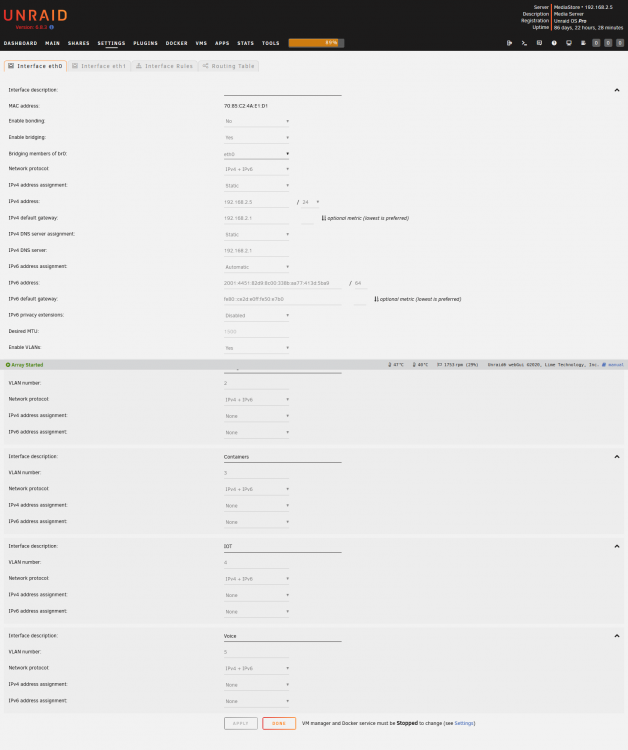
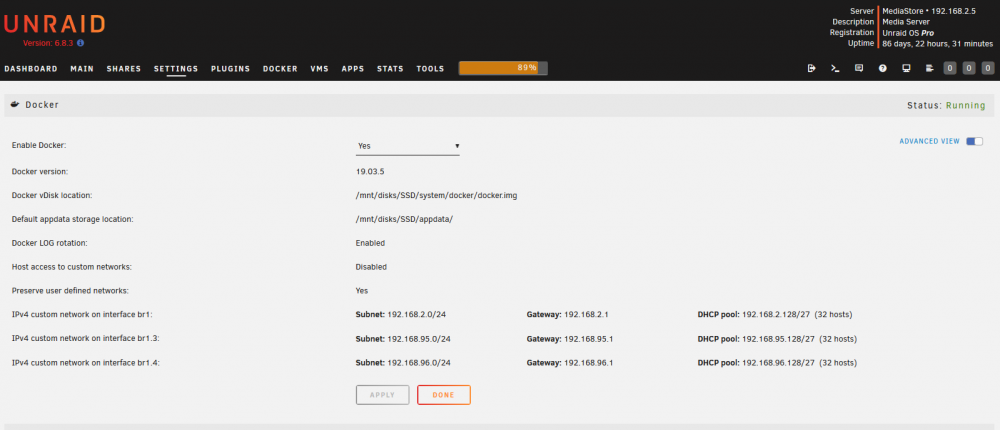
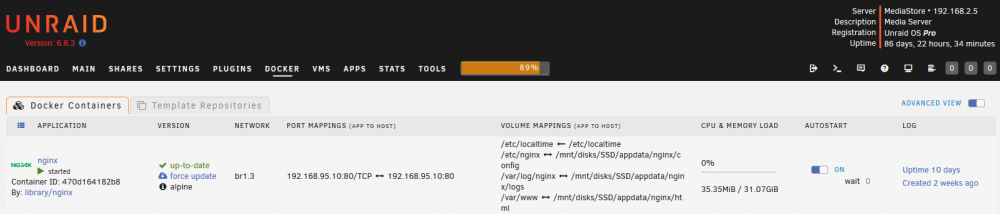
If you have VLAN support on your switch, you can set it up like this This will create subinterfaces eth0.x/br0.x (leaving bridging on is up to you as well as joining eth1). Then you configure the docker network on br0.x I just happen to have my nics split off and keep all my dockers on br1 (I set it up before the host access option for docker was there - haven't tested it if it'll work as like.) So my docker containers (like my nginx reverse proxy)
-
Looks good. I'll assume its working for you.
-
Setting it all to automatic would then make your pfsense assign via DHCP to Unraid 3x. For each subnet along with default gateway. So don't. just do static assignment and decide with interface (typically eth0/br0/bond0) is the "main" one and will be used to go out to the internet. Just leave blank for the non-main interfaces and leaving it blank for all will make your Unraid unable to reach the internet.
-
May I know why you have 3 interfaces on the same subnet? If you have bridging enabled, why not bridge all 3 interfaces together as br0?
-
Actually the GUI won't let you change routes that are already defined by the system ie result of Network settings. And the reason its the wrong fix is that it won't stay like that: you restart Unraid; or make networking changes, and then all these extra gateways will all comeback and confuse you. Particularly if you don't reboot until its been months down the line.
-
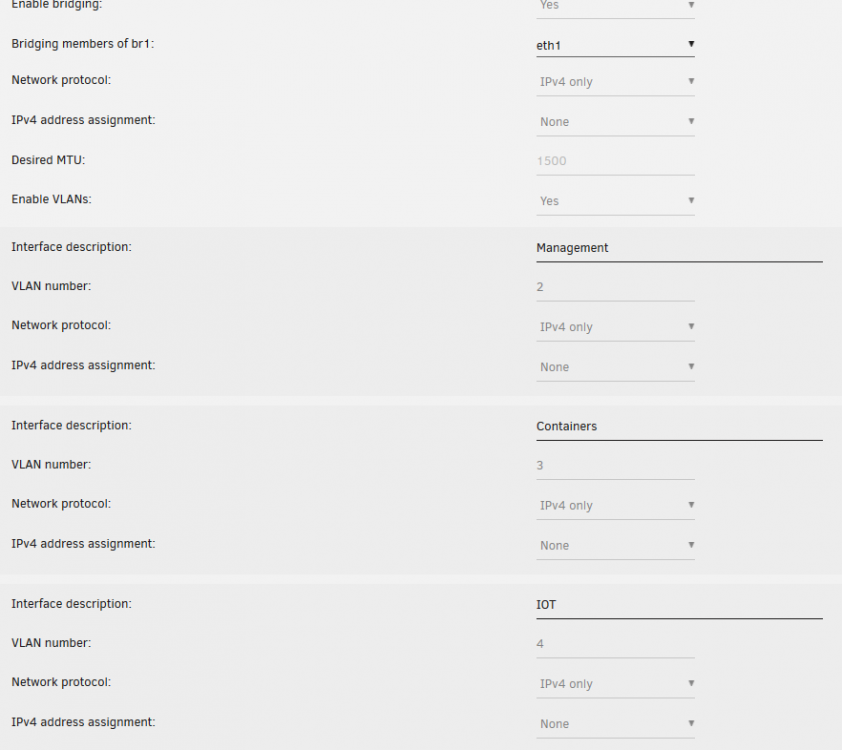
@905jay @kana That's the wrong fix. You want to change your Unraid networking config and not specify default gateways for the other interfaces Here's my config for my eth1 There's no config at all, as I don't need Unraid to be accessible on that interface, but Dockers can live on that interface and VLAN interfaces without issues.
-
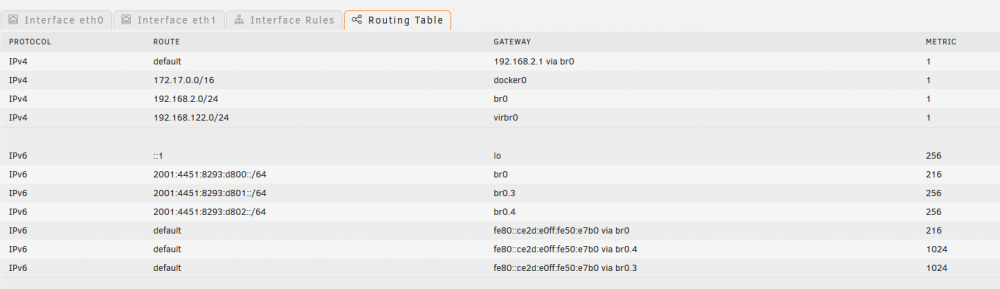
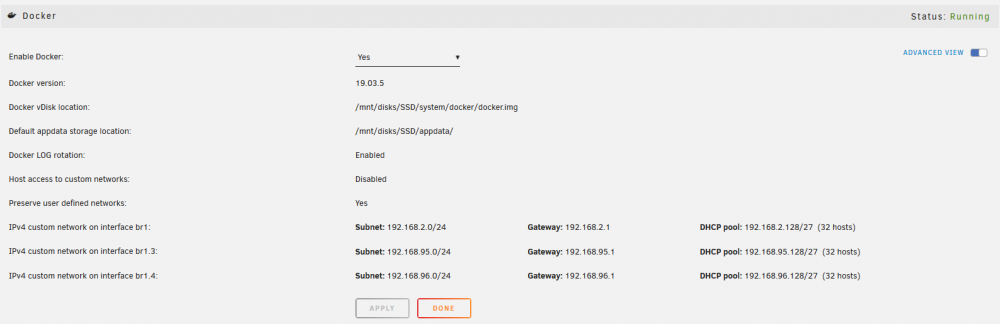
You're seem to have default gateways defined for each subnet / NIC interface. Unless its a router (Unraid is not that capable), don't specify the default gateway for all interfaces. Pick the default/main interface only (usually br0/eth0). Then for VM's on the other interfaces, DHCP can take care of it (or have static settings). Same with dockers, the docker custom network you define for each interface can have the gateway defined there, not on the Unraid level. Just so you don't get confused, I'm running my dockers all on a secondary interface to allow docker and Unraid communications. Its been like this from 6.3 series.
-
Its valid still. when you run /etc/rc.d/rc.sshd restart it should restart sshd service by first copying all the files from /boot/config/ssh to /etc/ssh, regenerate server keys if needed, then backup the newly generated server keys. If you did what my post suggested, the authorized keys file will now be by default /etc/ssh/root.pubkeys, which will need to be backup to the /boot/config/ssh directory at your discretion. if you are getting asked for a password only after you restarted sshd, you must have added the public keys to the wrong place (/etc/ssh/root.pubkeys) then restarted sshd. add them to /boot/config/ssh/root.pubkeys, then restart sshd
-
Just like to point out that this statement is wrong as this docker image is using Arch Linux and not Alpine Linux, which is its own thing.
-
You've done something really wrong. Please refer to the first page for some details, but in a nutshell, you used the container to run a copy of dropbox client as the container root user, which now places the files inside the container image. Start over (delete the container, and re add it) When the container has started up, view the logs of the container (which will show you the link url) Link your account, and wait a bit as it will now populate the directory for the Data files. If you ever access the shell to check anything, you'll need to run su - nobody before doing anything else, as the dropbox client is running as nobody user instead of the default root.
-
Sorry. I give up. You are the first to have this error, and I have no obvious clues or ideas as to why the client is stalling. Maybe Dropbox can provide support, but the headless client seems to have the absolute minimum of support (at least for free users)
-
I can only guess, but the dropboxd process probably crashed or something without showing anything in the logs. Well restarting the container would restart the process, but as for the runningand syncing for 24h, I have no idea what happened there...
-
hmm. really odd. If you now open a shell in the container and su to your user, does dropbox.py status say its running? If it is, then there should be no problem (and I'm out of clues or ideas) If it isn't, I'm actually stumped as to why the dropboxd binary is stopping for you.
-
Can you restart the Dropbox container and attach the log? Probably starting from the last dropbox: initializing line
-
I think you've misconfigured the container somehow... can you should me the docker configuration again?
-
The dropbox process is running as the nobody user. So when you go in, you'll need to switch to the nobody user: sh-4.3# su - nobody nobody@dropbox:~$ cd Dropbox nobody@dropbox:~/Dropbox$ dropbox.py filestatus .dropbox: unwatched .dropbox.cache: unwatched 2019-03-07 13.57.05.pdf: up to date 3D Stuff: up to date nobody@dropbox:~/Dropbox$
-
I have no idea what could be wrong here... are you still at 3 or less devices signed in vs the Free tier of the Dropbox account (you can check on the web site under security)? or are you paying for it monthly? You might need to go in via a shell and run the dropbox.py command to inspect your files.
-
Its been a while, but I think the docker settings page limits which network interfaces it will display. You need to enable "Preserve user defined networks" in the Docker Settings, then in the command line run something like # docker network create \ -o parent=vibr1 \ --driver macvlan \ --subnet 192.168.1.0/24 \ --ip-range 192.168.1.128/25 \ --gateway 192.168.1.1 \ labnet Adjust the IPs to your needs. Unfortunately, docker won't let you create a network without a gateway defined and imposes a few other annoying constraints on docker networks.
-
You need to tell docker about the new bridge by going to the Settings | Docker Menu. Stopping the docker engine will then let you edit the networks and allow you to define the IP and gateways for the internal network.
-
Hmm. your diagnostics show that you have a netdata container that is not properly reaping the finished processes 201 15538 0.2 0.0 33416 22352 ? SNl 03:01 2:23 | | \_ /usr/bin/python /usr/libexec/netdata/plugins.d/python.d.plugin 1 201 300 0.0 0.0 0 0 ? ZNs 05:34 0:00 | | \_ [timeout] <defunct> 201 301 0.0 0.0 0 0 ? ZNs 06:28 0:00 | | \_ [timeout] <defunct> 201 302 0.0 0.0 0 0 ? ZNs 04:32 0:00 | | \_ [timeout] <defunct> ... snip ... 201 32766 0.0 0.0 0 0 ? ZNs 09:32 0:00 | | \_ [timeout] <defunct> 201 32767 0.0 0.0 0 0 ? ZNs 08:54 0:00 | | \_ [timeout] <defunct> So your server is running out of process ids to run new processes. You should check with the support thread for the netdata container you are running
-
You tried to start the dropbox service as the root user. This made your dropbox sync to /root/Dropbox (inside the container) which is in docker.img because of some limitations, the container drops you into a root shell, not the user running the dropbox service. so you actually need to run su - nobody before interacting with the dropbox service inside the container. From within my container: sh-4.3# su - nobody -c 'dropbox.py status' Up to date I have to say you are the first to encounter a bunch of issues... Most of the people using this container have been able to configure without much difficulty, barring the crap Dropbox created with the filesystem limits and the recent dropbox builds now needing graphical libraries to run headless. If your docker logs says just that then there should be nothing wrong. Mine is like this. The killed line at the end indicates dropbox service restarting it self. You can run the status command above or the ls command 'dropbox.py ls /dropbox/Dropbox' to check the sync status. dropbox: locating interpreter dropbox: logging to /tmp/dropbox-antifreeze-bUcbWA dropbox: initializing dropbox: initializing python 3.7.5 dropbox: setting program path '/dropbox/.dropbox-dist/dropbox-lnx.x86_64-97.3.460/dropbox' dropbox: setting python path '/dropbox/.dropbox-dist/dropbox-lnx.x86_64-97.3.460:/dropbox/.dropbox-dist/dropbox-lnx.x86_64-97.3.460/python-packages.zip' dropbox: python initialized dropbox: running dropbox dropbox: setting args dropbox: applying overrides dropbox: running main script dropbox: load fq extension '/dropbox/.dropbox-dist/dropbox-lnx.x86_64-97.3.460/cryptography.hazmat.bindings._constant_time.cpython-37m-x86_64-linux-gnu.so' dropbox: load fq extension '/dropbox/.dropbox-dist/dropbox-lnx.x86_64-97.3.460/cryptography.hazmat.bindings._openssl.cpython-37m-x86_64-linux-gnu.so' dropbox: load fq extension '/dropbox/.dropbox-dist/dropbox-lnx.x86_64-97.3.460/cryptography.hazmat.bindings._padding.cpython-37m-x86_64-linux-gnu.so' dropbox: load fq extension '/dropbox/.dropbox-dist/dropbox-lnx.x86_64-97.3.460/psutil._psutil_linux.cpython-37m-x86_64-linux-gnu.so' dropbox: load fq extension '/dropbox/.dropbox-dist/dropbox-lnx.x86_64-97.3.460/psutil._psutil_posix.cpython-37m-x86_64-linux-gnu.so' dropbox: load fq extension '/dropbox/.dropbox-dist/dropbox-lnx.x86_64-97.3.460/apex._apex.cpython-37m-x86_64-linux-gnu.so' dropbox: load fq extension '/dropbox/.dropbox-dist/dropbox-lnx.x86_64-97.3.460/tornado.speedups.cpython-37m-x86_64-linux-gnu.so' dropbox: load fq extension '/dropbox/.dropbox-dist/dropbox-lnx.x86_64-97.3.460/wrapt._wrappers.cpython-37m-x86_64-linux-gnu.so' dropbox: load fq extension '/dropbox/.dropbox-dist/dropbox-lnx.x86_64-97.3.460/PyQt5.QtWidgets.cpython-37m-x86_64-linux-gnu.so' dropbox: load fq extension '/dropbox/.dropbox-dist/dropbox-lnx.x86_64-97.3.460/PyQt5.QtCore.cpython-37m-x86_64-linux-gnu.so' dropbox: load fq extension '/dropbox/.dropbox-dist/dropbox-lnx.x86_64-97.3.460/PyQt5.QtGui.cpython-37m-x86_64-linux-gnu.so' dropbox: locating interpreter dropbox: logging to /tmp/dropbox-antifreeze-crogcX dropbox: initializing dropbox: initializing python 3.7.5 dropbox: setting program path '/tmp/.dropbox-dist-new-86fd6rhb/.dropbox-dist/dropbox-lnx.x86_64-97.3.465/dropbox' dropbox: setting python path '/tmp/.dropbox-dist-new-86fd6rhb/.dropbox-dist/dropbox-lnx.x86_64-97.3.465:/tmp/.dropbox-dist-new-86fd6rhb/.dropbox-dist/dropbox-lnx.x86_64-97.3.465/python-packages.zip' dropbox: python initialized dropbox: running dropbox dropbox: setting args dropbox: applying overrides dropbox: running main script dropbox: load fq extension '/tmp/.dropbox-dist-new-86fd6rhb/.dropbox-dist/dropbox-lnx.x86_64-97.3.465/cryptography.hazmat.bindings._constant_time.cpython-37m-x86_64-linux-gnu.so' dropbox: load fq extension '/tmp/.dropbox-dist-new-86fd6rhb/.dropbox-dist/dropbox-lnx.x86_64-97.3.465/cryptography.hazmat.bindings._openssl.cpython-37m-x86_64-linux-gnu.so' dropbox: load fq extension '/tmp/.dropbox-dist-new-86fd6rhb/.dropbox-dist/dropbox-lnx.x86_64-97.3.465/cryptography.hazmat.bindings._padding.cpython-37m-x86_64-linux-gnu.so' dropbox: load fq extension '/tmp/.dropbox-dist-new-86fd6rhb/.dropbox-dist/dropbox-lnx.x86_64-97.3.465/psutil._psutil_linux.cpython-37m-x86_64-linux-gnu.so' dropbox: load fq extension '/tmp/.dropbox-dist-new-86fd6rhb/.dropbox-dist/dropbox-lnx.x86_64-97.3.465/psutil._psutil_posix.cpython-37m-x86_64-linux-gnu.so' dropbox: load fq extension '/tmp/.dropbox-dist-new-86fd6rhb/.dropbox-dist/dropbox-lnx.x86_64-97.3.465/apex._apex.cpython-37m-x86_64-linux-gnu.so' dropbox: load fq extension '/tmp/.dropbox-dist-new-86fd6rhb/.dropbox-dist/dropbox-lnx.x86_64-97.3.465/tornado.speedups.cpython-37m-x86_64-linux-gnu.so' dropbox: load fq extension '/tmp/.dropbox-dist-new-86fd6rhb/.dropbox-dist/dropbox-lnx.x86_64-97.3.465/wrapt._wrappers.cpython-37m-x86_64-linux-gnu.so' dropbox: load fq extension '/tmp/.dropbox-dist-new-86fd6rhb/.dropbox-dist/dropbox-lnx.x86_64-97.3.465/PyQt5.QtWidgets.cpython-37m-x86_64-linux-gnu.so' dropbox: load fq extension '/tmp/.dropbox-dist-new-86fd6rhb/.dropbox-dist/dropbox-lnx.x86_64-97.3.465/PyQt5.QtCore.cpython-37m-x86_64-linux-gnu.so' dropbox: load fq extension '/tmp/.dropbox-dist-new-86fd6rhb/.dropbox-dist/dropbox-lnx.x86_64-97.3.465/PyQt5.QtGui.cpython-37m-x86_64-linux-gnu.so' dropbox: locating interpreter dropbox: logging to /tmp/dropbox-antifreeze-y31su9 dropbox: initializing dropbox: initializing python 3.7.5 dropbox: setting program path '/dropbox/.dropbox-dist/dropbox-lnx.x86_64-97.3.465/dropbox' dropbox: setting python path '/dropbox/.dropbox-dist/dropbox-lnx.x86_64-97.3.465:/dropbox/.dropbox-dist/dropbox-lnx.x86_64-97.3.465/python-packages.zip' dropbox: python initialized dropbox: running dropbox dropbox: setting args dropbox: applying overrides dropbox: running main script dropbox: load fq extension '/dropbox/.dropbox-dist/dropbox-lnx.x86_64-97.3.465/cryptography.hazmat.bindings._constant_time.cpython-37m-x86_64-linux-gnu.so' dropbox: load fq extension '/dropbox/.dropbox-dist/dropbox-lnx.x86_64-97.3.465/cryptography.hazmat.bindings._openssl.cpython-37m-x86_64-linux-gnu.so' dropbox: load fq extension '/dropbox/.dropbox-dist/dropbox-lnx.x86_64-97.3.465/cryptography.hazmat.bindings._padding.cpython-37m-x86_64-linux-gnu.so' dropbox: load fq extension '/dropbox/.dropbox-dist/dropbox-lnx.x86_64-97.3.465/psutil._psutil_linux.cpython-37m-x86_64-linux-gnu.so' dropbox: load fq extension '/dropbox/.dropbox-dist/dropbox-lnx.x86_64-97.3.465/psutil._psutil_posix.cpython-37m-x86_64-linux-gnu.so' dropbox: load fq extension '/dropbox/.dropbox-dist/dropbox-lnx.x86_64-97.3.465/apex._apex.cpython-37m-x86_64-linux-gnu.so' dropbox: load fq extension '/dropbox/.dropbox-dist/dropbox-lnx.x86_64-97.3.465/tornado.speedups.cpython-37m-x86_64-linux-gnu.so' dropbox: load fq extension '/dropbox/.dropbox-dist/dropbox-lnx.x86_64-97.3.465/wrapt._wrappers.cpython-37m-x86_64-linux-gnu.so' dropbox: load fq extension '/dropbox/.dropbox-dist/dropbox-lnx.x86_64-97.3.465/PyQt5.QtWidgets.cpython-37m-x86_64-linux-gnu.so' dropbox: load fq extension '/dropbox/.dropbox-dist/dropbox-lnx.x86_64-97.3.465/PyQt5.QtCore.cpython-37m-x86_64-linux-gnu.so' dropbox: load fq extension '/dropbox/.dropbox-dist/dropbox-lnx.x86_64-97.3.465/PyQt5.QtGui.cpython-37m-x86_64-linux-gnu.so' dropbox: locating interpreter dropbox: logging to /tmp/dropbox-antifreeze-iKKsTy dropbox: initializing dropbox: initializing python 3.7.5 dropbox: setting program path '/tmp/.dropbox-dist-new-ejm8ndtg/.dropbox-dist/dropbox-lnx.x86_64-98.3.150/dropbox' dropbox: setting python path '/tmp/.dropbox-dist-new-ejm8ndtg/.dropbox-dist/dropbox-lnx.x86_64-98.3.150:/tmp/.dropbox-dist-new-ejm8ndtg/.dropbox-dist/dropbox-lnx.x86_64-98.3.150/python-packages.zip' dropbox: python initialized dropbox: running dropbox dropbox: setting args dropbox: applying overrides dropbox: running main script dropbox: load fq extension '/tmp/.dropbox-dist-new-ejm8ndtg/.dropbox-dist/dropbox-lnx.x86_64-98.3.150/cryptography.hazmat.bindings._constant_time.cpython-37m-x86_64-linux-gnu.so' dropbox: load fq extension '/tmp/.dropbox-dist-new-ejm8ndtg/.dropbox-dist/dropbox-lnx.x86_64-98.3.150/cryptography.hazmat.bindings._openssl.cpython-37m-x86_64-linux-gnu.so' dropbox: load fq extension '/tmp/.dropbox-dist-new-ejm8ndtg/.dropbox-dist/dropbox-lnx.x86_64-98.3.150/cryptography.hazmat.bindings._padding.cpython-37m-x86_64-linux-gnu.so' dropbox: load fq extension '/tmp/.dropbox-dist-new-ejm8ndtg/.dropbox-dist/dropbox-lnx.x86_64-98.3.150/psutil._psutil_linux.cpython-37m-x86_64-linux-gnu.so' dropbox: load fq extension '/tmp/.dropbox-dist-new-ejm8ndtg/.dropbox-dist/dropbox-lnx.x86_64-98.3.150/psutil._psutil_posix.cpython-37m-x86_64-linux-gnu.so' dropbox: load fq extension '/tmp/.dropbox-dist-new-ejm8ndtg/.dropbox-dist/dropbox-lnx.x86_64-98.3.150/apex._apex.cpython-37m-x86_64-linux-gnu.so' dropbox: load fq extension '/tmp/.dropbox-dist-new-ejm8ndtg/.dropbox-dist/dropbox-lnx.x86_64-98.3.150/tornado.speedups.cpython-37m-x86_64-linux-gnu.so' dropbox: load fq extension '/tmp/.dropbox-dist-new-ejm8ndtg/.dropbox-dist/dropbox-lnx.x86_64-98.3.150/wrapt._wrappers.cpython-37m-x86_64-linux-gnu.so' dropbox: load fq extension '/tmp/.dropbox-dist-new-ejm8ndtg/.dropbox-dist/dropbox-lnx.x86_64-98.3.150/PyQt5.QtWidgets.cpython-37m-x86_64-linux-gnu.so' dropbox: load fq extension '/tmp/.dropbox-dist-new-ejm8ndtg/.dropbox-dist/dropbox-lnx.x86_64-98.3.150/PyQt5.QtCore.cpython-37m-x86_64-linux-gnu.so' dropbox: load fq extension '/tmp/.dropbox-dist-new-ejm8ndtg/.dropbox-dist/dropbox-lnx.x86_64-98.3.150/PyQt5.QtGui.cpython-37m-x86_64-linux-gnu.so' dropbox: locating interpreter dropbox: logging to /tmp/dropbox-antifreeze-TyX1Rm dropbox: initializing dropbox: initializing python 3.7.5 dropbox: setting program path '/dropbox/.dropbox-dist/dropbox-lnx.x86_64-98.3.150/dropbox' dropbox: setting python path '/dropbox/.dropbox-dist/dropbox-lnx.x86_64-98.3.150:/dropbox/.dropbox-dist/dropbox-lnx.x86_64-98.3.150/python-packages.zip' dropbox: python initialized dropbox: running dropbox dropbox: setting args dropbox: applying overrides dropbox: running main script dropbox: load fq extension '/dropbox/.dropbox-dist/dropbox-lnx.x86_64-98.3.150/cryptography.hazmat.bindings._constant_time.cpython-37m-x86_64-linux-gnu.so' dropbox: load fq extension '/dropbox/.dropbox-dist/dropbox-lnx.x86_64-98.3.150/cryptography.hazmat.bindings._openssl.cpython-37m-x86_64-linux-gnu.so' dropbox: load fq extension '/dropbox/.dropbox-dist/dropbox-lnx.x86_64-98.3.150/cryptography.hazmat.bindings._padding.cpython-37m-x86_64-linux-gnu.so' dropbox: load fq extension '/dropbox/.dropbox-dist/dropbox-lnx.x86_64-98.3.150/psutil._psutil_linux.cpython-37m-x86_64-linux-gnu.so' dropbox: load fq extension '/dropbox/.dropbox-dist/dropbox-lnx.x86_64-98.3.150/psutil._psutil_posix.cpython-37m-x86_64-linux-gnu.so' dropbox: load fq extension '/dropbox/.dropbox-dist/dropbox-lnx.x86_64-98.3.150/apex._apex.cpython-37m-x86_64-linux-gnu.so' dropbox: load fq extension '/dropbox/.dropbox-dist/dropbox-lnx.x86_64-98.3.150/tornado.speedups.cpython-37m-x86_64-linux-gnu.so' dropbox: load fq extension '/dropbox/.dropbox-dist/dropbox-lnx.x86_64-98.3.150/wrapt._wrappers.cpython-37m-x86_64-linux-gnu.so' dropbox: load fq extension '/dropbox/.dropbox-dist/dropbox-lnx.x86_64-98.3.150/PyQt5.QtWidgets.cpython-37m-x86_64-linux-gnu.so' dropbox: load fq extension '/dropbox/.dropbox-dist/dropbox-lnx.x86_64-98.3.150/PyQt5.QtCore.cpython-37m-x86_64-linux-gnu.so' dropbox: load fq extension '/dropbox/.dropbox-dist/dropbox-lnx.x86_64-98.3.150/PyQt5.QtGui.cpython-37m-x86_64-linux-gnu.so' /usr/local/bin/dockerinit.sh: line 19: 19 Killed su -l ${DROPBOX_USER} -c "/dropbox/.dropbox-dist/dropboxd"
-
Right, I guess I wasn't clear, but you need to to use a specific disk for the Dropbox share since you don't have a cache drive. Since you already have a Dropbox user share, it probably is on disk1, and you can confirm from the Web UI Shares Tab, Click on Compute for the Dropbox share and it will return where the share is currently saved to. Edit the docker to change /mnt/user/Dropbox to whichever disk is used for it ie /mnt/disk1/Dropbox for disk1 Some caveats with this configuration. If you create/edit files over Samba to the Dropbox share, there is the possibility that files might end up on the other disks and would then be not seen by the Dropbox container. You should edit the Dropbox share to limit it to only one disk.
-
its the exec line. exec stops the current process and replaces it whatever you exec'd - so in this script. once it exec's the zsh, then the entire script stops and a zsh process runs and exits. Reading the script indicates exec'ing zsh is point less. why are you trying to reload zsh? its not even running as the #! of the script is bash.



