





ken-ji
Members
-
Joined
-
Last visited
Everything posted by ken-ji
-
What kind of NFS share to you have? (Public/Secure/Private) and what's the output of # cat /etc/exports # exportfs -v And how are they mounted from the CentOS client?
-
Bridge mode - shares IP with unRAID - usually ok but sometimes annoying because container wants a specific port that's already in use by unRAID or another container. - your network cannot distinguish between container traffic and NAS services (hard to perform QoS or specific VPN routing) Custom eth0/br0 - allows your container to have a different IP from unRAID. - This is mostly OK since this means stuff like QoS and selective VPN routing can be done. - However, this prevents all communications between the container and unRAID (which prevents stuff like reverse proxying) unless you have VLANs or extra network interfaces.
-
wherever your Dropbox files get sync'd - usually a share.
-
That's usually a permission error. Check that all the files (particularly new ones) are owned by the same user (default is nobody)
-
You probably want a GPS/Cell tower sensor instead. It won't trip in the same locality (adjacent room, up from the basement, etc) but still be able workout that its being moved a bit of a distance away.
-
Odd. just deployed a new container without any issues,
-
Its been a while, and I haven't found the time to work out the one really annoying bug(?) with dropbox when inside a docker container. Whatever dropbox client uses to ID the host, it changes and invalidates when unRAID is rebooted. that said, @jowi I can force the image to update, and it should pull the latest dropbox binaries in.
-
You'd be surprised. A well prepared team of three can do this and transfer the entire Rack (still powered up running on batteries) across the block between buildings. We did something similar before, but decided to power down in the end lessen the risk of corrupting data. The trick is that most high end server deployments have redundant power inputs at the rack level, so you can unplug one input, move the rack, plug it in and unplug the remaining one, rinse and repeat. This will also let you swap UPS/batteries while keeping the system running. .
-
For single drives yes. For multiple drives, qualified yes - ok for limited media access, but parity checks and drive rebuilds will definitely suffer slowdown. And getting a stable controller with proper PM support can be very hard.
-
Anybody here familiar on how to prevent thumbnails from being generated incorrectly for certain video codecs? Video Codec H264 AVC Yes Profile High 4:4:4 Predictive Level 50 Resolution 1280x720 Pixel format yuv444p10le

-
That's not quite true. When a docker container gets its own IP, it can no longer talk to host unRAID on the same logical interface (network port). This is a security feature design by the Docker devs. However, if you have an extra interface that is not bonded to the main interface, you can enable it with out assigning it an IP and use that interface for the docker container. This will then allow the docker container to reach the unRAID IP.
-
Is it possible to add some/all of the network interface stat graphs? Since we now have other sensible use cases for the additional interfaces? Adding a aggregate graph for networks is also ok, since some users just bridge and bond everything together. And maybe same with the disks?
-
Only that a docker container could potentially take a IP already assigned by the DHCP server if you don't/forget to assign the static IP. Ideally, you're DHCP server range should be a subset of 192.168.1.0/24 like 192.168.1.128/25 and your docker network for eth0 is set to 192.168.1.64/26 so as to prevent possible collisions. Its just like you have a network served by a DHCP server, and you have a user adding a device and he randomly picked an IP without consulting the DHCP leases. The DHCP server probably checks before assigning the used IP, but something was using it already and the container comes on-line...
-
You should be using 6.4.1 as it will make things simpler (unclear from your sig - syas 6.1?) Under the Docker settings (can only change while Array is down) Also refer to:
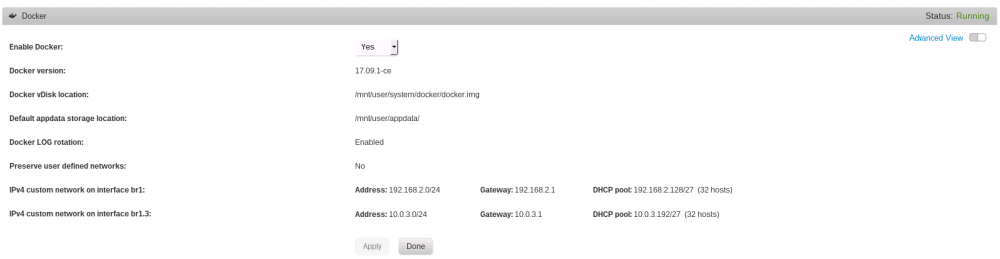
-
I setup my VLAN network in 6.3 (before anybody knew about the custom docker networks) In any case a quick testing on my network indicates, that unfortunately DNS queries will be issued using the IP address of the docker container. so if your container is on a restricted VLAN, it won't be able to make the DNS queries.
-
MediaStore:~# docker run --rm --network containers busybox nslookup www.google.com Server: 127.0.0.11 Address 1: 127.0.0.11 Name: www.google.com Address 1: 2404:6800:4005:809::2004 hkg07s24-in-x04.1e100.net Address 2: 172.217.161.164 hkg07s29-in-f4.1e100.net root@MediaStore:~# docker run --rm --network br1 busybox nslookup www.google.com Server: 127.0.0.11 Address 1: 127.0.0.11 Name: www.google.com Address 1: 2404:6800:4005:80e::2004 hkg12s17-in-x04.1e100.net Address 2: 216.58.220.196 del01s08-in-f196.1e100.net root@MediaStore:~# docker run --rm busybox nslookup www.google.com Server: 192.168.2.1 Address 1: 192.168.2.1 router.way-of-the-blade.com Name: www.google.com Address 1: 2404:6800:4005:809::2004 hkg07s24-in-x04.1e100.net Address 2: 172.217.161.164 hkg07s29-in-f4.1e100.net root@MediaStore:~# docker run --rm --network host busybox nslookup www.google.com Server: 192.168.2.1 Address 1: 192.168.2.1 router.way-of-the-blade.com Name: www.google.com Address 1: 2404:6800:4005:809::2004 hkg07s24-in-x04.1e100.net Address 2: 172.217.161.164 hkg07s29-in-f4.1e100.net hmm. this what I get, so its not clear to me what you mean by not being able to use DNS. Also using docker run without the --rm option will spawn containers that't you'll need to manually clean up.
-
its a bit odd. as my containers have this root@MediaStore:~# docker exec Transmission cat /etc/resolv.conf nameserver 127.0.0.11 options ndots:0 root@MediaStore:~# docker exec NGINX cat /etc/resolv.conf nameserver 127.0.0.11 options ndots:0 root@MediaStore:~# cat /etc/resolv.conf # Generated entries: nameserver 192.168.2.1 AFAIK, docker actually generates an internal DNS server for containers to use, while the host OS does the actual lookups. These dockers are using custom docker macvlan network
-
try: ip addr ip route cat /etc/resolv.conf
-
You'll need to have an IP assigned to the interface you want to show up Docker network drop down. This will be fixed in a future release according to @bonienl Or you'll need to have the docker network manually recreated every startup of the docker service. caveat: If you have multiple interfaces with ip addresses in the same subnet (and are physically on the same LAN), some protocols are known to misbehave - I think Samba (Windows File Shares) is one of those. This is because broadcast and discovery sometimes get confused. caveat: The host cannot talk to dockers on the same interface as itself, so if br0 has an IP of 192.168.1.10, br1 has an IP of 192.168.1.11, container A is on br1 with ip of 192.168.1.110. Container A will fail to talk to 192.168.1.11 and vice versa. This is by design. Container A needs to talk to unRAID using 192.168.1.10 and 192.168.1.10 only. However, any protocol that uses discovery and broadcasting will potentially be confused and try to use the wrong IP at times, resulting in flaky behavior. To manual create a docker network and use it with the Plex docker container see this topic:
-
If nobody has encountered this issue yet; I did long before in 6.3.0 When unRAID w/ IP 192.168.1.2) has an interface (say br1) with IP of 192.168.2.2 It will attempt to reach the other machines (VMs, Containers, or devices) on 192.168.2.x using that interface. It will then fail silently as it can't reach any of the containers due to the macvlan network restrictions. The workaround here is to either: make a routing rule for the docker ip range to be reached via the default gateway 192.168.1.1 not assign and ip to the container network, which forces the host to reach the non-local subnet via the default router. This is why I was complaining to bonienl about the current requirement of needing to have an IP to the docker network parent interface.
-
Yes I plugged that in for now. Thanks. Like I said I was pissed. Sleep clears the sleep deprived mind of useless stuff - like anger and frustration
-
I guess I was pissed. But I should have seen it coming, I just didn't get to participate the RC to have seen this actual effect. Its still annoying that its an all or nothing approach right now.you should have left custom networks with un-address-ed interfaces alone. maybe that would be a better compromise.
-
Its not "crippled"... just that it now imposes some constraints that I consider naive and annoying. * Any interface with an IP address will have its custom docker network nuked without asking the user, and a new custom network setup based on the details of the IP address assigned. ** thus a new requirement that unRAID have an unnecessary IP in all custom docker networks. This requirement may sound trivial and not an issue, as containers can't reach unRAID on that IP, but i think users will get confused still and wonder why they can't reach unRAID on that IP. * Any other custom network is nuked away without even giving the user the option to use it. * and worse, there's no behavioral off switch. Workaround: the custom network can be defined after the docker service has started, but dockers on this custom network will no longer autostart. So now all my containers running on a separate VLAN won't even run since the custom docker network is now missing. My PHP sucks, but I think I can make a manually configured plugin to fix this silly limitation for now.
-
I'm sorry but I'm going to consider Docker network support in 6.4 too simple and naive. With the auto clean up of docker networks, it completely broke my system post upgrade. I'm now going to have to work out a correct way of setting up custom docker networks, without assigning unRAID an IP for my own simplicity. And still having the containers come up automatically. Do you have any suggestions?
-
Well the default of the Docker is to run as the user nobody which has all the necessary permissions to be accessible by guest/(insecure share) I think the missing step is to actually define the Dropbox share user the Shares TAB of the unRAID Web UI Because if you didn't define it there, it will pickup/assume some settings that might not make any sense to your configuration (public share, etc) Do take note that by default a user share with a cache drive is a recipe for data loss, since any changes to your Dropbox files will result in the mover running at some point causing Dropbox to delete the underlying files. tl;dr the Dropbox share should be a cache-only or share-only. Do not try any of the other settings. The app running is the default one by Dropbox and has no "dumbo-mode" UI's . There's no site/page either - 17500 is needed for LAN syncing - Dropbox will happily send/receive updates from any of your Laptops/Desktops One known issue with Dropbox that I haven't solved is that upon restart of unRAID Dropbox thinks its a new PC and wants to be linked again. I haven't figured out what's causing this and have yet to get a controlled environment to test and try to fix with.


