




.jpg.adf8def3431e0aa8e590900f82752d7a.jpg)

wgstarks
Members
-
Joined
-
Last visited
Everything posted by wgstarks
-
Please describe exactly how you are connecting to your local network from a remote location to access the webui. Are you running multiple OpenVPN servers? If it’s just one then any connections would all be in a preconfigured range.
-
I double checked my account settings to be sure they’re configured correctly (they are). I can see the topics are still marked as “followed” but I don’t get any emails for new posts.
-
I don’t know what this means? You use DNS to access every web page. Can you describe exactly how you are trying to access the webui? And what your IP is when the access fails?How are you accessing remotely that doesn’t work?Is WireGuard using 192.168.2.0/24?It sounds like it’s operating normally. With your current settings you will not be able to access the app from any IP not in 192.168.1.0/24. You’ll need to add other networks to LAN NETWORK (comma separated) to be able to access from them.I was thinking about installing this docker since Calibre seems to be very popular recently but it appears that most of the users have unresolved issues and there isn’t much support. Am I wrong? Also looks like Calibre doesn’t work with iBooks on iOS but I’m seeing a lot of conflicting info about that. Can iBooks be linked with Calibre?Several people have reported issues with DNS. You might try just using something like 1.1.1.1 for the DNS server and see if that resolves your issue. If it does you can add the defaults back one at a time until you see which is creating the problem. If changing the DNS settings doesn’t help add your supervisord log and dicker run command that your next post. Be sure to redact users/passwords.Make sure to note which drive is parity.It’s a setting that’s well and truly hidden.😁Right click any of the files being downloaded or seeded and select Category>Add New.You stated earlier that you are connecting remotely to the webui using WireGuard. Is your assigned IP in the 192.168.64.0/19 network? Any IP that isn’t a part of this network won’t be able to connect.Click the “Edit” button for Port: Webui interface and post a screenshot of that screen.Delete the path where you mapped port 4445 to port 8080.It should be 4445:4445.This is your problem.It’s the port you added in this part of Q4 from the FAQ. The name assigned by the container may be different.Looks like you have port 4445 mapped to port 8080. You need the map it to 4445 on the host. Here’s a screenshot of my port mapping. Just replace 8088 with your preferred port.
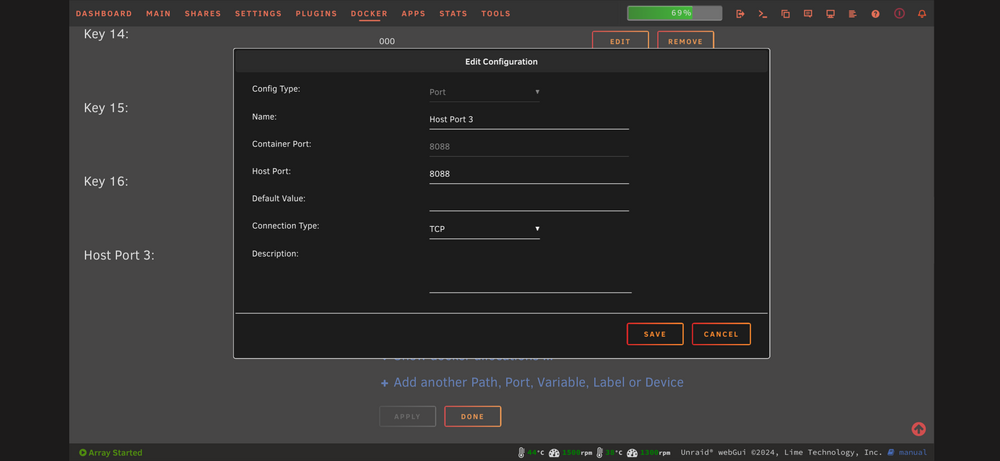 Post your docker run command.Are you using the temp password shown in supervisord.log?The container is just a package containing the qbittorrent app. Credentials and settings are a part of the app. All those files and logs will be in appdata. This will apply for most of the dockers.You would also need to delete the associated file from boot/config/plugins/dockerMan/templates-user/ These are the files that show CA that you had this docker previously installed and preserve your current port and path settings. Delete them and you will have to re-enter all the container settings.Probably using an older version of the app.What about the supervisord log?



