





Everything posted by ashman70
-
Thanks I was wondering about this myself.
-
Something is definitely wrong, I assume in my settings somewhere. I have three shows in my schedule that aired at 10pm its now 11:45 and I can find all three shows listed in my NZB providers however Medusa is not downloading them her logs say: 2017-04-17 23:44:13 INFO SEARCHQUEUE-DAILY-SEARCH :: [a011615] Beginning daily search for new episodes2017-04-17 23:44:16 INFO SEARCHQUEUE-DAILY-SEARCH :: [a011615] Using daily search providers2017-04-17 23:44:16 INFO SEARCHQUEUE-DAILY-SEARCH :: [a011615] Using daily search providers2017-04-17 23:44:18 INFO SEARCHQUEUE-DAILY-SEARCH :: [a011615] No needed episodes found So for some reason she is saying No needed episodes found which is false. A quick check of each of these three shows and their status has been changed to 'skipped' instead of 'wanted' I don't know which setting is changing them to skipped.
-
Thanks, I still can't figure out how to rollback though.
-
Yes and I get conflicting info under general settings its says version 3.2.1 and under the server tab it says Version 1.5.5.3634
-
OK now I am even more confused, I can't find what version of plex I am running. How do I do that?
-
I have noticed another problem. I have a few shows that air tonight say at 9pm and they are in the queue, I see in the logs at 9:57 that for some reason Medusa sets their status to 'skipped' any idea why its doing this? I've also noticed that more often then not, an hour or more after a show has aired, I still have to go in an do an auto search on the episode in the schedule to get it to be downloaded, it doesn't seem to be doing it automatically. 7-04-17 21:54:08 INFO POSTPROCESSOR :: [a011615] Feature 'postpone post-processing if no subtitle available' is enabled2017-04-17 21:54:10 INFO POSTPROCESSOR :: [a011615] PostProcessing Path: /downloads/completed2017-04-17 21:55:25 INFO DAILYSEARCHER :: [a011615] Setting status (Skipped) for show airing today: xxx.xxx.xxx- S01E06 - xxx.xxx2017-04-17 21:55:25 INFO DAILYSEARCHER :: [a011615] Setting status (Skipped) for show airing today: xxx - S01E11 -xxx2017-04-17 21:55:25 INFO DAILYSEARCHER :: [a011615] Setting status (Skipped) for show airing today: xxx - S06E22 - xxx
-
I haven't changed anything in Plex. How does one rollback to an earlier version?
-
So my inlaws who have been away since January just got back and my mother in law has been looking forward to catching up on shows from my plex server. They have a new LG 65' tv that I installed plex on back in the fall when they got it and before they went away it was working fine, even if my internet connection was being used to download while she was watching stuff off plex. Now since she got back, she's had issues with the app on the tv freezing and it behaving really slow. They have a 1GB internet connection so I doubt its their end, however plex has had several updates since then. I have also upgraded my server by adding two new CPU's but I can't see that causing this problem? I do have these custom settings for CPU cores, are they wrong, or could they be causing problems? --cpuset-cpus=3,15,4,16,5,17 I wonder if I should uninstall and reinstall the app on their tv? Thoughts?
-
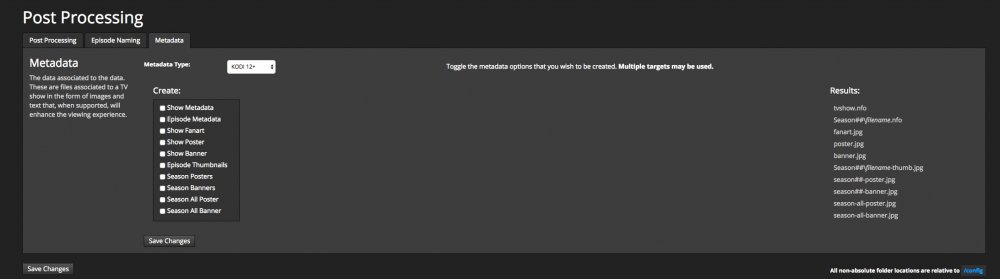
One more question about Medusa, when I was using Sonarr, it would grab metadata for an episode, nfo, thumb.jpg, fanart.jpg etc, currently its barely grabbing an nfo. In the screen shot I have attached, do I have to check off the boxes on the left to get the metadata I want?
-
I would up going with this: Season %S/%S.N.S%0SE%0E.%SQ.N.%RG That gets me this: Season 2/Show.Name.S02E03.720p.HDTV.x264.RLSGROUP.ext And that puts the show in its respective season folder. Thanks for your help.
-
Not sure what you are asking here? Are you asking about the episode naming?
-
Thanks for the info.
-
Where do you change the indexer?
-
Where can I post this as a question to the Medusa devs, Github?
-
Ok I think I have this sorted now, thanks for your help. Another question, some shows are showing foreign languages on some posters, my language is set to English, any reason why this might be? Is there a way to change the poster image? I have looked and I can't seem to find one. Here are a couple of samples.




-
His suggestion didn't work.
-
So after having issues with Sonarr and Sickrage, I have decided on someone else's advice to try Medusa. I am having similar issues with Medusa that i was having with Sickrage, namely that episodes are being copied into the correct folder, but not the season folder. So for example, I have a folder for a show called ABC 123, inside this folder I have folders named Season 1 and Season 2. I go to download abc.123.S02e09 and it gets downloaded, copied to my tv server but dumped in the ABC 123 show folder, not the Season 2 folder where it should go. I am sure there is a setting in Medusa somewhere, but I couldn't find it in Sickrage.
-
I am no using the drone feature in Sonarr, but thanks.
-
Still having massive issues with Sonarr, had to hard reset my server again today because the docker was unresponsive and I can't unmount my array. Uninstalled it again, reinstalled it, its still downloading episodes but what gets copied to my other server is not the amount that is downloaded and as a consequence downloaded/copied episodes don't play properly because they are not the same file size as what was downloaded.
-
Ok so my parity check is almost done. I have a docker/container I can't stop and because of this I can't unmount my array cleanly and because of this I have to do a dirty shutdown and reboot. Oh and the webui for sonarr won't load either. Suggestions?
-
It didn't the sonarr docker/container is still running.
-
ok that got be back to the command prompt, anything I should type now?
-
So now I have a blinking cursor at the command prompt on the server after I entered the command docker kill sonarr. I can't do a hard reset at the moment because I am at about 60% on a parity check......great
-
This is where I am for the past 5 minutes. Is there a command to forcibly stop the container?

-
Ok I edited the edited the mappings Squid, unRAID is now trying to stop the docker to apply them......

