





Everything posted by ashman70
-
If you really want to use Esxi I wouldn't recommend installing it on unRAID, I would recommend installing it on bare metal. You are not likely to find Esxi running on unRAID as a production server in the real world. There are lots of inexpensive HP, Dell, Lenovo servers you can buy off eBay that are a few generations old that should run up to Esxi 6.0. That would be a better experience for Exsi in my opinion.
-
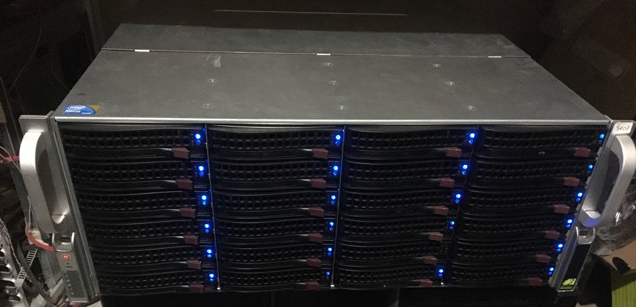
Nothing special or 'pimped' out here, just a 36 bay Supermicro chassis. Unfortunately you can't see the 12 bays in the back, sorry I'll have to get around to taking a pic of that. 30 drives in total for 108TB of space.
-
I was able to fix it, I just added the container with no paths to my libraries and it added fine. I then added the paths to my libraries and they added fine. Not sure what broke this in the first place since all I did was an update like I always do.
-
So now when I try to add the plex media serve container as per Bonienl's instructions, I get this: Command: root@localhost:# /usr/local/emhttp/plugins/dynamix.docker.manager/scripts/docker run -d --name="PlexMediaServer" --net="host" --privileged="true" -e TZ="America/New_York" -e HOST_OS="unRAID" -v "/mnt/user/Movies":"Movies":rw -v "/mnt/user/appdata/plexmediaserver":"/config":rw limetech/plex /usr/bin/docker: Error response from daemon: Invalid bind mount spec "/mnt/user/Movies:Movies:rw": Invalid volume destination path: 'Movies' mount path must be absolute.. See '/usr/bin/docker run --help'. The command failed.
-
This is what I am referring to and running 'LSIO plex docker' which is now broken. How do you suggest I fix it? All I did was try and update it as it indicated there was an update and what I got were the errors I posted.
-
This was an update for Plex itself, I also performed an update for binhex-sickrage and it updated normally, just plex is giving me this error.
-
The usual way I update a docker, is right click on the icon for the docker, in this case Plex, and left click on update, it then opens a window and performs the update, this time I did exactly that.
-
I noticed today there was an update for Plex so I went to apply the update and got this error: oot@localhost:# /usr/local/emhttp/plugins/dynamix.docker.manager/scripts/docker run -d --name="plex" --net="host" -e TZ="America/New_York" -e HOST_OS="unRAID" -e "PUID"="99" -e "PGID"="100" -e "VERSION"="latest" -v "/mnt/user/Movies/":"/movies":rw -v "/mnt/user/TV/":"/tv":rw -v "/mnt/user/appdata/plex":"/config":rw --cpuset-cpus=3,11,4,12 linuxserver/plex /usr/bin/docker: Error response from daemon: Conflict. The name "/plex" is already in use by container daefe599cfefd11d827ae303e5a52e66e1234775d3cef737ef3875b0d51c9335. You have to remove (or rename) that container to be able to reuse that name.. See '/usr/bin/docker run --help'. Not sure why there is a conflict, I haven't changed anything and this has now broken plex. Should I just delete the image and reinstall it?
-
Depends on the brand of your UPS, typically though one UPS can shut down only one server, whichever server the the smart cable is plugged into and the software is installed on. Some UPS's such as APC SmartUPS can have 'network' cards and they are able to shutdown multiple servers, but the software can be expensive to do this. Its probably cheaper just to buy a second UPS.
-
Good to know, thanks!
-
Regarding hot swap drives, I assume if I stopped the array and lets say, added a new drive by just popping it in an empty slot, that there is no way for unRAID to know about that drive until a reboot? Likewise, if I wanted to replace a drive with a larger one, or even replace a failed drive, reboots would be in order for any of these scenarios?
-
Is there a way to assign two cores, even specific cores, to Plex via parameters in the docker setup?
-
Thanks, figured it out, my firewall was geoblocking certain countries and I found a thread that helped me out, once I made changes to my firewall it worked.
-
i am trying to add a second indexer to Sonarr and I am following the instructions from the indexing site on how to add it to Sonarr, yet after adding the correct info, Sonarr times out saying it is unable to communicate with the indexing site? I have tried several times with the same result. The indexing site says its API is up and available, if I put the API url in a browser it comes back that its up but that my query is incorrect which is normal as its not meant to come from a browser. I can't imagine there is anything in Sonarr that would be preventing the communication but I thought I would put it out here for you guys to see. I checked my firewall and it's not blocking outbound communication to the url for the indexing site which is using HTTPS. Oh and I did stop and restart the Sonarr docker a couple times to see if that would help, it did not. I have another indexing site in Sonarr which works fine btw. This is what I pulled out of the Sonarr logs: [Warn] Newznab: Unable to connect to indexer [v2.0.0.4427] System.Net.WebException: The request timed out at System.Net.HttpWebRequest.EndGetResponse (IAsyncResult asyncResult) <0x41cb5740 + 0x00197> in <filename unknown>:0 at System.Net.HttpWebRequest.GetResponse () <0x41cb33b0 + 0x0005a> in <filename unknown>:0 one.Common.Http.Dispatchers.ManagedHttpDispatcher.GetResponse (NzbDrone.Common.Http.HttpRequest request, System.Net.CookieContainer cookies) [0x000fe] in M:\BuildAgent\work\6c3239faf2b92630\src\NzbDrone.Common\Http\Dispatchers\ManagedHttpDispatcher.cs:61 Thoughts?
-
No I did nothing but download the 6.2.4 update and enlarge the docker image from 10GB to 20GB and reboot. I've since rebooted the server again, and now Plex is binding the proper internal IP and the webgui is loading, odd though.
-
I just updated to unRAID 6.2.4 and now Plex won't load its webgui. I've restarted Plex, stopped and restarted it, no dice. This is from the Plex logs. Not sure why its showing an odd IP address. I do have a second unused network interface on my server, its plugged in but I've set the port to down. One thing I did do before rebooting after the upgrade was increase the size of my docker image from 10GB to 20GB, but my other dockers appear to be working fine. ------------------------------------- _ _ _ | |___| (_) ___ | / __| | |/ _ \ | \__ \ | | (_) | |_|___/ |_|\___/ |_| Brought to you by linuxserver.io We do accept donations at: https://www.linuxserver.io/donations ------------------------------------- GID/UID ------------------------------------- User uid: 99 User gid: 100 ------------------------------------- [cont-init.d] 10-adduser: exited 0. [cont-init.d] 30-dbus: executing... [cont-init.d] 30-dbus: exited 0. [cont-init.d] 40-chown-files: executing... [cont-init.d] 40-chown-files: exited 0. [cont-init.d] 50-plex-update: executing... No update required [cont-init.d] 50-plex-update: exited 0. [cont-init.d] done. [services.d] starting services Starting dbus-daemon Starting Plex Media Server. [services.d] done. 6 3000 /config/Library/Application Support d dbus[273]: [system] org.freedesktop.DBus.Error.AccessDenied: Failed to set fd limit to 65536: Operation not permitted Starting Avahi daemon Found user 'avahi' (UID 106) and group 'avahi' (GID 107). Successfully dropped root privileges. avahi-daemon 0.6.32-rc starting up. No service file found in /etc/avahi/services. socket() failed: Address family not supported by protocol Failed to create IPv6 socket, proceeding in IPv4 only mode socket() failed: Address family not supported by protocol Joining mDNS multicast group on interface eth0.IPv4 with address 172.17.0.2. New relevant interface eth0.IPv4 for mDNS. Network interface enumeration completed. Registering new address record for 172.17.0.2 on eth0.IPv4. Host name conflict, retrying with Tower-2 Registering new address record for 172.17.0.2 on eth0.IPv4. Server startup complete. Host name is Tower-2.local. Local service cookie is 2971223842. Exception AttributeError: "'ZipArchive' object has no attribute '_zip'" in <bound method ZipArchive.__del__ of <Framework.components.data.ZipArchive object at 0x14ff090>> ignored Got SIGTERM, quitting. Leaving mDNS multicast group on interface eth0.IPv4 with address 172.17.0.2. avahi-daemon 0.6.32-rc exiting. [cont-finish.d] executing container finish scripts... [cont-finish.d] done. [s6-finish] syncing disks. [s6-finish] sending all processes the TERM signal. [s6-finish] sending all processes the KILL signal and exiting. [s6-init] making user provided files available at /var/run/s6/etc...exited 0. [s6-init] ensuring user provided files have correct perms...exited 0. [fix-attrs.d] applying ownership & permissions fixes... [fix-attrs.d] done. [cont-init.d] executing container initialization scripts... [cont-init.d] 10-adduser: executing... ------------------------------------- _ _ _ | |___| (_) ___ | / __| | |/ _ \ | \__ \ | | (_) | |_|___/ |_|\___/ |_| Brought to you by linuxserver.io We do accept donations at: https://www.linuxserver.io/donations ------------------------------------- GID/UID ------------------------------------- User uid: 99 User gid: 100 ------------------------------------- [cont-init.d] 10-adduser: exited 0. [cont-init.d] 30-dbus: executing... [cont-init.d] 30-dbus: exited 0. [cont-init.d] 40-chown-files: executing... [cont-init.d] 40-chown-files: exited 0. [cont-init.d] 50-plex-update: executing... No update required [cont-init.d] 50-plex-update: exited 0. [cont-init.d] done. [services.d] starting services Starting Plex Media Server. Starting dbus-daemon [services.d] done. 6 3000 /config/Library/Application Support d dbus[269]: [system] org.freedesktop.DBus.Error.AccessDenied: Failed to set fd limit to 65536: Operation not permitted Starting Avahi daemon Found user 'avahi' (UID 106) and group 'avahi' (GID 107). Successfully dropped root privileges. avahi-daemon 0.6.32-rc starting up. No service file found in /etc/avahi/services. socket() failed: Address family not supported by protocol Failed to create IPv6 socket, proceeding in IPv4 only mode socket() failed: Address family not supported by protocol Joining mDNS multicast group on interface eth0.IPv4 with address 172.17.0.2. New relevant interface eth0.IPv4 for mDNS. Network interface enumeration completed. Registering new address record for 172.17.0.2 on eth0.IPv4. Host name conflict, retrying with Tower-2 Registering new address record for 172.17.0.2 on eth0.IPv4. Server startup complete. Host name is Tower-2.local. Local service cookie is 1511087008. Got SIGTERM, quitting. Leaving mDNS multicast group on interface eth0.IPv4 with address 172.17.0.2. avahi-daemon 0.6.32-rc exiting. [cont-finish.d] executing container finish scripts... [cont-finish.d] done. [s6-finish] syncing disks. [s6-finish] sending all processes the TERM signal. [s6-finish] sending all processes the KILL signal and exiting. [s6-init] making user provided files available at /var/run/s6/etc...exited 0. [s6-init] ensuring user provided files have correct perms...exited 0. [fix-attrs.d] applying ownership & permissions fixes... [fix-attrs.d] done. [cont-init.d] executing container initialization scripts... [cont-init.d] 10-adduser: executing... ------------------------------------- _ _ _ | |___| (_) ___ | / __| | |/ _ \ | \__ \ | | (_) | |_|___/ |_|\___/ |_| Brought to you by linuxserver.io We do accept donations at: https://www.linuxserver.io/donations ------------------------------------- GID/UID ------------------------------------- User uid: 99 User gid: 100 ------------------------------------- [cont-init.d] 10-adduser: exited 0. [cont-init.d] 30-dbus: executing... [cont-init.d] 30-dbus: exited 0. [cont-init.d] 40-chown-files: executing... [cont-init.d] 40-chown-files: exited 0. [cont-init.d] 50-plex-update: executing... No update required [cont-init.d] 50-plex-update: exited 0. [cont-init.d] done. [services.d] starting services Starting dbus-daemon Starting Plex Media Server. [services.d] done. dbus[268]: [system] org.freedesktop.DBus.Error.AccessDenied: Failed to set fd limit to 65536: Operation not permitted 6 3000 /config/Library/Application Support d Starting Avahi daemon Found user 'avahi' (UID 106) and group 'avahi' (GID 107). Successfully dropped root privileges. avahi-daemon 0.6.32-rc starting up. No service file found in /etc/avahi/services. socket() failed: Address family not supported by protocol Failed to create IPv6 socket, proceeding in IPv4 only mode socket() failed: Address family not supported by protocol Joining mDNS multicast group on interface eth0.IPv4 with address 172.17.0.2. New relevant interface eth0.IPv4 for mDNS. Network interface enumeration completed. Registering new address record for 172.17.0.2 on eth0.IPv4. Host name conflict, retrying with Tower-2 Registering new address record for 172.17.0.2 on eth0.IPv4. Server startup complete. Host name is Tower-2.local. Local service cookie is 816544945. Got SIGTERM, quitting. Leaving mDNS multicast group on interface eth0.IPv4 with address 172.17.0.2. avahi-daemon 0.6.32-rc exiting. [cont-finish.d] executing container finish scripts... [cont-finish.d] done. [s6-finish] syncing disks. [s6-finish] sending all processes the TERM signal. [s6-finish] sending all processes the KILL signal and exiting. [s6-init] making user provided files available at /var/run/s6/etc...exited 0. [s6-init] ensuring user provided files have correct perms...exited 0. [fix-attrs.d] applying ownership & permissions fixes... [fix-attrs.d] done. [cont-init.d] executing container initialization scripts... [cont-init.d] 10-adduser: executing... ------------------------------------- _ _ _ | |___| (_) ___ | / __| | |/ _ \ | \__ \ | | (_) | |_|___/ |_|\___/ |_| Brought to you by linuxserver.io We do accept donations at: https://www.linuxserver.io/donations ------------------------------------- GID/UID ------------------------------------- User uid: 99 User gid: 100 ------------------------------------- [cont-init.d] 10-adduser: exited 0. [cont-init.d] 30-dbus: executing... [cont-init.d] 30-dbus: exited 0. [cont-init.d] 40-chown-files: executing... [cont-init.d] 40-chown-files: exited 0. [cont-init.d] 50-plex-update: executing... No update required [cont-init.d] 50-plex-update: exited 0. [cont-init.d] done. [services.d] starting services Starting dbus-daemon Starting Plex Media Server. [services.d] done. 6 3000 /config/Library/Application Support d dbus[268]: [system] org.freedesktop.DBus.Error.AccessDenied: Failed to set fd limit to 65536: Operation not permitted Starting Avahi daemon Found user 'avahi' (UID 106) and group 'avahi' (GID 107). Successfully dropped root privileges. avahi-daemon 0.6.32-rc starting up. No service file found in /etc/avahi/services. socket() failed: Address family not supported by protocol Failed to create IPv6 socket, proceeding in IPv4 only mode socket() failed: Address family not supported by protocol Joining mDNS multicast group on interface eth0.IPv4 with address 172.17.0.2. New relevant interface eth0.IPv4 for mDNS. Network interface enumeration completed. Registering new address record for 172.17.0.2 on eth0.IPv4. Host name conflict, retrying with Tower-2 Registering new address record for 172.17.0.2 on eth0.IPv4. Server startup complete. Host name is Tower-2.local. Local service cookie is 2143496046./code]
-
Great video but I must be blind as I cannot find the link to download the files to begin, is it there?
-
One more question, a show got downloaded on Sunday night, but rather then it being the requisite mkv file, it was a passworded rar file. What can I do in Sonarr setup to prevent this from happening?
-
I agree, just can't seem to figure out what, been through settings so many times, just can't find whatever it is.
-
Wondering why stuff that has been downloaded still shows up on my calendar? So some shows that were downloaded over the weekend are still in the calendar in purple. Is there a setting to auto clear them once they have completed downloading?
-
I found this: EMail - send E-Mail notification Sends E-Mail notification when the job is done. The message includes: job-status (success, failure); the list of resulted files (optionally); content of _brokenlog.txt (if exists - for failed jobs); full post-processing log of the job (optionally: always, never, on-failure). The script is included with NZBGet. Says its included with Nzbget ? ??? What do I have to do to implement it?
-
Does anyone know where I can get a generic script and or help compiling one so I can get email notifications when a download is completed or failed? Thanks Ash
-
I tried to tell sonarr to import from /TV but I got all those errors I posted.
-
I guess, I'm confused. I'll just add the shows manually, sorry to bother you and thanks for your help tho.
-
Its not working, nothing is getting imported, this is what I grabbed from the sonarr logs: - Path does not exist [Warn] ArgumentValidator: value [mnt/cache/downloads/] is not a valid *nix path. paths must start with / [Warn] NzbDroneErrorPipeline: Invalid request Validation failed: -- Invalid Path [Warn] ArgumentValidator: value [mnt/cache/downloads/] is not a valid *nix path. paths must start with / [Warn] ArgumentValidator: value [mnt/cache/downloads/] is not a valid *nix path. paths must start with / [Warn] ArgumentValidator: value [mnt/cache/] is not a valid *nix path. paths must start with / [Warn] NzbDroneErrorPipeline: Invalid request Validation failed: -- Invalid Path [Warn] ArgumentValidator: value [mnt/cache/] is not a valid *nix path. paths must start with / [Warn] ArgumentValidator: value [mnt/cache/] is not a valid *nix path. paths must start with / [Warn] ArgumentValidator: value [mnt/cache/] is not a valid *nix path. paths must start with / [Warn] ArgumentValidator: value [mnt/cache/] is not a valid *nix path. paths must start with / [Warn] ArgumentValidator: value [mnt/cache/] is not a valid *nix path. paths must start with / [Warn] ArgumentValidator: value [mnt/cache/] is not a valid *nix path. paths must start with / [Warn] ArgumentValidator: value [mnt/cache/] is not a valid *nix path. paths must start with / [Warn] ArgumentValidator: value [mnt/cache/] is not a valid *nix path. paths must start with / [Warn] ArgumentValidator: value [mnt/cache/] is not a valid *nix path. paths must start with / [Warn] NzbDroneErrorPipeline: Invalid request Validation failed: -- Invalid Path [Warn] NzbDroneErrorPipeline: Invalid request Validation failed: -- Path does not exist [Warn] ArgumentValidator: value [mnt/] is not a valid *nix path. paths must start with / [Warn] NzbDroneErrorPipeline: Invalid request Validation failed: -- Invalid Path [Warn] NzbDroneErrorPipeline: Invalid request Validation failed: -- Path does not exist [Warn] NzbDroneErrorPipeline: Invalid request Validation failed: -- Invalid Path [Warn] NzbDroneErrorPipeline: Invalid request Validation failed: -- Path does not exist [Warn] NzbDroneErrorPipeline: Invalid request Validation failed: -- Path does not exist [info] RssSyncService: Starting RSS Sync [info] DownloadDecisionMaker: Processing 93 releases [info] RssSyncService: RSS Sync Completed. Reports found: 93, Reports grabbed: 0 [Warn] NzbDroneErrorPipeline: Invalid request Validation failed: -- Path does not exist [Warn] NzbDroneErrorPipeline: Invalid request Validation failed: -- Path does not exist [Warn] NzbDroneErrorPipeline: Invalid request Validation failed: -- Path does not exist [info] RssSyncService: Starting RSS Sync [info] DownloadDecisionMaker: Processing 93 releases [info] RssSyncService: RSS Sync Completed. Reports found: 93, Reports grabbed: 0
