





saarg
Community Developer
-
Joined
-
Last visited
Everything posted by saarg
-
http://letmegooglethat.com/?q=delete+database+mariadb
-
You are on the unraid support forum now. You are not using unraid, so post on our forum or join our discord for support.
-
Post your docker run command.
-
Have you checked the manual method linked in the first post?
-
Looks like you are forbidden to access the download server for openvpn-as.
-
You have to update it yourself. The nextcloud version is not updated on a container update. So update using the webui or the linked method in the first post. If 19 is not available yet in the webui you have to wait until nextcloud lets you update.
-
It's not complex. You install the container and name it collabora, rename the sample proxy conf, add the subdomain in letsencrypt and your DNS provider, unless you use wildcard in letsencrypt.
-
I have no idea about collabora. Why not install it as a container and point nextcloud to it?
-
No need to restart.
-
You need all the files locally, but you also have to modify the settings file for the entry you are booting, or else it will download the files. Windows boot is not so easily done, but there might be some guides online. You can also check our blog, https://blog.linuxserver.io for a quick start for netboot.
-
There is info in the readme on github.
-
Then your port 80 is blocked and you can't use http verification. Try using DNS.
-
Most likely something with unraid that was the error then.
-
Use 80 and 443 as external and 180 and 1443 as internal. Then use the IP of unraid. Of course you have to add two entries. Is your subdomain of duckdns okavangonextcloud and okavangoserver or just okavango?
-
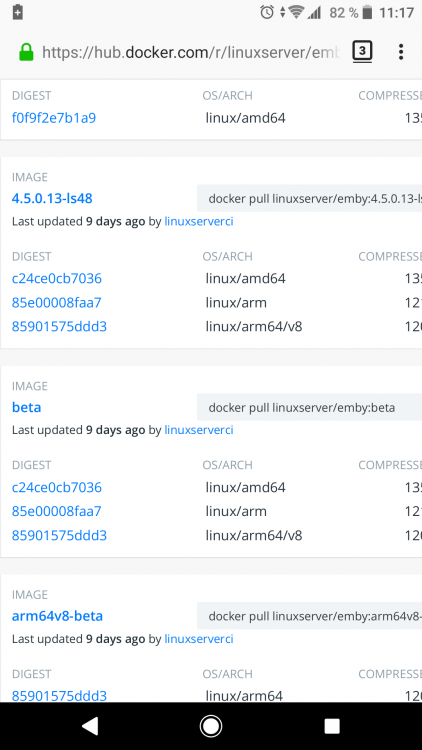
From looking at docker hub, the beta tag points to 4.5.0.13-ls48
-
The Cron job to renew the certs are run at 02:08, so check if there are any errors for certbot. Might be that you guys have a network issue and something in the process is locked up.
-
How do you decide that it didn't update? Have you compared the version in the webui with the version tag on docker hub or are you just looking at unraid saying there is an update available? This isn't an issue with the container, but with unraid, so it's probably better to create a new thread about it in the correct sub-forum. There was an issue in an earlier unraid version always showing an update was ready, so be sure you are on the latest version.
-
That update log says it finished successfully.
-
Nothing we can do to fix the only office stuff. Don't wait for a fix, as it won't come. Just use a separate container for it. What does appimage got to do with this?
-
I gave you a pretty specific tip, but with that attitude I don't care to help you anymore.
-
Search for the file nextcloud asks about?
-
Did you see my post?
-
Do you expose it to the internet without a password?
-
It doesn't look like you have used the same path since nextcloud doesn't find the file it needs.
-
Looks like you have had it installed before. Nuke the appdata folder and restart the container.



