






tomjrob
Members
-
Joined
-
Last visited
Everything posted by tomjrob
-
JorgeB, Thank you for your help. I have enabled syslog server to a cache preferred share on the tower and it appears to be working as I see a new file syslog there. This problem is intermittant so it may take a while to catch the issue. I will post to this link when it happens.
-
I have been losing access to the unraid web interface. It has happened multiple times over the last few months. When it happens, I can still log into the server console with command line, however cannot ssh into the server. I have only been able to resolve by rebooting. I am attaching system diagnostics which I ran from the command line before rebooting, so I hope this will provide some insight. I would appreciate any help in determining what is happening here. Thanks to the community in advance. tower-diagnostics-20221012-1157.zip
-
Recently, I have been losing access to the unraid web interface. It has happened a few times over the last month or so. When it happens, I can still log into the server console with command line, however cannot ssh into the server. I have only been able to resolve by rebooting. I am attaching system diagnostics which I ran from the command line before rebooting, so I hope this will provide some insight. I would appreciate any help in determining what is happening here. Thanks to the community in advance. tower-diagnostics-20220423-0853.zip
-
Upgraded from 6.8.3 to 6.9.2 a few days ago. Upgrade went smoothly and all Dockers and VM's are running great. Only issue was the cache prefer setting not working on a share with a space. renamed shared to remove space and all working. Thanks to the entire team for the great work. Next step is to try multiple cache pools.
-
Could Use Some Guidance, I have installed and set up the Bazaar docker and have been able to get it working with my series (TV Shows) without any issues. This is a great addon and I appreciate the work done on this. Very helpful. I am having a problem with movies though. I am getting the message about the path being invalid, and I can see why it is happening. It appears as though Bazaar assumes that each movie will always be in it's own folder. However, mine are not. Example below: Actual Path: /mnt/Movies/Features/South Pacific 1958 Bluray-1080p.mkv Example of Bazaar Invalid path message shows path: /movies/Features/South Pacific (1958)/South Pacific 1958 Bluray-1080p.mkv When I created the Folder "South Pacific (1958)" and put the movie file there, the app worked great. My question is do I need to put each movie in a separate folder to get this working (not ideal solution because I would need to reconfigure hundreds of files) or is there a setting I am missing that would allow Bazaar to find the file if it is not in it's own folder. I have tried a number of different settings and searched the forums, but haven't found an answer yet. Thanks in advance to the members that assist here.
-
Upgraded today. All is good. Thanks for the efforts here.
-
Just finished setting up and testing WireGuard. Very easy, and all is working great. Can access unRaid Gui, unRaid shares, and all servers on the LAN from a remote laptop in a different state. Great performance. Very impressed so far. Thanks to the entire team. Next step to try is ipad client access.
-
-
Update: Just checked Docker Container Size again before trying your suggested changes, and it appears that all is OK now. binhex-nzbget 738 MB 13.8 MB 7.51 kB The only thing I did was change the port mapping & change it back to create the run command, so not sure but it appears that corrected the issue. I can now reduce docker image size. Thanks for the help.
-
Thanks for the help. I will try your suggestions and get back.
-
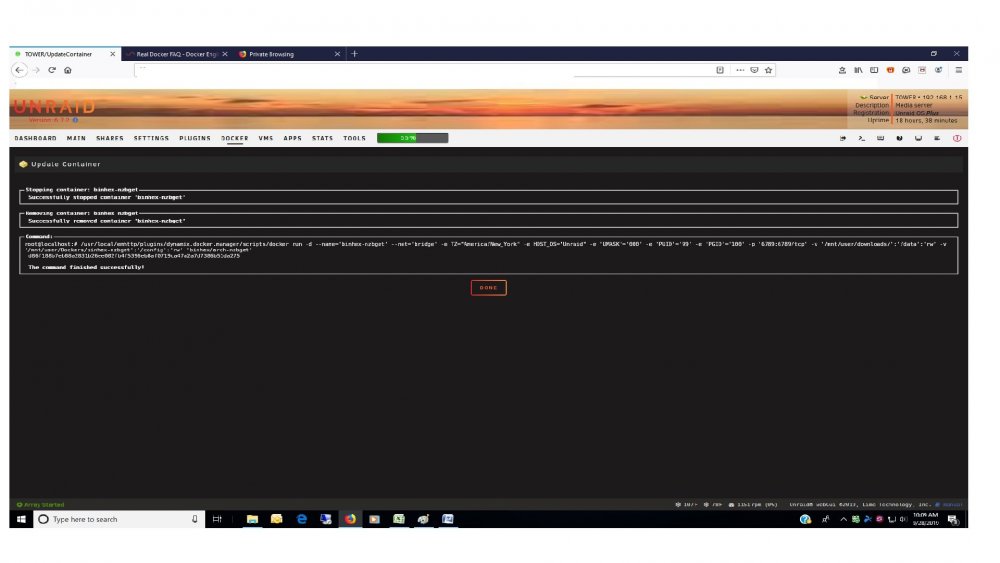
Run Command Attached
-
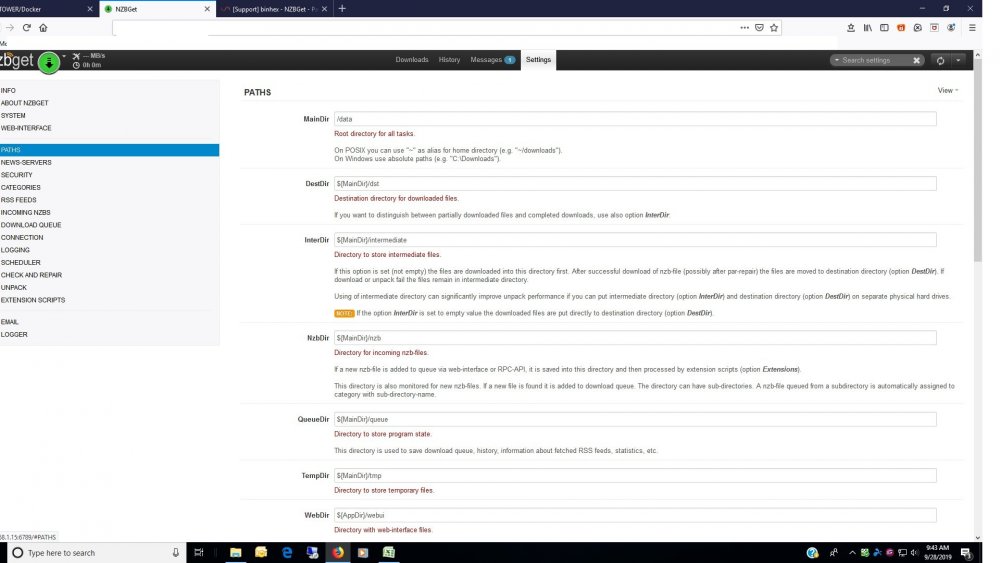
Squid, Thanks for the quick response. I have tried to see what is misconfigured, but do not see it. I have compared this container mappings to my sabnzb container, which appears to be mapped correctly, and cannot identify the problem. I am attaching the paths page of the container. Can you identify which setting is incorrect? Thanks in advance.
-
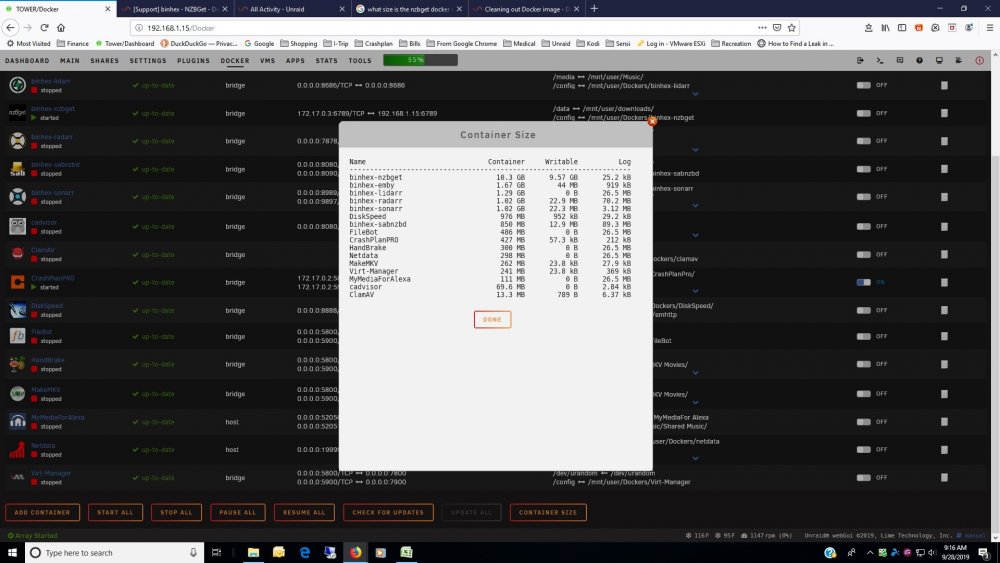
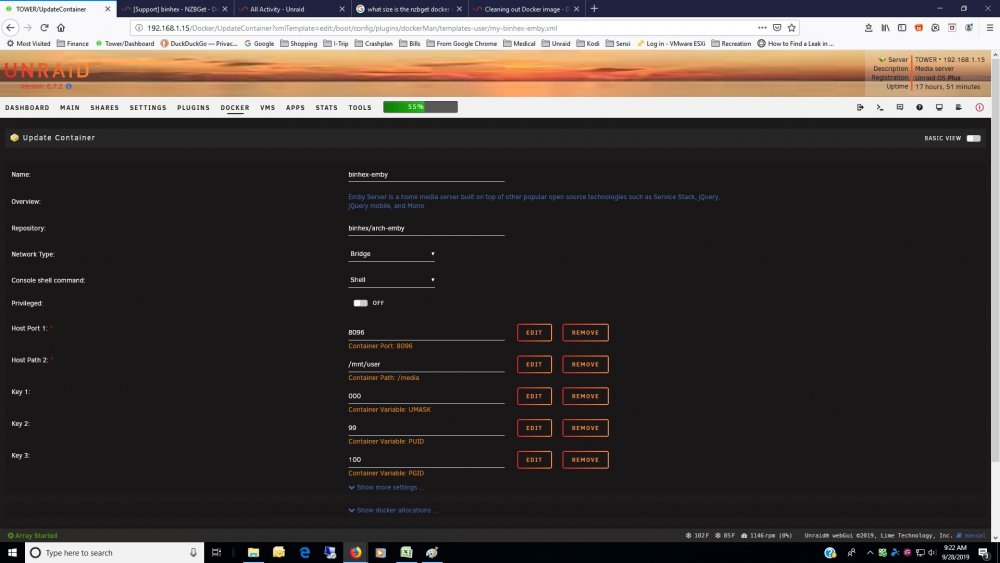
Hi, I have a general question about this container size. Could use some advice. I recently installed the container, and started getting notices that my docker.img file was very full. Original file size was 20G, so I increased it to 30G and all notices stopped. Looking at the Docker Container Size shows the binhex-nzbget container size to be 10.3GB. My Question: Is this the normal size for this container? Next Largest container is binhex-emby, considerably smaller. No other container is close to this size. I am attaching the Container size and device mappings screenshots for reference.
-
Upgraded to 6.7 from 6.6.7 this morning. Upgrade was very smooth. All Dockers and VM's appear to be running without any issues. Really like the new dashboard. Thanks to everyone on the team. Great Work!
-
(Solved) After deleting the docker image, and recreating it at 20G, it appears that all of the errors have been resolved and all containers are working properly. Did BTRFS scrubs (both cache and Dockers), and no corruption identified. The procedure recommended to recreate the containers worked perfectly, and all data within the containers is intact. Not sure what I was doing wrong in the past, but a big thank you for all of the support. Not sure if I need to do anything additional to close this, but if so let me know and I will do it. Want to follow the forum rules.
-
Thanks for the suggestions. I have never had the docker image fill up. I just made it that large because I had the space. As for the plugins, I usually keep them all up to date. Just checked now, and the only plugin that is flagged as having an update available is the Dynamix System Stats. That one cannot be updated at this time because I am not running Version 6.7 yet, which is a prereq. I will take your suggestion and delete the image and recreate it at 20G. One point of confusion for me is that in the past I have had issues recreating containers. Sometimes the container will be recreated, but all of the data is gone. It's as if I just downloaded it for the first time. This is a real problem in this situation as there are many settings and much customization done to these containers and it will take a long time to get them set up again from scratch. I am wondering if I am doing something wrong in the procedure. One note is that I do not use the default appdata folder for my dockers. I have a folder on the cache pool called "Dockers, with subfolders for each container. Is this a supported method? If so, can you provide guidance on the procedure to get the containers back? Seems simple enough. My procedure is: 1. Stop the docker service. 2. delete the image. 3. Select new size and restart docker service. 4. Go to Apps/Previous Apps 5. Select "Reinstall Button for each container. Shouldn't this re-install the containers with the data and customizations intact? I will wait to take your suggestion until you can verify the procedure. Thank you very much for the help. Long time UNRAID user and love the OS and the great support group here.
-
Thanks for the help. Attached is the Diagnostics zip file. tower-diagnostics-20190325-1421.zip
-
Not sure if this is the correct place to post this, but am looking for some help. I have been using 4 binhex dockers for awhile now with great success. They are: sabnzb, Radarr, and Sonarr, and Emby. First up, a great big thanks for the great work on all of these. Upgraded to Unraid 6.6.7 a couple of weeks ago, and all was well until today. Got notifications today that there were upgrades available for sabnzb and radarr. Performed the suggested upgradestower-syslog-20190325-0907.ziptower-syslog-20190325-0907.ziptower-syslog-20190325-0907.zip, and now none of the binhex dockers work. All 4 binhex dockers fail to start. I saw some btrfs csum errors on my cache pool (mirrored 256GB SSD's), so did a scrub. All errors were corrected and now the scrub runs clean. However the binhex dockers still do not start. All other dockers (Makemkv, Handbrake, Diskspeed, Crashplan Pro) still work fine. I have also rebooted the server 2X, and no resolution. I am attaching system log file which still show some csum errors when trying to start these dockers. Any hep is greatly appreciated. Please let me know if I need to provide any additional info.
-
Solved: Djoss, Thanks for setting me straight. Can't believe I missed those mappings, but that was definitely it. All storage is visible to the app now that the mapping is correct. I am still having trouble trying to get the software to take over the old backup, but hopefully Code42 can assist in that. Thanks again for the help.
-
I'm having a major problem with the new Crashplan Pro. Since I have migrated to Pro, I cannot select any files in the /mnt folder to backup. They just do not appear. The good news is that my data still exists on the Code42 server, but there support is telling me that the "Docker" version of the software is not supported, and that is why nothing in the /mnt folder is visible. Essentially, all that is backing up since the move to CrashPlan Pro is the root of the flash drive (459MB of the existing 2.9TB) on the server. I am hoping that this is a configuration error. Can anyone offer some help on what I am missing? Thanks in advance.
-
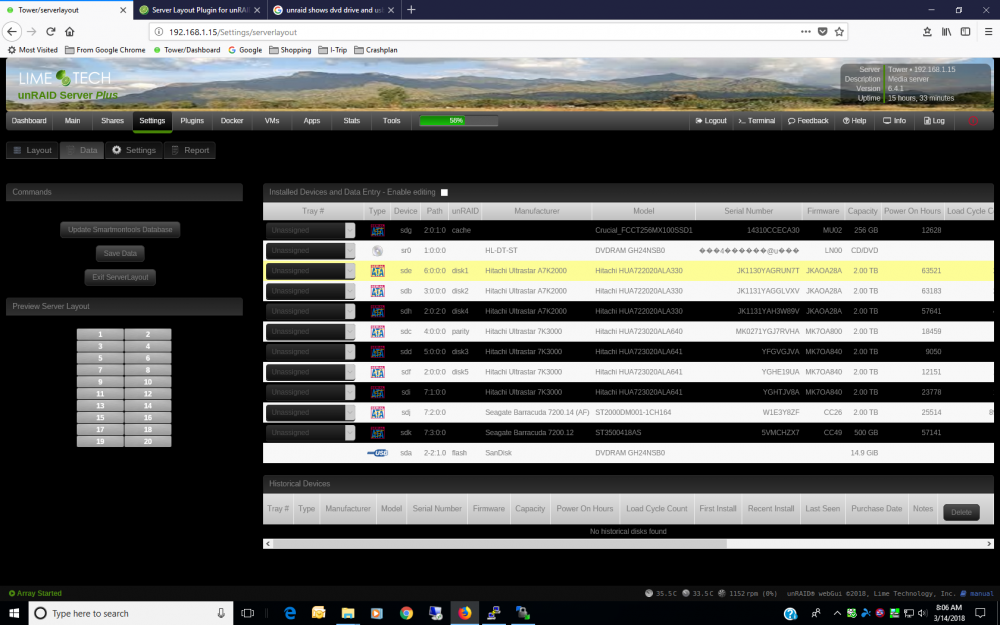
Like this plugin and would like to use it, but I'm having an issue with this plugin. It appears as though the DVD drive (sr0) and the usb drive (sda) are being detected as same device. Result is whenever the DVD rive is added to the layout, the plugin loses all drive data and the layout settings are scrambled. I am posting a screen shot. Any help is appreciated.
-
SCSI Devices (unRAID 6.2 or later) Can someone provide a little more explanation of the bolded /underlined statement below? I would like to install this plugin, but do not want to break anything or lose data in the array, which is running well at this point. My concern is that "re-assigning" appears to have the potential of causing data loss if done incorrectly. Thanks in advance for any clarification. SCSI Devices (unRAID 6.2 or later) updates the udev persistent storage devices rules file (courtesy of bubbaQ), which allows proper naming of SCSI attached disks. Please by aware that after installation of this plugin, it might be necessary to re-assign disks due to their changed names!
-
I am having the same problem that Fortressbeast is describing above. This also seems related to the problem I posted about above on May 6.
-
Having a small problem with the app. The UNRAID Boot Disk is a 16GB SanDisk Cruzer, but the app is showing the model as a DVDRAM Model GH24NSB0. This just happens to be the same model as the actual DVD drive in the tower, which is an LG GH24NSB0. In addition, the DVD drive does not always get detected. When it does, and I assign it a spot, the configuration gets blown away and defaults back to 4 columns of 6 rows instead of the 2 columns of 10 rows I had set. This is very strange, and it appears to have begun when I upgraded to UNRAID version 6.3.3. Does anyone have any idea what might cause this? Thanks




