





romain
Members
-
Joined
-
Last visited
Everything posted by romain
-
This is just a thought I had this morning: It would be nice if Unraid would make a post on here or a page on the official docs with a walkthrough on how to best use the diagnostics zip folder so that we can troubleshoot ourselves a bit before posting them up on here. Or if one/some of the admins on here who are constantly looking at other people's diagnostics would make a post explaining what they look for first. I'd like to be able to diagnose my server's issues myself a little better, but the diagnostics folder has quite a bit of info in there and I'm usually not sure what to look at first or where to look next if I check out the syslog text files and don't notice anything strange. This might save some time in the long run for the mods as well. I'm sure many of us would like to be more active in our own troubleshooting than posting a zip and waiting for suggestions. I couldn't find anything like this in my searching this morning, if it already exists, someone please send me a link so I can bookmark it!
-
@JorgeB thank you. Do you have any ideas or suggestions on anything to try next to resolve the issue?
-
@JorgeB I had my VM turned off when I booted into safe mode and everything was working well, so I turned on the VM and the server immediately locked up. Here are the diagnostics from before I rebooted. unraid-diagnostics-20241023-1135.zip
-
@JorgeB sounds good. I guess I'll give it 3 to 7 days before checking back in unless it crashes sooner.
-
@JorgeB Thanks for taking a look. I rebooted into safe mode and got new diagnostics, attached here.unraid-diagnostics-20241022-0928.zip
-
Hi everyone, hoping someone can help diagnose this issue. I have logs attached from the last time it happened just now. This has happened 2 or 3 times in the last week or 10 days where the GUI stops loading. Any docker containers that were already running are available and I can SSH into the server to grab logs or try to "powerdown" gracefully. It's hit or miss whether or not server actually powers down gracefully or not though. I ran the diagnostics command and wound up with 2 different zip files from within 10 minutes of each other, I'm not sure what the difference is so I'm attaching both here. unraid-diagnostics-20241021-1252.zip unraid-diagnostics-20241021-1246.zip
-
Thanks for taking a look. I mounted the array yesterday and was able to browse through files on the array disk through the webui. I wound up starting the "Rebuilding a drive onto itself" process last night, so just hoping that works: https://docs.unraid.net/unraid-os/manual/storage-management/#rebuilding-a-drive-onto-itself I ran the quick smart test on each drive and the tests reported back that everything is fine.
-
Messing with the cables didn't do anything. Any & all input is appreciated!
-
Hi everyone, it's been a bad day for the server. I powered down this morning to install a GPU and when I powered up the 2 NICs built into my motherboard didn't seem to be working, so I spent half the day rebooting and removing and adding hardware back and forth and changing BIOS settings. Ended up just using a PCIe NIC. After all that I get the server turned back on and the drives mounted and I have a red X next to one of my parity drives and one of my data drives. I rebooted the server one more time hoping that that might help somehow but no luck there. My diagnostics are attached, if anyone can tell me if I have a bad drive or what to try or troubleshoot further I'd appreciate it! The server is a Dell T630 so all the drives are plugged into a backplane connected to a Dell RAID card. Maybe I should power down and unplug/plug the cable and see what happens..will try that now. unraid-diagnostics-20241010-1632.zip
-
Thanks @JorgeB I will wait. This has been happening since late 6.11.x releases but I've also reconfigured a pool and added a pool so wasn't sure what was going on.
-
I tried stopping a docker container that was unresponsive this morning and was getting an error so I tried to stop the array and now it looks like it's having trouble unmounting a zfs cache pool. I ended up restarting the server manually. These lines are repeating in the log: Jan 8 12:07:12 unRAID root: rmdir: failed to remove '/mnt/user': Device or resource busy Jan 8 12:07:12 unRAID emhttpd: shcmd (6600): exit status: 1 Jan 8 12:07:12 unRAID emhttpd: shcmd (6602): rm -f /boot/config/plugins/dynamix/mover.cron Jan 8 12:07:12 unRAID emhttpd: shcmd (6603): /usr/local/sbin/update_cron Jan 8 12:07:12 unRAID emhttpd: Retry unmounting user share(s)... Jan 8 12:07:17 unRAID emhttpd: shcmd (6604): /usr/sbin/zfs unmount -a Jan 8 12:07:17 unRAID root: cannot open 'trash': pool I/O is currently suspended Jan 8 12:07:17 unRAID root: cannot open 'trash/media': pool I/O is currently suspended Jan 8 12:07:17 unRAID root: cannot unmount '/mnt/cache': pool or dataset is busy Jan 8 12:07:17 unRAID emhttpd: shcmd (6604): exit status: 1 Jan 8 12:07:17 unRAID emhttpd: shcmd (6605): umount /mnt/user Jan 8 12:07:17 unRAID root: umount: /mnt/user: target is busy. Jan 8 12:07:17 unRAID emhttpd: shcmd (6605): exit status: 32 Jan 8 12:07:17 unRAID emhttpd: shcmd (6606): rmdir /mnt/user This happens on and off, I've googled and searched the forum before for answers but am not sure what is going on. I ran diagnostics before forcing the reboot, they're attached here. Hopefully someone can point me in the right direction to fix whatever is causing this. unraid-diagnostics-20240108-1152.zip
-
I've been able to bulk upload photos to Immich manually through the command line by going to my Docker tab, finding the Immich container, clicking ">_ Console" and running the command: immich upload --key HFEJ38DNSDUEG --server http://192.168.1.216:2283/api --recursive directory/ This works fine, but I'd like to automate this using userscripts so that it runs automatically from time to time. I don't know much about writing scripts though - I've tried a few things but haven't gotten it to work. If I click the ">_" button at the top of my GUI for the UNRAID terminal, and run: docker exec -it immich bash I can get into the docker container, so my userscript looks like this: #!/bin/bash docker exec -it immich bash immich upload --key HFEJ38DNSDUEG --server http://192.168.1.216:2283/api --recursive directory/ When I run that though I get the error: I've also tried running: docker exec -it immich upload --key HFEJ38DNSDUEG --server http://192.168.1.216:2283/api --recursive directory/ but get an error message telling me that the upload command is not found. I'm pasting in the generic 'immich upload' command from the Immich website, the command that I'm running has my correct API key, IP address & upload source directory. Can anyone suggest a way to set up my user script so that I can run it on a schedule to grab any photos that I put into the upload source directory? Another item that I'm concerned about once I get the first part running - when I run the immich upload command through the docker console, there is a message that says something like 'you're about to upload ### photos, are you sure?' and then I have to enter y/n. Is there a way to make sure that the user script can confirm 'y' for me?
-
That did it, thanks!
-
@Djoss thanks for writing back. For some reason I was thinking that I couldn't see photos but I just checked again and you're right it works the same in the container as it does with the desktop version. I tried double clicking on some .mp4 and .mov files that it found and could not watch the videos. Is there anything extra that I might need to do to allow czkawka to show video?
-
I'm curious if there's a way to view photos & videos through this container?
-
I did a short search for this and didn't see any thing so maybe there's not much demand for this and it's just me, but I have about 50 user shares and if I need to update anything it can take a while because they all have different settings so I'm usually hesitant to use the "Read settings from" or "Write settings to" options. It would be great if you could just go to the SHARES tab and edit main settings of all shares on one page as if you were working on a spreadsheet - for example if you had 20 shares and you wanted to exclude disk 4 from 7 of them, you would just have to find the "Excluded disk(s)" column and select disk 7 from each row (share) that you wanted it excluded from and then click APPLY at the bottom.
-
@Swarles That fixed it! Changed the share to media1234 and then back to media and the .cfg file updated itself accordingly and mover started working. Thanks for the help.
-
@Swarles What does the line below do in the context of Mover? Does it give a list of files to move? Skipfiletypes string: find "/mnt/nzbget/Media" -depth I ran it and got nothing, because my share name is "media", not "Media" - I replaced the upper case "M" with a lower case "m" and got a full list of everything on the cache pool. Could that be the reason that I'm having an issue? If so, I don't know how to fix it if somehow Unraid is capitalizing a letter that it shouldn't be. I took a look around and there are no upper case M's anywhere that I've typed that I can find so I'm not sure why it's capitalized in the log.
-
@Swarles Thanks for responding! share.cfg exists and shareCacheEnabled="yes" was present in that file, so here is the log after following your other instructions. Mover_Tuning_2023-08-15T000944.log
-
I'm having an issue where if I have this plugin installed mover starts and immediately stops without moving anything, but if I uninstall the plugin mover works fine. I have 2 cache pools: - Cache - Sabnzbd Any shares that use the Cache pool are set to Cache only, so mover only moves files from the Sabnzbd cache pool to the array. When I install the Mover Tuning plugin, all I do is update this one setting; Move Now button follows plug-in filters: Yes and after that if I click MOVE NOW, mover starts and immediately stops, here is the log: Aug 14 18:09:33 unRAID move: mover: started Aug 14 18:09:34 unRAID move: mover: finished I've tried reinstalling and updating the plugin and have messed around with some other settings, but after whittling settings away it looks like that's all it takes to keep Mover from running for me. I was wondering if it was an issue with my using a cache pool called Sabnzbd instead of Cache, but saw a thread on reddit saying that the plugin should work fine with multiple cache pools so now I'm not really sure what the issue is.
-
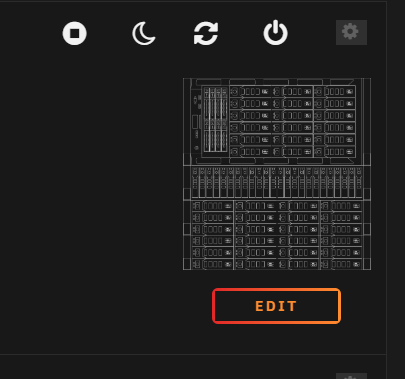
I spent a little time tracing out my server and disk shelves in nanocad and I tried to make an icon out of it with inkscape but the finished product is hard to really see in the Unraid dashboard. I don't know much about inkscape, just downloaded it yesterday to mess with this - can anyone help me out with this image so that it fills out a little better on the dashboard? I'm attaching the DXF and a screen shot of how it looks now in Unraid. T630 stack.dxf
-
Diagnostics are attached. I was using unbalance overnight to move files off of one of three drives that I was going to remove from the array, when I came back to check on it in the morning the server was unresponsive through the gui so I rebooted it through idrac & everything started up fine. I re-ran unbalance to get the last few gigs off of the hard drive, then I powered down the server, pulled the three drives out of the server and turned it back on. I created a new config and preserved all assignments, then I went to the main page and moved some disks around so that there wouldn't be any empty spots in the list and so that the disks were ordered largest to smallest, I started the array, entered my encryption key and things hung up on 'mounting disks' so I checked the log and had the segfault error. I forced a reboot through idrac and when the server came back on I put the disks back in their original order because the log was giving errors about 'wrong fs type' on the 2 newer drives which are formatted to zfs, I was wondering if that was an issue if they're the first drives that unraid looked at, so I put them back in the same order that they were in while things were working well, minus the three drives that I just removed. I started the array and got a similar segfault error. I forced a power down through idrac and added the three drives back into the server, when the OS was back up I reset the config again and went through to put all the drives including the three I had removed back in the same order that they were in before any of the issues started popping up, and I started the array and again got the segfault error. I've rebooted my server maybe 5 times since updating to 6.12.0-rc6 and have had no issues, I started getting the segfault errors right after I removed the drives and set up the new config, but resetting everything to be the same as it was before getting the segfault hasn't solved the issue. These diagnostics are from the most recent start up, I didn't save any diagnostics from the first 2 segfault hang ups. I have some parts coming in from ebay today for another server that I'm planning to migrate my unraid hardware into so whenever that gets here I'll try moving my drives over to see how it responds. The new server has different CPUs and RAM so If it's a CPU or RAM issue it should not have this problem in the new server. unraid-diagnostics-20230526-1224.zip
-
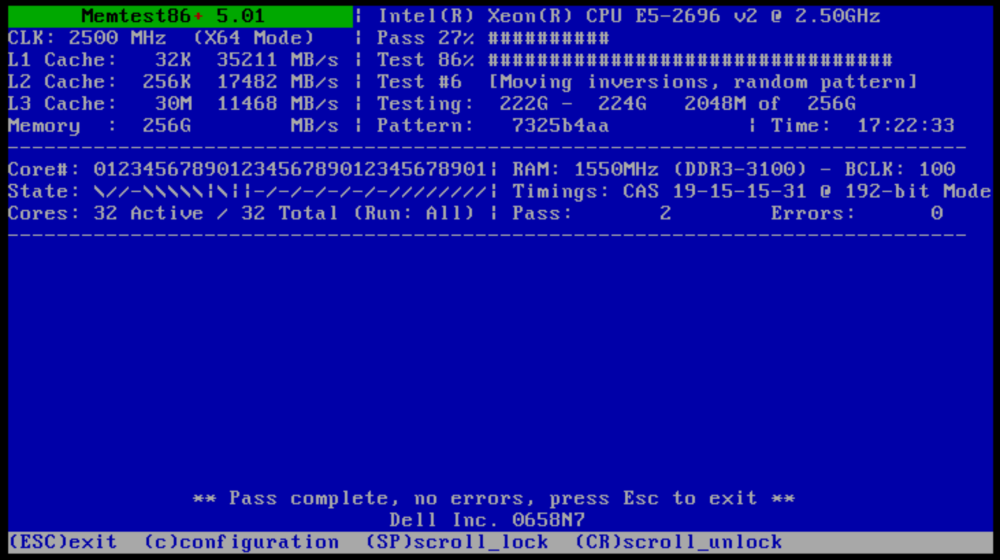
@JorgeB I'm closing in on my second 24 hour memtest run with no errors. I'm still considering letting it just go for 72 or 96 hours because that's how long a preclear takes. Assuming I get though the memtest with no issues would you still suggest pulling half the RAM and running the preclear or do you have any other ideas on troubleshooting paths I could take?
-
I'll give it a try, thanks for the input
-
So for the whole background, I precleared both of these drives and they post read failed so I did some looking around and saw people recommending memtest to other people, so I ran memtest for 24 hours and had no issues. Then I did another preclear with these drives and they finished with no issues. After that I figured I'd run 1 more preclear to double check that all issues were taken care of and that's when I got these failures. Should I run a 3-4 day memtest because it takes 3-4 days to preclear these drives or are there other things that I could/should look into?

