




.jpg.5ae2f92187bdbff1d7c0edfb6f4d26ca.jpg)
heffe2001
Members
-
Joined
Everything posted by heffe2001
-
In the past when I've tried to just re-add a drive back in that had been triggered bad, I'd had to wipe it to get it to accept it again. What would be the procedure to NOT have to do that in this instance? Drop the disk from the array, add it back and then rebuild, or will it allow me to do that? In the past when I've had drives drop due to issues like this, I've usually precleared it again just to make sure the smart attributes and all hadn't been incremented or anything like that, but in this instance, I know EXACTLY what happened, lol. Went ahead and dropped it from the array, started, stopped, added it back, and now it's rebuilding. Like I said, I've always run the clear again in the past to 'test' the drive, but I don't think it's necessary in this case.
-
I have a few empty drive sleds in a Compellant SC200, and went to pull one to zero out a 6tb SAS drive. I didn't pay close enough attention, and pulled an active drive in the array (the light on that sled is extremely dim, not bright like the rest), and the drive entered an error state (not for any write errors, but 1 read error). Upon reboot, it's got he drive marked as bad, and being emulated, even though it's not ACTUALLY bad. What's the best way to handle this and get the drive back into the array? Pull it, reboot, then reinstall and run a preclear is the process I've run in the past, or would I just be better off dropping the parity drive, readding it, and just rebuilding parity? I'm 99.999% certain there's no data errors (mover wasn't running, and I don't have any processes that write directly to the array disks). Either way I'm going to have to preclear and I'm guessing either way is going to require one a drive rebuild, but parity is larger (10tb), where this was an 8tb, so it'd (i'm guessing) be faster to go that route. Just wondering what other folks process for bone-head moves like this, lol.
-
The larger drive size was reported on 6.12.1, and reported correctly on the older 6.11.5 version. Both drives passed preclear this last attempt (the one running the preclear docker went through all the steps, except on the post-read, it got to 63% before the docker process hung, but it still passed the drive anyway). The one difference on the 6.11.5 VM preclear, the output during the operations looked very different from the normal preclear on the self-updating status screen. I'm wondering if that has something to do as to how Proxmox passed that drive through to the VM though. I took that drive, put it in my main unraid box, and it verified the preclear signature, so it appears it did at least complete correctly (I've verified both drives at this point, both got valid signatures). I also had already done a media validation on both drives before this last preclear operation doing a format and DD passes by hand, so I'm pretty confident that the drives are fully functional. I'm currently rebuilding my array with one of them replacing a very old 4tb drive, and as soon as that's done, I plan on replacing another with the 2nd drive. I NEED to replace a pre-fail ST8000AS0002 (slowly starting to get correctable media errors), but apparently the HGST 8tb I got, plus the EROS drive format out to just a touch smaller than the AS0002, so they won't work for that.. I'm debating just dropping parity, moving the data from that drive by hand to the new drives, and having the system completely rebuild parity again (I'd split the data from that failing 8tb over to the excess new free space on those replaced 4tb's if I do that). It's either that, or start looking into larger sas drives (my parity is currently only a 10gb drive, so might just grab a couple 10tb sas models and throw them in the mix, lol). Not sure if you've noticed or not though, several posts above yours DLandon says he's having an issue with larger drives and read failures, but that the preclear docker works on those issue-causing drives (it's using the older preclear script I believe), so if you're just wanting to get them all cleared and set up, that would probably be a good way to go to get around the issue with the current preclear plugin script issues.
-
I'm seeing a very similar problem using the plugin version of the preclear script on 2 8tb SAS drives I got last week. Both get to near the end of the zero phase, hang, and keep restarting until failure (I got the same restart at 0% on I think the 3rd retry attempt). I installed the preclear docker image to test the original preclear script on my server (running 6.12.1 at the moment), and the first drive I tried has so far completed all the zeroing process with the preclear script that's included with the docker version, and is in the final read phase on the drive. This was with 2 different manufacturers (one HGST, one Seagate Exos, both 8tb). The Seagate ran through the zero process 3 total attempts, with 3 retries per attempt, and failed every time, the HGST failed a 3 retry pass before I started it using the docker. I've currently got the Exos drive running a preclear on a virgin 6.11.5 install with just the preclear & UD plugins installed as a VM on my Proxmox server, with the drive passed through to that VM, and it's SO FAR at 83% and still going (VERY slowly, it's at I think 38 hrs on JUST the zero phase, lol, getting I think about 54m/s zero rate). I'll let it go until it either completes, or fails on the zero, and move it back into my primary rig if it passes, and try it under the docker image too. I DO notice that the Exos drive was shown as having a reported size of 8001563222016 total on the preclear plugin version n 6.12.1, where under 6.11.5 it's showing 7865536647168, so I'm not sure where, exactly it was getting the larger size from.. Same controller in both machines, only difference is it's being passed through to the VM directly, and not directly on bare metal. As far as the HGST drive being in the final step (final read), I changed NOTHING on the server or plugins, just installed the plugin docker image (reports Docker 1.22), and started it using that instead of the canned preclear script with it's defaults..
-
I had the same issue, and if I remember correctly, I had to move some directories/folders around in the data folder. It was either that, or the actual mount point. On mine, it was looking for another directory inside the data folder, THEN the blocklists under that. I'd assumed it was because I was coming from another person's technitium app, and not something with the official one though. Below is my directory structure under the appdata/ts-dnsserver directory. My definition for the data directory on the docker page: If that doesn't work, look at how the permissions are set. I'm now getting the issue where it tells me version information is 'Not Available' since I switched over to the official. I can force-update it, but it never shows that there's an actual update available or that I'm 'Up To Date'. No biggie I guess, since I was coming from a version that was WAY behind the actual releases (6.x I think).
-
It ended up failing again after 3 reboots. Those lines aren't in my syslinux.cfg. It's definitely not my usb keys (I've tried many, and even bought new Samsung brand keys).
-
Just wanted to add that this doesn't just apply to Dell servers, I've been having issues booting my flash on my HP DL380p Gen8 machine for months, to the point I changed out all my usb keys, and have to do all updates by hand (and attempt to boot them a dozen times or more till it just happens to work). Added the lines above to my syslinux.cfg file, and it boots every time. As long as updates don't rewrite the syslinux.cfg, it should survive updates now too (haven't been able to do an automatic update since the 6.10.x series started in RC...).
-
Just a FYI, 2020.05.27a took care of my issue, details are shown now with no issues.
-
Yep, sure do. I'm currently a version behind latest, waiting to update after everyone here goes to bed, lol. I've verified that I do have director information on my movies, so not sure why it's getting an error on that line. Updated this morning to the latest Plex Pass version, and still the same.
-
Still not able to get any detailed info on any show that comes up, gives me the same error still as posted above.
-
When I click on detail, I'm getting the following error on every movie I've tested: Warning: Invalid argument supplied for foreach() in /usr/local/emhttp/plugins/plexstreams/movieDetails.php on line 63 Year: Rating:
-
Seems everything survived through 2 reboots (for other reasons), so it would appear it was that dynamix plugin causing the issue.. On another note, would it be possible to add an option to hide passed-thru drives?
-
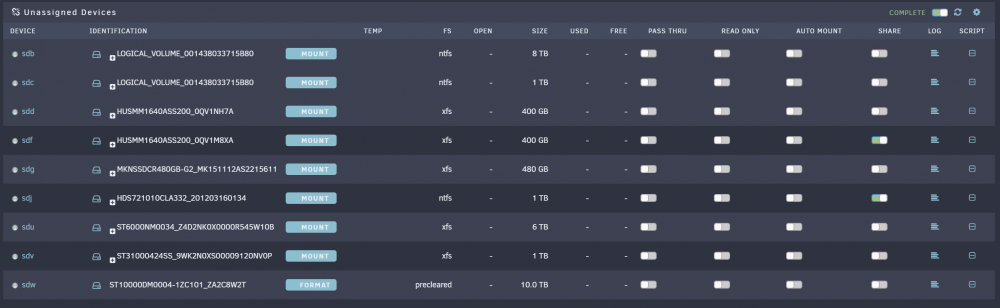
After removing that dynamix SCSI devices plugin I get the desired results.. SO if anybody is having the issue of SAS drives (or raid containers) not showing up on UD, and have that dynamix plugin installed (and aren't using a Areca controller), try removing it and see if it helps.
-
With Preclear removed it still shows the same (none of the SCSI- drives are listed). I'll look at the ST6000, it's not been used and I honestly can't even remember buying it let alone installing it, lol. I do have the dynamix SCSI Devices plugin installed from when I had an Areca controller in the machine (long since removed). I wonder if that's got anything to do with the issues? I may try uninstalling it soon as my docker restore is done and restarting the machine to see if it makes any difference.

-
Those would be the ones. The've been giving those 2 warnings since installation, but have worked without issue up to now (and still seem to work ok when I manually mount them). UD won't actually see any of the scsi- devices (I have a couple raid arrays set up on a hp 420 controller that I use directly mapped to a windows VM, but it didn't see them before I mapped them either). Looks like it's basically not finding a grown defect list by that 'error': 0x1C 0x02 GROWN DEFECT LIST NOT FOUND It's not seeing any of these devices: scsi-HUSMM1640ASS200_0QV1M8XA@ scsi-LOGICAL_VOLUME_001438033715B80-part1@ scsi-ST31000424SS_9WK2N0XS00009120NV0P-part1@ scsi-HUSMM1640ASS200_0QV1M8XA-part1@ scsi-LOGICAL_VOLUME_001438033715B80-part2@ scsi-ST6000NM0034_Z4D2NK0X0000R545W10B@ scsi-HUSMM1640ASS200_0QV1NH7A@ scsi-LOGICAL_VOLUME_001438033715B80-part3@ scsi-ST6000NM0034_Z4D2NK0X0000R545W10B-part1@ scsi-HUSMM1640ASS200_0QV1NH7A-part1@ scsi-LOGICAL_VOLUME_001438033715B80-part4@ scsi-LOGICAL_VOLUME_001438033715B80@ scsi-ST31000424SS_9WK2N0XS00009120NV0P@ I'd forgotten about even putting that ST6000 in there at all, since neither the system nor the UD detected it, lol.
-
I'm having the same issue. I have 2 SAS SSD's installed that were showing up, I tried to add another drive to that controller and it wouldn't show up, so I tried restarting the server just to see if the controller could even see the drive (it didn't, drive is definitely bad, but it does still see the 2 SAS SSD's). On restart, Unassigned Devices can't see those 2 SAS drives now, but you can find them in the '/dev/disk/by-id' to identify them, and even manually mount them if you want (both contain XFS partitions, one I'm using for my plex transcoding cache, and the other I'm going to use for my Docker appdata). I can always edit the go file to mount those 2 drives where they need to be by their 'by-id' info (just in case them move from their 'sd?' designation), but they WERE working in UD, but it will NOT see them now (through about 4 boots so far, and this damned HP DL380p-G8 takes forever to reboot, lol). I'm going to attach my current diagnostics to this post. Also, is there a reason you can't mount a drive in UD wherever you want (I believe this was the old behavior), and not be forced to mount them in /mnt/disks/ ? Or would it be possible to make that a toggleable feature? media01-diagnostics-20200505-0102.zip
-
What client machines are you using? I saw a post on the Plex group last night about issues with some Android boxes doing what you're describing. Go into the plex settings on that client, and find 'Use New Player' and disable it and see if it works. My father in law is having the same issue, and I'm going to try to walk him through that to see if it fixes his issue as well this afternoon.. Thread here: https://forums.plex.tv/t/new-player-on-android-tv-not-working/545682/2
-
I'm seeing the same thing, but every other screen refresh they disappear under Unassigned Devices. This is on the latest RC.
-
I'm seeing the same thing on my end. Are you on unRAID 6.1.9? If so update the plugin. Just tried that and got an error while trying to update: plugin: updating: speedtest.plg +============================================================================== | Skipping package tablesorter-2.27.6-x86_64-1 (already installed) +============================================================================== plugin: skipping: python-2.7.12-x86_64-1.txz - unRAID version too low, requires at least version 6.2 plugin: downloading: https://raw.githubusercontent.com/dmacias72/unRAID-plugins/master/packages/6.2/python-2.7.9-x86_64-1.txz ... failed (Invalid URL / Server error response) plugin: wget: https://raw.githubusercontent.com/dmacias72/unRAID-plugins/master/packages/6.2/python-2.7.9-x86_64-1.txz download failure (Invalid URL / Server error response)
-
I would say it'd be safe to do so. I'm currently running it without any further errors after using that set variable after upgrading to it. *I edited my post on the forums here that contained the seedbox script I'm using for automatic downloads with the new info just in case someone else is using it and has the same errors. It's here just in case anybody else has the issue and comes to this thread: http://lime-technology.com/forum/index.php?topic=42250.0
-
The error has something to do with the new version passing a new SSL key to the remote host (maybe something to do with the 6.2 beta cycle and SSL changes?), and it not matching the key on file on the remote. On the 4.6.1 version, it appears to be sending the old key info, in the 4.6.5 version it's sending a new key. In trying to connect the same way with the new version, I'm currently passing the username/password and site info like this: lftp -p 22 -u $login,$pass sftp://$host If you do that from a command line, or through a script, it never asks you if the new key is valid or not with the 4.6.5 version (it didn't when I hand-logged in either). Apparently in 4.6.5 they added a net set variable for lftp (sftp:auto-confirm true), which you can pass with any other set variables in your script, and it will acknowledge the new key-change and actually work. This variable wasn't included with 4.6.1, so I'm going to assume that the older version just accepted the sftp key change and went about it's business. Once that keychange has been accepted with the 4.6.5 version, you can remove the set variable and it will continue to work (I did leave it in my sync watchdir script though). Just wanted to let you know I was able to get it working with 6.2 & the 4.6.5 version, and say sorry for the extra work for you to revert it back to 4.6.1 when the new version can be made to work..
-
Having issues with the lftp that's been included with the 6.2 repo (4.6.5). It won't pass ssl credentials correctly, and won't connect a sftp connection. I reverted to the version included in the 6.1 repo (4.6.1), and it works fine with that one. Not sure if it's a problem with the specific build you've included, or with LFTP in general. It's getting "Host key verification failed" when attempting to connect to the remote SFTP server.
-
I forgot to let you know that the update did fix the issue. With a raid drive sent through with the default name on it (with the # sign in it), the display works fine without the errant text. ls /dev/disk/by-id: root@media01:~# ls /dev/disk/by-id/ ata-MKNSSDCR480GB-G2_MK151112AS2215611@ scsi-ST8000AS0002-1NA_Z84030D2-part1@ ata-MKNSSDCR480GB-G2_MK151112AS2215611-part1@ scsi-ST8000AS0002-1NA_Z8405313@ ata-OCZ-TRION100_952B54S2KMCX@ scsi-ST8000AS0002-1NA_Z8405313-part1@ ata-OCZ-TRION100_952B54S2KMCX-part1@ scsi-WD30EFRX-68AX9N0_WD-WMC1T3481101@ scsi-ARC-1231-VOL#06_0000003895606702@ scsi-WD30EFRX-68AX9N0_WD-WMC1T3481101-part1@ scsi-ARC-1231-VOL_00_0000003274592794@ scsi-WD5000HHTZ-04N21_WD-WX61E62L3287@ scsi-ARC-1231-VOL_00_0000003274592794-part1@ scsi-WD5000HHTZ-04N21_WD-WX61E62L3287-part1@ scsi-SATA_MKNSSDCR480GB-GMK151112AS2215611@ usb-MUSHKIN_MKNUFDAM16GB_070B4262D199D096-0:0@ scsi-SATA_MKNSSDCR480GB-GMK151112AS2215611-part1@ usb-MUSHKIN_MKNUFDAM16GB_070B4262D199D096-0:0-part1@ scsi-SATA_OCZ-TRION100_952B54S2KMCX@ wwn-0x58889141000739ff@ scsi-SATA_OCZ-TRION100_952B54S2KMCX-part1@ wwn-0x58889141000739ff-part1@ scsi-ST8000AS0002-1NA_Z8402DA1@ wwn-0x5e83a972002b8d00@ scsi-ST8000AS0002-1NA_Z8402DA1-part1@ wwn-0x5e83a972002b8d00-part1@ scsi-ST8000AS0002-1NA_Z84030D2@ And disks.ini: ["parity"] idx="0" name="parity" device="sdb" id="ARC-1231-VOL_00_0000003274592794" rotational="1" size="7814036428" status="DISK_OK" temp="*" numReads="694304" numWrites="545097" numErrors="0" format="GPT: 4K-aligned" type="Parity" comment="" color="green-on" exportable="no" fsStatus="-" fsColor="grey-off" spindownDelay="-1" spinupGroup="host1" deviceSb="" idSb="ARC-1231-VOL_00_0000003274592794" sizeSb="7814036428" ["disk1"] idx="1" name="disk1" device="sde" id="ST8000AS0002-1NA_Z84030D2" rotational="1" size="7814026532" status="DISK_OK" temp="*" numReads="13018140" numWrites="85082" numErrors="0" format="GPT: 4K-aligned" type="Data" comment="" color="green-on" exportable="no" fsStatus="Mounted" fsColor="green-on" fsError="" fsType="xfs" fsSize="7811939620" fsFree="487010472" spindownDelay="-1" spinupGroup="host1" deviceSb="md1" idSb="ST8000AS0002-1NA_Z84030D2" sizeSb="7814026532" ["disk2"] idx="2" name="disk2" device="sdf" id="ST8000AS0002-1NA_Z8405313" rotational="1" size="7814026532" status="DISK_OK" temp="*" numReads="16001758" numWrites="450315" numErrors="0" format="GPT: 4K-aligned" type="Data" comment="" color="green-on" exportable="no" fsStatus="Mounted" fsColor="green-on" fsError="" fsType="xfs" fsSize="7811939620" fsFree="836276820" spindownDelay="-1" spinupGroup="host1" deviceSb="md2" idSb="ST8000AS0002-1NA_Z8405313" sizeSb="7814026532" ["disk3"] idx="3" name="disk3" device="sdg" id="ST8000AS0002-1NA_Z8402DA1" rotational="1" size="7814026532" status="DISK_OK" temp="*" numReads="12613446" numWrites="14560" numErrors="0" format="GPT: 4K-aligned" type="Data" comment="" color="green-on" exportable="no" fsStatus="Mounted" fsColor="green-on" fsError="" fsType="xfs" fsSize="7811939620" fsFree="773954064" spindownDelay="-1" spinupGroup="host1" deviceSb="md3" idSb="ST8000AS0002-1NA_Z8402DA1" sizeSb="7814026532" ["disk4"] idx="4" name="disk4" device="sdc" id="WD30EFRX-68AX9N0_WD-WMC1T3481101" rotational="1" size="2930266532" status="DISK_OK" temp="*" numReads="2414973" numWrites="4608" numErrors="0" format="GPT: 4K-aligned" type="Data" comment="" color="green-on" exportable="no" fsStatus="Mounted" fsColor="green-on" fsError="" fsType="xfs" fsSize="2928835740" fsFree="963815736" spindownDelay="-1" spinupGroup="host1" deviceSb="md4" idSb="WD30EFRX-68AX9N0_WD-WMC1T3481101" sizeSb="2930266532" ["cache"] idx="24" name="cache" device="sdd" id="WD5000HHTZ-04N21_WD-WX61E62L3287" rotational="1" size="488386552" status="DISK_OK" temp="*" numReads="3816162" numWrites="909037" numErrors="0" format="MBR: 4K-aligned" type="Cache" comment="" color="green-on" exportable="no" fsStatus="Mounted" fsColor="yellow-on" fsError="" fsType="xfs" fsSize="488148084" fsFree="482845092" spindownDelay="-1" spinupGroup="host1" deviceSb="sdd1" idSb="WD5000HHTZ-04N21_WD-WX61E62L3287" sizeSb="488386552" uuid="" ["flash"] idx="25" name="flash" device="sda" id="MKNUFDAM16GB" rotational="0" size="15141472" status="DISK_OK" temp="*" numReads="1838" numWrites="2709" numErrors="0" format="unknown" type="Flash" comment="unRAID Sever OS boot device" color="green-on" exportable="yes" fsStatus="Mounted" fsColor="yellow-on" fsError="" fsType="vfat" fsSize="15133280" fsFree="14926880" I found the problem. It is with a '#' in the device id string. 'scsi-ARC-1231-VOL#06_0000003895606702@' It was causing a failure with a php string function finding the partitions on a device. I'll release a new version this evening with a fix.
-
ls /dev/disk/by-id: root@media01:~# ls /dev/disk/by-id/ ata-MKNSSDCR480GB-G2_MK151112AS2215611@ scsi-ST8000AS0002-1NA_Z84030D2-part1@ ata-MKNSSDCR480GB-G2_MK151112AS2215611-part1@ scsi-ST8000AS0002-1NA_Z8405313@ ata-OCZ-TRION100_952B54S2KMCX@ scsi-ST8000AS0002-1NA_Z8405313-part1@ ata-OCZ-TRION100_952B54S2KMCX-part1@ scsi-WD30EFRX-68AX9N0_WD-WMC1T3481101@ scsi-ARC-1231-VOL#06_0000003895606702@ scsi-WD30EFRX-68AX9N0_WD-WMC1T3481101-part1@ scsi-ARC-1231-VOL_00_0000003274592794@ scsi-WD5000HHTZ-04N21_WD-WX61E62L3287@ scsi-ARC-1231-VOL_00_0000003274592794-part1@ scsi-WD5000HHTZ-04N21_WD-WX61E62L3287-part1@ scsi-SATA_MKNSSDCR480GB-GMK151112AS2215611@ usb-MUSHKIN_MKNUFDAM16GB_070B4262D199D096-0:0@ scsi-SATA_MKNSSDCR480GB-GMK151112AS2215611-part1@ usb-MUSHKIN_MKNUFDAM16GB_070B4262D199D096-0:0-part1@ scsi-SATA_OCZ-TRION100_952B54S2KMCX@ wwn-0x58889141000739ff@ scsi-SATA_OCZ-TRION100_952B54S2KMCX-part1@ wwn-0x58889141000739ff-part1@ scsi-ST8000AS0002-1NA_Z8402DA1@ wwn-0x5e83a972002b8d00@ scsi-ST8000AS0002-1NA_Z8402DA1-part1@ wwn-0x5e83a972002b8d00-part1@ scsi-ST8000AS0002-1NA_Z84030D2@ And disks.ini: ["parity"] idx="0" name="parity" device="sdb" id="ARC-1231-VOL_00_0000003274592794" rotational="1" size="7814036428" status="DISK_OK" temp="*" numReads="694304" numWrites="545097" numErrors="0" format="GPT: 4K-aligned" type="Parity" comment="" color="green-on" exportable="no" fsStatus="-" fsColor="grey-off" spindownDelay="-1" spinupGroup="host1" deviceSb="" idSb="ARC-1231-VOL_00_0000003274592794" sizeSb="7814036428" ["disk1"] idx="1" name="disk1" device="sde" id="ST8000AS0002-1NA_Z84030D2" rotational="1" size="7814026532" status="DISK_OK" temp="*" numReads="13018140" numWrites="85082" numErrors="0" format="GPT: 4K-aligned" type="Data" comment="" color="green-on" exportable="no" fsStatus="Mounted" fsColor="green-on" fsError="" fsType="xfs" fsSize="7811939620" fsFree="487010472" spindownDelay="-1" spinupGroup="host1" deviceSb="md1" idSb="ST8000AS0002-1NA_Z84030D2" sizeSb="7814026532" ["disk2"] idx="2" name="disk2" device="sdf" id="ST8000AS0002-1NA_Z8405313" rotational="1" size="7814026532" status="DISK_OK" temp="*" numReads="16001758" numWrites="450315" numErrors="0" format="GPT: 4K-aligned" type="Data" comment="" color="green-on" exportable="no" fsStatus="Mounted" fsColor="green-on" fsError="" fsType="xfs" fsSize="7811939620" fsFree="836276820" spindownDelay="-1" spinupGroup="host1" deviceSb="md2" idSb="ST8000AS0002-1NA_Z8405313" sizeSb="7814026532" ["disk3"] idx="3" name="disk3" device="sdg" id="ST8000AS0002-1NA_Z8402DA1" rotational="1" size="7814026532" status="DISK_OK" temp="*" numReads="12613446" numWrites="14560" numErrors="0" format="GPT: 4K-aligned" type="Data" comment="" color="green-on" exportable="no" fsStatus="Mounted" fsColor="green-on" fsError="" fsType="xfs" fsSize="7811939620" fsFree="773954064" spindownDelay="-1" spinupGroup="host1" deviceSb="md3" idSb="ST8000AS0002-1NA_Z8402DA1" sizeSb="7814026532" ["disk4"] idx="4" name="disk4" device="sdc" id="WD30EFRX-68AX9N0_WD-WMC1T3481101" rotational="1" size="2930266532" status="DISK_OK" temp="*" numReads="2414973" numWrites="4608" numErrors="0" format="GPT: 4K-aligned" type="Data" comment="" color="green-on" exportable="no" fsStatus="Mounted" fsColor="green-on" fsError="" fsType="xfs" fsSize="2928835740" fsFree="963815736" spindownDelay="-1" spinupGroup="host1" deviceSb="md4" idSb="WD30EFRX-68AX9N0_WD-WMC1T3481101" sizeSb="2930266532" ["cache"] idx="24" name="cache" device="sdd" id="WD5000HHTZ-04N21_WD-WX61E62L3287" rotational="1" size="488386552" status="DISK_OK" temp="*" numReads="3816162" numWrites="909037" numErrors="0" format="MBR: 4K-aligned" type="Cache" comment="" color="green-on" exportable="no" fsStatus="Mounted" fsColor="yellow-on" fsError="" fsType="xfs" fsSize="488148084" fsFree="482845092" spindownDelay="-1" spinupGroup="host1" deviceSb="sdd1" idSb="WD5000HHTZ-04N21_WD-WX61E62L3287" sizeSb="488386552" uuid="" ["flash"] idx="25" name="flash" device="sda" id="MKNUFDAM16GB" rotational="0" size="15141472" status="DISK_OK" temp="*" numReads="1838" numWrites="2709" numErrors="0" format="unknown" type="Flash" comment="unRAID Sever OS boot device" color="green-on" exportable="yes" fsStatus="Mounted" fsColor="yellow-on" fsError="" fsType="vfat" fsSize="15133280" fsFree="14926880"
-
The ARC drive is attached to an Areca controller (all my drives are with the exception of the OCZ SSD, which is connected to one of the motherboard ports). It's been in the system for about 4 months or so, without any issues at all. The Areca controllers don't pass drive names for hardware raid drives, just the ARC information. My parity drive (2x4tb WD Red drives) also shows up as an ARC device. I really wish Lime Tech would add more support for the Areca controllers, so they could grab temperature and other smart data (as well as spin up and spin down). I've mentioned it in the past without any response . That drive didn't contain any data currently, so I removed the hardware raid assignment for it (just deleted it, since didnt' contain any data), and the errant text went away. Before the last 2 versions of UD it didn't have that errant text, so I wonder what's changed since then? I'm going to try it on a static pass through of the drive and see if it still does it (not a raid set, since it was a raid set of 1 anyway). With that drive set as pass through, the text also doesn't show up. Apparently it's only when the drive is a raidset from the Areca hardware raid controller. Is this something you may be able to fix, as I was planning on setting up a hardware array of 2 480g SSD's to replace my aging Raptor cache drive, and also set up a 2x240gb SSD Docker drive.
.thumb.jpg.3a77b2fd7693ae4dd1dce532b1a29e70.jpg)


