






jeffreywhunter
Members
-
Joined
-
Last visited
Everything posted by jeffreywhunter
-
Ah, I was searching on the actual error message, not the app feed. Thanks for the insight. I'll go into patience mode...
-
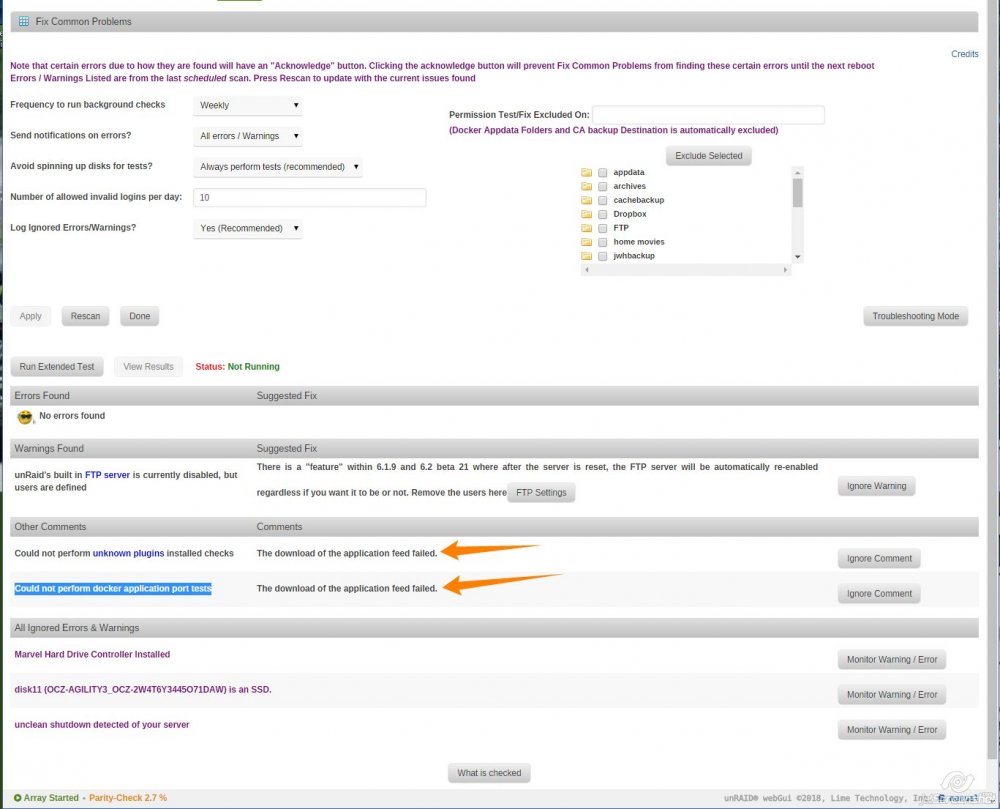
I'm getting a couple errors in fix common problems. Not finding the errors in any forum. Shows up in "Other Comments" Could not perform unknown plugins installed checks The download of the application feed failed. Could not perform docker application port tests The download of the application feed failed. Thanks in advance!
-
So I've noticed a "BLAKE2 hash key mismatched (updated)" entries in logs on a few files across a several disks. I've checked the files out and they all seem to play correctly (all movies). If the file plays with no issues, what does the error mean?
-
Hey thanks for the suggestion. But I had already tired that again when the error showed up this time. Yep, it worked then and cleared the log, but when it showed up again this time the error continues (and why did it come back?). So apologies for a terse post, should have included that history, will try to do better next time.
-
I renamed a couple shares and I'm seeing this in my log. How do I correct? When I go into settings, the old directories are not in the list. Jan 26 16:40:25 HunterNAS cache_dirs: ---------------------------------------------- Jan 26 16:40:25 HunterNAS cache_dirs: ERROR: included directory "DocArchive" does not exist. Jan 26 16:40:25 HunterNAS cache_dirs: ERROR: included directory "ISO\ Files" does not exist. Jan 26 16:40:26 HunterNAS cache_dirs: cache_dirs process ID 9360 started Thanks!
-
@SlrGI do use fix common problems, and not seen anything recently. The system is still running a parity check and found a bunch of errors. Assuming those are being corrected (I'll run another parity check after this one completes...). Does this trigger anything for you? Regarding the rootfs getting full. I've got a 16gb USB stick. The webgui is now unresponsive (won't load). But I could SSH, did a df -a and only 7% of the file system is used. DF -a from SSH. So unless I don't understand something, appears space not an issue? Thoughts? Dec 4 08:54:44 HunterNAS root: Restarting HunterNASPlexServer Dec 4 08:54:44 HunterNAS root: ####################### Dec 4 08:54:44 HunterNAS root: appData Backup complete Dec 4 08:54:44 HunterNAS root: ####################### Dec 4 08:54:49 HunterNAS sSMTP[27981]: Creating SSL connection to host Dec 4 08:54:49 HunterNAS sSMTP[27981]: SSL connection using ECDHE-RSA-AES128-GCM-SHA256 Dec 4 08:54:51 HunterNAS sSMTP[27981]: Sent mail for [email protected] (221 2.0.0 closing connection i63sm2650913itb.35 - gsmtp) uid=0 username=root outbytes=747 Dec 4 08:54:51 HunterNAS root: Deleting /mnt/user/cachebackup/current/[email protected] Dec 4 08:54:51 HunterNAS root: Backup / Restore Completed Dec 4 09:08:52 HunterNAS kernel: md: recovery thread: P incorrect, sector=3307104224 Dec 4 09:08:52 HunterNAS kernel: md: recovery thread: P incorrect, sector=3307104232 Dec 4 09:08:52 HunterNAS kernel: md: recovery thread: P incorrect, sector=3307104240 Dec 4 09:08:52 HunterNAS kernel: md: recovery thread: P incorrect, sector=3307104248 Dec 4 09:08:52 HunterNAS kernel: md: recovery thread: P incorrect, sector=3307104256 Dec 4 09:08:52 HunterNAS kernel: md: recovery thread: P incorrect, sector=3307104264 Dec 4 09:08:52 HunterNAS kernel: md: recovery thread: P incorrect, sector=3307104272 Dec 4 09:08:52 HunterNAS kernel: md: recovery thread: P incorrect, sector=3307104280 Dec 4 09:08:52 HunterNAS kernel: md: recovery thread: P incorrect, sector=3307104288 Dec 4 09:08:52 HunterNAS kernel: md: recovery thread: P incorrect, sector=3307104296 Dec 4 09:08:52 HunterNAS kernel: md: recovery thread: P incorrect, sector=3307104304 Dec 4 09:08:52 HunterNAS kernel: md: recovery thread: P incorrect, sector=3307104312 Dec 4 09:08:52 HunterNAS kernel: md: recovery thread: P incorrect, sector=3307104320 Dec 4 09:08:52 HunterNAS kernel: md: recovery thread: P incorrect, sector=3307104328 Dec 4 09:08:52 HunterNAS kernel: md: recovery thread: P incorrect, sector=3307104336 Dec 4 09:08:52 HunterNAS kernel: md: recovery thread: P incorrect, sector=3307104344 Dec 4 09:08:52 HunterNAS kernel: md: recovery thread: P incorrect, sector=3307104352 Dec 4 09:08:52 HunterNAS kernel: md: recovery thread: P incorrect, sector=3307104360 Dec 4 09:08:52 HunterNAS kernel: md: recovery thread: P incorrect, sector=3307104368 Dec 4 09:08:52 HunterNAS kernel: md: recovery thread: P incorrect, sector=3307104376 Dec 4 09:08:52 HunterNAS kernel: md: recovery thread: P incorrect, sector=3307104384 Dec 4 09:08:52 HunterNAS kernel: md: recovery thread: P incorrect, sector=3307104392 Dec 4 09:20:03 HunterNAS kernel: md: recovery thread: P incorrect, sector=3408952616
-
Yep, I have several windows machines, but I'm on the same one that had the SMB issue. I was never able to get SMB to work consistently with GoodSync. I ended up moving to Proftpd - which worked well until this error...and the further oddity is that (and don't know why I didn't mention it), I have a dozen backup jobs running in GoodSync. Except this one. In fact I'm running a backup now that is working. I've had jobs abort before, so I was watching the syslog when the above mentioned abort happened. So it appears to be sporadic. I'm having other problems with the server where the webgui either slows way down or locks up after a day or two of running. Webgui goes first (unresponsive), then pieces of the system degrade until the console finally becomes unresponsive. Then I have to do a hard reset. I have an AOC-SAS2LP-MV8, which i've replaced with an LSI 9207-8i. But I still have 8 drives that are on the motherboard (ASUS P8Z77-V LK Pro) which use the marvell controller, so I'm about to move all the drives off the motherboard onto a second LSI 9207-8i. Will try that once parity completes (its also having problems being VERY slow). If I enable debug logging, will that fill up the flash drive? Would you recommend I turn it on and leave it on until the next occurrence, or should I wait to see if these other modifications fix the problem?
-
Latest version of the ProFTPd docker running on 6.3.4. I'm using FTP for doing backups from my windows 10 stations. Its worked flawlessly. In my last backup attempt, I ran into the following errors showing up in my log. Dec 3 12:07:00 HunterNAS emhttp: err: sendFile: sendfile /usr/local/emhttp/update.htm: Broken pipe Dec 3 12:45:14 HunterNAS emhttp: err: sendFile: sendfile /usr/local/emhttp/webGui/styles/font-awesome.css: Broken pipe Dec 3 12:45:14 HunterNAS emhttp: err: sendFile: sendfile /usr/local/emhttp/update.htm: Broken pipe Dec 3 12:45:15 HunterNAS emhttp: err: sendFile: sendfile /usr/local/emhttp/update.htm: Broken pipe Dec 3 12:45:17 HunterNAS proftpd[14758]: 127.0.0.1 (192.168.29.11[192.168.29.11]) - notice: user ftpaccount: aborting transfer: Data connection closed Dec 3 13:10:23 HunterNAS proftpd[20140]: 127.0.0.1 (192.168.29.11[192.168.29.11]) - notice: user ftpaccount: aborting transfer: Data connection closed Dec 3 13:39:01 HunterNAS emhttp: err: sendFile: sendfile /usr/local/emhttp/update.htm: Broken pipe Dec 3 14:17:14 HunterNAS emhttp: err: sendFile: sendfile /usr/local/emhttp/update.htm: Broken pipe Dec 3 14:42:43 HunterNAS emhttp: err: sendFile: sendfile /usr/local/emhttp/update.htm: Broken pipe Dec 3 14:44:57 HunterNAS emhttp: err: sendFile: sendfile /usr/local/emhttp/update.htm: Broken pipe Dec 3 15:00:01 HunterNAS root: mover started Dec 3 15:00:01 HunterNAS root: moving "archives" to array Dec 3 15:00:01 HunterNAS root: .d..t...... ./ Dec 3 15:00:01 HunterNAS root: .d..t...... archives/ Dec 3 15:00:01 HunterNAS root: .d..t...... archives/_gsdata_/ Dec 3 15:00:01 HunterNAS root: .d..t...... archives/ Dec 3 15:00:01 HunterNAS root: mover finished Dec 3 15:20:04 HunterNAS emhttp: err: sendFile: sendfile /usr/local/emhttp/update.htm: Broken pipe Dec 3 15:20:04 HunterNAS emhttp: err: sendFile: sendfile /usr/local/emhttp/update.htm: Broken pipe Dec 3 15:28:10 HunterNAS emhttp: err: sendFile: sendfile /usr/local/emhttp/update.htm: Broken pipe The last entry continues to repeat. I've canceled the backup job that was running on the PC (using Goodsync via FTP). But the messages keep repeating sporadically. Thoughts on the cause?
-
Thought it would be interesting to report that I found a bad memory module in my system. Since removing that, I've not had any issue with inotify watches. I wonder if it could be that the watches were getting stuffed into bad memory and then failing somehow?
-
I'm seeing the following errors in the syslog every time ProFTPd executes (I do backups every night via FTP). HunterNAS proftpd[619]: 127.0.0.1 (192.168.29.11[192.168.29.11]) - error: /boot/config/plugins/ProFTPd is a world-writable directory Oct 18 01:30:07 HunterNAS proftpd[619]: 127.0.0.1 (192.168.29.11[192.168.29.11]) - unable to open TransferLog '/boot/config/plugins/ProFTPd/xferlog': No such file or directory I've looked at the plugins directory, and the xferlog file is there. Not been written to since 8/23/17. Other files in that directory have been written to, even today, so I know its being accessed. What could be causing this? Diags attached. Thanks in advance! hunternas-diagnostics-20171019-2227.zip
-
Yep, that's where I've been making the change to inotifywatches... We'll see if the latest lift makes a difference. What I find interesting is its always complaining about the same disk, Disk8. Which is a 3TB disk with only 512gb on it...
-
Great that you found a solution. I'm still getting the error. Currently just upped inotify from 2048000 to 3072000. Does anyone know if there is a real-time command or a utility to show how many watches are in use? I did the following and got this - not sure if there is a better way... ls -l /proc/*/fd/* | grep notify root@HunterNAS:~# ls -l /proc/*/fd/* | grep notify /bin/ls: cannot access '/proc/26277/fd/255': No such file or directory /bin/ls: cannot access '/proc/26277/fd/3': No such file or directory /bin/ls: cannot access '/proc/self/fd/255': No such file or directory /bin/ls: cannot access '/proc/self/fd/3': No such file or directory /bin/ls: cannot access '/proc/thread-self/fd/255': No such file or directory /bin/ls: cannot access '/proc/thread-self/fd/3': No such file or directory lr-x------ 1 root root 64 Oct 1 18:31 /proc/1252/fd/5 -> anon_inode:inotify lr-x------ 1 root root 64 Oct 1 18:31 /proc/1594/fd/5 -> anon_inode:inotify lr-x------ 1 root root 64 Oct 1 18:31 /proc/1652/fd/8 -> anon_inode:inotify lr-x------ 1 root root 64 Oct 2 11:39 /proc/1672/fd/14 -> anon_inode:inotify lr-x------ 1 root root 64 Oct 6 06:04 /proc/25548/fd/4 -> anon_inode:inotify lr-x------ 1 nobody users 64 Oct 6 06:04 /proc/25579/fd/93 -> anon_inode:inotify lr-x------ 1 root root 64 Oct 1 18:31 /proc/8071/fd/4 -> anon_inode:inotify lr-x------ 1 root root 64 Oct 1 18:31 /proc/8072/fd/4 -> anon_inode:inotify lr-x------ 1 root root 64 Oct 1 18:31 /proc/8073/fd/4 -> anon_inode:inotify lr-x------ 1 root root 64 Oct 1 18:31 /proc/8074/fd/4 -> anon_inode:inotify lr-x------ 1 root root 64 Oct 1 18:31 /proc/8075/fd/4 -> anon_inode:inotify lr-x------ 1 root root 64 Oct 1 18:31 /proc/8076/fd/4 -> anon_inode:inotify lr-x------ 1 root root 64 Oct 1 18:31 /proc/8206/fd/13 -> anon_inode:inotify The log appears to only complain about inotifywatches on Disk8 Syslog attached. Thoughts? hunternas-diagnostics-20171006-1132.zip
-
Backblaze B2, even at 400% cheaper than S3, is still very expensive. I've got over 15TB of data. That means more than $700/year. Ouch...? Or am I missing something?
-
Sadly, no, no one has ever shown interest. I gave up and have moved to FTP as a transport method. So far, its worked well. And yes, sad about Crashplan... The Goodsync engine does a good job. There is a cost, but so many things do.
-
@SlrG Hey thanks for the reply, hope you had a restful vacation. Yep, I had already looked through and verified this section. See the attached screenshot. You can see from the telnet session the /flash.../xferlog directory exists on the flash and its propagating to the /boot.../xferlog directory. But I'm still getting that error. Screenshot
-
LOL, not being the developer, I have no idea. It does not seem to matter, so live and let live I guess...
-
So the world-writable is not really an error...just a warning that its exposed and in the case of unraid does not matter? So should I just put a go statement to create the directory on boot?
-
I'm using latest version of Proftpd for access to my server from my backup software (Goodsync, latest version). All is working as it should, except I see a couple errors in my syslog everytime I open an FTP connection. But the connection works just fine. Jul 29 08:13:18 HunterNAS proftpd[29300]: 127.0.0.1 (192.168.29.11[192.168.29.11]) - error: /boot/config/plugins/ProFTPd is a world-writable directory Jul 29 08:13:18 HunterNAS proftpd[29300]: 127.0.0.1 (192.168.29.11[192.168.29.11]) - unable to open TransferLog '/boot/config/plugins/ProFTPd/xferlog': No such file or directory Not sure what the first error indicates, it shows as a 'red' error in the syslog. I've looked into the second error on my flash drive, the directory did not exist, given the boot directory is created every startup, do I need to insert a go file statement to create the directory? Log attached just FYI... Thanks in advance! hunternas-diagnostics-20170729-0831.zip
-
This is what I see... root@HunterNAS:~# cd /boot root@HunterNAS:/boot# cat inotify.txt udevd 1252 root 5r a_inode 0,9 0 2050 inotify dbus-daem 1597 messagebus 5r a_inode 0,9 0 2050 inotify acpid 1655 root 8r a_inode 0,9 0 2050 inotify smbd-noti 1675 root 14r a_inode 0,9 0 2050 inotify agetty 7886 root 4r a_inode 0,9 0 2050 inotify agetty 7887 root 4r a_inode 0,9 0 2050 inotify agetty 7888 root 4r a_inode 0,9 0 2050 inotify agetty 7890 root 4r a_inode 0,9 0 2050 inotify agetty 7891 root 4r a_inode 0,9 0 2050 inotify agetty 7892 root 4r a_inode 0,9 0 2050 inotify avahi-dae 8019 avahi 13r a_inode 0,9 0 2050 inotify tail 9975 root 4r a_inode 0,9 0 2050 inotify Plex\x20M 10734 nobody 92r a_inode 0,9 0 2050 inotify Plex\x20M 10734 10735 nobody 92r a_inode 0,9 0 2050 inotify Plex\x20M 10734 10736 nobody 92r a_inode 0,9 0 2050 inotify Plex\x20M 10734 10742 nobody 92r a_inode 0,9 0 2050 inotify Plex\x20M 10734 10743 nobody 92r a_inode 0,9 0 2050 inotify Plex\x20M 10734 10748 nobody 92r a_inode 0,9 0 2050 inotify Plex\x20M 10734 10749 nobody 92r a_inode 0,9 0 2050 inotify Plex\x20M 10734 10750 nobody 92r a_inode 0,9 0 2050 inotify Plex\x20M 10734 10792 nobody 92r a_inode 0,9 0 2050 inotify Plex\x20M 10734 10795 nobody 92r a_inode 0,9 0 2050 inotify Plex\x20M 10734 10796 nobody 92r a_inode 0,9 0 2050 inotify Plex\x20M 10734 10798 nobody 92r a_inode 0,9 0 2050 inotify Plex\x20M 10734 10800 nobody 92r a_inode 0,9 0 2050 inotify Plex\x20M 10734 10834 nobody 92r a_inode 0,9 0 2050 inotify Plex\x20M 10734 10843 nobody 92r a_inode 0,9 0 2050 inotify Plex\x20M 10734 14195 nobody 92r a_inode 0,9 0 2050 inotify grep 15559 root 1w REG 8,1 0 19966 /boot/inotify.txt How do I decode this to determine why my 720,000 inotify watches are not large enough...?
-
I'll look into tips and tweaks. But how many more user inotify watches do I need? Is there a way to identify what's demanding them?
-
I've been dealing with a recurring error regarding inotify watches being exceeded. Jul 21 10:38:43 HunterNAS inotifywait[9065]: Failed to watch /mnt/disk5; upper limit on inotify watches reached! So I read in the forum about changing them in the go file, which I did some time ago. And no problems for a while, now I'm seeing them again on disk 5. Current Go File #!/bin/bash # Start the Management Utility /usr/local/sbin/emhttp & # resize to 128mb filesize (from 256) tmpfs mount -o remount,size=128m /var/log # Increase max_user_watches to 720000 (was 524288) echo 720000 > /proc/sys/fs/inotify/max_user_watches cat /proc/sys/fs/inotify/max_user_watches returns 720000, so I know the command worked. I tailed the log, and no "no space left on device" error displayed root@HunterNAS:~# tail -f /var/log/dmesg [ 19.910230] sd 1:0:7:0: [sdm] 7814037168 512-byte logical blocks: (4.00 TB/3.64 TiB) [ 19.910301] sd 1:0:7:0: Attached scsi generic sg13 type 0 [ 19.910397] sd 1:0:7:0: [sdm] 4096-byte physical blocks [ 19.910519] sd 1:0:7:0: [sdm] Write Protect is off [ 19.910599] sd 1:0:7:0: [sdm] Mode Sense: 00 3a 00 00 [ 19.910617] sd 1:0:7:0: [sdm] Write cache: enabled, read cache: enabled, doesn't support DPO or FUA [ 19.927154] sdl: sdl1 [ 19.927586] sd 1:0:6:0: [sdl] Attached SCSI disk [ 19.986792] sdm: sdm1 [ 19.987355] sd 1:0:7:0: [sdm] Attached SCSI disk Is there a way to determine what is consuming these watches? Should I just increase them again? Thanks in advanced Oh wizened ones...
-
I've had to reinstall my system a couple of times and just noticed that I have 3 plexmediaserver directories. Evidently I'm not consistent in my naming scheme! http://my.jetscreenshot.com/12412/20170609-ntiq-75kb The latest iteration of my installation uses plexmediaserver in all lower case. http://my.jetscreenshot.com/12412/20170609-sk7t-145kb Am I correct that the other two directories could be deleted? Or does plex create more than one?
-
Sorry, meant to say Cache! Critical oversight...
-
Quick question on replacing a cache drive. The process is very simple. Shutdown. Swap drive. Reboot. Select new drive as Parity. Run appdata restore. Correct?
-
Latest versions of UR and Dynamix SSD Trim. I've set Dynamix SSD Trim to run once a week. Is there a way to get a status report of the results? Is there a webgui status somewhere?

