






jeffreywhunter
Members
-
Joined
-
Last visited
Everything posted by jeffreywhunter
-
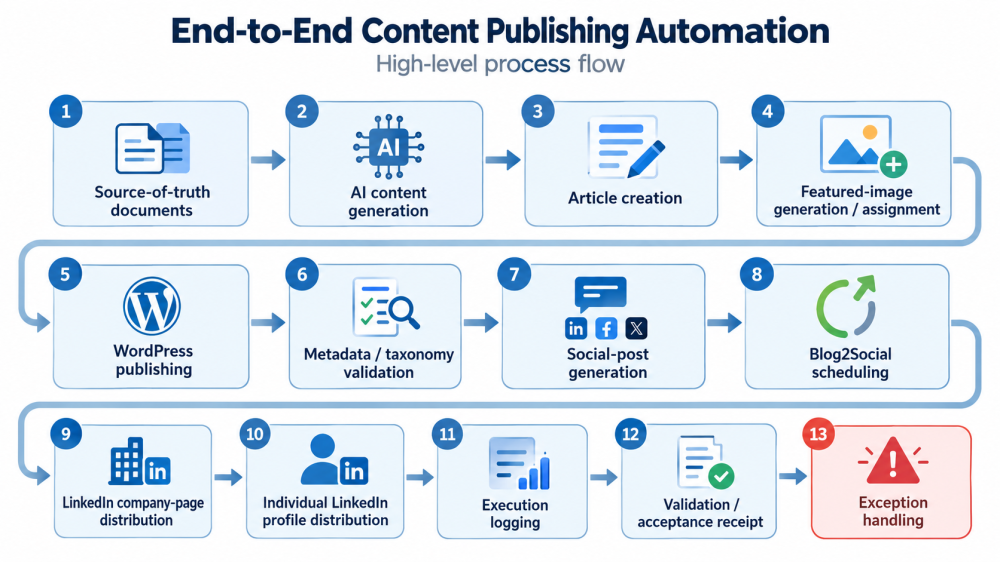
Hi all, I'm looking for some advice on an automation environment I've been building. There are really two related, but distinct, questions: The best way to securely give an SI/AI system controlled access to services running on my Unraid server. The best architecture for allowing that AI system to interact with, inspect, troubleshoot, and potentially modify n8n workflows. The Environment I'm running Unraid as the server platform, with n8n running in Docker. The broader automation stack currently includes: Unraid Docker n8n Tailscale Unraid Connect / myunraid.net for remote server administration WordPress WPVibe for AI-to-WordPress interaction Blog2Social for social-media distribution LinkedIn company and individual profile posting ChatGPT as the primary AI orchestration and content-development layer I have also built a webhook-based execution gateway (bfp-gateway) so the AI side can initiate specific n8n processes without exposing the n8n administrative interface directly. For example, one of the current Tailscale services looks roughly like: https://[server IP].ts.net:10000/bfp-gateway -> http://127.0.0.1:5678/webhook/bfp-content-execution The intent is to expose narrowly defined execution endpoints rather than simply making the entire n8n instance publicly reachable. What We're Automating The project is an end-to-end content publishing system for a company blog and its associated social-media channels. At a high level, the process is intended to look like this: I've developed fairly extensive operating rules around the process, including content templates, editorial standards, taxonomy rules, image standards, social-media formats, QA procedures, and validation requirements. The AI therefore isn't just generating an article and throwing it at WordPress. It is being used more like an orchestration and QA layer around a fairly deterministic publishing pipeline generated from a sophisticated source of truth for both content topics and editorial/imagery standards. What Is Already Working I've had surprisingly good success with individual pieces. The AI can develop the complete content package. It can interact with WordPress through WPVibe and perform operations such as: Create/update posts Assign categories and tags Set metadata Work with featured images Execute controlled WordPress operations Audit the resulting post n8n can receive execution requests through webhooks and act as the workflow/orchestration engine. Blog2Social provides the downstream social-posting layer. I have also added concepts such as: Execution manifests Acceptance receipts Failure branches Logging Validation steps Stop conditions Explicit external-call boundaries So the system is getting close to being a genuine automated publishing pipeline rather than a collection of scripts. Where I'm Still Getting Stuck The remaining problem is closing the loop. Today the AI can reason about what should happen and can initiate parts of the process, but it doesn't have sufficiently controlled visibility into the Unraid/n8n environment on my unRaid sever to reliably answer questions like: Did the workflow actually execute? Which node failed? What data was passed between nodes? Was the correct workflow version executed? Did Blog2Social receive the payload? Was the LinkedIn post really scheduled? Did the WordPress post end up with the expected metadata? Should the workflow retry, repair something, or stop? Can the AI safely make a workflow correction and rerun it? Right now I can give the AI console output, JSON exports, screenshots, logs, or other information manually, but that defeats much of the objective. I'd like the AI to be able to inspect the relevant environment directly while still maintaining a strong security boundary. Topic 1: Secure AI Access to Unraid Services I'm interested in how others would expose selected capabilities on an Unraid system to an external AI/orchestration system. I'm specifically NOT looking to simply expose the Unraid GUI, Docker socket, SSH, or n8n editor to the public Internet. Some approaches I'm considering include: Tailscale Tailscale Serve/Funnel A dedicated API gateway Reverse proxy with authentication Restricted SSH/API account A purpose-built container acting as an AI control gateway n8n webhooks Unraid APIs, if appropriate Capabilities available through Unraid Connect/myunraid.net A VPN-accessible management/API network The idea is to place a secure, authenticated gateway between the AI system and the Unraid environment rather than giving the AI direct administrative access. The gateway would expose only a defined set of approved operations, such as triggering a specific n8n workflow, reading execution status, retrieving selected logs, checking Docker container health, or calling a particular application API. Each request could be authenticated, logged, permission-scoped, and validated before it reaches n8n, Docker, or another backend service. This creates a controlled interface where the AI can observe and act on the automation environment without receiving unrestricted shell access or broad control over the Unraid server. Rather than the AI having unrestricted shell access to Unraid. I'd be very interested in how people would design that boundary. Topic 2: AI Access to n8n Workflows The second question is more specifically about n8n. Ideally, I'd like the AI to be able to: List workflows Read workflow definitions Determine whether a workflow is active See recent executions Inspect execution errors Examine node input/output Trigger a workflow Potentially activate/deactivate a workflow Update a workflow under controlled circumstances Validate the modified workflow Roll back if necessary I know n8n has APIs and its own permission/security model, so I'm interested in whether people have built something similar. Would you expose the n8n API directly through a secure private network, or put another service in front of it? For AI-driven administration, would you allow the AI to modify workflows directly, or instead have it generate proposed JSON changes that another controlled process validates and applies? The Bigger Goal The target design is something fairly ambitious: "Create and publish tomorrow's content package." The AI would then be able to: Develop the article and social content from our source-of-truth material. Create or update the WordPress content. Create/assign the appropriate image. Validate the WordPress article. Hand the approved social package to n8n. n8n passes it through the required distribution workflows. Blog2Social schedules/publishes it. The system verifies the actual result. Failures are returned to the AI with enough information to diagnose them. The AI either repairs/retries the process or escalates the exception. The important distinction is Step 8. Triggering a workflow is easy. Knowing that the entire business process successfully completed - and being able to diagnose it when it didn't - is the harder problem. Questions for the Community I'd particularly appreciate thoughts on: How would you securely expose selected Unraid capabilities to an AI agent? Is Tailscale the right foundation, or is there a better Unraid-native architecture? Does Unraid Connect expose any useful API or integration capabilities for this type of application? What is the safest way to expose the n8n REST API in this environment? Has anyone built an AI/MCP/API gateway in front of n8n? Would you allow AI to modify n8n workflows directly? What permissions or isolation model would you use? How would you implement execution auditing and rollback? Is there an existing Unraid container/project that already solves part of this problem? I'm particularly interested in architectures people are actually running rather than simply exposing another administrative interface to the Internet. The system is already far enough along that we're successfully automating substantial portions of the process, but the remaining barriers tend to appear at the handoff points between systems. We run into issues such as authentication or authorization stopping an action, webhook calls succeeding without enough confirmation that the downstream process actually completed, limited visibility into n8n execution state, difficulty retrieving node-level errors or logs, API or plugin approval gates that still require manual intervention, uncertainty about whether a workflow actually scheduled or published the intended social post, and cases where the AI can identify what needs to be corrected but does not have a sufficiently controlled mechanism to inspect or repair the workflow directly. In other words, initiating an action is often relatively easy; reliably confirming the result, diagnosing failures, making a bounded correction, and safely retrying the process without human intervention is much harder. The remaining challenge is establishing the secure control, observability, permission model, error handling, and feedback loop required to move from "AI-assisted automation" to genuinely unattended end-to-end execution. Thanks in advance for any suggestions, criticism, or examples of how others have approached this. Jeff
-
It was an easy fix once I understood it. Just fall back to the appropriate driver. Why anyone would force the latest driver in such an update is a mystery. Honor what's there - or at least give us the option to retain the existing driver...
-
Nvidia Driver Plugin - Upgrade Path Breaks Pascal GPUs (Driver Branch Not Honored) I ran into an issue after upgrading to the latest Nvidia Driver (and at the same time I had upgraded from 7.2.2 to 7.2.3 - not sure which, but one of them caused my Nvidia GPU (Quadro P2000, Pascal) to disappear entirely from the system because it upgraded the driver to 595.x from 580.142 (which is the latest version that supports the P2000). Environment: Unraid: 7.2.3 (kernel 6.12.54) GPU: NVIDIA Quadro P2000 (Pascal, device ID 10de:1c30) Plugin: Nvidia Driver Original working driver: 580.x branch Issue observed after upgrade: Driver was automatically set to 595.58.03 (Production/latest) nvidia-smi failed: “couldn't communicate with the NVIDIA driver” /dev/nvidia* devices were not created dmesg repeatedly showed: GPU detected as P2000 but “supported through 580.xx Legacy drivers” “595.xx driver will ignore” “No NVIDIA GPU found” Result: Docker containers requiring GPU (Plex in this case) failed to start due to missing /dev/nvidia0 System behavior appeared as if GPU was not present Resolution: Manually changed preferred driver version to 580.142 Rebooted GPU immediately restored: /dev/nvidia* present nvidia-smi functional Plex container started normally Root cause (as understood): Plugin upgrade or Unraid upgrade defaulted driver selection to latest/Production branch That branch (595.x) does not support Pascal GPUs properly and ignores them entirely The plugin correctly identifies the recommended driver (580.x), but does not preserve or enforce it across upgrades Request / Suggestion: Would it be possible for the plugin to honor the currently installed/working driver branch across upgrades, especially when: A GPU is already configured and working The plugin can detect a recommended compatible version (e.g., 580.x for Pascal) A newer branch would result in loss of GPU functionality At minimum, one of the following would help: Preserve the existing driver version on upgrade instead of defaulting to latest Automatically constrain upgrades to the compatible branch (e.g., stay within 580.x for Pascal GPUs) Provide a warning before switching to an incompatible branch Optionally block auto-selection of drivers known to ignore the detected GPU Right now, the upgrade path can silently move a working system into a non-functional state for older but still widely used GPUs. At least identify the issue and prevent the upgrade or offer a notification of some sort... Thanks for the work on the recent per-GPU detection enhancements - those made diagnosis much easier. It would be great to extend that logic into upgrade behavior as well.
-
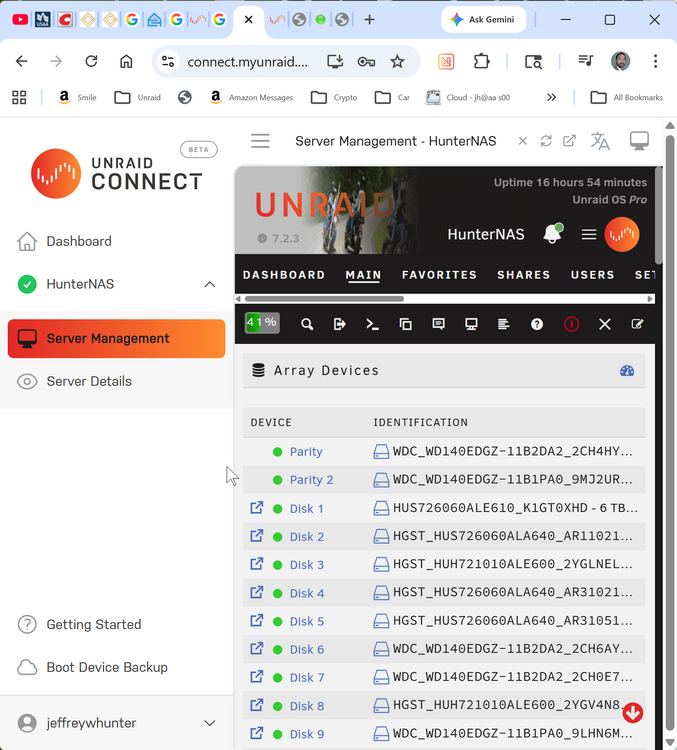
Also on version 7.2.3. I did the unraid-api stop and unraid-api start from the terminal. root@HunterNAS:~# unraid-api stop [PM2] [unraid-api](0) ✓ root@HunterNAS:~# unraid-api start Starting the Unraid API [PM2][WARN] Applications unraid-api not running, starting... [PM2][WARN] App unraid-api has option 'wait_ready' set, waiting for app to be ready... [PM2] App [unraid-api] launched (1 instances) +--- unraid-api namespace : default version : 4.31.1+726ae51e pid : 1287024 pm2 id : 0 status : online mode : fork restarted : 0 uptime : 30s memory usage : 223.4mb error log : /var/log/graphql-api.log watching : no PID file : /var/log/.pm2/pids/unraid-api-0.pid root@HunterNAS:~# I can see the server from the unraid connect server management. But trying to load the server link (https://10-253-0-1.xxxxxxxxxxxxxxxxxxxxxxxxxxxxxxxxx.myunraid.net:61234/) just returns "this site can't be reached". Any suggestions?
-
I'm looking for a replacment for Nerdtools, specifically the Screen function. Is there a replacement? I've not been able to find anything on the Apps store.
-
I'm not able to log into my unraid server externally using the Server Routes FQDN WAN. FQDN Lan works in my local network. MyUnraid account logs in and I see the server there. I must be missing something. Thanks!
-
I have an APC BR1500G UPS installed and connected via USB to my Unraid 7.0 server. Everything works. I see UPS in UPSSettings. When I try to run the ACPTEST it fails. I stop the daemon (/etc/rc.d/rc.apcupsd stop), then when I try to run ACPTEST, says command not found. I searched for ACPTEST on the system, but didn't find anything. Is there something I need to install in order to get ACPTEST (used to be in Nerdtools/Nerdpack but that does not support 7.0) to work in UR 7.0+?
-
Perfect thanks! Much improved version!!!
-
I just upgraded to 7.0.0 and was looking to update all my plugins and noticed that Disk Location states "not available" in the Status Column (see pic). Is there a problem I need to fix on my side after the 7.0.0 update?

-
Just wanted to share a successful Plex server setup for anyone running older hardware and considering GPU offload. System Specs: CPU: Intel i5-2600K GPU: NVIDIA Quadro P2000 Motherboard: ASUS P8Z77-V LK RAM: 32GB DDR3 OS: Unraid 6.12.x Docker: Plex Media Server (official image) NVIDIA Driver Plugin: v565.77 (New Feature Branch) Goal: Enable GPU-based hardware transcoding for multiple concurrent Plex streams—including 4K → 1080p—without maxing out the CPU. Key Steps: Installed the NVIDIA driver plugin via the Unraid CA. Passed the P2000 to the Plex container using: bash --runtime=nvidia --device=/dev/nvidia0 --device=/dev/nvidiactl --device=/dev/nvidia-uvm Enabled hardware acceleration in Plex (Settings → Transcoder → Use hardware acceleration when available). Rebuilt container with proper mappings (/config, /transcode, media libraries). Results: Up to 6 simultaneous streams, including 4K content. Hardware transcoding confirmed via nvidia-smi (GPU memory & Plex Transcoder process active). CPU usage stays between 8–32%, even under load. No playback issues. Both local and remote streaming perform great. Takeaway: The Quadro P2000 is still a beast for Plex! Even paired with an older i5-2500K, you can comfortably transcode 4K video and serve multiple users with ease. Great way to breathe new life into older hardware. Happy streaming!
-
I have had success triggering transcoding using Firefox as the browser (it does not support H.264 files I assume). And its working well. I've not found a way to trigger transcoding otherwise.
-
@MowMdown Thanks again for your posts, got me on the right track. I have one last issue with Transcoding. Plex on Firefox uses the transcoder and it works fantastic. Plex on Chrome seems to prefer to use the CPU - in spite of turning "Use hardware acceleration when available" on in Chrome>Settings (chrome://settings/system). I can't force Video Quality in the Plex Player anymore (unless someone knows how to do that!), so my question is: do you know a way in plex to force chrome to use GPU transcoding vs CPU transcoding?
-
Thanks MowMdown! Not sure how I missed that, but not setting up the KEY in addition to the VALUE was a big part of the problem. Additionally, (and this was a real challenge to figure out) there were a lot of permission issues at play. I ran Newperms on /mnt/cache/appdata/PlexMediaServer, /mnt/user/movies, /mnt/user/tv. The final bit, and this was important was making sure that I used the cache drive watch -n 1 "top -b -n1 | head -n 15; echo; nvidia-smi" With MowMdown's suggestions/observations, I finally got Plex Media Server running (mostly) perfectly on Unraid with hardware-accelerated transcoding using my NVIDIA Quadro P2000. Playback is buttery smooth, even with multiple concurrent 4K streams — here's exactly what I did to make it work, in checklist style for anyone else going down this road. 🧰 Hardware GPU: NVIDIA Quadro P2000 (Pascal, well-supported) Unraid Version: 7.0.0 Container: PlexInc/pms-docker Step-by-Step Setup 🖥️ 1. BIOS Configuration Enabled VT-d (IOMMU) in BIOS Disabled CSM (Compatibility Support Module) if present (not always needed) Enabled Resizable BAR if available (optional for newer GPUs) 🎮 2. Install NVIDIA Driver Plugin Go to Apps tab Install "NVIDIA Driver" plugin Reboot Unraid Confirm GPU is detected with: bash nvidia-smi or look in settings>system devices to find the GPU (important validation hardware is right) 🐳 3. Docker Container Setup (Plexinc) These are the critical Docker Container settings: Docker Container Setup Checklist – Plex with NVIDIA GPU (P2000) 📦 Container Basics Repository: plexinc/pms-docker Registry URL: https://hub.docker.com/r/plexinc/pms-docker Icon URL: https://raw.githubusercontent.com/plexinc/pms-docker/master/img/plex-server.png Network Type: Host Privileged: Off Use Tailscale: Off Console Shell: Shell CPU Pinning: (Optional — as needed) 🧠 GPU Hardware Transcoding Extra Parameters:--runtime=nvidia Devices: (Make sure both name and value are filled in) /dev/nvidia0 /dev/nvidiactl /dev/nvidia-uvm /dev/nvidia-uvm-tools Environment Variables: (Make sure name, key, value and default value are filled in) NVIDIA_VISIBLE_DEVICES: key:NVIDIA_VISIBLE_DEVICES, value=all, default value=all NVIDIA_DRIVER_CAPABILITIES= key:NVIDIA_DRIVER_CAPABILITIES, value=all, default value=all 📂 Volume Mappings Container Path Host Path Purpose /transcode /mnt/cache/appdata/PlexTransCode/ Fast SSD-based transcode folder /config /mnt/cache/appdata/PlexMediaServer/ Plex configuration & metadata storage /movies /mnt/user/movies/ Movie library /tv /mnt/user/tv/ TV Shows library /music /mnt/user/music/ Music library /homemovies /mnt/user/homemovies/ Personal/home movies /pictures /mnt/user/pictures/ Photo library 🔑 Environment Variables Key Value Description PLEX_CLAIM claim-XXXXY5xTiXXXXDE_XXX (example) Optional claim token for linking server PLEX_UID 0 Run as root (Unraid default) PLEX_GID 0 Group ID (Unraid default) VERSION latest Container image tag 🔥 NOTE: Using /mnt/cache/... instead of /mnt/user/... fixed several weird bugs with hardware transcoding. Plex can behave unpredictably with FUSE paths. 🔒 4. Permissions – Set Correct Ownership On appdata and media shares: newperms /mnt/cache/appdata/PlexMediaServer newperms /mnt/user/Movies newperms /mnt/user/TV Ensures proper nobody:users ownership and 775/664 permissions. 🎛️ 5. Plex Settings (Inside Plex Web UI) Settings → Transcoder ✅ Hardware Acceleration = Enabled ✅ Transcoder Directory = /transcode (if set above) ⚠️ Optional: Disable “Use HDR tone mapping” unless needed 🧪 6. Confirming GPU Usage In terminal: watch -n 1 nvidia-smi Look for: Plex Transcoder using 500–700MiB GPU Memory GPU-Util: >30% In Plex>Activity>dashboard: Playback shows: Transcode (Video: H264 (Hardware)) - (See MowMdown's first post above) 💡 Bonus Observations Firefox sessions triggered hardware transcode reliably on 4k videos - useful since you can't control from the Plex Player anymore. Chrome sometimes fell back to CPU transcode due to codec or subtitle rendering - THIS IS STILL AN ISSUE - in Chrome, Plex does CPU transcoding...*sigh* I have to work on that next. Plex ran thumbnails and streams simultaneously without skipping or pegging CPU. HELPFUL: Using watch -n 1 "top -b -n1 | head -n 15; echo; nvidia-smi" let me watch real-time both GPU and Processes at the same time. HELPFUL: I used ChatGPT for a lot of the debugging. You can't believe everything, but it was fantastic at providing options and specific commands to use (like Watch). I'm not a Linux GURU so this aspect of AI was VERY helpful. 🧵 TL;DR Summary ✅ BIOS VT-d on ✅ NVIDIA Driver plugin installed ✅ Docker has NVIDIA_VISIBLE_DEVICES & NVIDIA_DRIVER_CAPABILITIES - Key and Value set! ✅ Mapped to /mnt/cache, not /mnt/user ✅ newperms run on all relevant shares ✅ Confirmed hardware transcode with nvidia-smi + Plex dashboard
-
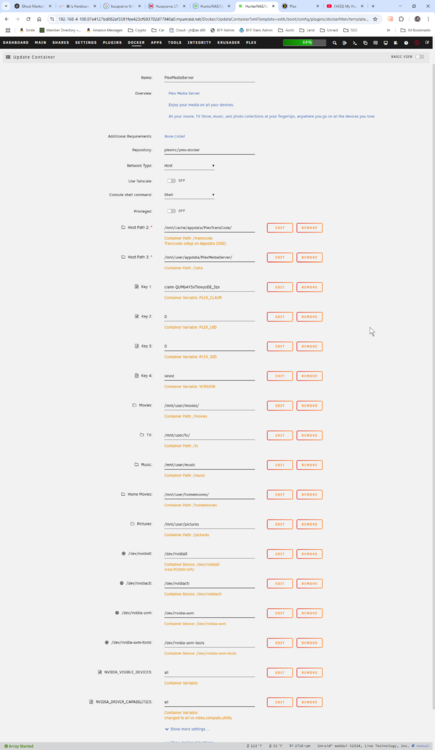
Both are there. Here's the complete Docker config (and screenshot attached). These are all the volume mappings, environment variables, and GPU passthrough settings. 1. PlexMediaServer Docker Configuration (Unraid - plexinc/pms-docker) Setting Value Notes Container Name PlexMediaServer Repository plexinc/pms-docker Official Plex image Network Type Host Privileged Mode Off Console Shell Command Shell Tailscale Off 2. Volume Mappings Host Path Container Path Purpose /mnt/user/appdata/PlexMediaServer/ /data Plex config directory /mnt/cache/appdata/PlexTransCode/ /transcode Transcoder temp directory (SSD) /mnt/user/movies/ /movies Movie library /mnt/user/tv/ /tv TV library /mnt/user/music /music Music library /mnt/user/homemovies/ /homemovies Home videos /mnt/user/pictures /pictures Photo library 3. Environment Variables Variable Value Notes PLEX_CLAIM claim-QUMb4Y5xTiewyoDE_5zx Claim token for initial setup PLEX_UID 0 Runs Plex as root (not ideal) PLEX_GID 0 Same as above VERSION latest Plex version NVIDIA_VISIBLE_DEVICES all Expose all GPUs NVIDIA_DRIVER_CAPABILITIES all Note: typically compute,video,utility recommended 4. GPU Passthrough Devices Host Device Container Device Description /dev/nvidia0 /dev/nvidia0 Quadro P2000 GPU /dev/nvidiactl /dev/nvidiactl NVIDIA Control Interface /dev/nvidia-uvm /dev/nvidia-uvm Unified Video Memory /dev/nvidia-uvm-tools /dev/nvidia-uvm-tools Additional UVM interface Despite all settings appearing correct, GPU hardware transcoding did not function with this configuration, and Plex only showed "Auto" in the Hardware Transcoding Device dropdown. The container lacked NVIDIA runtime libraries internally (nvidia-smi not found).
-
I've been told that the plexinc/pms-docker image does not bundle GPU support libraries by default. Perhaps that is why? Do you know for sure if its included? Is there a way to see if its there?
-
Here's the docker run: Command execution docker run -d --name='PlexMediaServer' --net='host' --pids-limit 2048 -e TZ="America/Chicago" -e HOST_OS="Unraid" -e HOST_HOSTNAME="HunterNAS" -e HOST_CONTAINERNAME="PlexMediaServer" -e 'PLEX_CLAIM'='claim-QUMb4Y5xTiewyoDE_5zx' -e 'PLEX_UID'='0' -e 'PLEX_GID'='0' -e 'VERSION'='latest' -l net.unraid.docker.managed=dockerman -l net.unraid.docker.webui='http://[IP]:[PORT:32400]/web' -l net.unraid.docker.icon='https://raw.githubusercontent.com/plexinc/pms-docker/master/img/plex-server.png' -v '/mnt/cache/appdata/PlexTransCode/':'/transcode':'rw' -v '/mnt/user/appdata/PlexMediaServer/':'/data':'rw' -v '/mnt/user/movies/':'/movies':'rw' -v '/mnt/user/tv/':'/tv':'rw' -v '/mnt/user/music':'/music':'rw' -v '/mnt/user/homemovies/':'/homemovies':'rw' -v '/mnt/user/pictures':'/pictures':'rw' -v '/mnt/user/appdata/PlexMediaServer':'/config':'rw' --device='/dev/nvidia0' --device='/dev/nvidiactl' --device='/dev/nvidia-uvm' --device='/dev/nvidia-uvm-tools' --runtime=nvidia 'plexinc/pms-docker' 74ca07ac98f52c59e5453e3114b926eecf5094d23db512ecd201f1d806c8b29e The command finished successfully!
-
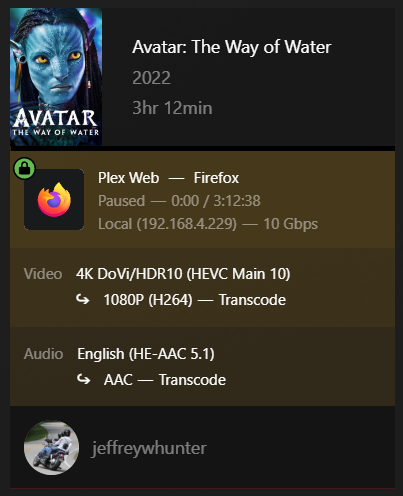
Yes I have a plex-pass. I am seeing transcoding, but not the same. I see: Transcode, not Transcode (hw). I am using the PlexInc Plex docker. When I try Running nvidia-smi inside the container fails with: bash: nvidia-smi: command not found So it appears that the official PlexInc image lacks NVIDIA libraries and tooling. Correct? I guess my option would be to go with the Limetech Plex? I'd RATHER NOT do that as I'd have to rebuild everything... Thoughts? Could I just copy the plex database files from the PlexInc docker to the Limetech Plex docker?
-
I've since tried to install the Quadro P2000. Unraid recognizes it in devices, I was able to choose it for hardware transcoding in Plex, setup the container with all the various bits Here's what I've done: 0. In BIOS I enabled IOMMU/VT-d (allows GPU passthrough) 1. Installed NVIDIA Driver Plugin from community applications. Verified P2000 in System Devices. 2. Added the following to Plex Container Extra Parameters: ---runtime=nvidia Host Path 2: /tmp (container Added Devices /dev/nvidia0: /dev/nvidia0 /dev/nvidiactl: /dev/nvidiactl /dev/nvidia-uvm: /dev/nvidia-uvm /dev/nvidia-uvm-tools: /dev/nvidia-uvm-tools Added Variables: NVIDIA_VISIBLE_DEVICES: all NVIDIA_DRIVER_CAPABILITIES: video,compute,utility 3. In Plex>Settings>Transcoder Enabled Use Hardware acceleration when available Enabled user hardware-accelerated video encoding Hardware transcoding device set to Auto (only choice) Ran watch -n 1 nvidia-smi displays the following (no change, even when playing a video that requires transcoding - i.e. on Firefox Plex Play). Every 1.0s: nvidia-smi HunterNAS: Thu May 8 16:42:23 2025 Thu May 8 16:42:23 2025 +-----------------------------------------------------------------------------------------+ | NVIDIA-SMI 565.77 Driver Version: 565.77 CUDA Version: 12.7 | |-----------------------------------------+------------------------+----------------------+ | GPU Name Persistence-M | Bus-Id Disp.A | Volatile Uncorr. ECC | | Fan Temp Perf Pwr:Usage/Cap | Memory-Usage | GPU-Util Compute M. | | | | MIG M. | |=========================================+========================+======================| | 0 Quadro P2000 Off | 00000000:02:00.0 Off | N/A | | 64% 37C P0 16W / 75W | 0MiB / 5120MiB | 0% Default | | | | N/A | +-----------------------------------------+------------------------+----------------------+ +-----------------------------------------------------------------------------------------+ | Processes: | | GPU GI CI PID Type Process name GPU Memory | | ID ID Usage | |=========================================================================================| | No running processes found | +-----------------------------------------------------------------------------------------+ So unraid sees the GPU, but does not appear that plex is using it. When I run a video that requires transcoding, CPU gets maxed and video is choppy (i.e. GPU not being used). Obviously I'm missing something... Ideas?
-
I have an unraid 7.0 server, i5-2600k, 32gb 1600mhz ram, 15 drives on an ASUS P8Z77 VLK mobo. I have the Limetech Plex Docker in place. I have an Intel P2000 GPU. I'm trying to keep the costs down and keep this decades old system running as long as possible. I have 5000 movies and 22000 TV shows on my system plus music. The i5 struggles to keep up with transcoding when remote users access movies. So a few questions... 1. I know that plex prefers direct play but also supports hardware transcoding. Will the P2000 work with this config and accomplish what I thought it would? 2. Are there any guides/instructions on how to install the P2000 with Unraid & Plex? Should I (*sigh*) just spring for more Mobo, CPU and Memory? What would be a cost effective upgrade?
-
I sprung for the 1000w PSU. It works no issues. 650 couldn't handle it.
-
Unraid 7.0.0. I've upgraded my system with 15 drives now (5 10TB, 6 6TB, 3 4TB and 1 2TB). I'm getting ready to add a Quadro P2000 for transcoding in Plex. I'm concerned that I am at the edge of the PSU and remember that Unraid used to have spinup groups. Seems that UR 7.0.0 has eliminated that? What's the best practice for ensuring that I have enough watts in my system to handle Spinup at boot, parity checks, etc... Or do I just need to spring for a 1000 watt PSU...
-
When I used to login to terminal, I would see the LimeTech logo and the be placed in the boot (if I remember correctly). Now when I load Terminal, I see root@HunterNAS:~# and nothing. I seem to be in "nowhere land". If I CD /, then I can see directories and such. Is the location where it opens configurable in 6.12.14?
-
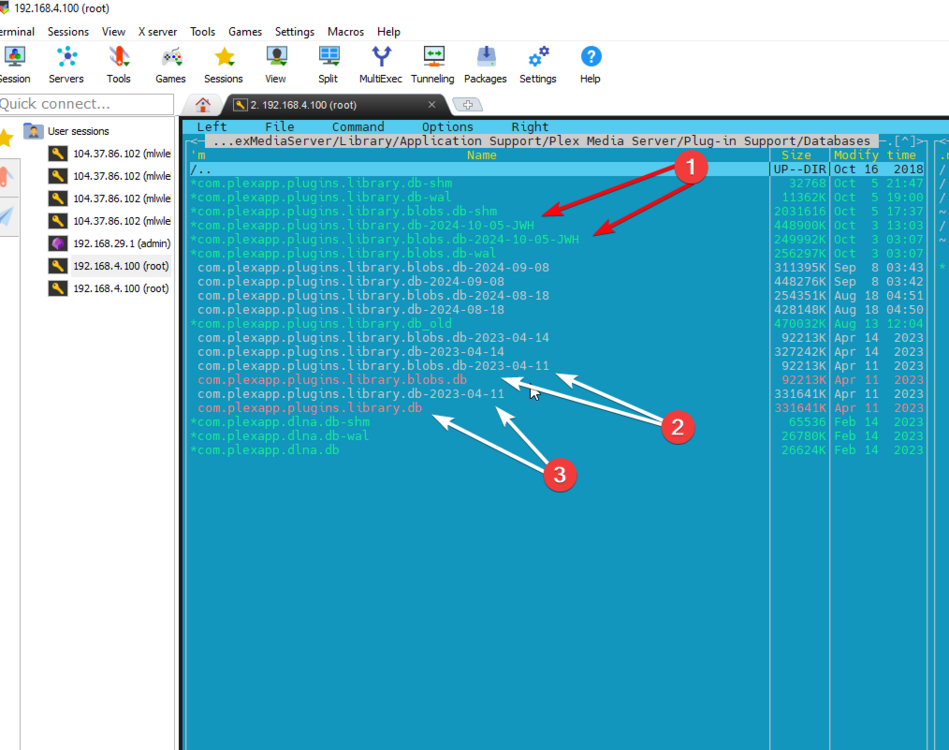
UnRaid 6.12.13, Plex Version 4.136.1 (Latest version of Linuxserver.io - Plex Media Server? I've searched for updates and there are none from the developer). Server Logs Attached. I've been having problems where Plex will not recognize new movies or music being added (i.e. Scan after adding anew movie, does not update), and the search function does not return anything despite the fact there are 3000+ movies out there. There are movies and music that display and i can play, but not recognizing new content and search does not find anything. So I stopped plex, then renamed the db and blobs.db files as in the screenshot (#1) Essentially backing up the old databases and copying the oldest backups I have to see if they would work (#2, #3). I restarted Plex, but now plex won't load. This displays in the browser. I've tried HTTP and HTTPS. I'm concerned that perhaps its a file permissions problem, but they appear to be the same (in spite of the different color in the MC display). This site can’t be reached 192.168.4.100 refused to connect. Try: Checking the connection Checking the proxy and the firewall ERR_CONNECTION_REFUSED So I restored the original files back and Plex starts as normal (still have the same issues). After restoring and restarting Plex, I ran sqlite3 on the com.plexapp.plugins.library.db database, then ran PRAGMA integrity_check; but got the sqlite> PRAGMA integrity_check; Parse error: no such collation sequence: icu_root. It appears The error "no such collation sequence: icu_root" is related to the collation settings used by the Plex Media Server's SQLite database. As I understand it, Plex uses a custom collation sequence for sorting text, and it appears that this collation sequence (icu_root) isn't available in my SQLite environment. I've run out of skillset to install an ICU-enabled version of SQLite. So I stopped plex, then tried to use the built-in Plex database repair tool, deleted the db-shm and db-wal files in the databases folder. When I restarted Plex, it recreated these files, but search still does not work. So I've passed my skillset in resolving this issue. Cover expert ideas of what do to next! Thanks in advance... hunternas-diagnostics-20241005-2222.zip
-
Has anyone ever experienced this issue? Lost with what to do next except perhaps to check for DB corruption, then reinstall? Or switch to something else?
-
Duh, I totally misread what the DNS Rebind protection did. I had understood that to protect the DNS resolution preventing attacks. But DNS rebinding protection blocks the use of private IP ranges by public domains - so that will essentially (potentially) give some modest protection - but also prevents resolution from connect.myunraid... Live and learn. Thanks!





