






jeffreywhunter
Members
-
Joined
-
Last visited
Everything posted by jeffreywhunter
-
Thanks! Works pretty good. i tried it with some Movie DVD ISO files and they worked just like there were in my DVD drive. I would assume then that an ISO of MS Office would behave the same, and if installed from that drive, would allow easy updates, new feature install, etc. Have to give that one a try.
-
I can see it from \\tower\WB_DVD. I also now see it in windows file manager (SMB) under the server shares. Does unassigned devices handle mounting it in SMB?
-
I'm trying to mount an ISO file using Remote ISO File Shares (see Image). It appears to be working, but I can't find anyplace to actually use the drive. The GUI states that the file is mounted, but I don't see anything or any way to use it. My expectation was to see a share come up. I looked in shares, but the mounted drive was not listed in the disks. I'm sure I'm missing something, just don't know what. Full search of the forum for mount ISO doesn't return anything useful... Thanks in advance...

-
I don't have a feature request beyond what I've read so far. Just want to say THANKS and KUDOS for a great effort to make tracking and connecting the 'bits' of our system together in such an effect and beneficial way. Perfect example of what this community is all about. WELL DONE!
-
I get it, don't want too old of an app out there before you automatically update. Makes sense...
-
I've started to use the auto-update function, which has worked well, but happened to be in my log today on another issue and noticed that Fix Common Problems was returning an error - "does not meet age requirements to update": What does this mean? Mar 2 00:00:01 HunterNAS Plugin Auto Update: Checking for available plugin updates Mar 2 00:00:01 HunterNAS root: mover finished Mar 2 00:00:10 HunterNAS Plugin Auto Update: Auto Updating community.applications.plg Mar 2 00:00:10 HunterNAS root: plugin: running: anonymous Mar 2 00:00:10 HunterNAS root: plugin: running: anonymous Mar 2 00:00:10 HunterNAS root: plugin: creating: /boot/config/plugins/community.applications/community.applications-2017.02.25.txz - downloading from URL https://raw.github.com/Squidly271/community.applications/master/archive/community.applications-2017.02.25.txz Mar 2 00:00:10 HunterNAS root: plugin: checking: /boot/config/plugins/community.applications/community.applications-2017.02.25.txz - MD5 Mar 2 00:00:10 HunterNAS root: plugin: running: /boot/config/plugins/community.applications/community.applications-2017.02.25.txz Mar 2 00:00:10 HunterNAS root: plugin: running: anonymous Mar 2 00:00:10 HunterNAS root: plugin: running: anonymous Mar 2 00:00:11 HunterNAS sSMTP[14637]: Creating SSL connection to host Mar 2 00:00:11 HunterNAS sSMTP[14637]: SSL connection using ECDHE-RSA-AES128-GCM-SHA256 Mar 2 00:00:13 HunterNAS sSMTP[14637]: Sent mail for [email protected] (221 2.0.0 closing connection x127sm3108982itg.26 - gsmtp) uid=0 username=xxx outbytes=697 Mar 2 00:00:14 HunterNAS Plugin Auto Update: fix.common.problems.plg version 2017.03.01 does not meet age requirements to update Mar 2 00:00:14 HunterNAS Plugin Auto Update: Update available for unassigned.devices.plg (Not set to Auto Update) Mar 2 00:00:14 HunterNAS Plugin Auto Update: Community Applications Plugin Auto Update finished
-
That did it! Making a change caused it to correct the config. Thanks!
-
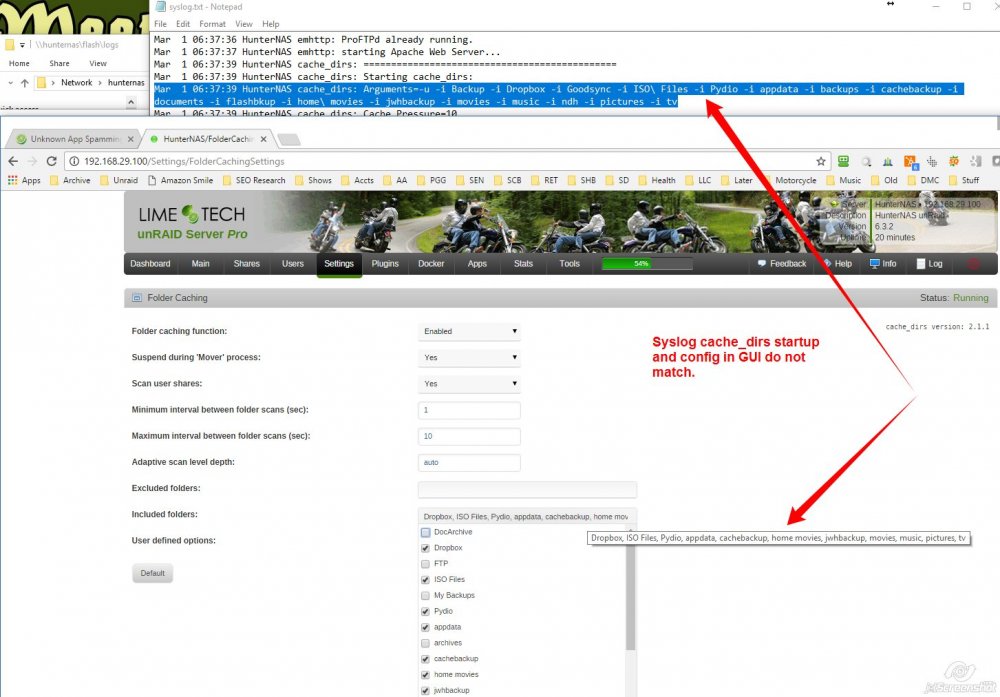
I recently removed a number of unused shares. When these cached shares are removed from the system, it appears that CacheDirs still tries to start them up. Where can I correct this error? Here's a log snippet of CacheDirs. Mar 1 06:37:39 HunterNAS cache_dirs: ============================================== Mar 1 06:37:39 HunterNAS cache_dirs: Starting cache_dirs: Mar 1 06:37:39 HunterNAS cache_dirs: Arguments=-u -i Backup -i Dropbox -i Goodsync -i ISO\ Files -i Pydio -i appdata -i backups -i cachebackup -i documents -i flashbkup -i home\ movies -i jwhbackup -i movies -i music -i ndh -i pictures -i tv Mar 1 06:37:39 HunterNAS cache_dirs: Cache Pressure=10 Mar 1 06:37:39 HunterNAS cache_dirs: Max Scan Secs=10, Min Scan Secs=1 Mar 1 06:37:39 HunterNAS cache_dirs: Scan Type=adaptive Mar 1 06:37:39 HunterNAS cache_dirs: Max Scan Depth=none Mar 1 06:37:39 HunterNAS cache_dirs: Use Command='find -noleaf' Mar 1 06:37:39 HunterNAS cache_dirs: Version=2.1.1 Mar 1 06:37:39 HunterNAS cache_dirs: ---------- Caching Directories --------------- Mar 1 06:37:39 HunterNAS cache_dirs: D..x Mar 1 06:37:39 HunterNAS cache_dirs: I..s Mar 1 06:37:39 HunterNAS cache_dirs: P..o Mar 1 06:37:39 HunterNAS cache_dirs: a..a Mar 1 06:37:39 HunterNAS cache_dirs: c..p Mar 1 06:37:39 HunterNAS cache_dirs: h..s Mar 1 06:37:39 HunterNAS cache_dirs: j..p Mar 1 06:37:39 HunterNAS cache_dirs: m..s Mar 1 06:37:39 HunterNAS cache_dirs: m..c Mar 1 06:37:39 HunterNAS cache_dirs: p..s Mar 1 06:37:39 HunterNAS cache_dirs: t..v Mar 1 06:37:39 HunterNAS cache_dirs: ---------------------------------------------- Mar 1 06:37:39 HunterNAS cache_dirs: ERROR: included directory "Backup" does not exist. Mar 1 06:37:39 HunterNAS cache_dirs: ERROR: included directory "Goodsync" does not exist. Mar 1 06:37:39 HunterNAS cache_dirs: ERROR: included directory "backups" does not exist. Mar 1 06:37:39 HunterNAS cache_dirs: ERROR: included directory "documents" does not exist. Mar 1 06:37:39 HunterNAS cache_dirs: ERROR: included directory "flashbkup" does not exist. Mar 1 06:37:39 HunterNAS cache_dirs: ERROR: included directory "ndh" does not exist. Mar 1 06:37:39 HunterNAS cache_dirs: cache_dirs process ID 13515 started In particular, the Arguments appear to not match the setting in the GUI (see image). Syslog shows (Highlighted are the deleted shares): Mar 1 06:37:39 HunterNAS cache_dirs: Arguments=-u -i Backup -i Dropbox -i Goodsync -i ISO\ Files -i Pydio -i appdata -i backups -i cachebackup -i documents -i flashbkup -i home\ movies -i jwhbackup -i movies -i music -i ndh -i pictures -i tv WebGUI shows: Dropbox, ISO Files, Pydio, appdata, cachebackup, home movies, jwhbackup, movies, music, pictures, tv Where can I edit the startup to correct this?
-
Update: Got Apache working correctly (was using the wrong web server path - Apache and ProFTPd needed to point to same path - mine was /mnt/user/web). I can now see Edit proftpd.conf. I've setup the ftpuser user with their directory in the description for the ftpuser account (ftpuser /mnt/user) When I try to access the FTP server from FileZilla with the correct user and password (verified), I still get the following: Status: Connecting to 192.168.29.100:21... Status: Connection established, waiting for welcome message... Response: 220 ProFTPD 1.3.6rc2 Server (ProFTPd) [192.168.29.100] Command: USER ftpuser Response: 331 Password required for ftpuser Command: PASS ********** Response: 530 Login incorrect. Error: Critical error: Could not connect to server Yes
-
So I used ftpaccount vs ftpuser and it works - Thanks! I originally had a problem where it always loaded to the root directory, until I restarted the FTP client (Filezilla), once restarted filezilla, its honoring the directory I setup. This is weird because I had it working with ftpuser as the account name. Then when i tried to load up Apache, ftp stopped working. Would Apache somehow affect ProFTPd?
-
Update: Got Apache working correctly (was using the wrong web server path - Apache and ProFTPd needed to point to same path - mine was /mnt/user/web). I can now see Edit proftpd.conf. I've setup the ftpuser user with their directory in the description for the ftpuser account (ftpuser /mnt/user) When I try to access the FTP server from FileZilla with the correct user and password (verified), I still get the following: Status: Connecting to 192.168.29.100:21... Status: Connection established, waiting for welcome message... Response: 220 ProFTPD 1.3.6rc2 Server (ProFTPd) [192.168.29.100] Command: USER ftpuser Response: 331 Password required for ftpuser Command: PASS ********** Response: 530 Login incorrect. Error: Critical error: Could not connect to server I have to be missing something simple. Thanks in advance for your advice...
-
Great advice. Got it working by installing Apache and then pointing WebServerPath to the SAME directory as the Apache Server (/mnt/user/web/ in my case). A bit of an ordeal connecting all the bits together, just need to pay attention to the details. 1. Apache needs to be installed and working 2. ProFTPd needs to be installed and pointed to the SAME Webserver path that the Apache Web Root is using. Easy peasy...once that's done...
-
I've not been able to get the apache plugin to work. I'm sure it a configuration issue. The default configuration does not work and I tried a bunch of other directories, but no luck. Says its running, but get 403's. I suspect is a permissions problem. Ran newperms, completed successfully, but no change. Do I need to make any configuration path changes (i.e. Directory, deny, allow, etc?) In messing with Apache, ProFTPd now is not working. It says its running, but when I try to connect, I get: Status: Connecting to 192.168.29.100:21... Status: Connection established, waiting for welcome message... Response: 220 ProFTPD 1.3.6rc2 Server (ProFTPd) [192.168.29.100] Command: USER ftpuser Response: 331 Password required for ftpuser Command: PASS ********** Response: 530 Login incorrect. Error: Critical error: Could not connect to server Password and user is correct, ftpuser is in the description.
-
When I try to access the config editor, I get Not Found The requested URL /ProFTPd/ConfEdit.php was not found on this server. BOTH from a web browser or from within ProFTPd.
-
Which web server should I install to support ProFTPd? Will it work with the internal unRaid web server? As to the error messages, I was able to get ProFTPd working with only this remaining problem.
-
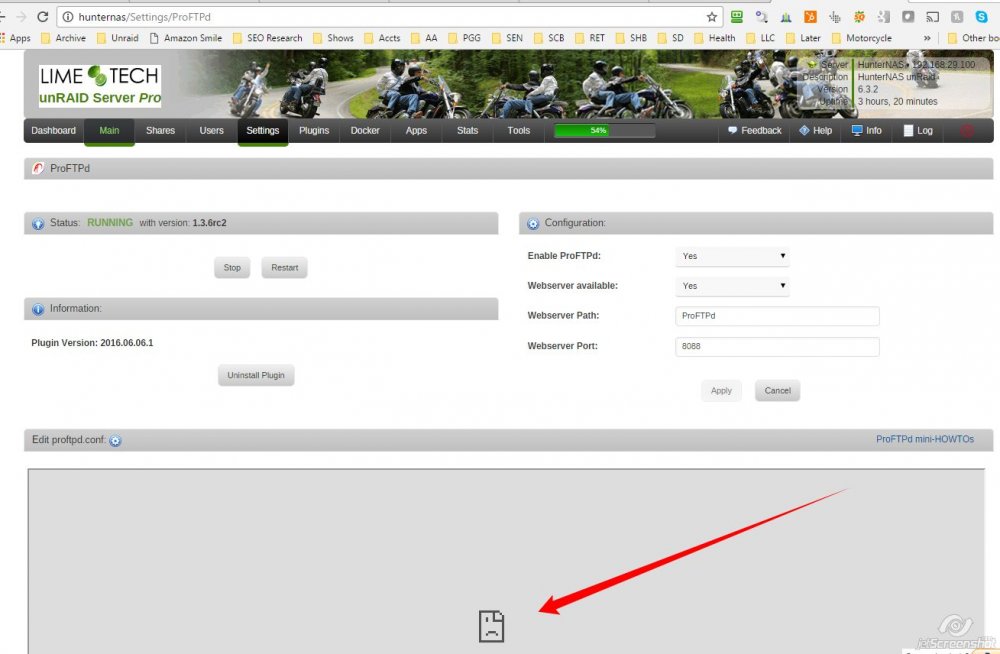
Installed ProFTPd on UR 6.3.2, running and been able to access server localnet via FTP. Great program thanks! One problem, I don't see the config display in the app config area. What can I check to see why this isn't displaying? Thanks in advance!
-
Just to clairfy for anyone coming back around on this, Docker Buttons became Advanced Buttons. For a while in the CA Apps directory, it was still called Docker Buttons. Its been corrected now. Advanced Buttons is the new and correct name.
-
Just a bump on this. Is the solution to add a line to the go file to increase max_user_watches? I currently have 524288 max_user_watches (from "cat /proc/sys/fs/inotify/max_user_watches") How many should I increase them to? echo ??? > /proc/sys/fs/inotify/max_user_watches (change the "???" to what?, Double? 50% more?) Thanks in advance...
-
I'm getting syslog errors stating I need to increase the number of inotifywatches so that dynamix file integrity will work properly. I've looked at both the File Integrity Control page and the File Integrity Settings page, but not seeing any parameter called inotifywatches. I've not seen any advanced tabs on any of those pages. Where should I look? Thanks!
-
Just FYI, I've clicked the "Delete Backup Sets" several times and it does not seem to be deleting the ERROR folders. http://my.jetscreenshot.com/12412/20170106-g79s-279kb.jpg[/img]
-
Its the difference between running SMB and a direct TCP/IP app. I've had problems with SMB 3.0 support with unRaid in the past. I think, it turned out to be a problem with a sharename. I had used "documents" (note case) as the share name which worked fine in the past. When 6.2.4 came out, I started to have errors as described in this post: https://lime-technology.com/forum/index.php?topic=41163.0. The fix turned out to be creating the share again. The general feeling being that the word 'documents' seems to have been a problem somehow between SMB 2.0 and 3.0. Recreating the share fixed the problem and now Goodsync works great. I've been told by GoodSync support that the TCP based version of GoodSync is significantly faster - ergo a second reason to get a docker created for it. I've not done anything with Windows VM on unraid yet. Interested, but don't have the time to invest. It might be a good solution, but my perspective is that a daemon based/docker based solution would be much cleaner. ? Still interested in getting one done by the way...
-
When you click the "Delete Incomplete Backup Sets" or the "Delete Old Dated Backup Sets" is there some way to tell that the operation has completed? Perhaps it just works really fast, but when I click on them, nothing happens. No message stating it completed successfully. Am I missing something?
-
Interesting, he just published an update on it... I took a look for Advanced Buttons, but the only app in the CA is Docker Buttons...
-
Ah, perhaps this is important. I've run Fix Common Problems before. Very helpful. Your post made me go back again. And behold, "The plugin docker.buttons.plg is not known to community applications and is possibly incompatible with your server. "as a general rule...[dont use it!]" I'll uninstall and see if that helps...
-
The only oddity I have found is that in the old documents (documents2 now) directory, all the files and directories are set with user JWH, whereas in the new documents folder, about 90% of the files and directories are set to nobody users. Rights appear to be identical between the two, but the owner is not... http://my.jetscreenshot.com/12412/20161224-b4if-510kb.jpg[/img]



