





steve1977
Members
-
Joined
-
Last visited
Everything posted by steve1977
-
Yes, I had shut down the VM and even restarted Unraid. Unfortunately, doesn't show up as a drive in Windows 11. Do I understand it correctly that it should just automatically show up as "drive d:\" in the Windows 11 VM?
-
Here we go. And br0 / virtio-net.
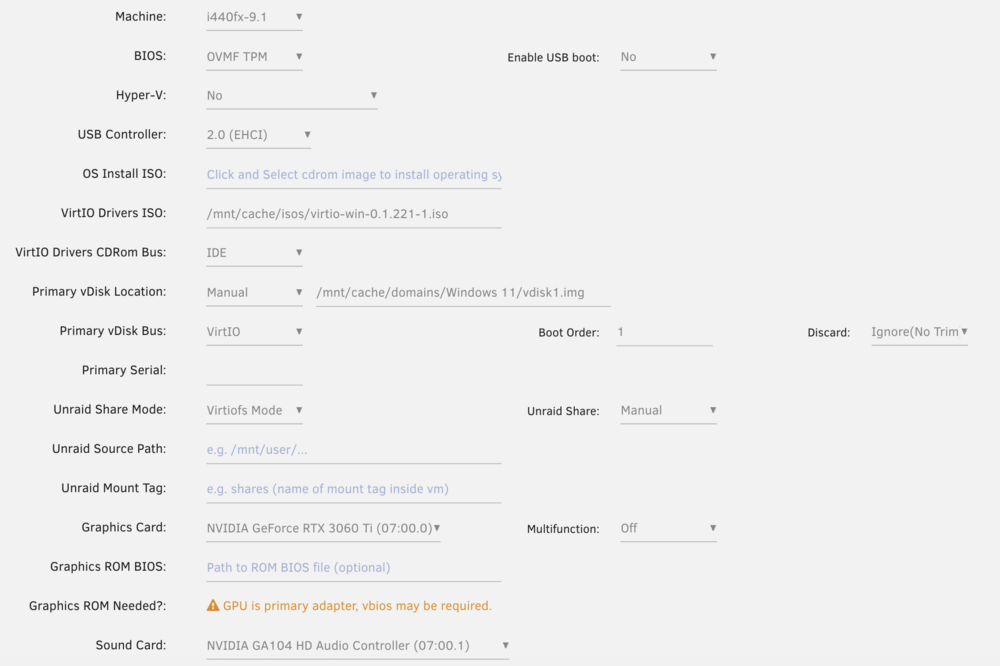
-
I cannot see the VM IP in the Unraid GUI. I read in the documentation that I need to install the virtio drivers within the VM. I am not sure how to do this. I have downloaded and mapped the /mnt/cache/isos/virtio-win-0.1.221-1.iso. However, I don't see this as a disk within the Windows VM. What am I doing wrong?
-
Got it. So, I will need to explore the "work-around" above. Any suggestion how to set the static IP and where/how to configure the ipvtap interface? Possible to get local.tower work or need to remember the IP?
-
Also, the link does not specify whetehr http://tower.local/ is supported. It seems not? Are we expecting some more wifi support in the future?
-
Thanks for your response. I saw the note. It says that i can still acccess them via VNC to the host? I thought RDP uses VNC or does this only support the Unraid native VNC connection? If so, I guess my way will be to use the plan-b that is described via the link. Can you elaborate a bit more on the how-to for below info: Configure the VM with a static IP address Configure the same IP address on the ipvtap interface, type: ip addr add IP-ADDRESS dev shim-wlan0
-
I restarted Unraid and can now access the GUI via the wifi IP. Unfortunately, I still cannot access the VM via RDP. I changed the network source to virbr0 and restarted the VM. Unfortunately, I still cannot access via RDP. Trying from the Windows App (aka as Remote Desktop). Is this supported and (if so) how?
-
Understand not recommended, but I am still keen to figure out whether I can run my Unraid server via wifi. I enabled wifi, added my network and set the password. Still being connected to LAN at the same time. I can now access the Unraid GUI from two different IP addresses (the LAN and WLAN one) as well as via http://tower.local/Main. So far so good... I now tried to unplug the LAN access, but now I can no longer access the Unraid GUI via any of the two IP addresses and also not via tower.local. Also my VM loses connectivity. Once I plug in my LAN again, all back to normal. Any thoughts?
-
I want to move every 24h, regardless of space on disk
-
Thanks! How to de-activate? Or just change to 0%?
-
Somehow, the mover is not moving anything. Probably something I did wrong in the settings. Any chance you have a look in the logs? Thanks! ca.mover.tuning-debug-20250625-0813.zip
-
Just did and it works with mover. It doesn't work with rsync. Shall I just leave it with mover?
-
Yes, all files are moving. Except the ones that have $ in the filename.
-
Not sure this was in response to me? If so, I updated and gave it another try. Still not able to move $$$ files and also not able to downlad the log (except the manual way shared above).
-
Just upgraded to Unraid 7.1.3. After the reboot, the Nvidia driver was no longer installed. I went into the Nvidia Driver plugin and downloaded the driver again. Now everything is working again. Same happened with prior updates. Ultimately, it's not a big deal as it is easy to download the driver again. Just sharing to see a potential fix for potential Unraid versions? Thanks!
-
I found it, please see attached log. Woudl be great to have your help! ca.mover.tuning-debug-20250606-2007.zip
-
Thanks for the update below. Unfortunately, I can still not download the log (ERROR: The Mover Tuning Debug Package Generation Script has failed - no response from the bash backend). I ran it manually via CLI (mover debug). Just not sure where to find it. I tried to download the diagnostic log (from Unraid GUI), which works, but I also cannot find the created debug file. It's not in the log folder.
-
Tried, but still not working. Will wait for the plugin update.
-
Unraid diagnostic works flawless. Let me try dev page once back home.
-
Tried a few dozen times, but no luck. Also tried different browsers.
-
I cannot download the debug package for the plugin. When I press the button in the plugin settings, I am receiving the following error message: ERROR: The Mover Tuning Debug Package Generation Script has failed - no response from the bash backend. I have disabled the file validation option, but it still does not move files with $.
-
Yes. Tried a few times, but cannot get the log. Any other way to see it? I ran mover a few times now, but the files with $ in the file name do not get moved.
-
ERROR: The Mover Tuning Debug Package Generation Script has failed - no response from the bash backend.
-
The Unraid log says that it completed successfully and the files were moved. However, the files remain on the cache drive and are not moved (though it says so). Where can I find the debug.zip? I am not so good with command line.
-
The file does not get moved even after disabling "validate input filenames" options. The error message disappears, but nothing is moved.

