





ryanhaver
Members
-
Joined
-
Last visited
Everything posted by ryanhaver
-
I wonder if we will ever have rock solid docker implementation on unraid. I just ran into this issues and had to change from ipvlan to macvlan, then reboot to resolve.
-
Thank you. I really appreciate the explanation. Have a great week.
-
@ljm42 Thank you for the clarification that My Servers is still in beta, I had assumed it had moved out of beta. Can you confirm the issue I was having was related to the recent fixes referenced in the My Servers plugin change log?
-
I think this issue may be related to the my.servers plugin. It's possible the most recent update for the plugin resolves this issue for me...and maybe for others too. It would be great if LimeTech were more forthcoming about what the plugin is doing under the hood. It appears that the plugin does facilitate some sort of interaction with the Unraid registration servers via the the new Unraid API, which in my mind would be a registration check. It's also possible that it doesn't do this and this was an innocent unforeseen consequence of how they are interacting with their own API. I'm guessing one or more of the changes I've highlighted below in yellow are what resolved my issue. This version resolves: Issues connecting to mothership Flash backup issues after uninstall Docker stats missing in specific conditions Unexpected disk spin up This version adds: Unraid 6.10 compatibility Streamlined communication between between unraid-api and mothership Ability to track server uptime on dashboard Ability to see number of VMs installed and running Origin checks to unraid-api If @limetech or another LimeTech employee can provide some candid clarification that would be great. I'd rather not make assumptions here and don't want to misrepresent your code and the way it interacts with your APIs.
-
I am running a paid Pro license. This was never an issue for me before Unraid 6.9.2...not that 6.9.2 is the problem, as the issue only reared it's head over the past month or two. It's possible that it's also a bug in Unraid, but I'm more inclined to think it's LimeTech's CDN and/or how they are using their CDN for registration checks...even with paid licenses.
-
Please excuse the angry rant here, but there is nothing more infuriating than not being able to use a product because of DRM or a critical design flaw. I've had repeated Issues booting Unraid 6.9.2 due to failed attempts connecting to registration.urnaid.net. Overall this appears to be random and inconsistent in nature. This is not an issue on my end, but something in-between my network and the services behind the address in question. The address resolves to a range of IP addresses, both IPv6 and IPv4, without issue, but Unraid continues to state that the connection failed due to timeout. I assume there is an issue with Cloudfront, the CDN, that LimeTech is using. Why would you architect your OS to freeze at a point during the boot process if it can resolve an address, but ultimately cannot reach the server or service behind the address? If we learned anything this week from yet another Akamai outage, it's that you don't build your product to be reliant on a single point of failure. Even though Akamai has redundancies built in their outage brought down an absolutely massive chunk of the internet globally. Why is this even an issue? What if my server didn't have internet access or was on a network where external DNS resolution was blocked?
-
I flashed BIOS 1.37 and am seeing bifurcation still existing in groupings as seen in the below screenshot. The only PCIe slot with separate bifurcation settings is PCIE6. Is this what you are seeing as well?
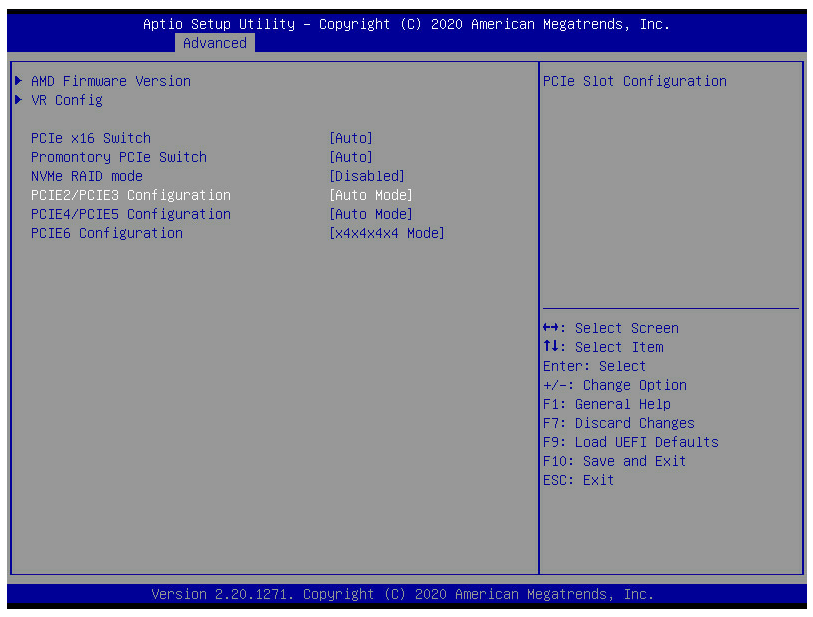
-
Thank you @cybrnook! AsRock Support just provided me with L1.32 which they state has support for bifurcation. I've asked them for clarification on the differences between BIOS versions L1.32 and L1.37.
-
@cybrnook Do you have an updated link to the beta bios?
-
It looks like Unraid gets grumpy when ram usage inside /tmp reaches half of the overall system memory. So I'm just going to add the mounting of the tmpfs to my go file so it will be automatically mounted during boot.
-
So it look like Unraid gets grumpy when ram usage inside /tmp reaches half of the system memory. using a dedicated ramdisk seems to be the resolution. Thank you for the suggestion.
-
I'll try with a dedicated ramdisk and see how things go. I have 256GB of RAM and space consumed by madmax plotting never peaks above 126GB, so it isn't an issue with filling RAM, but I think Unraid doesn't like the use of /tmp for plotting.
-
I'm actually seeing Unraid not be able to deal with plotting in RAM, although I am using /tmp not a dedicated ram disk. This may be more related to madmax than anything else. I'm currently testing different settings to see if I can get madmax working reliably. @Spazhead is there any reason you don't use /tmp instead of creating and actual ram disk?
-
anyone else trying to use madmax plotter and seeing the unraid array go offline or become unresponsive? I'm plotting to /tmp/plotting so that RAM is used, but UNRAID seems to not be able to handle this. In the middle of phase 1 is where things go south and UNRAID seems to have an brain aneurysm.
-
I'm thinking of using the UNRAID array without parity for harvesting storage until I hit the 33 drive limit. I wish UNRAID already supported having multiple UNRAID Arrays, as they only alternatives after 33 drives is to use Unassigned Devices or a BTRFS based pool with parity. To make using Unassigned Devices more palatable I'm considering using mergerfs. The script made by @testdasi, which is based on the work done here, is a good starting point for those interested in using mergerfs to make all disks disks mounted using Unassigned Devices accessbile over one share/mount point.
-
Thanks for the info. I opted to just preserve my config, manually move data off a few drives and rebuild parity.
-
@RobJ I'm running your clear_array_drive script and have a few questions. I'm currently looking at the the log file in /tmp/user.scripts/tmpScripts/clear_array_drive/log.txt which indicates the clear is happening at 1.5MB/s. It has churned through 300GB in 55hrs. At this rate it will take another 610 hours to complete. Is this the expected speed with reconstruct_write (turbo write) enabled? Can the script be safely canceled? What if any ramifications are there when canceling the script?
-
No worries. I appreciate your work on this. Have a good Sunday.
-
@StevenD Looks like there is an issue with the newest version of the plugin. The error message I'm seeing indicates the files hosted on GitHub are possibly corrupt Verifying package open_vm_tools-10.3.10-5.10.1-Unraid-x86_64-202012191115.tgz. Unable to install /boot/config/plugins/OpenVMTools_compiled/packages/open_vm_tools-10.3.10-5.10.1-Unraid-x86_64-202012191115.tgz: tar archive is corrupt (tar returned error code 2) Starting VMWare Tools Daemon.
-
I'll hopefully have time to put something together in the near future. Feel free to remind me because I tend to take on a lot of projects and get side-tracked. I've also added a few more considerations to my original post.
-
I haven't had time to test the new update, but I really appreciate the time you've put into this plugin. I'll know for certain the next time my server boots, but I'm fairly certain that the check for network connectivity before mounting remote shares will resolve my issue. Edit: Tested and working as expected! Thank you @dlandon
-
These next gen platform from PIA is a mess. I've tested a bunch of different endpoints that the API reports as supporting port forwarding and they all have issues. It seems their API is down very often.
-
In my use case mount can happen after boot with no real ramifications. Would you consider a user configurable override for when mounting occurs for network shares?
-
Attached are the affected unraid server's diagnostics. unraid-diagnostics-20201006-1418.zip
-
After upgrading to 6.9.0-Beta29 none of my NFS shares will auto mount. Anyone else have this issue? I can post diagnostics if needed. Additional Details I don't use USB or SMB related devices with with Unassigned Devices I can mount any of my NFS shares manually using the UD Mount button from the UI After boot they don't mount automatically, even with the Auto-Mount option enabled

