





egtrev
Members
-
Joined
-
Last visited
Everything posted by egtrev
-
My height looks to have been set to 840, I made it 1024 and I can see the Restore button now. Thanks for the help.
-
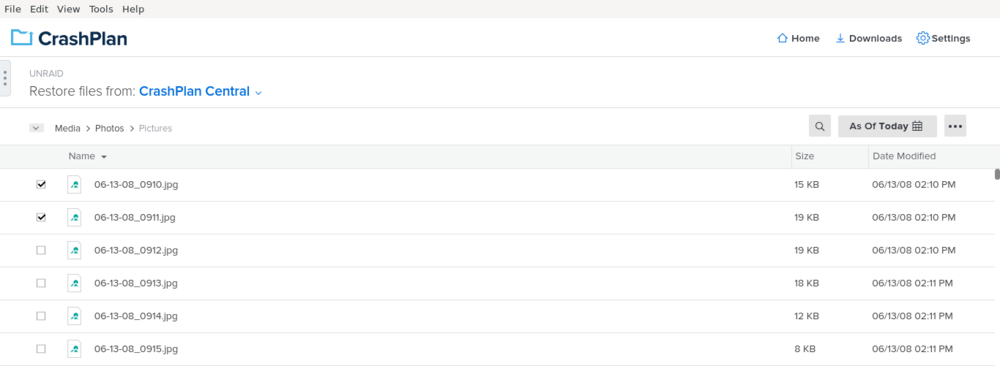
Mine is set to read/write slave too, I have restored previously but it's been a while. I just don't see what to do next after checking the files I want to restore, there doesn't seem to be a way to progress past that. It seems to be like the Web Gui may be cutting off the bottom of the UI where I assume there is a button to restore.
-
Does anyone know how you restore files from the docker Web UI? I go to Restore and check the file I want to restore but don't see what to do next. There is also a Download icon on the list too but clicking it does not seem to do anything.
-
Sorry, my mistake, I had my DHCP locked down, so my server wouldn't get an address when the network cfg was reset. All working now, it automatically made the 2.5 card eth0 and the motherboard ports eth1/eth2, which is what I wanted. Thanks for the help.
-
I have rebooted but I'm now unable to see my server on my network. Can I restore the deleted cfg files to get it back online, or will that mess things up?
-
I don't see eth122 in the interface rules. Currently using it as the backup with eth0/eth1 unplugged, works but would prefer to have it as the main interface.
-
Hi all, Currently I have a dual Gigabit LAN motherboard (Eth0 & Eth01), setup in Bonding mode 'active-backup', so if one goes down the other takes over. Static IP set and all works fine, solid 110MB/s network file transferring. I have purchased a 2.5Gbps PCI-E card, the goal is to have this as the main interface in Bonding mode 'active-backup' with one of the motherboard ports becoming the backup. I've installed the card and it shows up in devices fine, under network settings it shows as another interface 'eth122'. I'm a bit stuck now on how I can make this the main interface. So far I've added 'eth122' as a Bonding member and removed 'eth01', if I unplug 'eth0' it then falls to the 2.5G (eth122) and it works fine - 260-280MB/s network file transferring. The problem is I don't won't it to be the backup I want it to be the main interface. Would anyone be able to point me in the right direction on the correct steps for this please?
-
Has anyone had issues mounting an image backup from the WebUI? The WebUI tries to mount but it just endlessly keeps loading/spinning and doesn't come back with any errors. The log shows the below multiple times, which I'm guessing is related to the issue: ERROR: Cannot open "/media/DELL/231001-2019_Image_C/contents0": Permission denied (13) I have to restart the Docker to stop the Mount attempt.
-
Hi, I've noticing some errors when rebooting Unraid and they seem to point to the flash drive. See below for the Flash drive log, everything is working fine, is this something I should be worried about? Sep 1 11:06:37 UNRAID emhttpd: SanDisk_Ultra_Fit_4C531154480830111172-0:0 (sda) 512 60062500 Sep 1 11:06:37 UNRAID emhttpd: import flash device: sda Sep 1 11:06:37 UNRAID emhttpd: read SMART /dev/sda Sep 1 11:07:01 UNRAID kernel: sd 0:0:0:0: [sda] tag#0 UNKNOWN(0x2003) Result: hostbyte=0x00 driverbyte=DRIVER_OK cmd_age=0s Sep 1 11:07:01 UNRAID kernel: sd 0:0:0:0: [sda] tag#0 Sense Key : 0x3 [current] Sep 1 11:07:01 UNRAID kernel: sd 0:0:0:0: [sda] tag#0 ASC=0x11 ASCQ=0x0 Sep 1 11:07:01 UNRAID kernel: sd 0:0:0:0: [sda] tag#0 CDB: opcode=0x28 28 00 00 00 02 c8 00 00 01 00 Sep 1 11:07:01 UNRAID kernel: critical medium error, dev sda, sector 712 op 0x0:(READ) flags 0x0 phys_seg 1 prio class 2 Sep 1 11:07:01 UNRAID kernel: Buffer I/O error on dev sda1, logical block 680, async page read Sep 1 11:07:01 UNRAID kernel: sd 0:0:0:0: [sda] tag#0 UNKNOWN(0x2003) Result: hostbyte=0x00 driverbyte=DRIVER_OK cmd_age=0s Sep 1 11:07:01 UNRAID kernel: sd 0:0:0:0: [sda] tag#0 Sense Key : 0x3 [current] Sep 1 11:07:01 UNRAID kernel: sd 0:0:0:0: [sda] tag#0 ASC=0x11 ASCQ=0x0 Sep 1 11:07:01 UNRAID kernel: sd 0:0:0:0: [sda] tag#0 CDB: opcode=0x28 28 00 00 00 02 c9 00 00 07 00 Sep 1 11:07:01 UNRAID kernel: critical medium error, dev sda, sector 713 op 0x0:(READ) flags 0x0 phys_seg 7 prio class 2 Sep 1 11:07:01 UNRAID kernel: Buffer I/O error on dev sda1, logical block 681, async page read Sep 1 11:07:01 UNRAID kernel: Buffer I/O error on dev sda1, logical block 682, async page read Sep 1 11:07:01 UNRAID kernel: Buffer I/O error on dev sda1, logical block 683, async page read Sep 1 11:07:01 UNRAID kernel: Buffer I/O error on dev sda1, logical block 684, async page read Sep 1 11:07:01 UNRAID kernel: Buffer I/O error on dev sda1, logical block 685, async page read Sep 1 11:07:01 UNRAID kernel: Buffer I/O error on dev sda1, logical block 686, async page read Sep 1 11:07:01 UNRAID kernel: Buffer I/O error on dev sda1, logical block 687, async page read Sep 1 11:07:01 UNRAID kernel: sd 0:0:0:0: [sda] tag#0 UNKNOWN(0x2003) Result: hostbyte=0x00 driverbyte=DRIVER_OK cmd_age=0s Sep 1 11:07:01 UNRAID kernel: sd 0:0:0:0: [sda] tag#0 Sense Key : 0x3 [current] Sep 1 11:07:01 UNRAID kernel: sd 0:0:0:0: [sda] tag#0 ASC=0x11 ASCQ=0x0 Sep 1 11:07:01 UNRAID kernel: sd 0:0:0:0: [sda] tag#0 CDB: opcode=0x28 28 00 00 00 02 c8 00 00 01 00 Sep 1 11:07:01 UNRAID kernel: critical medium error, dev sda, sector 712 op 0x0:(READ) flags 0x0 phys_seg 1 prio class 2 Sep 1 11:07:01 UNRAID kernel: Buffer I/O error on dev sda1, logical block 680, async page read Sep 1 11:08:02 UNRAID kernel: sd 0:0:0:0: [sda] tag#0 UNKNOWN(0x2003) Result: hostbyte=0x00 driverbyte=DRIVER_OK cmd_age=0s Sep 1 11:08:02 UNRAID kernel: sd 0:0:0:0: [sda] tag#0 Sense Key : 0x3 [current] Sep 1 11:08:02 UNRAID kernel: sd 0:0:0:0: [sda] tag#0 ASC=0x11 ASCQ=0x0 Sep 1 11:08:02 UNRAID kernel: sd 0:0:0:0: [sda] tag#0 CDB: opcode=0x28 28 00 00 00 02 c8 00 00 01 00 Sep 1 11:08:02 UNRAID kernel: critical medium error, dev sda, sector 712 op 0x0:(READ) flags 0x0 phys_seg 1 prio class 2 Sep 1 11:08:02 UNRAID kernel: Buffer I/O error on dev sda1, logical block 680, async page read
-
This is great. I have a backup 4G WAN connection on my router when my main broadband goes down. The issue was the 4G provider uses a shared external IP with NAT so any port forwarding I was using does not work when running through the backup 4G connection so all my VPN's didn't work. This app allowed access to my network even when using the 4G WAN, very useful, thanks.
-
I seem to have lost the ability on the Dashboard to see current transcodes/playback. Does anyone know if this is a setting somewhere?
-
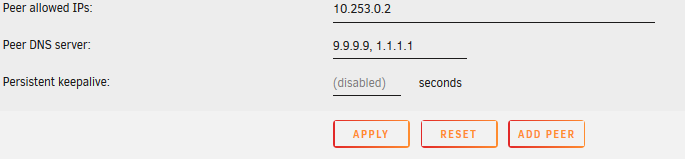
I haven't used Wireguard for a while but I had the same issue and I believe I fixed it my manually adding DNS on the config. See screenshot of my config. Worth a try if you haven't already.
-
Windows 7 Seabios (No signal) XML <?xml version='1.0' encoding='UTF-8'?> <domain type='kvm'> <name>Windows Seven</name> <uuid>4885e26a-5b51-9440-2568-7b98f117ba9b</uuid> <metadata> <vmtemplate xmlns="unraid" name="Windows 7" icon="windows7.png" os="windows7"/> </metadata> <memory unit='KiB'>2097152</memory> <currentMemory unit='KiB'>2097152</currentMemory> <memoryBacking> <nosharepages/> </memoryBacking> <vcpu placement='static'>1</vcpu> <cputune> <vcpupin vcpu='0' cpuset='0'/> </cputune> <os> <type arch='x86_64' machine='pc-i440fx-4.2'>hvm</type> </os> <features> <acpi/> <apic/> </features> <cpu mode='host-passthrough' check='none'> <topology sockets='1' cores='1' threads='1'/> <cache mode='passthrough'/> </cpu> <clock offset='localtime'> <timer name='rtc' tickpolicy='catchup'/> <timer name='pit' tickpolicy='delay'/> <timer name='hpet' present='no'/> </clock> <on_poweroff>destroy</on_poweroff> <on_reboot>restart</on_reboot> <on_crash>restart</on_crash> <devices> <emulator>/usr/local/sbin/qemu</emulator> <disk type='file' device='disk'> <driver name='qemu' type='raw' cache='writeback'/> <source file='/mnt/user/VM/Windows Seven/vdisk1.img'/> <target dev='hdc' bus='virtio'/> <boot order='1'/> <address type='pci' domain='0x0000' bus='0x00' slot='0x04' function='0x0'/> </disk> <disk type='file' device='cdrom'> <driver name='qemu' type='raw'/> <source file='/mnt/user/ISO/virtio-win-0.1.126-2.iso'/> <target dev='hdb' bus='ide'/> <readonly/> <address type='drive' controller='0' bus='0' target='0' unit='1'/> </disk> <controller type='pci' index='0' model='pci-root'/> <controller type='ide' index='0'> <address type='pci' domain='0x0000' bus='0x00' slot='0x01' function='0x1'/> </controller> <controller type='virtio-serial' index='0'> <address type='pci' domain='0x0000' bus='0x00' slot='0x03' function='0x0'/> </controller> <controller type='usb' index='0' model='ich9-ehci1'> <address type='pci' domain='0x0000' bus='0x00' slot='0x07' function='0x7'/> </controller> <controller type='usb' index='0' model='ich9-uhci1'> <master startport='0'/> <address type='pci' domain='0x0000' bus='0x00' slot='0x07' function='0x0' multifunction='on'/> </controller> <controller type='usb' index='0' model='ich9-uhci2'> <master startport='2'/> <address type='pci' domain='0x0000' bus='0x00' slot='0x07' function='0x1'/> </controller> <controller type='usb' index='0' model='ich9-uhci3'> <master startport='4'/> <address type='pci' domain='0x0000' bus='0x00' slot='0x07' function='0x2'/> </controller> <interface type='bridge'> <mac address='52:54:00:56:c3:8a'/> <source bridge='br0'/> <model type='virtio'/> <address type='pci' domain='0x0000' bus='0x00' slot='0x02' function='0x0'/> </interface> <serial type='pty'> <target type='isa-serial' port='0'> <model name='isa-serial'/> </target> </serial> <console type='pty'> <target type='serial' port='0'/> </console> <channel type='unix'> <target type='virtio' name='org.qemu.guest_agent.0'/> <address type='virtio-serial' controller='0' bus='0' port='1'/> </channel> <input type='mouse' bus='ps2'/> <input type='keyboard' bus='ps2'/> <hostdev mode='subsystem' type='pci' managed='yes' xvga='yes'> <driver name='vfio'/> <source> <address domain='0x0000' bus='0x02' slot='0x00' function='0x0'/> </source> <rom file='/mnt/cache/appdata/MSI960.dump'/> <address type='pci' domain='0x0000' bus='0x00' slot='0x05' function='0x0' multifunction='yes'/> </hostdev> <hostdev mode='subsystem' type='pci' managed='yes'> <driver name='vfio'/> <source> <address domain='0x0000' bus='0x02' slot='0x00' function='0x1'/> </source> <address type='pci' domain='0x0000' bus='0x00' slot='0x05' function='0x1'/> </hostdev> <memballoon model='none'/> </devices> </domain> The Windows 7 OVMF is pretty much the same as above, except GPU passthrough works (but gets stuck on Windows 7 boot logo) <?xml version='1.0' encoding='UTF-8'?> <domain type='kvm'> <name>Windows Seven</name> <uuid>b5648100-a87a-8272-a46f-f27253caa09a</uuid> <metadata> <vmtemplate xmlns="unraid" name="Windows 7" icon="windows7.png" os="windows7"/> </metadata> <memory unit='KiB'>2097152</memory> <currentMemory unit='KiB'>2097152</currentMemory> <memoryBacking> <nosharepages/> </memoryBacking> <vcpu placement='static'>1</vcpu> <cputune> <vcpupin vcpu='0' cpuset='0'/> </cputune> <os> <type arch='x86_64' machine='pc-i440fx-4.2'>hvm</type> <loader readonly='yes' type='pflash'>/usr/share/qemu/ovmf-x64/OVMF_CODE-pure-efi.fd</loader> <nvram>/etc/libvirt/qemu/nvram/b5648100-a87a-8272-a46f-f27253caa09a_VARS-pure-efi.fd</nvram> </os> <features> <acpi/> <apic/> </features> <cpu mode='host-passthrough' check='none'> <topology sockets='1' cores='1' threads='1'/> <cache mode='passthrough'/> </cpu> <clock offset='localtime'> <timer name='rtc' tickpolicy='catchup'/> <timer name='pit' tickpolicy='delay'/> <timer name='hpet' present='no'/> </clock> <on_poweroff>destroy</on_poweroff> <on_reboot>restart</on_reboot> <on_crash>restart</on_crash> <devices> <emulator>/usr/local/sbin/qemu</emulator> <disk type='file' device='disk'> <driver name='qemu' type='raw' cache='writeback'/> <source file='/mnt/user/VM/Windows Seven/vdisk1.img'/> <target dev='hdc' bus='virtio'/> <boot order='1'/> <address type='pci' domain='0x0000' bus='0x00' slot='0x04' function='0x0'/> </disk> <disk type='file' device='cdrom'> <driver name='qemu' type='raw'/> <source file='/mnt/user/ISO/virtio-win-0.1.126-2.iso'/> <target dev='hdb' bus='ide'/> <readonly/> <address type='drive' controller='0' bus='0' target='0' unit='1'/> </disk> <controller type='usb' index='0' model='ich9-ehci1'> <address type='pci' domain='0x0000' bus='0x00' slot='0x07' function='0x7'/> </controller> <controller type='usb' index='0' model='ich9-uhci1'> <master startport='0'/> <address type='pci' domain='0x0000' bus='0x00' slot='0x07' function='0x0' multifunction='on'/> </controller> <controller type='usb' index='0' model='ich9-uhci2'> <master startport='2'/> <address type='pci' domain='0x0000' bus='0x00' slot='0x07' function='0x1'/> </controller> <controller type='usb' index='0' model='ich9-uhci3'> <master startport='4'/> <address type='pci' domain='0x0000' bus='0x00' slot='0x07' function='0x2'/> </controller> <controller type='pci' index='0' model='pci-root'/> <controller type='ide' index='0'> <address type='pci' domain='0x0000' bus='0x00' slot='0x01' function='0x1'/> </controller> <controller type='virtio-serial' index='0'> <address type='pci' domain='0x0000' bus='0x00' slot='0x03' function='0x0'/> </controller> <interface type='bridge'> <mac address='52:54:00:1e:40:61'/> <source bridge='br0'/> <model type='virtio'/> <address type='pci' domain='0x0000' bus='0x00' slot='0x02' function='0x0'/> </interface> <serial type='pty'> <target type='isa-serial' port='0'> <model name='isa-serial'/> </target> </serial> <console type='pty'> <target type='serial' port='0'/> </console> <channel type='unix'> <target type='virtio' name='org.qemu.guest_agent.0'/> <address type='virtio-serial' controller='0' bus='0' port='1'/> </channel> <input type='mouse' bus='ps2'/> <input type='keyboard' bus='ps2'/> <hostdev mode='subsystem' type='pci' managed='yes'> <driver name='vfio'/> <source> <address domain='0x0000' bus='0x02' slot='0x00' function='0x0'/> </source> <rom file='/mnt/cache/appdata/MSI960.dump'/> <address type='pci' domain='0x0000' bus='0x00' slot='0x05' function='0x0' multifunction='yes'/> </hostdev> <hostdev mode='subsystem' type='pci' managed='yes'> <driver name='vfio'/> <source> <address domain='0x0000' bus='0x02' slot='0x00' function='0x1'/> </source> <address type='pci' domain='0x0000' bus='0x00' slot='0x05' function='0x1'/> </hostdev> <memballoon model='none'/> </devices> </domain>
-
Thanks for oyur help, unfortunately those steps are what I followed from Spaceinvaders videos, I don't have any issues except with Windows 7. My Windows 10 VM works great. Just Windows 7 with Seabios I get no signal and Windows 7 with OVMF I get video but can't get the installer to proceed. It's an MSI GTX960 Gaming 2GB. I don't know if something changed in UNRAID in the last year or so that broke my Windows 7 VM passthrough, driving me crazy that it was working previously! haha.
-
Tried again this weekend but can't get a Windows 7 VM running with GPU passthrough. I can get GPU passthrough if I start the new VM over with OVMF but can't get past the Windows 7 install logo (tried 1 core/Cirrus VNC & UEFI bootable Windows 7 USB) Any tips for getting a Windows 7 VM up and running with GPU passthrough? Frustating because I've had it working with this exact hardware, must have changed something on the config or settings that has broken it.
-
Followed a few guides and videos but still can't seem to get any video, latest XML I tried below. The first CPU core of whatever I assign just is pegged at 100% and the VM never boots enough to be on my network (unless I remove the GPU passthrough) If I add the VNC and then the GPU as a 2nd card the VNC viewer displays BSOD after the Windows logo. Any tips for Windows 7? <?xml version='1.0' encoding='UTF-8'?> <domain type='kvm' id='6'> <name>Windows 7</name> <uuid>abdb32a6-39c3-652c-4d0e-a71ed814055f</uuid> <metadata> <vmtemplate xmlns="unraid" name="Windows 7" icon="windows7.png" os="windows7"/> </metadata> <memory unit='KiB'>17301504</memory> <currentMemory unit='KiB'>17301504</currentMemory> <memoryBacking> <nosharepages/> </memoryBacking> <vcpu placement='static'>1</vcpu> <cputune> <vcpupin vcpu='0' cpuset='0'/> </cputune> <resource> <partition>/machine</partition> </resource> <os> <type arch='x86_64' machine='pc-i440fx-2.5'>hvm</type> </os> <features> <acpi/> <apic/> </features> <cpu mode='host-passthrough' check='none'> <topology sockets='1' cores='1' threads='1'/> </cpu> <clock offset='localtime'> <timer name='rtc' tickpolicy='catchup'/> <timer name='pit' tickpolicy='delay'/> <timer name='hpet' present='no'/> </clock> <on_poweroff>destroy</on_poweroff> <on_reboot>restart</on_reboot> <on_crash>restart</on_crash> <devices> <emulator>/usr/local/sbin/qemu</emulator> <disk type='file' device='disk'> <driver name='qemu' type='raw' cache='writeback'/> <source file='/mnt/user/VM/Windows 7/vdisk1.img'/> <backingStore/> <target dev='hdc' bus='virtio'/> <boot order='1'/> <alias name='virtio-disk2'/> <address type='pci' domain='0x0000' bus='0x00' slot='0x04' function='0x0'/> </disk> <controller type='pci' index='0' model='pci-root'> <alias name='pci.0'/> </controller> <controller type='virtio-serial' index='0'> <alias name='virtio-serial0'/> <address type='pci' domain='0x0000' bus='0x00' slot='0x03' function='0x0'/> </controller> <controller type='usb' index='0' model='ich9-ehci1'> <alias name='usb'/> <address type='pci' domain='0x0000' bus='0x00' slot='0x07' function='0x7'/> </controller> <controller type='usb' index='0' model='ich9-uhci1'> <alias name='usb'/> <master startport='0'/> <address type='pci' domain='0x0000' bus='0x00' slot='0x07' function='0x0' multifunction='on'/> </controller> <controller type='usb' index='0' model='ich9-uhci2'> <alias name='usb'/> <master startport='2'/> <address type='pci' domain='0x0000' bus='0x00' slot='0x07' function='0x1'/> </controller> <controller type='usb' index='0' model='ich9-uhci3'> <alias name='usb'/> <master startport='4'/> <address type='pci' domain='0x0000' bus='0x00' slot='0x07' function='0x2'/> </controller> <interface type='bridge'> <mac address='52:54:00:7a:c9:77'/> <source bridge='br0'/> <target dev='vnet2'/> <model type='virtio'/> <alias name='net0'/> <address type='pci' domain='0x0000' bus='0x00' slot='0x02' function='0x0'/> </interface> <serial type='pty'> <source path='/dev/pts/2'/> <target type='isa-serial' port='0'> <model name='isa-serial'/> </target> <alias name='serial0'/> </serial> <console type='pty' tty='/dev/pts/2'> <source path='/dev/pts/2'/> <target type='serial' port='0'/> <alias name='serial0'/> </console> <channel type='unix'> <source mode='bind' path='/var/lib/libvirt/qemu/channel/target/domain-6-Windows 7/org.qemu.guest_agent.0'/> <target type='virtio' name='org.qemu.guest_agent.0' state='disconnected'/> <alias name='channel0'/> <address type='virtio-serial' controller='0' bus='0' port='1'/> </channel> <input type='tablet' bus='usb'> <alias name='input0'/> <address type='usb' bus='0' port='2'/> </input> <input type='mouse' bus='ps2'> <alias name='input1'/> </input> <input type='keyboard' bus='ps2'> <alias name='input2'/> </input> <hostdev mode='subsystem' type='pci' managed='yes' xvga='yes'> <driver name='vfio'/> <source> <address domain='0x0000' bus='0x02' slot='0x00' function='0x0'/> </source> <alias name='hostdev0'/> <rom file='/mnt/cache/appdata/MSI960.dump'/> <address type='pci' domain='0x0000' bus='0x00' slot='0x05' function='0x0' multifunction='on'/> </hostdev> <hostdev mode='subsystem' type='pci' managed='yes'> <driver name='vfio'/> <source> <address domain='0x0000' bus='0x02' slot='0x00' function='0x1'/> </source> <alias name='hostdev1'/> <address type='pci' domain='0x0000' bus='0x00' slot='0x05' function='0x1'/> </hostdev> <hostdev mode='subsystem' type='usb' managed='no'> <source> <vendor id='0x046d'/> <product id='0xc534'/> <address bus='3' device='3'/> </source> <alias name='hostdev2'/> <address type='usb' bus='0' port='1'/> </hostdev> <memballoon model='none'/> </devices> <seclabel type='dynamic' model='dac' relabel='yes'> <label>+0:+100</label> <imagelabel>+0:+100</imagelabel> </seclabel> </domain>
-
Looking for some help getting an old Windows 7 VM with GPU passthrough working again. I haven't used it since 2019, at the time the GPU worked fine (GTX 960). I don't know if I've messed the config up maybe all or if an UNRAID update has changed anything since then. Currently the VM gets no video at all (monitor thinks nothing is plugged in) and does not boot and I can't get remote desktop connection either, and isn't on my network, if I change to VNC instead it works and boots fine (just no GPU) all the NVIDIA drivers are installed from previously. I've tried a ROM dump of my card but still nothing, Note if I create any new Seabios VM I get no video if I passthrough a card, so I must be overlooking something. All I know is it has been working previously in the same system. This is my only GPU (apart from intel onboard) and is in the second PCI-E slot. XML (without ROM) <?xml version='1.0' encoding='UTF-8'?> <domain type='kvm'> <name>Windows 7</name> <uuid>abdb32a6-39c3-652c-4d0e-a71ed814055f</uuid> <metadata> <vmtemplate xmlns="unraid" name="Windows 7" icon="windows7.png" os="windows7"/> </metadata> <memory unit='KiB'>17301504</memory> <currentMemory unit='KiB'>17301504</currentMemory> <memoryBacking> <nosharepages/> </memoryBacking> <vcpu placement='static'>4</vcpu> <cputune> <vcpupin vcpu='0' cpuset='1'/> <vcpupin vcpu='1' cpuset='5'/> <vcpupin vcpu='2' cpuset='2'/> <vcpupin vcpu='3' cpuset='6'/> </cputune> <os> <type arch='x86_64' machine='pc-i440fx-2.5'>hvm</type> </os> <features> <acpi/> <apic/> </features> <cpu mode='host-passthrough' check='none'> <topology sockets='1' cores='2' threads='2'/> </cpu> <clock offset='localtime'> <timer name='rtc' tickpolicy='catchup'/> <timer name='pit' tickpolicy='delay'/> <timer name='hpet' present='no'/> </clock> <on_poweroff>destroy</on_poweroff> <on_reboot>restart</on_reboot> <on_crash>restart</on_crash> <devices> <emulator>/usr/local/sbin/qemu</emulator> <disk type='file' device='disk'> <driver name='qemu' type='raw' cache='writeback'/> <source file='/mnt/user/VM/Windows 7/vdisk1.img'/> <target dev='hdc' bus='virtio'/> <boot order='1'/> <address type='pci' domain='0x0000' bus='0x00' slot='0x04' function='0x0'/> </disk> <controller type='pci' index='0' model='pci-root'/> <controller type='virtio-serial' index='0'> <address type='pci' domain='0x0000' bus='0x00' slot='0x03' function='0x0'/> </controller> <controller type='usb' index='0' model='ich9-ehci1'> <address type='pci' domain='0x0000' bus='0x00' slot='0x07' function='0x7'/> </controller> <controller type='usb' index='0' model='ich9-uhci1'> <master startport='0'/> <address type='pci' domain='0x0000' bus='0x00' slot='0x07' function='0x0' multifunction='on'/> </controller> <controller type='usb' index='0' model='ich9-uhci2'> <master startport='2'/> <address type='pci' domain='0x0000' bus='0x00' slot='0x07' function='0x1'/> </controller> <controller type='usb' index='0' model='ich9-uhci3'> <master startport='4'/> <address type='pci' domain='0x0000' bus='0x00' slot='0x07' function='0x2'/> </controller> <interface type='bridge'> <mac address='52:54:00:7a:c9:77'/> <source bridge='br0'/> <model type='virtio'/> <address type='pci' domain='0x0000' bus='0x00' slot='0x02' function='0x0'/> </interface> <serial type='pty'> <target type='isa-serial' port='0'> <model name='isa-serial'/> </target> </serial> <console type='pty'> <target type='serial' port='0'/> </console> <channel type='unix'> <target type='virtio' name='org.qemu.guest_agent.0'/> <address type='virtio-serial' controller='0' bus='0' port='1'/> </channel> <input type='mouse' bus='ps2'/> <input type='keyboard' bus='ps2'/> <hostdev mode='subsystem' type='pci' managed='yes' xvga='yes'> <driver name='vfio'/> <source> <address domain='0x0000' bus='0x02' slot='0x00' function='0x0'/> </source> <address type='pci' domain='0x0000' bus='0x00' slot='0x05' function='0x0'/> </hostdev> <hostdev mode='subsystem' type='pci' managed='yes'> <driver name='vfio'/> <source> <address domain='0x0000' bus='0x02' slot='0x00' function='0x1'/> </source> <address type='pci' domain='0x0000' bus='0x00' slot='0x06' function='0x0'/> </hostdev> <hostdev mode='subsystem' type='usb' managed='no'> <source> <vendor id='0x046d'/> <product id='0xc534'/> </source> <address type='usb' bus='0' port='1'/> </hostdev> <memballoon model='none'/> </devices> </domain> Devices and groups IOMMU group 0: [8086:0c00] 00:00.0 Host bridge: Intel Corporation 4th Gen Core Processor DRAM Controller (rev 06) IOMMU group 1: [8086:0c01] 00:01.0 PCI bridge: Intel Corporation Xeon E3-1200 v3/4th Gen Core Processor PCI Express x16 Controller (rev 06) [8086:0c05] 00:01.1 PCI bridge: Intel Corporation Xeon E3-1200 v3/4th Gen Core Processor PCI Express x8 Controller (rev 06) [10de:1401] 02:00.0 VGA compatible controller: NVIDIA Corporation GM206 [GeForce GTX 960] (rev a1) [10de:0fba] 02:00.1 Audio device: NVIDIA Corporation GM206 High Definition Audio Controller (rev a1) IOMMU group 2: [8086:0412] 00:02.0 VGA compatible controller: Intel Corporation Xeon E3-1200 v3/4th Gen Core Processor Integrated Graphics Controller (rev 06) IOMMU group 3: [8086:0c0c] 00:03.0 Audio device: Intel Corporation Xeon E3-1200 v3/4th Gen Core Processor HD Audio Controller (rev 06) IOMMU group 4: [8086:8c31] 00:14.0 USB controller: Intel Corporation 8 Series/C220 Series Chipset Family USB xHCI (rev 05) IOMMU group 5: [8086:8c3a] 00:16.0 Communication controller: Intel Corporation 8 Series/C220 Series Chipset Family MEI Controller #1 (rev 04) IOMMU group 6: [8086:153b] 00:19.0 Ethernet controller: Intel Corporation Ethernet Connection I217-V (rev 05) IOMMU group 7: [8086:8c2d] 00:1a.0 USB controller: Intel Corporation 8 Series/C220 Series Chipset Family USB EHCI #2 (rev 05) IOMMU group 8: [8086:8c20] 00:1b.0 Audio device: Intel Corporation 8 Series/C220 Series Chipset High Definition Audio Controller (rev 05) IOMMU group 9: [8086:8c10] 00:1c.0 PCI bridge: Intel Corporation 8 Series/C220 Series Chipset Family PCI Express Root Port #1 (rev d5) IOMMU group 10: [8086:8c14] 00:1c.2 PCI bridge: Intel Corporation 8 Series/C220 Series Chipset Family PCI Express Root Port #3 (rev d5) IOMMU group 11: [8086:8c16] 00:1c.3 PCI bridge: Intel Corporation 8 Series/C220 Series Chipset Family PCI Express Root Port #4 (rev d5) IOMMU group 12: [8086:8c18] 00:1c.4 PCI bridge: Intel Corporation 8 Series/C220 Series Chipset Family PCI Express Root Port #5 (rev d5) IOMMU group 13: [8086:8c26] 00:1d.0 USB controller: Intel Corporation 8 Series/C220 Series Chipset Family USB EHCI #1 (rev 05) IOMMU group 14: [8086:8c44] 00:1f.0 ISA bridge: Intel Corporation Z87 Express LPC Controller (rev 05) [8086:8c02] 00:1f.2 SATA controller: Intel Corporation 8 Series/C220 Series Chipset Family 6-port SATA Controller 1 [AHCI mode] (rev 05) [8086:8c22] 00:1f.3 SMBus: Intel Corporation 8 Series/C220 Series Chipset Family SMBus Controller (rev 05) IOMMU group 15: [1b21:0612] 04:00.0 SATA controller: ASMedia Technology Inc. ASM1062 Serial ATA Controller (rev 01) IOMMU group 16: [8086:1539] 05:00.0 Ethernet controller: Intel Corporation I211 Gigabit Network Connection (rev 03) IOMMU group 17: [1b21:0612] 06:00.0 SATA controller: ASMedia Technology Inc. ASM1062 Serial ATA Controller (rev 01) Any help or suggestions would be appreciated.
-
I tried changing this in Clover and still the same issue. Thanks for the help with it, think it's time to give up on this one.
-
Unfortunately it is the same as before with no audio devices shown. Also seem to have some graphics issues now (this was with Clover too before trying Opencore) the login in screen has lines show up and kind of like refreshes, same thing if I full screen a video.
-
Here it is, thank you. config.plist
-
I tired a DisplayPort to hdmi adapter (my monitor doesn't have DP) but still no luck. Version 10.13.6. No worries, thanks for your help, I had the same issue with a GTX 960 years ago and just gave up, thought I'd give it another guy with this docker.
-
It's a Asus Strix, it has 2 HDMI & DP. Neither ports worked, however VoodooHDA.kext has now given me 4 HDMI devices under sounds but audio doesn't seem to be working, maybe I'm missing something. Her'e the dump now. ioreg3.ioreg.zip
-
Here it is again, it does open if I extract it on the Mac VM. ioreg 2.ioreg.zip Am I using the right program I wonder? I got it from Apple Developer site (v3.02 it says in about)
-
Thanks for your help. ioreg.ioreg.zip
-
I think I have ioregistry explorer installed now, but can't seem to find how to dump a zip? Do I save a copy as .ioreg and then just zip it up myself?


