





Gizmotoy
Members
-
Joined
-
Last visited
Everything posted by Gizmotoy
-
Thanks! Minor clarification here: does it update at "Start" or Install-time? Say a new version comes out. Can I just stop the container and restart it and have it auto-install the latest version?
-
I thought I had the same issue as Bill when transitioning from the needo docker, but it turns out it worked eventually. I started the docker and noticed I couldn't connect on the mapped port. After previously doing the same with sabnzbd and couchpotato I remembered there was some long-ish delay between starting the docker and the webui becoming available. After 5 minutes or so Sonarr came up. Looking at Sonarr's interface, it seems I have a version from March 16th. At the same time, it appears the docker hasn't been updated since January. Putting that all together, does it mean that when we start this docker it's pulling the lastest Sonarr code from git? That would explain all the behavior I've seen.
-
15GB seemed like it was going to be enough (CA reports a total of ~2.5GB in active containers). I didn't realize how wasteful Docker was with disk space in general when I got started. I'll increase the size. Is there a guide for deleting the image and starting over without losing settings? I couldn't fine much of anything on CA previous apps or my* templates. I guess I could screencap my drive mappings (basically the extent of the "config" for the containers I'm using), but if there's an easier way I'll use it.
-
I'm getting this warning now as well. I tried cAdvisor, but as unRAID kept posting utilization increase notices the cAdvisor-reported sizes of my containers stayed static. I tried the find command noted above, but didn't get much: root@Hyperion:~# find /var/lib/docker/btrfs -type f -size +50000k -exec ls -lh {} \; | awk '{ print $9 ": " $5 }' /var/lib/docker/btrfs/subvolumes/ebbd21529e4613beba6f7607487737c1e52dc0cb84ec0931c5db9af4387f27ad/usr/lib/jvm/java-7-oracle/jre/lib/rt.jar: 60M /var/lib/docker/btrfs/subvolumes/eaab34e28f71a2dc3cb1be60dcf82a1fb67356fb189ce0fde94573c2048cb624/usr/share/icons/mate/icon-theme.cache: 73M /var/lib/docker/btrfs/subvolumes/f529fb50a329d4f84eb0408e726fbb43cce3d73a0aa2b00863b8db5bf7b83f4b/usr/share/icons/mate/icon-theme.cache: 73M /var/lib/docker/btrfs/subvolumes/c0f13c41287cc25b75f7abcd264afc18f873683b041548b7771842102bdf49aa/usr/lib/jvm/java-7-oracle/jre/lib/rt.jar: 60M /var/lib/docker/btrfs/subvolumes/9afad1d1ff13d88787575af2abb58db3259e170bfc1ecb6f0f983c82e0663aee/usr/lib/jvm/java-7-oracle/jre/lib/rt.jar: 60M /var/lib/docker/btrfs/subvolumes/4abc20213697e28d534019b5efb7c486cf1c86b090182281345aa44d3aac62bd/usr/lib/jvm/java-7-oracle/jre/lib/rt.jar: 60M /var/lib/docker/btrfs/subvolumes/2fc900c39351bb8332117d23522c747aad386dde51e5a84f0c732644a589dc40/usr/lib/jvm/java-8-oracle/jre/lib/amd64/libjfxwebkit.so: 55M /var/lib/docker/btrfs/subvolumes/2fc900c39351bb8332117d23522c747aad386dde51e5a84f0c732644a589dc40/usr/lib/jvm/java-8-oracle/jre/lib/rt.jar: 63M /var/lib/docker/btrfs/subvolumes/76d5ba319f723928c3c589f2ffb858ff9f83e927a4e97a2e98f5ca36e6ac99a9/usr/lib/jvm/java-8-oracle/jre/lib/amd64/libjfxwebkit.so: 55M /var/lib/docker/btrfs/subvolumes/76d5ba319f723928c3c589f2ffb858ff9f83e927a4e97a2e98f5ca36e6ac99a9/usr/lib/jvm/java-8-oracle/jre/lib/rt.jar: 63M /var/lib/docker/btrfs/subvolumes/88392dc0830b3019a7cc463efcc2e672b606ed78b8e634bfaafeef1117eeda28/usr/lib/jvm/java-8-oracle/jre/lib/amd64/libjfxwebkit.so: 55M /var/lib/docker/btrfs/subvolumes/88392dc0830b3019a7cc463efcc2e672b606ed78b8e634bfaafeef1117eeda28/usr/lib/jvm/java-8-oracle/jre/lib/rt.jar: 63M /var/lib/docker/btrfs/subvolumes/323a75e039f3d9a1fb101e897eb1474b87e9f495dce90fe1a8ab202bbe6306a4/usr/share/icons/mate/icon-theme.cache: 73M /var/lib/docker/btrfs/subvolumes/78cb538c3c7f431ca144fcdebab693bfeecc91943f107f77a7fb75e45d10b28b/usr/share/icons/mate/icon-theme.cache: 73M /var/lib/docker/btrfs/subvolumes/865df05ce0be27ceda437774ac8d3a0640144455acdcd88d4e0cdb8b873f069c/usr/share/icons/mate/icon-theme.cache: 73M /var/lib/docker/btrfs/subvolumes/cc39a5d4b99853b010d74c325232c4d385eb50dd387c1176ed4b699bbc88838b-init/usr/share/icons/mate/icon-theme.cache: 73M /var/lib/docker/btrfs/subvolumes/cc39a5d4b99853b010d74c325232c4d385eb50dd387c1176ed4b699bbc88838b/usr/share/icons/mate/icon-theme.cache: 73M /var/lib/docker/btrfs/subvolumes/1d710cf1ee75d67ec7416ec5ef566ea44617ae511ac1ba6b2063d308f822872a/usr/lib/jvm/java-8-oracle/jre/lib/amd64/libjfxwebkit.so: 55M /var/lib/docker/btrfs/subvolumes/1d710cf1ee75d67ec7416ec5ef566ea44617ae511ac1ba6b2063d308f822872a/usr/lib/jvm/java-8-oracle/jre/lib/rt.jar: 63M /var/lib/docker/btrfs/subvolumes/8647eba2054fe2e30ee321beb28fcfb6592c34439ef92e909da5ad566bd72d0f/usr/lib/jvm/java-8-oracle/jre/lib/amd64/libjfxwebkit.so: 55M /var/lib/docker/btrfs/subvolumes/8647eba2054fe2e30ee321beb28fcfb6592c34439ef92e909da5ad566bd72d0f/usr/lib/jvm/java-8-oracle/jre/lib/rt.jar: 63M /var/lib/docker/btrfs/subvolumes/2d02fe93d96ee71cd85d6dcab837d420ae62e4cfb6f25f88dff2da85d35f27a0/usr/lib/jvm/java-8-oracle/jre/lib/amd64/libjfxwebkit.so: 55M /var/lib/docker/btrfs/subvolumes/2d02fe93d96ee71cd85d6dcab837d420ae62e4cfb6f25f88dff2da85d35f27a0/usr/lib/jvm/java-8-oracle/jre/lib/rt.jar: 63M /var/lib/docker/btrfs/subvolumes/2a5f568fe0c518e4902a34d720f425ef0b8b426b609ef094a863fccd5c713758-init/usr/lib/jvm/java-8-oracle/jre/lib/amd64/libjfxwebkit.so: 55M /var/lib/docker/btrfs/subvolumes/2a5f568fe0c518e4902a34d720f425ef0b8b426b609ef094a863fccd5c713758-init/usr/lib/jvm/java-8-oracle/jre/lib/rt.jar: 63M /var/lib/docker/btrfs/subvolumes/2a5f568fe0c518e4902a34d720f425ef0b8b426b609ef094a863fccd5c713758/usr/lib/jvm/java-8-oracle/jre/lib/amd64/libjfxwebkit.so: 55M /var/lib/docker/btrfs/subvolumes/2a5f568fe0c518e4902a34d720f425ef0b8b426b609ef094a863fccd5c713758/usr/lib/jvm/java-8-oracle/jre/lib/rt.jar: 63M I'm a little unclear on the actual mountpoint of the image, though. If I hop up a directory, I found these files which seems to be exceedingly large: root@Hyperion:/var/lib/docker/containers# find /var/lib/docker/containers -type f -size +50000k -exec ls -lh {} \; | awk '{ print $9 ": " $5 }' /var/lib/docker/containers/7065ca451d0b80ff1e4531eae9e6b5bc14240098f5df6f2917968ab571cb4da9/7065ca451d0b80ff1e4531eae9e6b5bc14240098f5df6f2917968ab571cb4da9-json.log: 1.8G /var/lib/docker/containers/33f597123d2ead97028b0b9fd0bc3e41cf17e2ce46fbecda7dbb1f6bbd182ae3/33f597123d2ead97028b0b9fd0bc3e41cf17e2ce46fbecda7dbb1f6bbd182ae3-json.log: 1.9G Could those be the issue? Are they safe to delete? The strings correspond to my currently-running SABnzbd and CrashPlan containers. This same log on other containers is only a few hundred kB. Finally, I noticed that I have just over a hundred subvolumes. I only have 5 docker containers running. Is that normal? Each appears to be consuming a good chunk of space, but it's hard to determine what each really is. Spencers posted a method to delete them up above, but I'm not sure which ones are safe to delete. Can I delete all of them without a string matching a currently-running container? I'm kind of confused why this isn't handled automatically. Deleting so many of these is going to be tedious. Then it just stopped growing this morning without me really taking any action. Not sure what's going on.
-
I currently have the needo version of Sonarr installed, but from what I can tell it hasn't been updated since April 2015. Is there a process for migrating? Is it as simple as just uninstalling my current Sonarr docker, installing this one, and pointing it at my data files?
-
I/O is cached in memory until memory is used up, then it has to wait on the disk. That accounts for the burst at the beginning. Writing to the parity array is always slower than the drives because it must first read the disk to be written and read parity, calculate the change that would be made to parity by the data to be written, write parity and write data. So, 2 reads and 2 writes when writing to the parity array. Dah. For some reason it didn't click that they're both parity-protected drives. Makes sense. Thanks for the explanation.
-
Anyone have any ideas why rsync would seem to copy a file at about 150Mbps for the first few seconds, then drop to a stable 25Mbps? Both the source and destination drives could sustain transfers faster than 25Mbps and they're on fast controllers. Is it normal, or do I have a problem somewhere? Cloning around 3.5TB seems to take about 24hours. Edit: Should probably note the exact command I'm using, which is rsync -avPX /mnt/disk15/ /mnt/disk5/
-
Interesting. Just wondered. Sounds like gfjardim was away on business and is in the process of catching up so it's certainly not a huge issue, but we've lost CrashPlan maintainers a couple times now. It's easier with Docker and github since forking is easier if necessary, but it seems like having a few people somehow sharing the load would be safer and that's not easy to do with github. Oh well. Just thinking out loud, basically.
-
At this point the CrashPlan Desktop should be able to connect to CrashPlan. If you reboot your server (or otherwise restart the main Crashplan docker), you'll need to modify the .ui_info file again. I believe the other changes will remain intact. Pretty interesting solution. I'll give it a shot. Given the code for this is on github, and there's a lot of community knowledge regarding keeping this running here, does anyone know if there's a way to fork and make a community-maintained version of this? gfjardim did such a great job, but he has so many dockers I'm sure it's nearly impossible to keep them all up to date. We've had CrashPlan maintainer issues for years and years going back to the early plugin days. It seems like we could do better if there wasn't always a single person in charge of the project, and was managed by a group of us instead. It seems feasible, but there must be some stumbling block, yes?
-
Testing the update right now. Just curious how the testing was going? Anything we can help with?
-
I see there's a lot of problems with the Desktop instance, but is anyone else having trouble with the server? My server seems to shut itself down or something about once a day. My CrashPlan instances on other machines which back up to the unRAID box all show as disconnected from the box's server engine. Then, if I stop and restart the CrashPlan Engine docker, it works again for another day or so before disconnecting. Any ideas what is happening? My remote machines seem to be on 4.4.1.
-
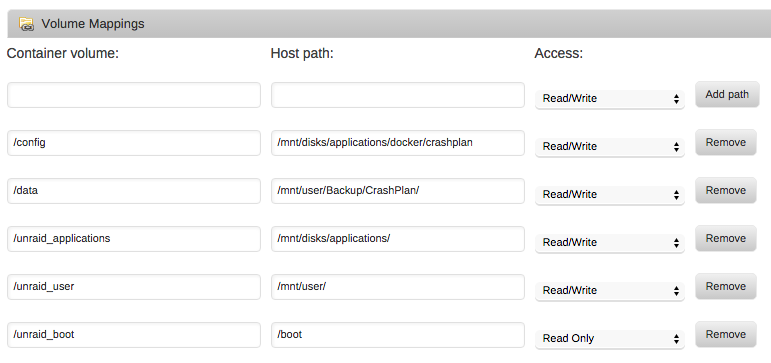
Shouldn't need to. I just did the following in the volume mappings with no further changes. I called mine "/unraid_boot" in the CrashPlan docker, set it to map to Unraid's /boot mount point as Read Only, and then used the CrashPlan UI to select and backup that entire directory. Mine didn't show up as a hidden folder, so it was all pretty straightforward.
-
Updated both the desktop and the mate, plus added the suggested extra parameters setting, and all is well. Working perfectly. Thanks!
-
Gizmotoy how do you go back to history? I have two tower destinations which are marked as "offline" in the restore tab in the new crashplan container. I have had to start backups all over in the past.I do not want to do it a third time.I can see my backup destination files on the tower. What config is crashplan looking for? If I restore my old v5.5 unraid flash on a vm,can I restore my crashplan plugin config?What should the path be? It sounds like you started a new device previously rather than using the "adopt" option. If you adopt, it should not create another device. If the paths to the data being backed up hasn't changed, it should just go through a process where it compares block information and looks like it's backing up stuff again but is really just flying through all the comparisons at an extremely higher rate. As such, all the previous version stuff would be retained and things would continue on. IF the paths to the data being backed up is different, the one key thing to note is that you want to leave the previous paths (that will be noted as "Missing" in the backup area of the UI) if you wish to retain the old versions of stuff. So, you would have the old path marked as missing and the new path that shows the active amount of stuff being backed up. It'll still do the block-level comparing and only re-upload all the changes, so it won't be re-backing up everything again. Incidentally, the proper time to do the adopt step is when you first sign into the app after re-install. At the top, it should have an option to click to adopt a previous computer backup. Just pick the previous instance and you're good. Couldn't have said it any better than this. This was exactly my experience. My paths had changed, so I do see data in the old path that I'll leave there for potential future use. flamegrilled asked how you go back to history. I'm not sure I understand what you mean, but if you mean verify the history of your files, you can do that via the Restore tab. You can drill down to individual files, and CrashPlan tells you all the versions it has stored for that file. That's how I verified my history was intact.
-
I asked this awhile back, but in case anyone has a similar question, I can say that this worked brilliantly. I allowed the container to make a new configuration (I didn't try to reuse my existing config). I then mapped the Docker backup directory to my existing CrashPlan backup directory. Once the Engine was up and running, I installed the desktop mate and used it to log in, and finally "Adopt" the previous machine's backup. Every client then instantly recognized the new host and connected. Each had to go through a lengthy synchronization and version pruning process, but after that everything was fully functional. I didn't even lose any history. This was worth the v6 upgrade all on its own. Having the desktop mate is fantastic. Thanks so much for making all of this.
-
I tried to use this plugin to update from v5.0.6 and it seemed like it worked. I verified the directory structure after rebooting. Unfortunately now the machine won't boot. It says: SYSLINUX 3.72 2008-09-25 EBIOS Copyright (C) 1994-2008 H. Peter Anvin Could not find kernel image: linux boot: With a blinking prompt after boot. Thoughts? Edit: While I was posting I saw RobJ's comment. Going to try that. Edit2: Looks like make_bootable_mac fails. Not sure where to go from here. /Volumes/UNRAID/make_bootable_mac ; exit; iMac-2:~ Jason$ /Volumes/UNRAID/make_bootable_mac ; exit; INFO: make_bootable_mac v1.1 INFO: The following drive appears to be the unRAID USB Flash drive: /dev/disk4 UNRAID 4.0GB cp: /Volumes/UNRAID/syslinux/*: No such file or directory To continue please enter your admin Password: sudo: /tmp/UNRAID/syslinux/make_bootable_mac.sh: command not found logout [Process completed] Edit3: Looks like installing from plugin doesn't get you the syslinux folder, which is required for the script. I copied it from the 6.0.1 .zip release and ran make_bootable_mac again and it succeeded. Might want to add copying that syslinux folder to the plugin install. Edit4: That maybe got a little further. I now get: SYSLINUX 3.72 2008-09-25 EBIOS Copyright (C) 1994-2008 H. Peter Anvin _ with that last line a blinking cursor. It's been stuck there for about 5 minutes now with no further progress. Looks like plugin upgrade was a failure. :'( Will revert to the manual process. Glad I made a couple backups before I started. Edit5: Looks like a manual install of 6.0.1 does the exact same thing. I guess go back to v5? Since this seems like it might be unrelated to the plugin I made a separate post: http://lime-technology.com/forum/index.php?topic=41088.msg389042#msg389042
-
This can be done but you need to be a bit careful. As long as you have set “Remove deleted files” under “Backup Frequency and Variations Settings” to “Never” your files on CrashPlan Central will stay where they are. You are mentioning that backups are stored on your array as well so it’s hard to know your configuration in detail. However as long as CrashPlan finds files that already are backed up it will not back them up again. Suggest you search the support pages at CrashPlan, there is a lot of information there even if it’s a bit hard to navigate. Look for transferring ChrashPlan between computers and stuff like that. It's not really that backups are stored on the array "as well," it's just the only place they're stored. Other computers in the house backup to CrashPlan on the unRAID server, which stores those backups in a user share on the protected disk array. Pretty straightforward. The unRAID server doesn't do any backing up of its own, it's strictly a destination. There's good information on the CrashPlan site for "adopting" a computer you back up from when changing machines, but nothing about what happens when you change the machine you're backing up to. Even though I don't do any backing up from my unRAID machine, I guess my best bet would be to have the unRAID Docker CrashPlan instance adopt the current (empty) standalone instance and hope all the other machines figure out that their destination machine has changed. I can contact CrashPlan support for guidance. Does the CrashPlan Docker instance allow you to set the backup target folder to be on the main protected array, or is it completely sandboxed?
-
I'm currently on v5 and thinking of upgrading to v6 and one of the major concerns is migrating my CrashPlan install. I have other computers that back up to my unRAID's CrashPlan, and I don't want to lose all that file revision history. The backups are stored on my array. Is it possible to install this docker implementation, tell it to backup to my existing folder, and have the clients carry on like nothing happened? I tried to search through the thread and didn't find anything, hopefully I didn't miss it.
-
If the kernel is not crashing, why would low memory be important? Isn't low memory that which is reserved for the kernel? It looks like I have 8MB free, which seemed pretty low, but after some research online I can't find any other example /proc/meminfo outputs with more free low memory. I don't know if that's unusually low for unRaid or not. This is the current output of /proc/meminfo cat /proc/meminfo MemTotal: 4090796 kB MemFree: 1073768 kB Buffers: 459036 kB Cached: 1676776 kB SwapCached: 0 kB Active: 753568 kB Inactive: 1220544 kB Active(anon): 510516 kB Inactive(anon): 9604 kB Active(file): 243052 kB Inactive(file): 1210940 kB Unevictable: 666824 kB Mlocked: 0 kB HighTotal: 3226632 kB HighFree: 1064864 kB [b]LowTotal: 864164 kB LowFree: 8904 kB[/b] SwapTotal: 0 kB SwapFree: 0 kB Dirty: 54156 kB Writeback: 29500 kB AnonPages: 505012 kB Mapped: 32648 kB Shmem: 15128 kB Slab: 303184 kB SReclaimable: 286392 kB SUnreclaim: 16792 kB KernelStack: 2536 kB PageTables: 4420 kB NFS_Unstable: 0 kB Bounce: 0 kB WritebackTmp: 0 kB CommitLimit: 2045396 kB Committed_AS: 1552712 kB VmallocTotal: 122880 kB VmallocUsed: 9540 kB VmallocChunk: 112436 kB DirectMap4k: 6136 kB DirectMap2M: 907264 kB It's crashing the same way it was previously, which I described in this post two pages back: http://lime-technology.com/forum/index.php?topic=4500.msg207729#msg207729 For comparison, this is the most recent crash log excerpt: Nov 30 20:18:01 Hyperion crond[1238]: ignoring /var/spool/cron/crontabs/root- (non-existent user) Nov 30 21:00:46 Hyperion kernel: mdcmd (68): spindown 0 (Routine) Nov 30 21:07:01 Hyperion crond[1238]: ignoring /var/spool/cron/crontabs/root- (non-existent user) Nov 30 21:08:36 Hyperion kernel: ------------[ cut here ]------------ Nov 30 21:08:36 Hyperion kernel: WARNING: at arch/x86/kernel/apic/ipi.c:109 default_send_IPI_mask_logical+0x2f/0xb9() (Minor Issues) Nov 30 21:08:36 Hyperion kernel: Hardware name: MS-7680 Nov 30 21:08:36 Hyperion kernel: empty IPI mask Nov 30 21:08:36 Hyperion kernel: Modules linked in: md_mod xor i2c_i801 i2c_core ahci libahci r8169 sata_sil24 mvsas libsas scsi_transport_sas [last unloaded: md_mod] (Drive related) Nov 30 21:08:36 Hyperion kernel: Pid: 11945, comm: cache_dirs Not tainted 3.0.30-unRAID #4 (Errors) Nov 30 21:08:36 Hyperion kernel: Call Trace: (Errors) Nov 30 21:08:36 Hyperion kernel: [<c1028a84>] warn_slowpath_common+0x65/0x7a (Errors) Nov 30 21:08:36 Hyperion kernel: [<c101636e>] ? default_send_IPI_mask_logical+0x2f/0xb9 (Errors) Nov 30 21:08:36 Hyperion kernel: [<c1028afd>] warn_slowpath_fmt+0x26/0x2a (Errors) Nov 30 21:08:36 Hyperion kernel: [<c101636e>] default_send_IPI_mask_logical+0x2f/0xb9 (Errors) Nov 30 21:08:36 Hyperion kernel: [<c1014b93>] native_send_call_func_ipi+0x4c/0x4e (Errors) Nov 30 21:08:36 Hyperion kernel: [<c1049a53>] smp_call_function_many+0x18c/0x1a4 (Errors) Nov 30 21:08:36 Hyperion kernel: [<c105ee4a>] ? page_alloc_cpu_notify+0x2d/0x2d (Errors) Nov 30 21:08:36 Hyperion kernel: [<c105ee4a>] ? page_alloc_cpu_notify+0x2d/0x2d (Errors) Nov 30 21:08:36 Hyperion kernel: [<c1049a85>] smp_call_function+0x1a/0x1e (Errors) Nov 30 21:08:36 Hyperion kernel: [<c1049a9b>] on_each_cpu+0x12/0x27 (Errors) Nov 30 21:08:36 Hyperion kernel: [<c105fcbe>] drain_all_pages+0x14/0x16 (Errors) Nov 30 21:08:36 Hyperion kernel: [<c106031e>] __alloc_pages_nodemask+0x371/0x47f (Errors) Nov 30 21:08:36 Hyperion kernel: [<c1026fd4>] dup_task_struct+0x46/0x119 (Errors) Nov 30 21:08:36 Hyperion kernel: [<c10279ef>] copy_process+0x70/0x9f6 (Errors) Nov 30 21:08:36 Hyperion kernel: [<c1028443>] do_fork+0xce/0x1e6 (Errors) Nov 30 21:08:36 Hyperion kernel: [<c1032e31>] ? set_current_blocked+0x27/0x38 (Errors) Nov 30 21:08:36 Hyperion kernel: [<c1032f67>] ? sigprocmask+0x7e/0x89 (Errors) Nov 30 21:08:36 Hyperion kernel: [<c100819b>] sys_clone+0x1b/0x20 (Errors) Nov 30 21:08:36 Hyperion kernel: [<c130f59d>] ptregs_clone+0x15/0x38 (Errors) Nov 30 21:08:36 Hyperion kernel: [<c130ec65>] ? syscall_call+0x7/0xb (Errors)
-
So I recently bought 2 more 3TB drives and I'm in the process of preclearing them. I'm using the modified (slower) command Joe posted above, but cache_dirs is still crashing. It's happened twice now, so I thought that had fixed it but apparently it did not. According to /usr/bin/free, I'm using 2GB of my 4GB of total system RAM, so it's not even close to running out of memory. This seems like something else. Any ideas?
-
As a quick follow-up, my run with the default settings took 25 hours. I just finished one cycle with the new settings, and it took 50 hours. So the settings Joe posted above give you exactly a 2x slowdown. Beware.
-
Not to derail the lively discussion here, but for anyone stumbling on this I just wanted to mention that the suggested parameters for preclearing did in fact solve the issue. I'm on my second preclear cycle without a complaint from the server. It does appear to be taking quite a bit longer, though.
-
Hmm. That's unexpected. I have 4GB of RAM, but I suppose I am running quite a few apps/plugins (CrashPlan, Apache, mySQL, SickBeard, Sabnzbd, and a few others). I'll check my free memory when I get home since I can't access it remotely. Those plugins combined with the preclear sounds like it could be the issue, so I'm sure you're right. The array's been rock solid for months and this is the first time I've ever had a cache_dirs problem, or any memory-related problem, so I'm not surprised they're related. I guess I lucked out that it killed cache_dirs instead of something more important like the webGUI. I'll wait for this preclear to finish, reboot the server, and then use the above command when I run my final 2 cycles (I usually run 1 initial preclear cycle, then follow it up with 2 more if the drive passes). Thanks for the info. I'll let you know how it works out.
-
I'm running cache_dirs -w from my go script on boot. I haven't had any trouble with it, but today I got the following error in my syslog while preclearing my first 3TB drive. I'm still running 5.0RC2 for now. Nov 6 04:37:23 Hyperion kernel: Pid: 11795, comm: cache_dirs Not tainted 3.0.30-unRAID #4 (Errors) Nov 6 04:37:23 Hyperion kernel: Call Trace: (Errors) Nov 6 04:37:23 Hyperion kernel: [<c1028a84>] warn_slowpath_common+0x65/0x7a (Errors) Nov 6 04:37:23 Hyperion kernel: [<c101636e>] ? default_send_IPI_mask_logical+0x2f/0xb9 (Errors) Nov 6 04:37:23 Hyperion kernel: [<c1028afd>] warn_slowpath_fmt+0x26/0x2a (Errors) Nov 6 04:37:23 Hyperion kernel: [<c101636e>] default_send_IPI_mask_logical+0x2f/0xb9 (Errors) Nov 6 04:37:23 Hyperion kernel: [<c1014b93>] native_send_call_func_ipi+0x4c/0x4e (Errors) Nov 6 04:37:23 Hyperion kernel: [<c1049a53>] smp_call_function_many+0x18c/0x1a4 (Errors) Nov 6 04:37:23 Hyperion kernel: [<c105ee4a>] ? page_alloc_cpu_notify+0x2d/0x2d (Errors) Nov 6 04:37:23 Hyperion kernel: [<c105ee4a>] ? page_alloc_cpu_notify+0x2d/0x2d (Errors) Nov 6 04:37:23 Hyperion kernel: [<c1049a85>] smp_call_function+0x1a/0x1e (Errors) Nov 6 04:37:23 Hyperion kernel: [<c1049a9b>] on_each_cpu+0x12/0x27 (Errors) Nov 6 04:37:23 Hyperion kernel: [<c105fcbe>] drain_all_pages+0x14/0x16 (Errors) Nov 6 04:37:23 Hyperion kernel: [<c106031e>] __alloc_pages_nodemask+0x371/0x47f (Errors) Nov 6 04:37:23 Hyperion kernel: [<c1026fd4>] dup_task_struct+0x46/0x119 (Errors) Nov 6 04:37:23 Hyperion kernel: [<c10279ef>] copy_process+0x70/0x9f6 (Errors) Nov 6 04:37:23 Hyperion kernel: [<c1028443>] do_fork+0xce/0x1e6 (Errors) Nov 6 04:37:23 Hyperion kernel: [<c1032e31>] ? set_current_blocked+0x27/0x38 (Errors) Nov 6 04:37:23 Hyperion kernel: [<c1032f67>] ? sigprocmask+0x7e/0x89 (Errors) Nov 6 04:37:23 Hyperion kernel: [<c100819b>] sys_clone+0x1b/0x20 (Errors) Nov 6 04:37:23 Hyperion kernel: [<c130f59d>] ptregs_clone+0x15/0x38 (Errors) Nov 6 04:37:23 Hyperion kernel: [<c130ec65>] ? syscall_call+0x7/0xb (Errors) Any ideas why it crashed or if it's something I should be worried about? syslog-2012-11-06.txt.zip
