





Gizmotoy
Members
-
Joined
-
Last visited
Everything posted by Gizmotoy
-
Have you had any problems with your SAS2LP-MV8 on 6.7? I have the same card and am hesitant to upgrade given the other issues noted in this thread. I guess I should investigate if there's a well-reviewed LSI-based card that's a drop-in replacement. I don't really want to redo cabling if I don't have to, and my MV8 has been rock solid for over 8 years now.
-
Hmm. That does work, but only if I don't need access to Unraid itself. That makes Plex work, but it then breaks Unraid's Main even if I then set up a custom location for that. There's many inter-dependancies. This is tricky.
-
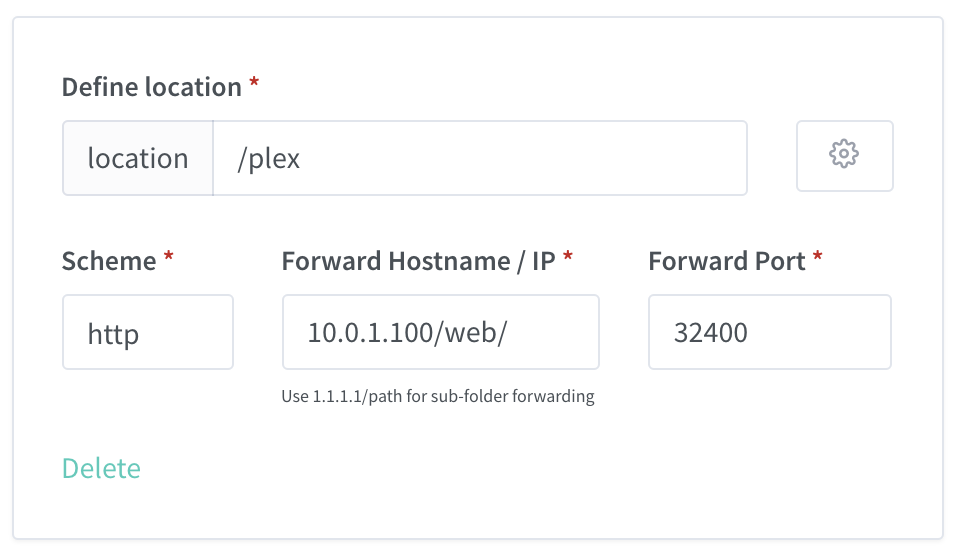
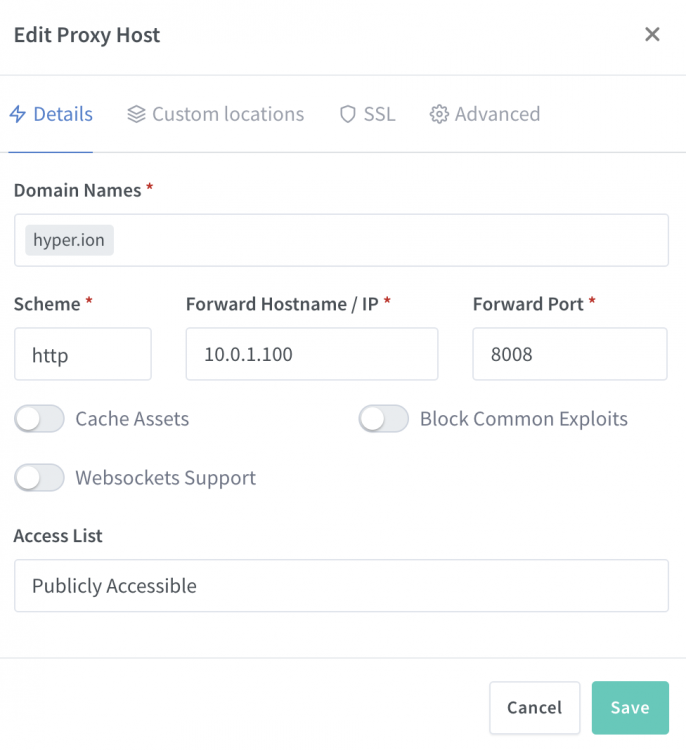
Has anyone been able to get this to work with Plex? I've gotten Grafana and a bunch of others working, but Plex just redirects back to my main Unraid page. I just use an invalid TLD locally without SSL. With a local DNS server as well, this traffic never goes outside my network. Unraid is on 8008, and Plex is on its usual 32400.
-
I've tried everything at this point. Bridged/Host/Static network modes and every optional parameter in `speedtest-cli`. I installed it on my desktop machine on the same network, and it works there. It just won't work in this docker container, for whatever reason. It's not a measurement/reporting issue, either: stats from my network switch confirms that the throughput is actually very low upstream. There's a large upstream burst right at the start of the test, then nothing, resulting in a low Mbps reading. I'm not an expert, but it kind of seems like it's waiting for acknowledgement from the Speedtest server before sending more data, and that ACK never arrives. The current results use HTTP. There's a pull request outstanding for a socket-based option. Maybe that'll help whenever it gets integrated back into master.
-
This is great, thank you. The downstream measurements are now roughly inline with expectations. Still can't figure out why the upstream is locked to 4Mbps, though, but at least the downstream works.
-
Thanks for the insight. I'm not super-knowledgable on underlying Docker stuff: can I just change the "Repository" field in my existing container? Or is it more complex than that?
-
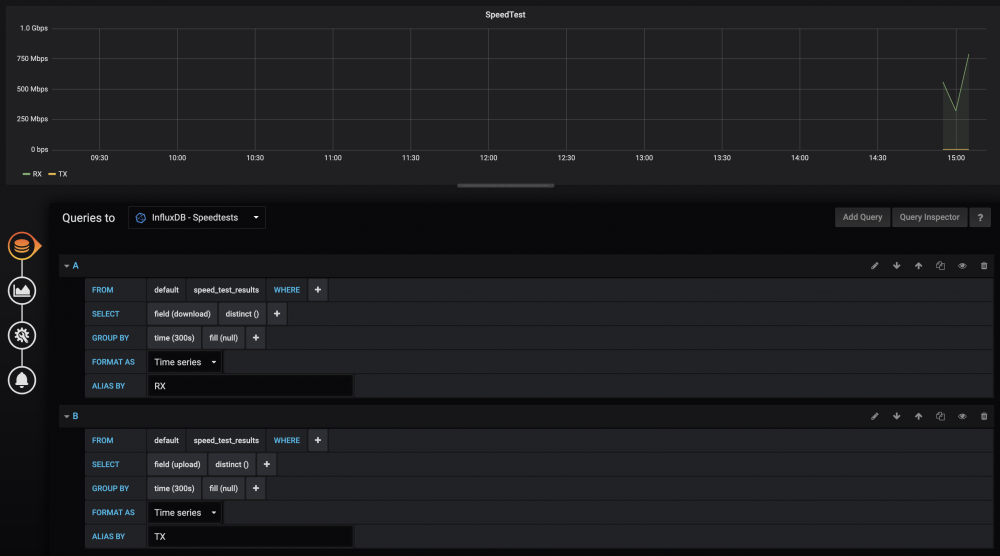
These are fantastic! Thanks! I'm using the Speedtestforinfluxdb and getting some unusual results, though. I have symmetrical gigabit fiber, and show Speedtests in the neighborhood of 800Mbps down, 4Mbps up. I could maybe believe the down (though it's about 940 Mbps when tested manually), but the upstream seems straight wrong (also 940Mbps when tested manually). I'm also seeing pings in the 25ms range ("0" to 2 ms is typical manually). Any thoughts on what might be wrong? I assume I've misconfigured something, but I'm not sure what. [GENERAL] Delay = 300 [INFLUXDB] Address = <my_actual_ip_was_here> Port = 8086 Database = speedtests Username = Password = Verify_SSL = False [SPEEDTEST] # Leave blank to auto pick server Server = [LOGGING] # Valid Options: critical, error, warning, info, debug Level = info
-
Good point. That is a pretty rare one. A private key is mandatory on SpiderOak, which is a plus. Looks like it's a thing: https://github.com/neochrome/docker-spideroak Looks like that 30% off discount is permanent, too: https://twitter.com/SpiderOak/status/900460454585257984 Not sure if they'll offer better support for headless installations than CrashPlan did, though. As soon as Code42 found out it was a headless or Docker install they discontinued support. The plan I had isn't offered any more. It was quite awhile ago (7-8 years, maybe?). I think it was even 50GB or 100GB or something that seems laughably small today. The CrashPlan 75% discount is good for 12 months. If you're syncing to Unraid and backing up from there, you probably have more options since it makes it look like a single machine is backing up. You're better positioned to use services that charge per machine. I think I want my machines to be able to back up independently of my Unraid installation. Feels like a single point of failure to me.
-
Probably depends on your needs. At this time I'm aware of only a single option, at any price, that meets all of: Cross platform, including under linux so it could theoretically be Dockerized Offers offsite backup (Unraid+machines to cloud) Permits centralized local backup (Machines to Unraid) Offers versioning/deleted file protection CrashPlan Business gets 1/2/4, but can't do 3. It can backup to local or external drive, but not directly to the Unraid Docker. The Dropbox-like sync options get 1/2/3, but not 4. Carbonite and Backblaze lacks 1 and 3 since they don't have a linux client. Maybe someone else can chime in, but the only other service I'm aware of that can do everything CrashPlan Home could do is SpiderOak. I had been with SpiderOak for a number of years before I switched to CrashPlan. The service was great, but the app was terrible. I see it's gotten an overhaul. Perhaps it's an option for us. Only the limited 1TB plan is price-competitive with CrashPlan Home, though, and (perhaps wisely?) there's no unlimited option. Looks like they'll be trying to grab some of us: https://twitter.com/SpiderOak/status/900116225833000960
-
As speculated above, their official Twitter confirmed that PC to PC backups will cease when they turn Home off next October.
-
The biggest annoyance is that even if you agree to their Small Business terms, you still can't have computer-to-computer backups. So it's not straightforward to maintain both on-site and cloud backups. This was CrashPlan's biggest advantage and they just abandoned it. So it's not just a price increase, it's a feature reduction too. I've had the unfortunate experience of using Carbonite in the past. I don't think I'll be switching. I'm not sure what my plan is. I have until May to figure it out.
-
Wondering the same. I have the same behavior where Gitlab thinks everything is on Unraid:9080. My host isn't Unraid and the port isn't 9080, so that presents a bit of a problem. I can't seem to SSH into the docker to tinker manually, either. I just get a "Connection Refused" on the remapped port (7022). A way to change this from the template would be really nice, considering there's a few functions broken without it. Any ideas on how to fix it when SSH access doesn't seem to work? Update: I've managed to change the setting without SSH, but I don't think it's possible for it to work if you've had to remap ports from the default. I did: sudo docker exec -it GitLab-CE /bin/bash nano /etc/gitlab/gitlab.rb * Modify gitlab.rb to add: "external_url 'http://example.com:7080/'" * sudo gitlab-ctl reconfigure sudo gitlab-ctl restart After doing so, the Gitlab UI is unresponsive. If I use 9080, the local port inside the container, the setting works and the URLs are updated to example.com:9080, but it doesn't work on my client because 7080 is the actual use-facing port after Docker remaps it. From what I can tell, it's not possible to utilize attachments or images with the Gitlab instance in this docker unless you keep the default port. Unfortunately I can't because of a conflict. Update 2: I found a workaround. First, set the default destination for 9080 to some dummy port. We won't be using it. Set external_url in gitlab.rb to be the actual host:port you want to use (like 7080). Then add a custom port in the docker configuration where you map 7080 in the docker to 7080 on the host. As long as the docker & host ports are the same, it will all work. It's pretty hacky, but it does seem to work just fine.
-
Has anyone had a problem where client synchronization takes forever (looks like maybe 2-3 weeks, at current speed) for machines backup up to to the unRAID machine? I'm at 35% after synchronization running for 1 week. Neither I nor Code42 can find anything wrong on the client side. I upgraded unRAID to 6.2.4. Upgraded the dockers. Added a parity drive (now dual parity). I suppose it could be any of those, but no CrashPlan settings changed. No other problems, and parity checks are pretty fast.
-
A suggestion: when the plugin notices that a disk needs updating because some files don't have checksums, could the Build process (and the Export process, if enabled - ie. orange circle, not blue cross) be triggered automatically? Perhaps include an option to enable this behaviour or leave it to be done manually. Sounds like a good idea, but with the problems noted above, I think this could end up just thrashing our drives in an endless loop. Mine are endlessly showing files missing checksums. Making it optional sounds ok, though.
-
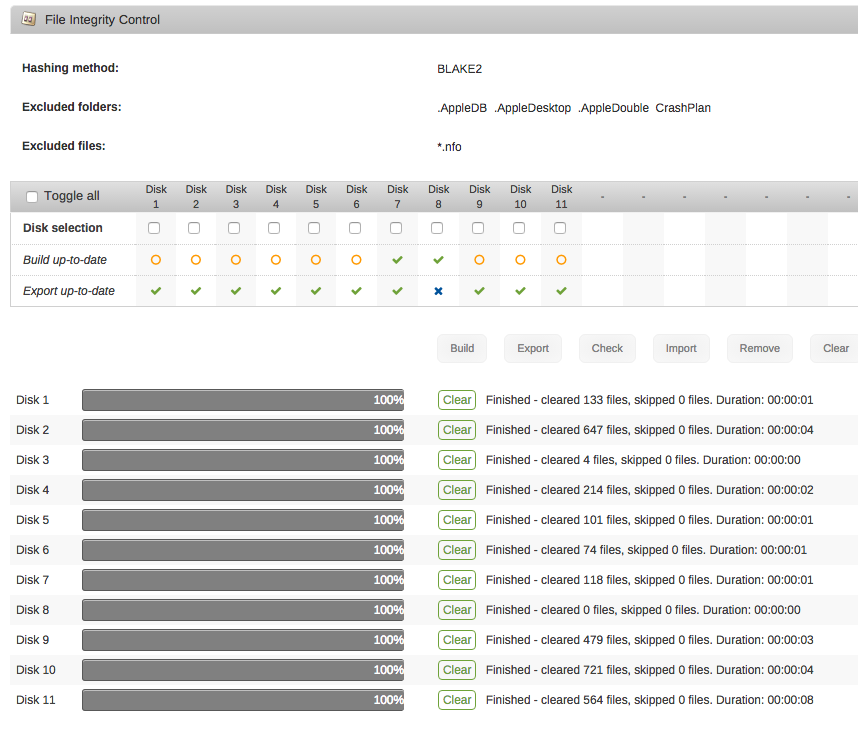
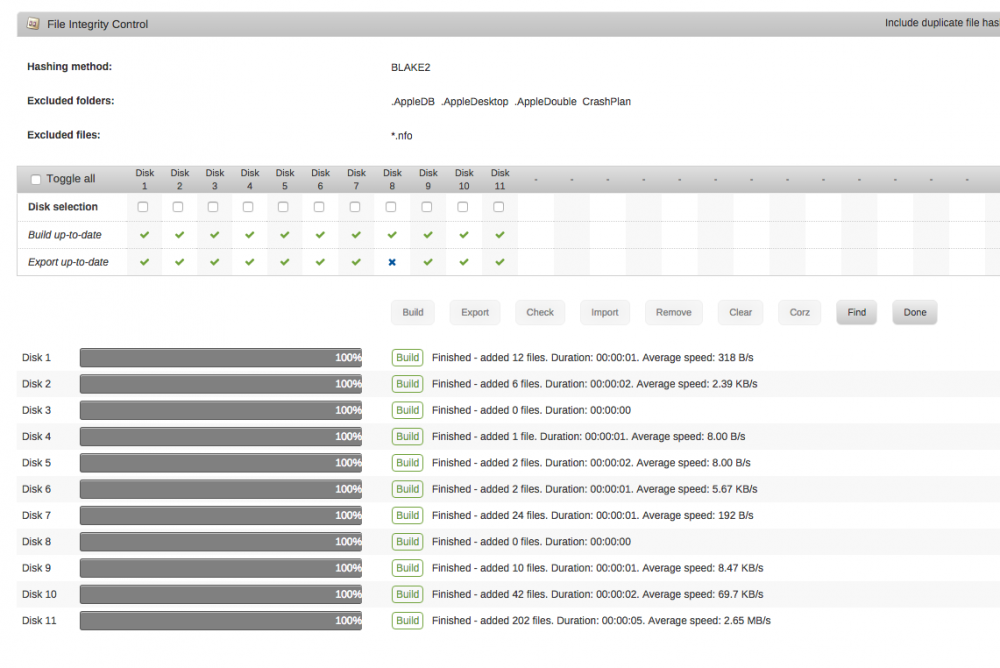
Ok, performed a clear. It found a dozen or so files that needed clearing since yesterday. Ran export on all disks and grepped for ".nfo" and "CrashPlan", which are in my exclusion list. No instances of either found. So I guess the auto-generation is somehow malfunctioning. I disabled that feature, then re-enabled it. We'll see if that does anything. Just checking in. No, disabling and then re-enabling "Automatically protect new and modified files" doesn't work. Same behavior. I tried upgrading to 6.2.1 (which I had planned to do anyway), and tried both tests again. Same behavior. Edit: Ok, I've done a LOT more testing and I'm nearly certain that there's a serious problem with this plugin, at least in my setup. I took the following steps: 1) Run a build on all disks. All show green checks. 2) Export all disks to check for excluded files. All disks still have green checks. 3) Clear all disks. Hundreds of files cleared since last clear operation yesterday. All disks still have green checks. 4) Once the clear operation is complete, almost all disks show they need built (see screenshot). 5) Run build again. Hundreds of new files hashed (see screenshot). Between #1 and this step the array was idle. I can then alternate between building and clearing, back-to-back, with hashes being added and cleared with every operation. It seems like the Build and Clear operations are not using the same exclusion lists.
-
In case anyone else is looking for info, I upgraded from 6.1.9 to 6.2.1 with docker.img on an Unassigned Devices drive. It worked fine. Another data point for you, at least.
-
Ok, performed a clear. It found a dozen or so files that needed clearing since yesterday. Ran export on all disks and grepped for ".nfo" and "CrashPlan", which are in my exclusion list. No instances of either found. So I guess the auto-generation is somehow malfunctioning. I disabled that feature, then re-enabled it. We'll see if that does anything.
-
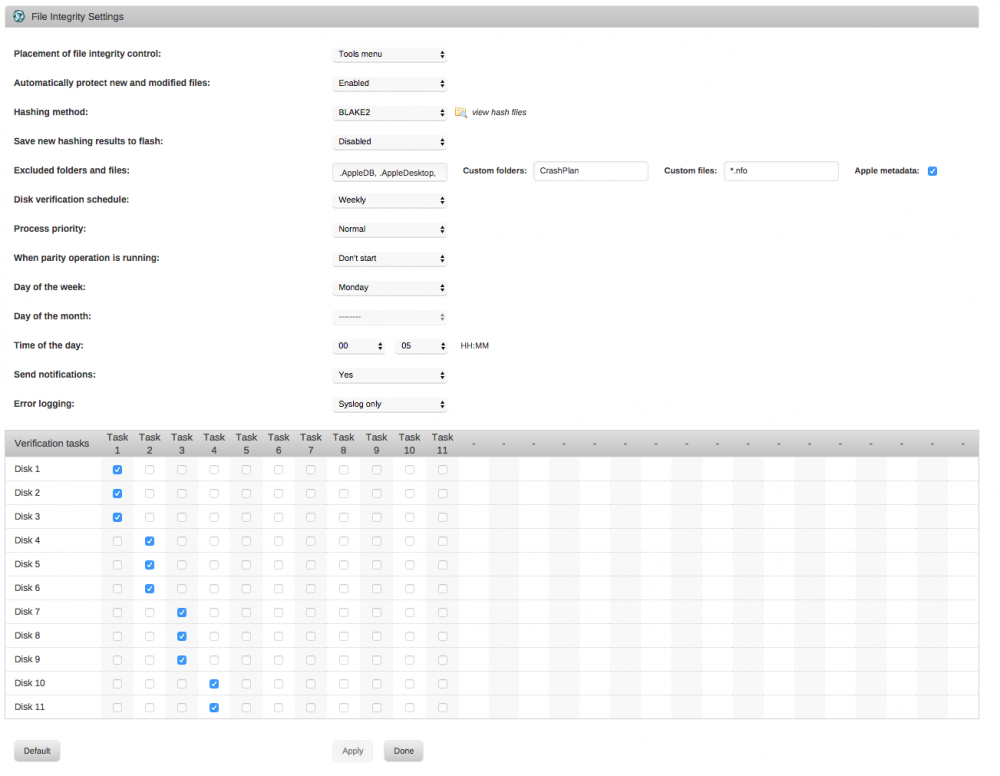
Same here. I cleared all disks last night. I then ran Build on all disks to get them "up to date". Today I have several disks that show that they're aren't up to date. I ran clear again, and it cleared more files. Seems like something's broken. How can I help figure out what?
-
Pretty sure this is also why my excluded files were being ignored and I kept getting warnings as noted in the post above. So the verify operation ignores the exclusions, which are obeyed only during the hash generation step. If I may, it might be worth adding a note about that to the help. I made the changes mentioned and will keep an eye on it this week.
-
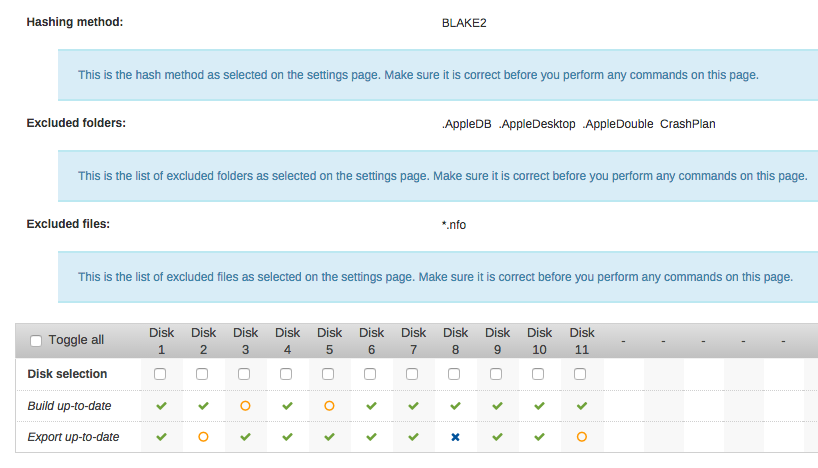
So there's a lot here I still don't understand. I have the plugin setup, I think, to ignore all .nfo files and files in the CrashPlan folder. I have it configured as follows, and have the verification schedule set to run a few drives every week. If I run the Build manually, I can get all the checkmarks green. The next morning, the "Build up to date" status for some drives are orange circles, as shown in this screenshots, even though no verification was run. It's not clear how "Build up to date" could change from green to orange. All the help says is that it's an "Open operation", but no indication what that means. Automatically protect new files is enabled. Then when a verification runs, I always get some warnings about mismatches or corruption in the folders and filetypes I've specifically set as ignored. Any idea what's going on here? This doesn't make sense to me.
-
Is it expected that the "Build Up to Date" row almost always has a few disks with Os? It says that means there's an open operation, but isn't really clear on what could trigger that. I manually force updates on all disks, then they all turn into the green checkmarks, but by the next morning two or three are Os again. The setting to automatically update the hashes when files are added/modified is enabled. Not sure what I could be doing wrong here.
-
Does this only support 6.2 going forward?
-
Hmm. That seems like it shouldn't happen, but I'm not familiar enough with the file access behavior of the two apps that use these files to know for sure. I don't think they're changing often (seems I get 3-4 of these errors every 2 weeks at verification time), but I don't really care that much about them so I just added them to the ignore list. Thanks for the help.
-
I'm getting what appear to be a lot of false positives when checking for modified checksums. The files being identified as corrupted are always .nfo files within TV and Movie user shares that are accessed over the network from a Windows machine running Kodi. If I look at the .nfo files, they appear intact and uncorrupted. Kodi reads them fine, and they appear to be accurate, though it's entirely possible they've changed since the last time a verification occurred. I do have automatically protect new and modified files Enabled. They're just metadata I don't really care about that's easy to regenerate, so I could add them to the ignore list, but I'm kind of curious what's going on. Any thoughts?
-
I just restarted and had the launching/crashing issue noted earlier in the thread. The extra parameter fixed it for me as well, but, presumably, leaving it set prevents any further updates from occurring. Is anyone else still having this issue? Looks like the last mention of it I see was nearly a month ago. Seems like it would have been mentioned again if the SAB code was still broken.




