





coltonc18
Members
-
Joined
-
Last visited
Everything posted by coltonc18
-
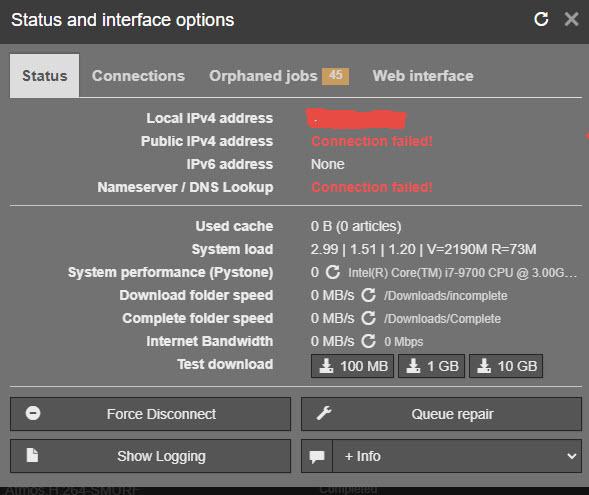
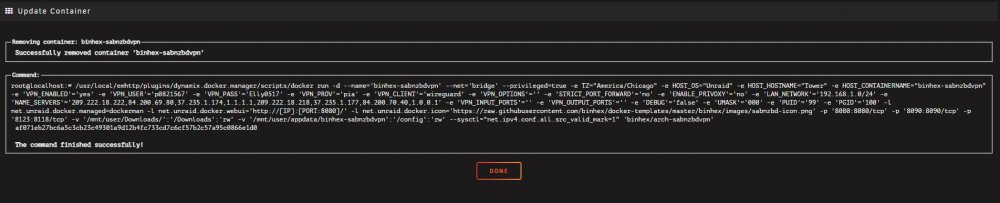
Good morning, I have been using sabnzbdvpn for a while without any problems, but here recently I have started getting the connection failed....and I searched it, but the issues in the passed seem to tie to the cipher issue, and I dont see that in my log. I was thinking maybe change my endpoint, but the faq said different endpoints should show in the supervisord log, but I dont see any in there? Would someone mind taking a look and helping me out here? Thank you -Chase
-
Thank you both for the quick reply, Sounds like I don't need anything extra, and will just connect them to my switch and then work through the process of using them through Unassigned devices. Thanks again!!
-
Hello everyone, Trying to figure out the best way to do this. I currently have my 1 server that I use for plex and everything else, and its getting a little full of stuff. So my plan is to buy a Dell R730, and move all of my Containers and VM over to that except for Plex. My first server will be my Plex server and data storage. The 2nd server will host all the other containers/VM that I use now. This includes all the containers that support plex, such as all the arr's. My question is how to set this up, so I can have all the containers on one unraid instance, yet all the data on another unraid instance, and the one unraid instance be able to access/see that data and move data around on that server. Like radarr on unraid 2 will see something needs to be downloaded and will download it to download share on unraid 1, and then move it to my movie share on the array of unraid 1 etc etc etc. I'm just not sure if I will have issues with this considering the containters will be on a different unraid instance, and am wanting to make sure I understand everything before I go and do this. I was going to get a Nic 10 card for each server and connect them directly, but i'm not sure if that is the best way or even necessary, or if I should just connect them both to my switch. Thanks!!
-
Thanks for the reminder...I checked it out and I had never updated it when I created these domains. It only had my first domain on there, which ironically I don't use anymore. I have added them all to it now, so this shouldn't happen again. Thank you again for your time and patience with me.
-
Wow!! After the last message when I got home and put the girls to bed I started looking at this, and looked at duckdns......I noticed there was a current ip listed there....it listed my old IP, and not my new one. I updated the IP to show my new one, and bam it worked!! I had no idea something like that was needed, I never did that the first time I did this. Thanks again for all your time you spent trying to help me figure this out! I truly appreciate it!!
-
I'm at my daughters gymnastics right now, so on my cell, and just tried the public IP and it worked.... I tried adding :5055 on the end of it, and it didn't work. I'm not sure if that says something or not. So since the second was correct, my public IP is public, how do I go about researching the 1st issue more? These are duckdns domains, is this an issue with that some how? Or something else? Thanks again!
-
Slight update....I deleted the container completed and the app folder and started from scratch, and cant get a SSL certificate, but when I put my public IP out there I do get the Nginx home page, unfortunately it just means the same thing, somehow it can't reach the containers. The error I'm seeing in the logs there is Detail: 111.11.111.111: Fetching http://notifiarr.duckdns.org/.well-known/acme-challenge/abErDJIBoJR6U8sWtF0qofN4BmPSTjN6hwaFcmxWRH4: Timeout during connect (likely firewall problem) I'm at a loss as to what the firewall problems can be though. As the port forwarding seems to be working, or I wouldn't be getting the welcome screen.
-
I can reach overseer through my local IP that I use, and when I used - LsS I saw Nginx was able to access overseer based on the data that came back. But when I try to access overseer through the proxy domain I created in and put in Nginx I get the 5xx error. I spoke to some people on ubiquiti forums last night, and this system does have NAT loop back, so I'm a bit confused at this point.
-
Doing the -LsS it redirects to where it should....when looking up the Ubiquity UDM Pro it says it supports loopback/hairpinning....IT should considering its a high end commerical system, guess i'll have to ask them about it....
-
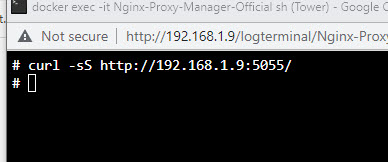
There goes my reading comprehension....for some reason I was thinking the next part was not.... Anyways after reading everything again, and going through it all. My issue appears to be at the curl, when I go to test the curl nothing happens. I can open overseer and it does work at this IP, so I know that is not the issue, reading down below that I wasn't sure what action to take next. I tried to change the Bridge network on Overseer to Custom Br0 to match this, but then Overseer wouldn't work, and I tried to do the same on binhex-nginx, and while that one allowed the change I still couldn't access the page attached to it. When I tried to change the network on nginx to bridge it just didn't work. The strange thing is all of these worked as they are right now, the only thing I changed was my router this weekend, and I have been working on getting everything set back up since then. Thank you for your patience with me!
-
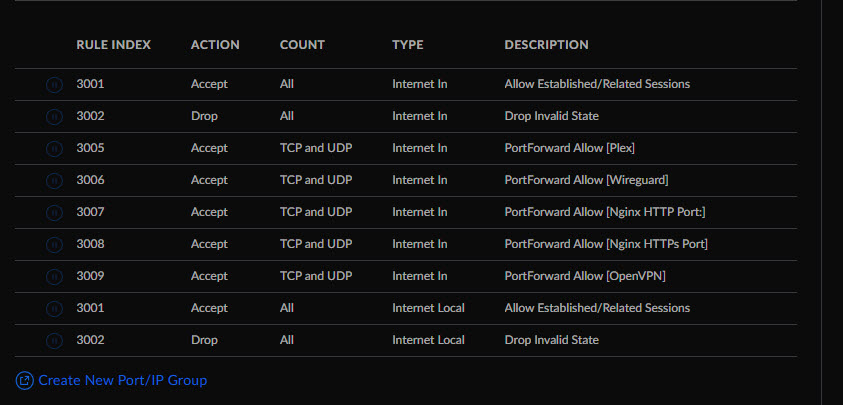
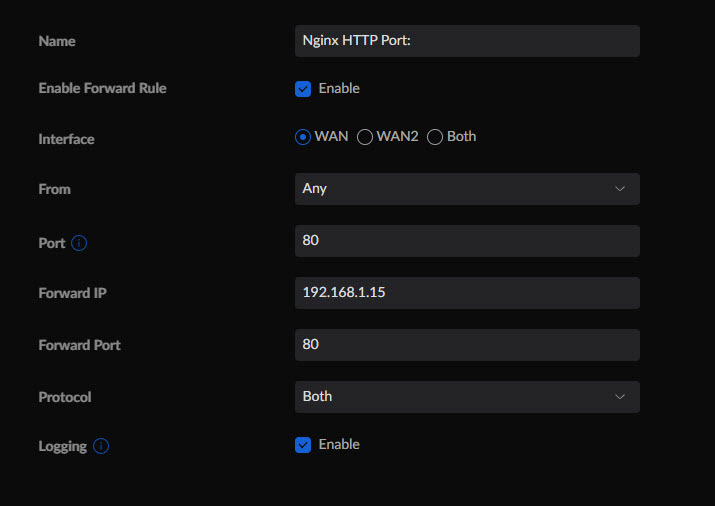
Based on that debug, this is my issue... This time you need to enter "http://[8888:7777:6666:5555]" (the square brackets are important and again do not use "https://"!). That did not work. Having said that, I'm still confused. I double checked all my port forwarding stuff, and everything looks correct. I don't understand why/how it would be different on a Ubiquiti UDM Pro vs a Netgear router. Here are the Port forward rules I have setup in my system. I even checked under firewall rules, and it looks ok.
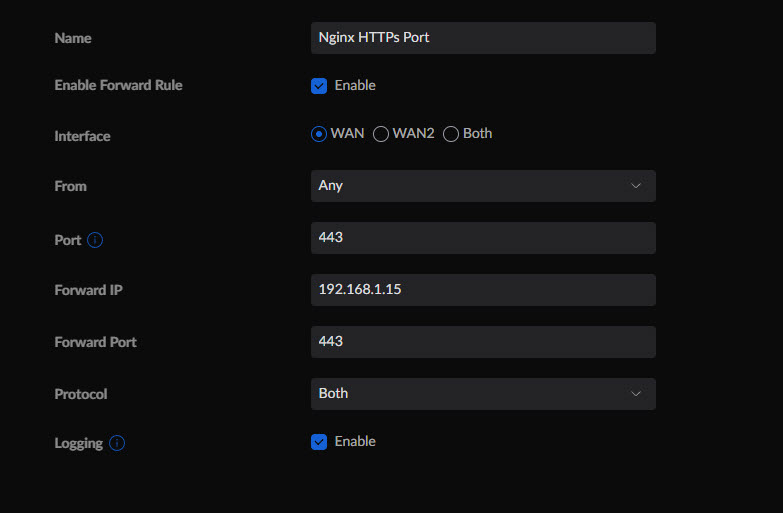
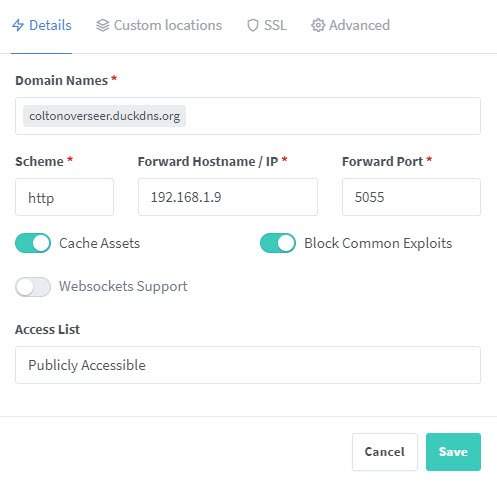


-
Hello, I recently switched from a netgear router, to UDM Pro, and its screwed up my Proxy setup and I can't figure out how. One of the connections it screwed up is to Overseer. I just watched another video on it, and everything looks correct, I've attached the relevent pics. If someone could look at it I would appreciate it. When I try to click on my site, it tells me the site is not safe, so I click to view it anyways then I get this. This site can’t be reached coltonoverseer.duckdns.org took too long to respond. Try: Checking the connection Checking the proxy and the firewall Running Windows Network Diagnostics ERR_CONNECTION_TIMED_OUT


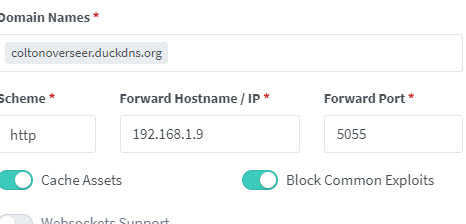

-
Hello everyone, I would appreciate your assistance! I am trying to get a VM with Home assistance and it just keeps going to Shell. I updated the cqow2 and it doesn't seem to be helping my issue. I'm at a loss as to what to do. Any help is appreciated. Thanks -Chase tower-diagnostics-20220730-1731.zip
-
So I've been trying to get Homeassistant VM going, and even tried a Windows VM to get going and was having the same issue above. I go to XML, and it shows RAW, but I change it as instructed and update and it still doesn't load. So I go to check it again, and it shows its raw again, for some reason its now staying udpated. Any recommendations?
-
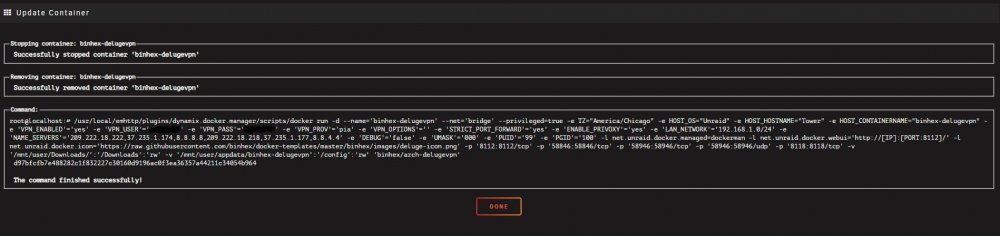
Does anyone have any thoughts on this issue?

-
Sorry, here you go. Thanks!
-
Hello, I'm not sure what is going on here....I've had Sonarr for years on Deluge without any issues, and sabnzbd for about a year without any issue....and all of a sudden about a month or so again it sends the file to be downloaded, but then it fails to transfer the file. It gives this error...2022-04-29 11:46:17.5|Error|DownloadedEpisodesImportService|Import failed, path does not exist or is not accessible by Sonarr: /Downloads/Complete/Moon.Knight.S01E05.Asylum.2160p.WEB-DL.x265.10bit.HDR.DDP5.1.Atmos-NOSiViD/. Ensure the path exists and the user running Sonarr has the correct permissions to access this file/folder Now what is weird, is it doesn't happen all the time, like I just downloaded new episodes on two different shows. One show it worked fine, and moved everything over like it is supposed to and moved into plex just fine. Then I did Ozark and it did not work....strangely that error is not even listed in the log....but there are plenty of other errors there for you to see what I am talking about. I don't understand what is happening. Any help is appreciated. sonarr.0.txt
-
Hello!! Love to see this!! I currently have all my audiobooks in Plex, but love the idea of having them in another arr system. I started adding my audiobooks to them, I have 340 GB of audiobooks, and I seem to be having difficulty with it seeing all of them. For example, I set it to see my whole folder of audiobooks, and just import it: However, as an example Robert Jordan. It's not importing all of the Wheel of time books. It is skipping half of them pretty much. So I went to manually import them, and it lets me click to manually import them, but nothing happens. It says import successful, but nothing has changed. Readarr log .txt
-
I'm just posting an update on this, since I figured it out....It had been so long since I originally setup Plex I obviously had forgotten, but didnt see anything when I search. So incase anyone else comes looking. If you go under the library you have and click Manage Library, then edit, Advanced, Store track Progress will make Plex remember and resume from your previous listening position.
-
Hello, I was using a different Plex docker, but was having a codec issue that randomly started up, and since I use a decent number of Binhex dockers, I decided to switch to this one. I work from home, and use the desktop Sonos controller to access my plex and listen to audiobooks that I have on my plex while I am working. On the last plex system I used, it would save my location when I stopped listening, and I would just push play and it would start back up again. With this one, after about 30 min it stops and goes back to the beginning. It wouldn't be a big deal if each track was only a few min long, but some books are all one track 12-15 hours long, and can become difficult to remember where I was. Is it possible a change can be made so it can remember maintain that connection and remember where it is? This is the only thing that I changed when this started up, and the sonos app remembers where I am when playing Spotify or something different. I'm not sure if you would need logs/diagnostics or not, but here they are. From Plex--the first was when I started listening, the second was after I had stopped. 2021-06-10 03:52:37,811 DEBG 'plexmediaserver' stderr output: __code__:183: FutureWarning: The behavior of this method will change in future versions. Use specific 'len(elem)' or 'elem is not None' test instead. 2021-06-10 09:19:16,237 DEBG 'plexmediaserver' stderr output: Connection to 104.237.138.40 closed by remote host. 2021-06-10 09:40:41,480 DEBG 'plexmediaserver' stderr output: Connection to 72.14.186.199 closed by remote host. tower-syslog-20210610-1522.zip tower-diagnostics-20210610-1023.zip
-
thanks, i'll play around with it and see what I can get to work.
-
ok sorry, its me again...apparently my torrent site doesnt like the newest version yet. Is there somewhere I can go to get the build names to put in to the Repository field? I'm going to start moving it back a build at a time until I find one it likes again. I was looking here, but i'm not sure what part of the name I would actually put in the Repository field. https://hub.docker.com/r/binhex/arch-delugevpn/builds?page=2
-
thank you, once it fully updated the issues cleared up.
-
At one time I had to prevent it from upgrading to 2.0. Now I want to constanstly upgrade to the newest version, I thought I had changed that so it had the right tag, but apparently I just put the newest tag at that time. Can you tell me what I need to put in the repository area so its just normal, and will just update as you push updates out?
-
From the PIA site " Enable Port Forwarding: In order to enable port forwarding in our PIA app, first disconnect from the VPN. Right-click the PIA Tray icon and select "Settings". From within the settings, select the Network tab and check the "Request Port Forwarding" checkbox. You will now see, in the server list, the servers on which you can connect with port-forwarding enabled. Any server that is unavailable, will be blacked out. At the moment, all of our non US Servers offer port-forwarding functionality and you can find a list of all of the servers we offer, here: https://www.privateinternetaccess.com/pages/network/" So any Non USA server should have port forwarding, but per the logs, they dont.


