





IamSpartacus
Members
-
Joined
-
Last visited
Everything posted by IamSpartacus
-
Has anyone using a ConnectX-3 card had any luck tuning their NFS/SMB settings to allow for increased throughput? I'm testing between two ramdisks on two unraid servers and only getting a max of 1.5GB/s while I get 39.5Gbps using iperf3.
-
Is it possible to complete this process in Unraid or some other Linux (one that can be run from LiveC) distro? I have no way of running Windows on my server currently and would love to get my Connectx-3 working in Unraid. EDIT: I managed to install Windows onto a USB3 HDD to the above steps working perfectly. Thanks!
-
and is there a variable one can use to call the name of the script?
-
By default that shows a red notification as if there's an error. Is there a way to manipulate the color displayed? Nvmd, was using the old WebGUI notification. Thanks.
-
Is there any easy way to add a start/stop notification for user scripts?
-
Thanks for the suggestion, that's actually a super workable solution.
-
@Squid How hard would it be to implement multiple different schedules into this plugin? So that, for example, one could backup all containers once a week but only the "production" containers every day.
-
I don't know if this is a bug or intended but even though I don't have Dynamic System Autofan installed, I still have an Airflow section in the lower left corner of my dash. And when I hit the settings wheel, it just loads to a blank page that obviously doesn't exist. Just curious if this is a bug or intended. beast-backup-diagnostics-20200130-2338.zip
-
This doesn't appear to work anymore, I assume since starting with 6.8 one can't run scripts directly from flash? Can this be adapted to run as a User script at array startup?
-
Is there anywhere I can get a download link for the rc3 build? That's the last build that I can successfully boot my EPYC server with and I need it to do some testing. Thanks.
-
Thank you for testing that. The only other variable is that my two unassigned NVMe devices (Intel Optane 900p drives) are part of a btrfs pool. My queries are identical to yours. My cache drive reads fine but if I choose either of the two drives in the btrfs pool I get no data.

-
Oh I see what you did there. Ok yea that work (stacking the inputs). Have you had any luck getting data off unassigned NVMe's or do you not use any in UD's?
-
Yup that did it. So I have to do that for all my spinner disk as well huh? I also noticed that the only nvme device I'm able to pull temp data on is my cache drive. I have 3 other unassigned nvme's but I can't see the temp data on those. Odd. Also, are you just manually installing smartmontools after each container update or are you doing it through a script?
-
Hmmmm. I can't seem to get the smart data to show up in my database. In my telegraf.conf, if I have 3 nvme devices do I need anything more than this? [[inputs.smart]] attributes = true devices = ["/dev/nvme0n1,/dev/nvme1n1,/dev/nvme2n1"]
-
Thanks for reminding me, Nvidia support was the reason I switched to this image as well. And thanks for the tip on getting smartmontools working. But I'm not any smart data available to choose from in my grafana queries. Was there anything else you had to do?
-
Yea this image isn't going to work with my current telegraf.conf. It doesn't appear to support the new inputs.apcupsd input that was recently added by telegraf and it gives me errors with all the fields I have in inputs.docker. It's not worth getting all that to play nice if this workaround won't even persist across container updates so I'll need to find a different solution.
-
I can try switching but I remember having some kind of issue with atribe's container when I first got this setup. Let me see if I can get that container working.
-
I'm using this container (latest) BTW.

-
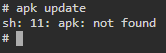
That's what I was hoping to avoid, a non-persistent work around. But even so, that does not work. apk is not a command that works for me inside the container.
-
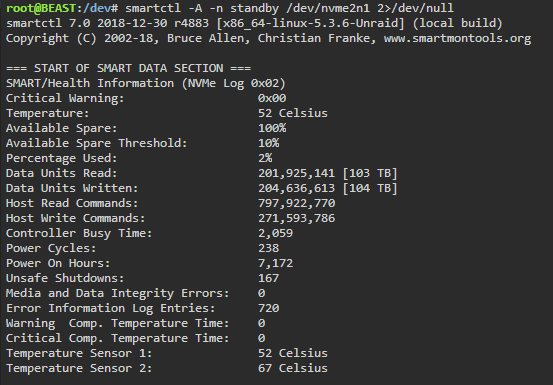
Has anyone successfully gotten [[inputs.smart]] working in telegraf on Unraid? It seems that using smartctl is the only way to get temperature metrics on NVMe devices but I can't discern a way to pass smartctl through from Unraid to the telegraf container.
-
Ok I see. I'll have to update the plugin when I get a chance I very much appreciate it sir.
-
I'm only polling one drive at the moment (a Samsung 960 Pro NVMe drive). I've set the high threshold below what the current temp is for that drive and given it a few minutes. It does nothing even though the HDD Temperature sensor is in fact showing the temperature is above the high threshold.
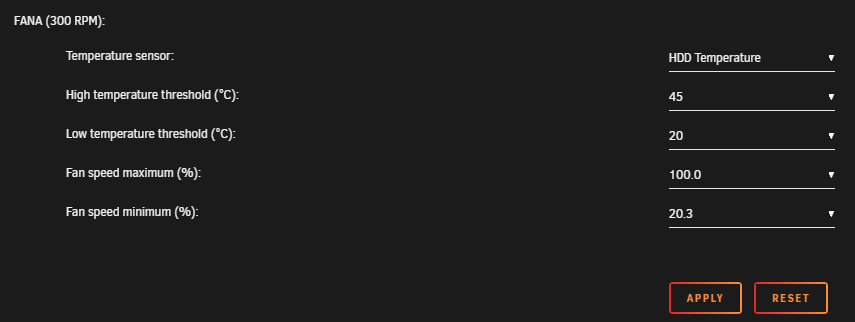 Ok, well I thought I was done. But apparently no matter what I set for the High temperature threshold for FANA using the HDD Temperature sensor, my fan never ramps up. If I set the temp sensor to be something like System Temp it works but will not work for HDD temperature.



