





tuxbass
Members
-
Joined
-
Last visited
Everything posted by tuxbass
-
What's the current status of the plugin? Plugins page says it's unlisted.
-
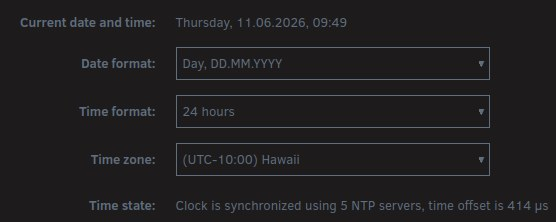
...and now discovered time config was borked: I'm EU-based. # ls -l /etc/localtime lrwxrwxrwx 1 root root 33 Jun 10 15:18 /etc/localtime -> /usr/share/zoneinfo/Europe/Madrid # ls -l /usr/share/zoneinfo/Europe/Madrid ls: cannot access '/usr/share/zoneinfo/Europe/Madrid': No such file or directory IIRC localtime used to be pointed at Paris node, no idea where Madrid now came from. Did the fancy new onboarding logic maybe deduct I'm somewhere in Spain and cleverly set it to Madrid without being asked to?
-
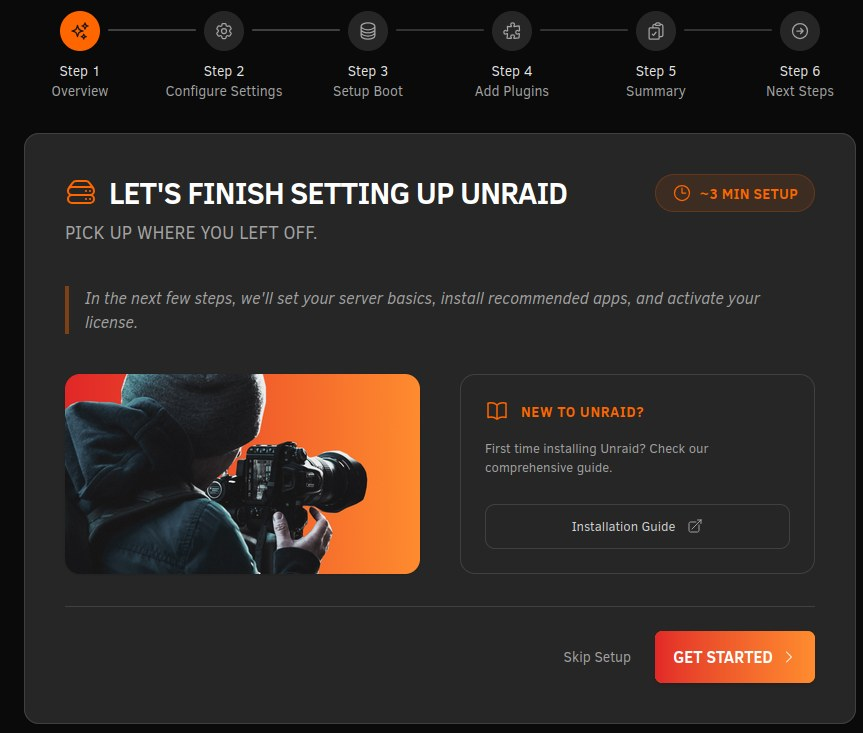
Upgraded from 7.2.7 to 3.1 and got a... on boarding prompt on a decade+ old installation?! I get that Unraid is a brand-new product and some things fall between the cracks, but come on.
-
There are "update stack" buttons, but how do you guys schedule images to automatically be updated, and old images/containers to be removed?
-
Anyone else getting 502 with emby? No idea when it started as local media player connects directly to the local IP, but external connection over reverse proxy now ends in 502: SSL_do_handshake() failed (SSL: error:0A00042E:SSL routines::tlsv1 alert protocol version:SSL alert number 70) while SSL handshaking to upstream, client: my.external.ip, server: emby.*, request: "GET / HTTP/2.0", upstream: "https://192.168.0.12:8920/", host: "emby.mydomain.com"Any idea as to what's changed? Edit: Fixed by changing proxy_pass to proxy_pass http://host.ip:8096; For years had it as proxy_pass https://host.ip:8920; so better question would be why did it ever work lol.
-
Has there been any announcement from dlandon as to what's going on? Are they just stopping work on it or are the repos/projects migrated somewhere else?
-
Can't say I'm intimately familiar with unraid plugin architecture, but this bit suggests my guess was correct.
-
My understanding was that property is only used by docker and wouldn't be in effect unless the plugin calls `compose up -d / compose start`, which is enabled by the toggle (which I have on the compose tab like on your screenshot). Is there plugin source available to see what it's doing?
-
I have a woodpecker stack consisting of two containers. autostart=false, yet one of the containers - the agent - is started on unraid startup. # cat woodpecker/autostart false # cat woodpecker/docker-compose.yml services: woodpecker-server: container_name: woodpecker-server image: woodpeckerci/woodpecker-server:v3 ports: - 8003:8000 volumes: - /mnt/user/appdata/woodpecker/server:/var/lib/woodpecker/ environment: - WOODPECKER_HOST=https://woodpecker.myserver.eu // other app env vars... networks: - main1 woodpecker-agent: container_name: woodpecker-agent image: woodpeckerci/woodpecker-agent:v3 command: agent restart: always depends_on: - woodpecker-server volumes: - /mnt/user/appdata/woodpecker/agent:/etc/woodpecker - /var/run/docker.sock:/var/run/docker.sock environment: - WOODPECKER_SERVER=woodpecker-server:9000 // other app env vars... networks: - main1 networks: main1: name: main external: true # use pre-existing network docker confirms there was no attempt to start the server: # docker ps --all | grep woodp 5f943419146d .../woodpecker-agent:v3 ... 30 hours ago Up 7 seconds (health: starting) bf936cadc804 .../woodpecker-server:v3 ... 30 hours ago Exited (0) 4 hours ago --- Why does the plugin try to start the agent?
-
# ls -A /boot/config/plugins/tablesorter/ tablesorter-2.27.6-x86_64-1.txz Is it okay to remove /boot/config/plugins/tablesorter/ dir with the plugin file? txz file is from 2016. Can't recall ever installing said plugin.
-
Good to know. Any idea as to why release notes made no mention of it nor why this issue isn't documented under 7.0.0 known issues? Reddit reccomended using tools such as Czkawka to search for duplicates. Are there any (semi-)official steps users should take to see whether they are affected and how to fix the problems? It's still a bit puzzling that unraid makes zero attempt at informing users about this.
-
Resolved as in further mover runs are OK. But should users look out for broken links and fix 'em manually?
-
GH mentions "This repository is compatible with slackpkg+" - how do you set up slackpkg+ on unraid to make use of your pre-built packages?
-
That's good to hear. I was referring to this report:
-
What about some users reporting mover failure creating dupes? Non-issue and users should ignore those comments?
-
mover - mover was not moving shares with spaces in the name from array to pool - mover was not handling hard links properly Seen this in the release notes. Wasn't aware of any mover issues. Is the problem fixed or do we have to do something? Unraid hasn't given me any errors so I'm assuming I'm not affected by it.
-
Does anyone have any insight to this? I'm running APC Back-UPS 1400VA and seeing effectively same error during normal (i.e. not a power event) Unraid shutdown. Cannot see these errors in syslog. Quite sure this is also what causes the shutdown procedure to take over one minute. Running 6.12.13
-
Thanks JorgeB, that was it. So looks like cable connectivity caused drive to be disabled, but to re-enable, it requires explicit action from the user.
-
Ah, didn't realize. Is this the way to re-sync the parity?
-
Been swapping power & data cables between the drives (including SATA ports on mobo side), and absolutely nothing has changed. Although I'm not seeing I/O errors for the drive in the syslog anymore. Also done an extended SMART test for the drive with no problems surfaced. Just some idiopathic failure? srvr-diagnostics-20240422-1003.zip
-
For a couple of weeks parity drive was getting UDMA CRC Error Count notifications which generally is harmless and potentially related to bad power and/or data connection. My cache drive (SSD) has been racking up those for a few years now with no problem. Now however parity is disabled with syslog full of read&write errors with parity being disabled. Is there still a chance this is a bad connection, or time for a drive change? Bit odd how quickly I'm going through WD Reds though. srvr-diagnostics-20240405-1141.zip
-
Truly thought I might be helpful here tracking down the possible cause of the problem affecting me, and just mentioned the UUOC and a different grep option - I personally don't know everything and oftentimes learn from others in similar manner. Didn't realize I'm doing something awful here. In my professional developer career I haven't reached the place where I ask "AI" (whatever that means) how to solve problems, I'll try to improve, sorry. Also wasn't aware this thread is essentially /r/Conservative where people get hurt over literally nothing, am sorry again. And it's really cool to slide into people's DMs and vaguely threaten them with reporting their horrible posts like mine. Just wanted to reiterate it's completely OK and I invite everyone to report such content.
-
Looking at source, isn't the problematic bit caused by $share_dev = basename($share)."/"; $files = shell_exec("cat /var/log/file.activity.log 2>/dev/null | grep ".escapeshellarg($share_dev)." i.e. we take basename of a share (resulting in "data" in my case) and then grep it through activity log; as the backup share node has "/data/" in event file path, those events get erroneously included? On an unrelated note - in this particular case there's no real need to escapeshellarg - can use grep's --fixed-strings option instead. Also, that is a great example of useless use of cat, why not directly grep the file?
-
There's a possible duplication under 'Share activity' tab: ** /mnt/user/backup ** Mar 25 05:19:00 OPEN => /mnt/disk1/backup/repo/config Mar 25 05:19:00 OPEN => /mnt/disk1/backup/repo/data/6/62605 Mar 25 05:19:00 OPEN => /mnt/disk1/backup/repo/data/6/62606 Mar 25 05:19:00 DELETE => /mnt/disk1/backup/repo/data/6/62605 ** /mnt/user/data ** Mar 25 05:18:56 OPEN => /mnt/disk1/backup/repo/data/6/62660 Mar 25 05:19:00 OPEN => /mnt/disk1/backup/repo/data/6/62605 Mar 25 05:19:00 OPEN => /mnt/disk1/backup/repo/data/6/62606 Mar 25 05:19:00 DELETE => /mnt/disk1/backup/repo/data/6/62605 Listing said shares: # ls -lt /mnt/user/data total 4.0K drwxrwxrwx 1 tuxbass users 92 Jul 24 2023 win-10-user-setting-backups drwxr-xr-x 1 tuxbass users 28 Aug 25 2022 media drwxr-xr-x 1 nobody users 158 Aug 5 2021 Documents drwxrwxrwx 1 root root 0 Mar 4 2021 vm_backups drwxrwxrwx 1 tuxbass users 194 Aug 23 2020 win10-bt-drivers # ls -lt /mnt/user/backup/ total 0 drwx------ 1 root root 92 Mar 25 05:19 repo drwx------ 1 root root 32 Jul 12 2023 vms Note data share doesn't show any modifications as of late. The activity above is expected to be under the backup share alone. Any idea as to why above activity is listed also for /mnt/user/data share?
-
DNS images such as the bind9 usually ask to start the container in host network. This however is blocked by dnsmasq service used by KVM. What is odd is I've already been running bind (and VMs) for years, but only now stumbled upon this problem. 1. how is this possible I haven't been affected by this problem before? Haven't changed any settings, containers nor VMs in months, and this config (roughly speaking) is 6+ years old on my system. 2. what's the correct way to go about standing up bind9? Use br0 network instead of host and ask for its own static IP from the router? Running Unraid 6.12.6
