





tuxbass
Members
-
Joined
-
Last visited
Everything posted by tuxbass
-
Hence my question regarding installing Windows onto the unassigned m2 drive. Yup, which I tried to solve some few years back with no luck, and decided to just turn a blind eye on.
-
Yes, agreed. My point was - could the Windows installation in this dual-boot setup have caused it, or it's just a coincidence and I'm really looking at another drive failure here? The timing is just too close for a coincidence, in my experience.
-
I believe that is a red herring. The cache drive has been showing those errors for over a year now. Have tried changing the cables to no avail. It's not a show-stopper of an error so I've just learnt to live with it. Including diagnostics from ~ year ago when cache mounted just fine: tower-diagnostics-20220606-2221.zip
-
System has following drives: - 3x4TB HDDs (array) - 500GB SSD (cache, sdb) - 512GB unassigned nvme m.2 Installed Windows 11 directly onto the nvme and all looked fine. While in windows, the other drives weren't even listed in the 'My Computer' section, but I disabled SATA controller just in case. Now when I booted back into Unraid, the cache drive no longer mounts: 1477:Jul 26 15:58:52 srvr emhttpd: shcmd (42): mount -t xfs -o noatime,nouuid /dev/sdb1 /mnt/cache 1479:Jul 26 15:58:52 srvr kernel: XFS (sdb1): Mounting V5 Filesystem 1581:Jul 26 15:58:54 srvr root: mount: /mnt/cache: can't read superblock on /dev/sdb1. What gives? Is it just a coincidence or windows managed to write something on that drive? srvr-diagnostics-20230726-1603.zip
-
Amazing that docker is even capable of affecting the array in this manner. Another beautiful waterfall release 👏
-
Upgraded from 6.11.X, and got same error as this user when trying to start docker container that binds to port 443 on host: As with OP, I had to change 'HTTPS port' to some random value under Settings/ManagementAccess, although 'Use SSL/TLS' has always been set to No. Is this an intentional change or a regression?
-
Ha, fair question! Think I was confused about the interaction of webmin and bare bind9 and what the implications are. I just amended the config files manually and all's well. Thanks!
-
GUI is rather confusing to me. Is it okay to largely copy the config files over from the old instance? There also are multiple db files missing compared to the old version - is this expected? These are files such as db.local, db.127, db.0, db.255 referenced from named.conf.default-zones: // prime the server with knowledge of the root servers zone "." { type hint; file "/etc/bind/db.root"; // !! note this one is equivalent to db.cache in your version! }; // be authoritative for the localhost forward and reverse zones, and for // broadcast zones as per RFC 1912 zone "localhost" { type master; file "/etc/bind/db.local"; }; zone "127.in-addr.arpa" { type master; file "/etc/bind/db.127"; }; zone "0.in-addr.arpa" { type master; file "/etc/bind/db.0"; }; zone "255.in-addr.arpa" { type master; file "/etc/bind/db.255"; }; And last, was it your decision to depart from the old convention of splitting named.conf into separate files as $ cat named.conf include "/etc/bind/named.conf.options"; include "/etc/bind/named.conf.local"; include "/etc/bind/named.conf.default-zones" if so, how come?
-
I'm running an old bind version from sameersbn/bind image that was last updated 3y ago: BIND 9.16.1-Ubuntu (Stable Release) <id:d497c32> webmin ver: 1.941 Is there a straight-forward enough way to upgrade to your image instead? Note current bind installation configuration/appdata bound to /data in the container looks like: ┌─[server]─[/mnt/user/appdata/bind] └──╼ + tree -L 3 . |-- bind | |-- etc | | |-- bind.keys | | |-- db.0 | | |-- db.127 | | |-- db.255 | | |-- db.empty | | |-- db.local | | |-- db.root | | |-- named.conf | | |-- named.conf.default-zones | | |-- named.conf.local | | |-- named.conf.local~ | | |-- named.conf.options | | |-- rndc.key | | `-- zones.rfc1918 | `-- lib | |-- mydomain.eu.hosts | `-- mydomain2.eu.hosts `-- webmin `-- etc |-- acl |-- adsl-client |-- ajaxterm |-- apache |-- at |-- ...etc Second, 2 years ago (near beginning of this thread) it was stated '- changed network mode to bridge as default' -- now it still defaults back to host network. Does it mean we should be running it in host network again?
-
Likely just a coincidence, but my unraid box just shut down without my input over night for the first time in 6-7 years. Available logs suggest it happened during time when docker images were being updated (could see Authelia instance restarting after which I got an Authelia configuration log due to updated image). Also seems to be a clean shutdown as there was no parity check upon starting up again. Running v6.11.5
-
This particular drive has been showing occasional read error for a while now. Now looks like it's also erroring on writes. Time to discard of it? Adding 2 diagnostics - one prior to reboot (~month uptime), one after. srvr-diagnostics-20230114-1709.zip srvr-diagnostics-20230115-1239.zip
-
Ye not complaining, just taking a note. I'm relatively new user myself, only been with unraid since 2016. The releases used to be rare, same with patching. Now the patches follow minor version releases in rapid succession. Have really vanilla needs though, so haven't been affected.
-
Is it just me or does it seem like QA is slipping with the 6.11? Last few releases feel like putting out fires.
-
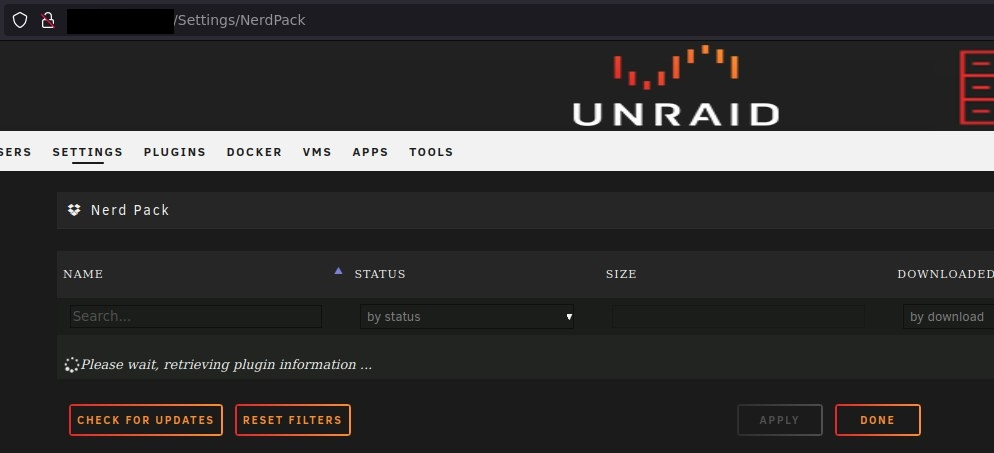
NerdPack plugin did not get uninstalled after booting into v6.11 first time. Should we just manually uninstall the plugin?
-
Guess I'm the only one seeing this?
-
Hi, setting up matrix container. What's this business with STUN TCP/UDP ports; additionally, why are both http & https defined? I'm using nginx on unraid, so it's the one doing TLS termination. Can I get away with only exposing HTTP port from the matrix container, or are the other 3 required?
-
Startup order, yes. Delay setting works perfectly for the initial startup. But when it comes to image upgrades (which will cause container restart), then delays don't mean anything. Example, say we have following containers: - redis - mariadb - delay 10s - - authelia Now when we have a situation where both redis & authelia containers are updated, then we can have a situation where authelia fails to start as redis is not up. If updates happened in the listed order, this problem would likely not occur.
-
With 6.9.2, the CPU 'Overall Load' as shown on Dashboard was mostly around 2%; same with older versions as far back as I can recall. ~24h ago upgraded to 6.10.3, and now it's between 2-6%, mainly in the 3-5% range. htop doesn't show anything odd. Main cpu consumer is shfs process, which has always been the case at idle. Have others noticed similar tendencies?
-
Something's going horribly wrong, given both array drive & cache are throwing CRC errors and have been disconnected within past week.
-
Ah right you are - interpreted my dashboard view to be all good, but it's clearly not mounted. Thanks.
-
Parity rebuild was uneventful, array started back up a-ok! Likely unrelated, but all docker world collapsed on me. Started another thread.
-
Recently I had an issue with a parity drive, which appears to be sorted now -- rebuild was successful and array started OK. Then noticed one docker container refused to stop - UI said it was stopped, but in reality it was still running. docker stop <id> didn't do the trick either. Upon unraid reboot, all docker containers are gone, and /appdata dir is empty. What gives? Dashboard looks ok to me: srvr-diagnostics-20220609-1347.zip
-
After wiggling the cables for a 3rd (!) time the parity drive is listed again. Running extended SMART tests overnight, then rebuild the parity. Is it possible the issue is caused by ageing setup? Living in a coastal subtropical zone and computer is now 6+years old - some metal bits on mobo are visibly corroded.
-
SSD/cache drive has been dripping those errors since almost day 1. Swapping cables around nor re-seating cable sockets hasn't improved it. Now looking, it seems the error count increase has sped up - used to be in the hundreds, now climbing into thousands... So, I rebooted the server. It came back with no parity assigned to array at all. - stopped array - went to 'Array Devices' tab to re-assign it - but it's not even listed! Seems like a complete connection error? Attaching post-reboot diags (with array stopped though) Guess best bet is to keep the array stopped, crack the case open and wiggle some cables? tower-diagnostics-20220607-1139.zip
-
Out of the blue got following notification: Starting SMART tests via UI does nothing, smart error log is empty. Parity drive is WDC_WD40EFRX-68N32N0_WD-WCC7K1VRDCFN, sdc. Including diagnostics file: tower-diagnostics-20220606-2221.zip How should one proceed? Reboot and see if it's possible to run SMART test?



