





tmchow
Members
-
Joined
-
Last visited
Everything posted by tmchow
-
I got this installed and container is running. Logs say nothing is wrong. however, when i try to hit the web dashboard, I get chrome error saying "too many redirects" and it doesn't load. Manually hitting http://192.168.1.161:9117/UI/Dashboard doesn't work, it redirects me to http://192.168.1.161:9117/UI/Login?ReturnUrl=%2FUI%2FDashboard. Any ideas?
-
I put “latest”
-
In the 6.8 RC5 release notes, it says this: I have some custom scripts running with user scripts plugin on boot up. Do we have to change anything?
-
I just bought an Nvidia GT 720 (specifically this card) to dedicate to a Windows 10 VM to just overall improve the performance of it as a daily general desktop usage. The overall UX is sluggish, and my research indicates this is likely due to not having a GPU, so I'm testing that theory with this relatively cheap ($60) GPU. I've noticed a lot of discussion almost entirely to GTX based cards. Does all this discussion apply to my card as well? I don't plan to share it with other VMs just yet, but could see myself wanting to if that's even possible.
-
The default color theme has always bothered me. I’m not color blind so can’t even imagine how hard it is for you.
-
does this block execution of rest of script until that is run? If not, i think I'd have to either: 1. run a sleep command instead within the script 2. create another script that uses "at now" to call my existing script
-
I have a user script that uses `wget` to download ffmpeg for use on my system. I have it setup to run "at first start of array". In watching the bootup procedure, the script runs but complains it can't resolve the host, and I think it's due to network connectivity not being available yet. The specific command I'm running is this: wget -qO- --show-progress --progress=bar:force:noscroll https://johnvansickle.com/ffmpeg/builds/ffmpeg-git-amd64-static.tar.xz -O //boot/custom/ffmpeg/ffmpeg-git-amd64-static.tar.xz Why wouldn't internet connectivity be available by the time the array is started? Is the solution to just add say a multi-minute sleep to the start of the script?
-
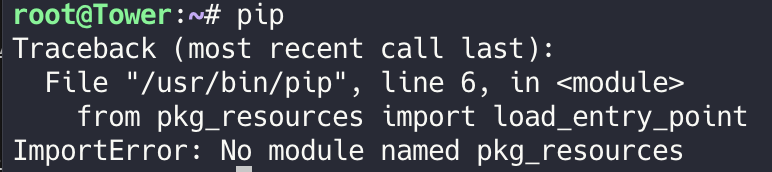
I'm having trouble with pip... I've installed it via nerd pack, but simply running "pip" from command line gets an error: I have Python 2.7 installed (also via nerd pack). Am I missing another dependency? SOLVED: Needed to install Python SetupTools. Did that and error went away.
-
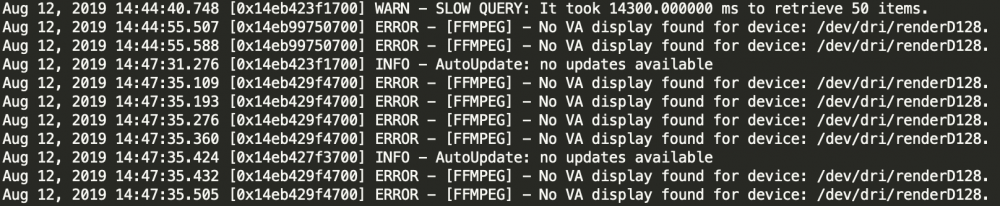
My second issue is an error I'm seeing in logs related to ffmpeg where I'm seeing this errror: No VA display found for device: /dev/dri/renderD128. e.g. screenshot of logs: I'm not sure if this is always been happening, but recently I added a Nvidia P2000 to my system to get HW transcoding to work (which seems to work since when I'm transcodoing, plex dashboard reports "(hw)" suffix and "watch nvidia-smi" shows the GPU is sued. I also at that time replaced my CPU to an Intel Xeon that supports QuickSync, but not because I wanted to use it for transcoding, just because the CPU was free. I'm NOT passing "--device=/dev/dri" in as extra params since I don't want to use the CPU, but i AM passing in "--runtime=nvidia" since I'm using the GPU. Admittedly I don't' know if these things are related to the error logs. Any ideas what's going on?
-
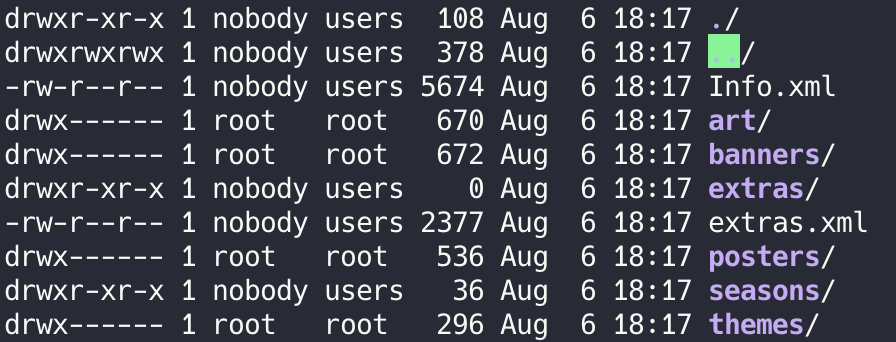
I looked through my logs and noticed 2 issues I'd love to get help on: First, I'm noticing a permissioning error throughout logs complaining about access to some files in the appdata. e.g. If I cruise through the folders and file permissions in /Library/ I'm seeing most stuff owned by nobody:users which I thnk is correct. However, I do see some files owned by root:root with 700 permissions. eg. Inside the one of the _content directories, these are the permissions: THen in the offending posters directory, I see these weird permissions: So something seems wrong that those files are owned by root:root, but have 000? 1. How do I fix these permissions safely? 2. How did this even happen to begin with? ----- UPDATE: I ended up just brute forcing this by fixing permissions on every file and dir in appdata: chown -R nobody:users followed by find . -type f -perm 000 -exec chmod 644 {} \; find . -type d -exec chmod 755 {} \;


-
Thanks for much for the detailed reply. Very much appreciated!
-
One question: What should I have `Tunable (enable NCQ)' set to? It's currently set to "off" but not sure if it should an alternate setting.
-
One problem is that my config changed after I've run it since I formatted my original single cache SSD from xfs to btrfs so I could add a second cache SSD. But here's the output: [0:0:0:0] disk usb:4-1:1.0 /dev/sda 15.3GB [1:0:0:0] disk sas:0x4433221103000000 /dev/sdb 3.00TB [1:0:1:0] disk sas:0x4433221100000000 /dev/sdc 3.00TB [1:0:2:0] disk sas:0x4433221101000000 /dev/sdd 3.00TB [1:0:3:0] disk sas:0x4433221102000000 /dev/sde 3.00TB [1:0:4:0] disk sas:0x4433221104000000 /dev/sdf 6.00TB [1:0:5:0] disk sas:0x4433221105000000 /dev/sdg 6.00TB [1:0:6:0] disk sas:0x4433221106000000 /dev/sdh 6.00TB [1:0:7:0] disk sas:0x4433221107000000 /dev/sdi 6.00TB [2:0:0:0] disk sata:5707c181007ca132 /dev/sdj 512GB [3:0:0:0] disk sata:5707c1810043a27a /dev/sdk 512GB
-
That looks wrong. My cache drive is 512GB but parity is 6TB
-
Just ran v4.0 on my array. Latest Unraid 6.7.2 with a 27TB array: Parity: 6TB WD Red Array: 3 x 6TB WD Red 2 x 3TB Seagate 1 x 3TB WD Red Test took 17 Hrs 45 Min 25 Sec to run. Attached the reports in case anyone was interested, including @Pauven LongSyncTestReport_2019_08_06_0008.csv LongSyncTestReport_2019_08_06_0008.txt
-
I think this is a better plan than disabling mover. I could see how this could get hairy later, Eg. In event of a bug where the original mover script is not replaced
-
Can you just run a find command for all files and folders on the cache disk directly?
-
Sure I see that but it also makes it dead simple to install, manage and not to mention it just works
-
Why not install telegraf via docker?
-
@dmacias any thoughts on the above given ffmpeg can be installed with a static build? This removes any issue with all the dependencies and extra libraries. Just need to download, extract and either copy to /usr/bin for example.
-
I have zerotier running on my unraid box and only want to use NPM with my zerotier IP. Reason is services I want to expose to the internet don’t need to be accessible on my WAN IP. Every device I use to connect has a zerotier client installed so I figure it’s better security (defense in depth) to limit access to zerotier IP Is this possible to configure?
-
Yes, thank you! I'll leave it in current settings then and not mess with it.
-
My parity checks are currently taking 14 hours, and reported to run at approx 109-114MB/s. Here was one recent summary: Event: Unraid Parity check Subject: Notice [TOWER] - Parity check finished (0 errors) Description: Duration: 15 hours, 15 minutes, 19 seconds. Average speed: 109.3 MB/s Importance: normal After running this tunables script last night, looks like I'm barely going to get any perf improvements but the stated speeds (both Bang for buck and unthrottled) are way faster what my parity speeds run at. What's the reason for the disparity? ******************************************************************************* Completed: 2 Hrs 9 Min 5 Sec. Best Bang for the Buck: Test 1 with a speed of 135.0 MB/s Tunable (md_num_stripes): 1408 Tunable (md_sync_window): 512 These settings will consume 33MB of RAM on your hardware. Unthrottled values for your server came from Test 27 with a speed of 138.6 MB/s Tunable (md_num_stripes): 2968 Tunable (md_sync_window): 1336 These settings will consume 69MB of RAM on your hardware. This is 39MB more than your current utilization of 30MB. NOTE: Adding additional drives will increase memory consumption. In unRAID, go to Settings > Disk Settings to set your chosen parameter values. ******************************************************************************* ******************************************************************************* * It is estimated that the Best Bang for the Buck values will provide 99% of * * the performance that the Unthrottled values will deliver, plus they provide * * much lower memory consumption. The Best Bang for the Buck values may be the * * smarter choice, especially if you run 3rd party plug-ins and add-ons that * * compete for memory. * *******************************************************************************
-
I have this scripted in go file to download a single tarball for static build and expanding it which is just a set of binaries: Main site Https://johnvansickle.com/ffmpeg/ Example to get the latest build in a static url: https://johnvansickle.com/ffmpeg/builds/ffmpeg-git-amd64-static.tar.xz
-
In addition to rclone, what about including ffmpeg? It’s so commonly used in media server setups.


