jademonkee
Members
-
Joined
-
Last visited
Everything posted by jademonkee
-
I've just started getting that error, too, but haven't yet tried to solve it Perhaps try it not in Volatile mode. The reasoning behind using Volatile mode is here: https://github.com/slskd/slskd/blob/master/docs/known_issues.md#devices-using-a-copy-on-write-filesystem-such-as-btrfs-or-zfs It may not apply to you.
-
See my post above: https://forums.unraid.net/topic/133844-support-manuel-rw-docker-support-thread/page/5/#findComment-1535627
-
Good to know, thanks. I haven't yet upgraded, so might wait for a few more point releases before I do.
-
True. Mine is just using the file syncing/sharing capabilities. I don't use it for calendar, contacts, docs, chat or video calls etc. I might give the upgrade a go tomorrow.
-
I've seen quite a few posting about problems upgrading to v32. Has anyone here upgraded without issue? I usually hold off upgrading to a major version until one or more minor versions have come out. That's now happened, but I'm hesitant to upgrade seeing some of the weird API errors and permission problems it seems to be causing. Are there any success stories about that could make me feel safer in the upgrade? Many thanks.
-
Just upgraded from 7.1.4 without issue. Any insight on what's changed regarding the below note in the changelog? Many thanks, as always, for your info - and for a great OS!
-
Just reporting back to say that it worked like a charm: everything handled in the back end, and I now have a 4TB (4x 2TB) mirrored pool. No extra config or fiddling was needed beyond just assigning the two new disks to the two new slots in the existing pool. Many thanks for your help - and a big shout out to Unraid and the Unraid devs: I'm continually impressed by the simplicity of managing this OS.
-
Hi there, I currently have a 2TB mirrored ZFS pool (comprising two SATA SSDs) that I use as my backup target. It's now filling up, and as I don't have any more NVMe ports, nor PCI-e slots, I have just purchased 2x more 2TB SATA SSDs. My initial intention was to move to RAIDZ1, but I heard that there's a performance hit, and I found some (now discontinued) MX500 SSDs for a great price, so I thought I would add another Mirrored vdev to the pool. Am I correct in thinking it's possible to do this? Maintain a single pool in Unraid, but with two sets of mirrored disks? The documentation here seems to say that it's possible, but I'm unsure if I have interpreted it correctly, or how I go about installing the new disks so that the storage of the pool appears seamless between the two mirrors. To quote: So how do I go about achieving this? Do I stop the array, add 2x more slots to my "pool2tb" then just add the two new disks? Or is another step required? Your help is appreciated. Below are the "Pool status" pool: pool2tb state: ONLINE scan: scrub repaired 0B in 01:15:09 with 0 errors on Mon Sep 8 01:15:10 2025 config: NAME STATE READ WRITE CKSUM pool2tb ONLINE 0 0 0 mirror-0 ONLINE 0 0 0 /dev/mapper/sdc1 ONLINE 0 0 0 /dev/mapper/sdb1 ONLINE 0 0 0 errors: No known data errors And "Pool Information" NAME SIZE ALLOC FREE CKPOINT EXPANDSZ FRAG CAP DEDUP HEALTH ALTROOT pool2tb 1.81T 1.41T 413G - - 4% 77% 1.00x ONLINE - mirror-0 1.81T 1.41T 413G - - 4% 77.8% - ONLINE sdc1 1.82T - - - - - - - ONLINE sdb1 1.82T - - - - - - - ONLINE Many thanks.
-
Thanks for all your work on it over the years! Very much appreciated.
-
Any word on if the new version (just now published by linuxserver) has the same warning or not? I held off upgrading last week when I saw your post.
-
A new flash drive will arrive Monday to replace my old one. Hopefully the problem doesn't happen again. I'll report back if it does.
-
Ok, I restored from a backup and it booted succesfully. Going to order a new (industrial grade) flash drive now. Hopefully it arrives before another problem occurs. Attached is the syslog. Hopefully the last lines in it cam shed some light on what happened. Many thanks for your help and insight. syslog.txt
-
I gave up and forced a shutdown via the power button. Looks like my flash drive died. Gonna go find a backup and restore it. (hopefully it's not the USB controller...)
-
Following your idea, I instead did: cp /var/log/syslog /mnt/user/public/syslog.txt and it executed correctly. However, I cannot mount that dir, as my mac can't connect to willow.local to mount the 'public' share
-
As mentioned above, it just results in: cp: cannot create regular file '/boot/syslog.txt' : Input/Output error
-
tail and cat seem to still work. See attached screenshot for the output of tail. The time for when the machine froze aligns with. the timestamp seen in the log. If anyone knows how to get more of the syslog, let me know.
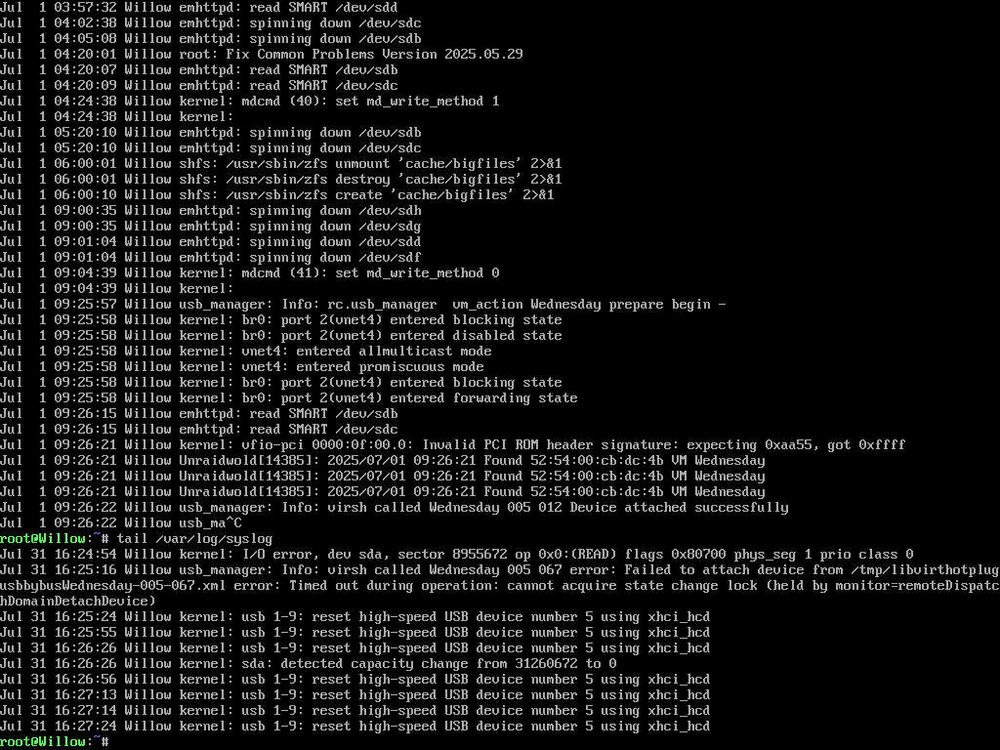
-
Hi I noticed today that my Nextcloud instance was no longer reachable. I tried logging into the unraid UI to see why, but it results in an "Unable to Connect" error. Strangely, my Plex and Lyrion Music Server Dockers remain working fine. I was running a Win 11 VM (named Wednesday), and had used a Powershell script to schedule its shutdown for 10 mins in the future before I noticed the problem with Nextcloud, so I was wondering if the problem could be a hanging VM. (I use that script all the time without problems) I can use my BMC to get to the Unraid terminal, so I tried the command: virsh stop Wednesday But it returned the error: error: failed to connect to the hypervisor error: failed to connect socket to 'var/run/libvirt/libvirt-sock' : Connection refused So I tried diagnostics and get -bash: diagnostics: command not found similarly when I try powerdown I get -bash: powerdown: command not found so I tried: cp /var/log/syslog /boot/syslog.txt and get cp: cannot create regular file '/boot/syslog.txt' : Input/Output error top gets -bash: top: command not found What can I do? What has happened? Thanks for your help.
-
Click on the Docker icon to bring up the menu, then click on "More Info" to go to the GitHub page for the Docker. From there, click on "Tags" to see all the available tags.
-
Welcome, Chris!
-
In case it helps, here is what I did to help with the Row Format errors in the upgrade to v31.
-
As a tip for backups (I didn't mention this in my previous post), I run a 2TB SATA SSD two disk pool as my backup target. Each night a script runs (via the User Scripts plugin) that puts NextCloud into maintenance mode, then rsyncs the data directory, database backup (generated by the db-backup Docker app), and config files backup (generated using the appdata backup plugin). Then, once a week, I attach an external USB HDD to backup from that SSD. This results in significantly faster backups to the external HDD, as well as ensuring that NextCloud backups only occur when the users are asleep (so that downtime isn't problematic).
-
Just chiming in here to reinforce that you should already have a backup of your NextCloud data. Go buy an external 8TB drive and use the User Scripts Unraid plugin to have it backup your NextCloud data (and any other important data) once a week (or whatever frequency you think best). Then save up for another 8TB drive and do the same thing with it. I do this, running alternating weeks between the two, so that my most important data (photos in particular) are stored in 3 places. A good overview of a useful backup strategy (the 3-2-1 rule) is available here: https://www.backblaze.com/blog/the-3-2-1-backup-strategy/ Best of luck in your upgrade path. I additionally recommend visiting the Admin page in NextCloud between upgrades, as it will tell you of any manual tasks that need to be performed, as well as any other problems. https://nextcloud.your.domain/settings/admin/overview
-
Just upgraded from 7.1.3 to 7.1.4 without issue. I've had no issues from any upgrade on 7.x See sig for specs.
-
OMGGGG thanks all for the tips. I just installed the update on my Win 11 VM and was upset to be greeted with a BSOD. Removing the CPU pinning (the new "deselect all" button in the Unraid VM template editor) allowed the update to finish installing and then boot into Windows. Doing anything was painfully slow with the single core CPU, so I tried re-enabling multiple cores, only to be greeted with the BSOD again. So I used the following instructions to enable the Virtual Machine Platform option mentioned above. FWIW I didn't need to enable the Windows Hypervisor Platform option, as I believe it's for running VMs in Windows, not running Windows as a VM. Thanks again, all, for your info: I was sure this was going to take all day to get working...
-
Upgraded from 7.1.2 yesterday without issue.