





Taddeusz
Community Developer
-
Joined
-
Last visited
Everything posted by Taddeusz
-
As a container maintainer how do I make my change log available when someone clicks the "more information"?
-
Click on the lock to the left of the address and there should be an option there to allow the site to access your clipboard.
-
I was going to ask what browser you're using. As @alturismo said it works under Chrome. Safari doesn't seem to give the same kind of access to the system clipboard so you have to manually paste into Clipboard input box.
-
Press shift-ctrl-alt on your keyboard and paste whatever you need into the Clipboard text box. Then you can right click in the terminal and it will paste.
-
In the password input fields?
-
I see your point but if the logged in user is not an admin then it makes perfect sense. If you’re in an environment where security is a more serious concern walking away from your desk while logged in as admin is the real problem.
-
To change the logged in user’s password you have to go to the Preferences tab. It makes sense for security purposes so someone can’t blindly change the logged in user’s password without knowing their current password.
-
@nuhll Have you tried logging in as guacadmin and then going to Settings and then Preferences? You can change the password there.
-
Were you logged on as guacadmin?
-
Did you try a longer more complex password? I changed my guacadmin password a long time ago so I know it’s possible. I used a rather long complex password though.
-
You can change your own password if you have the “can change own password” permission. The guacadmin account should be able to change its own password unless you removed that permission.
-
@nuhll You would need to have at least one user that is able to administer system, create users, and create user groups.
-
I would think that the user you're trying to do this with would need the proper permissions: Administer system, Create new users, etc.
-
Unless there's a specific option for QuickSync this sounds like a weird BIOS limitation that disables QuickSync whenever there's a PCIe video card present no matter which is set to be primary.
-
Do you have the latest bios? Do you have a monitor plugged into the motherboard when you’re booting UnRAID? I have an ASUS PRIME H370M-PLUS. I have to have a monitor plugged into the motherboard or else it makes my PCIe video card primary and QuickSync is disabled.
-
@DannyDonahue This may be nothing but what happens if you take the trailing "/" off the device and make it just "/dev/dri". Which Plex container are you using?
-
@DannyDonahue In your Plex Server Transcoder settings do you have the two hardware settings enabled?
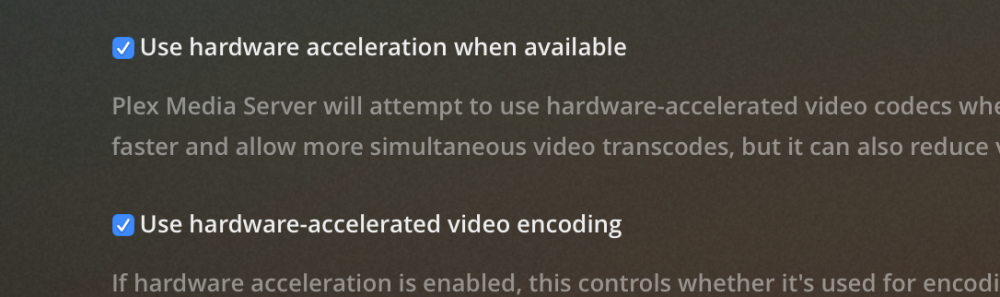
-
@DannyDonahue It may also be necessary to have a monitor attached to an iGFX port. When no monitor is attached to an iGFX port my motherboard will auto select the PCIe graphics card even though it's set to boot with the iGFX as the primary. What I ended up doing was connecting the VGA port to the motherboard and HDMI to the PCIe graphics card for my VM.
-
Okay, I guess I'm happy enough with the update code now. I had a revelation that the sql update scripts are cumulative so say upgrading from 0.9.13 requires running both the 0.9.14 and 1.0.0 scripts. I'll come up with a better way to do this but for now this is what I have. If someone can come up with a more elegant way to do this feel free to submit a pull request and I'll check it out. I'm still trying to figure out if there's a way I could provide database updates when using the nomariadb container. As always, please let me know if you have any problems.
-
They put out a statement the other day saying that the recently released 1.2.0 fixed this problem.
-
I’m not ready to update the “latest” branch yet. I think I need to rethink the database upgrade scripting. I’ve always thought it was a kludge. I just haven’t thought of a better way to do it. Fortunately there are no database changes this time around. However, if you’d like to test it out I’ve pushed out 1.2.0 with the tags “1.2.0” and “1.2.0-nomariadb”. I’m sure I’ll be making changes to the database update code before I decide to make this official. That being said, I really like the quick change feature for if you have multiple remotes open. I also have to admit that I personally haven’t been using my own Guacamole that much. A lot of that has to do with changing jobs and then having to work from home due to COVID-19. I just don’t need the remote access as much as I once did. Plus, Unraid’s built-in Wire Guard has made it much easier to get remote access when I need it. I am still dedicated to maintaining this container. It’s a great tool that needs an all-in-one version. I’m sure the separate client and server containers have their place but the all-in-one approach is much cleaner to deploy. If you decide to test this out please let me know if you run into any issues.
-
I'll work on getting this out by the end of the weekend. @Fidreus I'll also include the fix for OpenID.
-
@bbtiger @JT24 https://makemkv.com/forum/viewtopic.php?f=1&t=20579
-
@Djoss Would be nice to be able to adjust the container date for cases like this where the beta key hasn't been updated. Luckily I have a "backup" computer with a BD-ROM drive that I can use in a pinch but I'm sure others aren't so lucky.
-
@dodgypast Oh yeah, you can only reference the container name if you're running them on a custom network. Otherwise you have to reference your server's IP address. I'm glad you got it working.


