





Taddeusz
Community Developer
-
Joined
-
Last visited
Everything posted by Taddeusz
-
I got this today also. Seems this is something wrong with their repository if multiple people are seeing the issue unless it's something in Unraid's Docker implementation.
-
@trb037 Is TOTP still a problem for you?
-
I don't see anything obvious. What browser are you using? Have you tried clearing your browser's cache or reload the page with ctrl-f5?
-
Is that the catalina.out file? There should be a folder within the logs folder with this file. There is also a tomcat.log but that just monitors the status of the tomcat service. Not useful for this problem.
-
It's in your appdata folder in logs/tomcat
-
@trb037 Do you have the latest version of the container? There was a problem some time ago where TOTP wasn't working correctly due to folder permissions. Can you please post your catalina.out file from right after you've attempted to login?
-
For a while I've been having a couple problems with my oauth2proxy. I have cookie expiration set to 24 hours and refresh set to 1 hour. However, it seems after about an hour it's forcing me to login again. I can see the cookie is set to expire after an hour but it's still making me login again within the 24 hour period. The other problem I've been having is that periodically after I choose my Google account I get an error page rather than a success and forwarding to the requested page. If I then go back and attempt to login again it's successful. These two problems are rather annoying. Any ideas?
-
They support it just fine. I've used QSV with the Plex Docker with both an older Ivy Bridge i5 3470 and my current Coffee Lake i5 8400. It works great!
-
Well, after all that I see that the type of compression is selectable in the GUI. And in the end I decided to just disable compression. Especially after reading that having it enabled is not currently secure due to the VORACLE attack vector.
-
Well, this is a revolting development. I changed the "comp-lzo yes" lines and all "compress" types break my connection using the official OpenVPN iOS app. Tunnelblick works fine though.
-
It would be nice to see an option to select compression type and/or syntax. By that I mean being able to select whether to use 'comp-lzo' or the 'compress' command. Then also if you choose to select the 'compress' command being able to select between 'lzo', 'lz4', or 'lz4-v2'. Understanding that 'comp-lzo' is deprecated I believe 'compress lzo' should be the default syntax. Having a GUI like this means putting in enough functionality so that someone doesn't need to make manual edits like this unless it's something obscure.
-
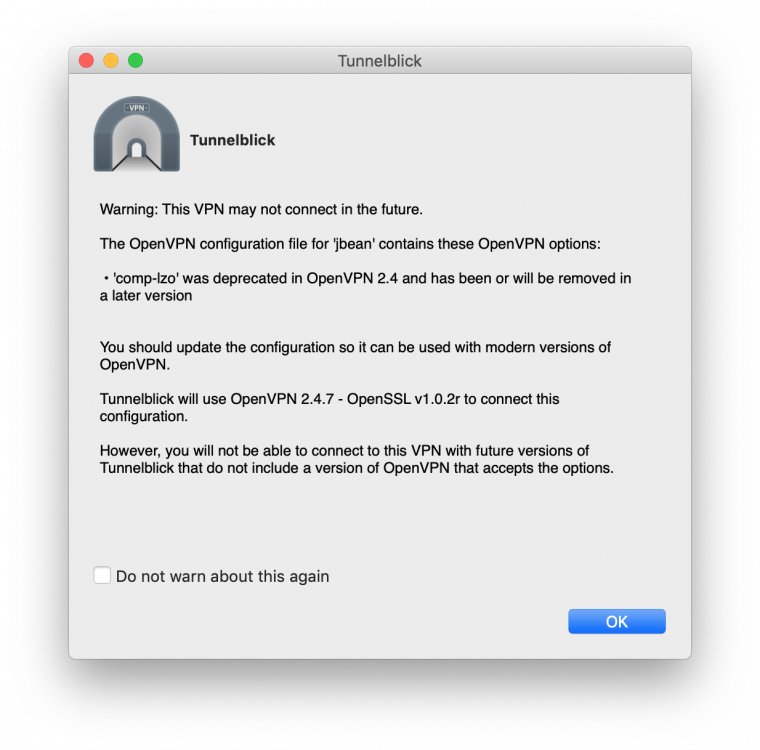
Recently I've been getting this message from Tunnelblick about the comp-lzo option being deprecated. I know I can click the checkbox so that the warning doesn't appear again but is there a better fix for this? A way to use a better supported compression option?
-
Neither, I have the latest version of FCP and I don’t spin down drives. Sent from my iPhone using Tapatalk
-
As the OP I just thought I would chime in that I’m NOT getting a cache warning from FCP. Sent from my iPhone using Tapatalk
-
I’ve had the same problem with the nct6775 driver since upgrading to 6.7.0. Sent from my iPhone using Tapatalk
-
Thank you.
-
Since git has been removed from Unraid 6.7.0 how do I use NerdPack to add it back? I don't see it listed in the GUI.
-
This is frustrating since it was there all through the pre-release phase and was only removed in the final release. Is there a way to manually add it back?
-
The drive I'm having problems with is an enterprise drive, a WD WD4000FYYZ Re/RE4 4TB. It's also on a separate cross-flashed IBM M1015. The rest of the drives are on a cross-flashed Dell H310. I've not found any information from WD on enabling the write cache on the drive. I can try moving the drive either to the H310 or to one of my motherboard's SATA ports.
-
For whatever reason I've recently been looking at the write cache on my drives. All of my array drives are showing write cache enabled except for my parity drive. Is this by design? When I try to manually set the write cache on that drive using hdparm this is what I get so it never gets enabled: root@unRAID:~# hdparm -W 1 /dev/sdj /dev/sdj: setting drive write-caching to 1 (on) write-caching = 0 (off) unraid-diagnostics-20190513-1345.zip
-
@Eris I also need the Docker container log itself. On Unraid's Docker basic view it's the little page icon on the right side of the row. Your guacamole.config would also be very helpful. I also don't see anywhere you've attempted to log in. In my own log I can see specifically where authentication requests were made.
-
@Eris Sorry, I meant like a screenshot of your Apache Guacamole Docker configuration page.
-
Unfortunately, I've never been able to repeat this problem. If you can post your logs after you've attempted logging in (both catalina.out & Docker console log) and your configuration.
-
There is one Docker container I've run across, "OAuth2 Proxy", that constantly says it has an update. When updates are run there is nothing. This container is hosted from quay.io and the repository address is https://quay.io/repository/pusher/oauth2_proxy. Not critical but very much annoying.
-
I’ve been having an issue where your OAuth2Proxy container always has an update available but there actually is none. I’ve tried starting from scratch by creating a new docker.img file, which has fixed this kind of thing in the past. Then every night when the updater runs it attempts an update. Any ideas? Sent from my iPhone using Tapatalk

