





Kewjoe
Members
-
Joined
-
Last visited
Everything posted by Kewjoe
-
I tried your config and it still didn't work. I tried different variations, but nothing is working.
-
I'm having an issue with Only Office. I followed spaceinvaderone's video. OnlyOfficeDocumentServer docker is set up. When i go to my "documentserver.mydomain.com" it shows "Document Server is running" with a green checkmark. I install the Only Office app in Nextcloud, i added the "documentserver.mydomain.com" to the Only Office options. It accepts it and saves. I create a document and go inside and i just get a blank screen. No errors (Using Firefox) The only clue I have, using Chrome i notice i get an error message in the middle of the screen only if i hover my mouse over which says "documentserver.mydomain.com refused to connect". I triple checked my nextcloud settings, my letsencrypt settings.. the documentserver subdomain conf file. I've removed and re-added both the docker and the only office app. Nextcloud, Let's Encrypt and the DocumentServer docker are on my proxynet network. Any one got any ideas?
-
@giantkingsquid Look at the first hit of the FAQ: https://github.com/LycheeOrg/Lychee/wiki/FAQ
-
Nice. that worked. Not sure how that happened. Isn't apcupsd one of the default scripts you include? i might have added it myself a long time ago. Ah well. works now. Thanks!
-
4041 drwxrwxrwx 14 root root 8192 Mar 12 16:24 ./ 4039 drwxrwxrwx 3 root root 8192 Jan 16 05:43 ../ 5133 drwxrwxrwx 2 root root 8192 Nov 18 18:57 USB\ HotPlug/ 5105 drwxrwxrwx 2 root root 8192 Nov 18 18:57 apcupsd?.sh/ 5109 drwxrwxrwx 2 root root 8192 Nov 18 18:57 clear\ an\ array\ drive/ 5115 drwxrwxrwx 2 root root 8192 Nov 18 18:57 delete.ds_store/ 5112 drwxrwxrwx 2 root root 8192 Nov 18 18:57 delete_dangling_images/ 5118 drwxrwxrwx 2 root root 8192 Mar 1 23:23 duplicacy\ install/ 5124 drwxrwxrwx 2 root root 8192 Nov 18 18:57 icon\ sync/ 5121 drwxrwxrwx 2 root root 8192 Nov 18 18:57 icon_banner\ downloader/ 5127 drwxrwxrwx 2 root root 8192 Nov 18 18:57 move\ array\ only\ shares/ 5130 drwxrwxrwx 2 root root 8192 Nov 18 18:57 move\ cache\ only\ shares/ 5135 drwxrwxrwx 2 root root 8192 Nov 18 18:57 viewDockerLogSize/ 5138 drwxrwxrwx 2 root root 8192 Nov 18 18:57 vm\ settings\ backup/
-
Here you go. Thanks! ganymede-diagnostics-20190313-0237.zip
-
I'm having a strange issue. All my schedules somehow got set to disabled and when i try to re-enable the schedule, i can't press "Apply". Nothing happens. If i go back to the page, it's all disabled again. I've tried different browsers and have rebooted several times (for other reasons) and it's still not working. The scripts work fine if run manually. I've tried removing and re-adding the user scripts plugin, didn't help.
-
I got the same thing with a fresh backup (2.3TB to my backup unraid server). I'm so sick of Duplicati. I've tried to run it for a long time now (more than a year off and on) and it just doesn't work for me. I give up.
-
@SlrG I uninstalled all plugins (except this one of course), disabled dockers/vm's and rebooted. Same error. This is a relatively untouched install of unraid. It's on my backup server and I haven't done anything too crazy with it. It is not heavily modified in anyway. Let me know what else I can test/provide to help.
-
I did a fresh install on 6.7.0-RC4 and got the exact same error as @Cessquill. I have a stock proftpd.conf. All i did was install and try to run.
-
I'm having the exact same problem. Created an SMB share on my backup server. Did a fresh install of Duplicati. When backup starts it soon locks up and 2 CPU cores are pegged at 100%. I can't stop or even kill duplicati when this happens. I can't shut down/reboot as the server is never able to stop the docker service. It's kind of crazy. I've already had to hard reset once (ouch), but i tried again and it happened again right away. is anyone else using SMB shares and not having this problem? Edit: I copied 6 gigs (2000+ files) to the SMB share using Krusader and it copied just fine. Definitely looks to be a Duplicati issue.
-
It was the password i had a passphrase, i guess it didn't like the spaces. All good now. Thanks!
-
I'm having an issue setting up an SMB share. I have 2 unRaid systems. Adding an SMB Share in Server 1 from Server 2. The share on Server 2 is set to "Private" and the user is set to read/write. But when i set up the SMB share on Server 1 and put the user credentials, I cannot mount the share. I've tried both Private and Secure and it doesn't work. If i set it to public it mounts just fine. Does UD not work with secure/private shares on another machine? I spent quite a bit reading this thread and searched for "private" and "secure" and couldn't find any information to help.
-
No, are you sure the CPU usage is being caused my pihole? Sent from my ONEPLUS A3000 using Tapatalk
-
I definitely did! Thanks! Sent from my ONEPLUS A3000 using Tapatalk
-
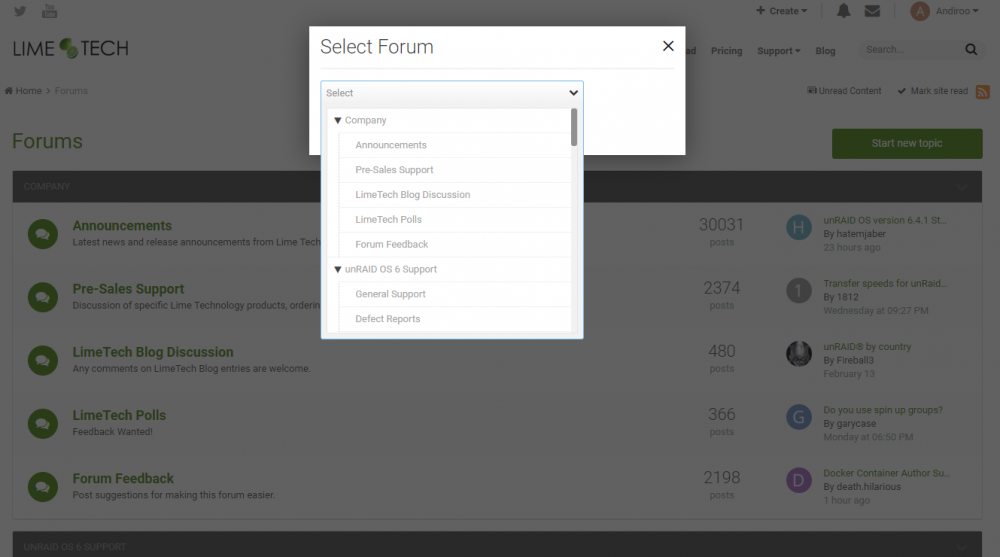
That's the strange part, he doesn't see a reply button on any thread/sub forum. Only the main page, and it's all greyed out. He's viewing this particular thread and he shared his screen with me, doesn't have a reply button. He created his account yesterday morning and was able to PM me, but can't post a new thread or reply to an existing thread.
-
I attached a screenshot of what he sees. When he attempts to post, it gives him that screen and all options are greyed out. He tried with both Chrome and IE, both had the same issue.
-
Hi Gents, A friend of mine is getting into unRaid and created an account. He is not able to post on any forum, everything is greyed out. He is able to PM though. Does his account need to be approved before he can post? User is @Andiroo Thanks!
-
Thanks! easy to install, easy to set up. Liking it so far!
-
https://github.com/diginc/docker-pi-hole
-
I've been running it for weeks with no issue (overall been running it for months) The only "fiddling" was when the image was moved from alpine to debian and there was a workaround needed. Other than that, works great.
-
Spants, super duper non-important thing. Maybe we can change the docker icon to the official logo? https://pi-hole.net/trademark-rules-and-brand-guidelines/ specifically https://i0.wp.com/pi-hole.net/wp-content/uploads/2017/06/Vortex-r.png?resize=300%2C300&ssl=1 I changed it manually. Just thought it'd be a nice touch.
-
My primary server is on 6.3.5
-
I also installed this on my backup server (running 6.4 RC9f) and I have the same problem there. For both I'm using separate IP's, but that shouldn't matter.
-
My appdata is in the standard location. Everything is User:Nobody, Group:Users. the pihole directory has 777. I've added whitelist and blacklist ltems and those stick. But anything done via GUI, nothing sticks. Once things are running, does anything else get copied to the appdata folder? or it's the same 3 files when you set it up?


