





GroxyPod
Members
-
Joined
-
Last visited
-
That's funny because I am using firefox and it worked fine for the first browser. My guess is it might be related to whatever ad blocker being used or similar.
-
Honestly I wish I could remember what exactly happened. I just re-installed and it's working fine when changing https to http. Checks out across all browsers. The only thing I do differently now is I use a custom IP for my dockers (queue the hissing "but mah security" proponents haha)
-
In your settings, you're trying to get an ssl cert for duckdns.org instead of your own custom dns name. You need to use the custom domain name you have on duckdns.org <eg: minecraft.duckdns.org>. By using a dynamic dns provider, I'm not sure if you can use subdomains at that point, I personally haven't used a dynamic dns provider and just go with a cheap .com instead. Nevermind, misread.
-
You necro’d an near- 4 month old thread that was literally a different animal at the time of posting the information. Clearly it’s changed and I’m well aware how to update containers. Not sure what you’re trying to gain here by doing so. Sent from my iPhone using Tapatalk Pro
-
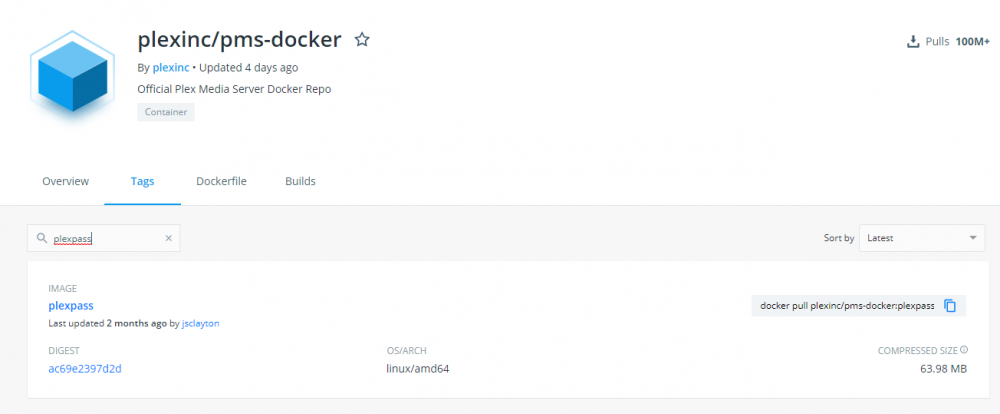
This message was posted over 3 months ago, when the post was accurate. BTW, the plexpass tag was update 2 months ago. The latest tag was updated 4 days ago.
-
Per their own docker hub at: https://hub.docker.com/r/plexinc/pms-docker they're supposed to have separate tagging: latest, plexpass, and public however they haven't updated the plexpass or public one in over a year. Safe to assume you're on the public (regular) version and not plex pass. To utilize plexpass versions (so long as you're a plex pass holder), you'll likely need to use another docker container like linuxserver where they keep it more up to date.
-
Anyone else having an issue with all torrents showing timed out on trackers with the latest update (assuming 1.1.r42.g37c9d4b-1-04)? Just backed down to 1.1.r42.g37c9d4b-1-03 and my torrents no longer show time out.
-
Looks to be an issue with Chrome, yet again. Really starting to hate Chrome. Thanks sparkyballs!
-
Installed this docker fresh and the WebGUI will not load. It gets to a certain point then stops. It looks like its halting at pulling the nightly build. Here is what I see in the log: -------------------------------------_ ()| | ___ _ __| | / __| | | / \| | \__ \ | | | () ||_| |___/ |_| \__/Brought to you by linuxserver.ioWe gratefully accept donations at:https://www.linuxserver.io/donations/-------------------------------------GID/UID-------------------------------------User uid: 99User gid: 100-------------------------------------[cont-init.d] 10-adduser: exited 0.[cont-init.d] 20-config: executing...Writing Pem file [/config/znc.pem]...[cont-init.d] 20-config: exited 0.[cont-init.d] done.[services.d] starting services[services.d] done.Checking for list of available modules...Opening config [/config/configs/znc.conf]...Loading global module [webadmin]...Binding to port [+6501] using ipv4...Loading user [admin]Loading user module [chansaver]...Loading user module [controlpanel]...Staying open for debugging [pid: 204]ZNC 1.7.x-nightly-20180404-d6bfe504 - https://znc.in
-
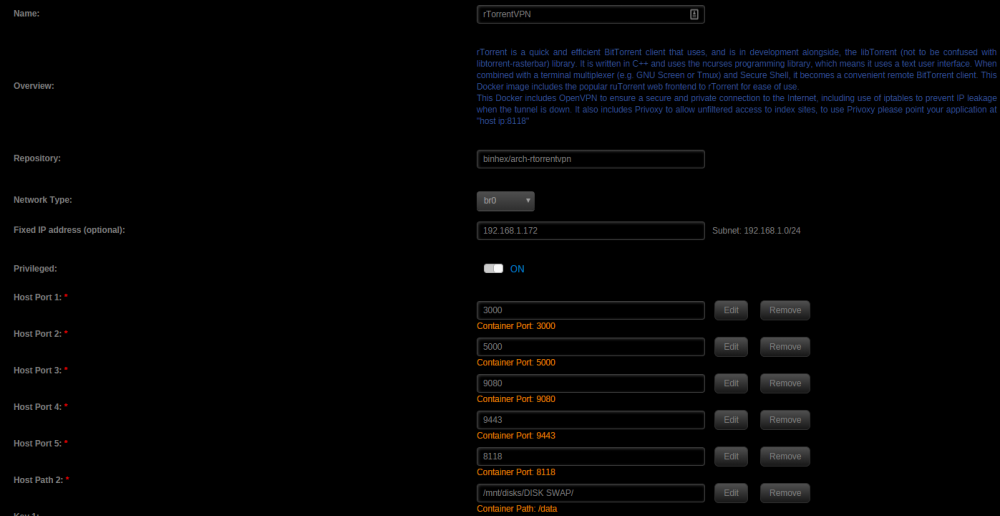
Looking at the nginx config, I definitely should be using RPC2. When I use xmlrpc within the docker, everything is reporting just fine. EDIT: Fixed, the docker does not like being attached to a dedicated IP. Soon as I switched it to bridge networking, I was able to get it to connect without issue. Thanks BrttClne22!
-
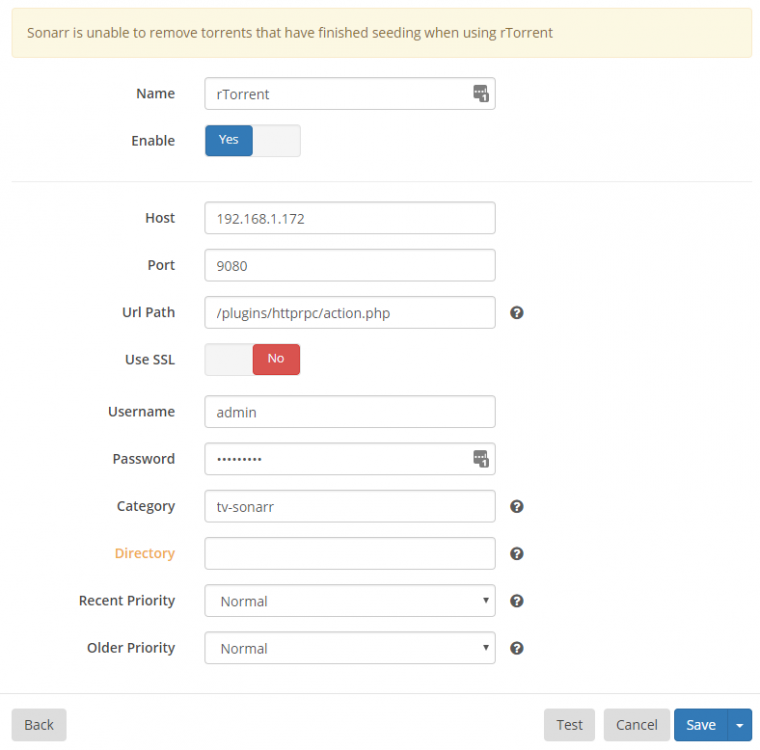
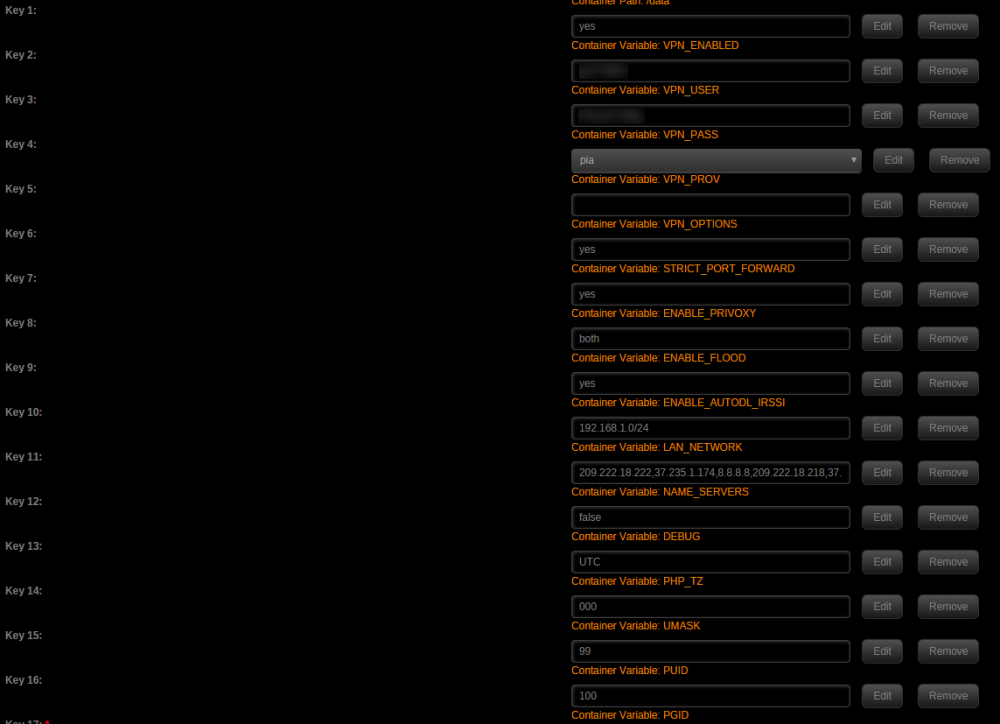
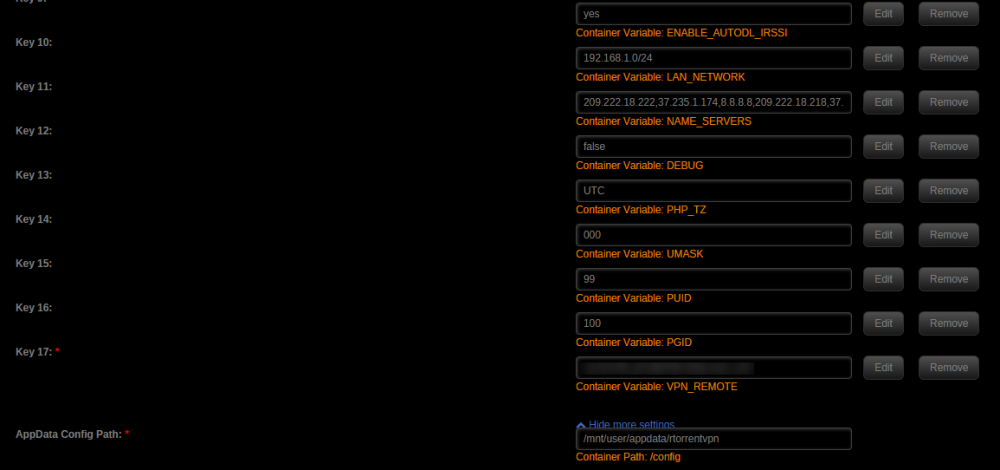
I'm trying to setup Sonarr with rTorrentVPN but I keep getting an issue where it says the connection failed. I noticed that both httprpc and rpc are included within the docker, but I must be doing something wrong with regards to the URL path. Here is what I have: I tried searching through the support thread and came across someone having issues with sickbeard but even after attempting the suggested fix, I still can't get it to work. Any help is appreciated, thank you!
-
Will do! Sent from my iPhone using Tapatalk Pro
-
Setup LinuxServer's Plex docker via CA and immediately after it is stating that it is out of date. If I update it, a few hours after that occurs, I start getting errors stating too many files are open (in both the docker and syslog) and it causes the server to crash. I'm now on the LinuxServer Plex docker setup via CA but have not triggered the update it is requesting. What information do you need regarding this issue? I'd like to avoid updating and having the server crash again if possible (unlikely I'm sure).
-
I encountered the very same issue and this is how I had to solve it: 1) Drop and re-create your database so it is fresh (if you don't, you'll get a primary key error after fixing the problem) 2) SSH into your unRAID box and type: docker exec -it projectsend /bin/bash --- Providing you kept the default docker name of projectsend. If you didn't, change it to whatever you set the docker name as 3) Change Directory (cd) into /var/www/htdocs/localhost/install 4) type: vi database.php 5) Navigate to line 26 and change expiry_date TIMESTAMP NOT NULL DEFAULT CURRENT_TIMESTAMP(), to expiry_date TIMESTAMP NOT NULL DEFAULT "2017-01-01 00:00:00", 6) Press and hold SHIFT then type ZZ 7) Attempt to finish installation now within the docker's web ui
-
Login to your unRAID box via ssh and then do a directory listing (ls) on the /tmp directory when you see a transcode happening on plex. You should see a randomized plex folder be created in the /tmp directory.


