





kaine1688
Members
-
Joined
-
Last visited
Everything posted by kaine1688
-
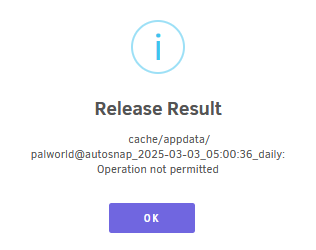
So i am able to destroy a dataset, but I am unable to release one. Doesn't matter what dataset i try to release it just gives the same message. I set everything up using SpaceInvaderOnes video so i think i did everything right. I might have tried to fix something and was try to fix permissions using the utility in tools, maybe that messed something up? I think it got to the ZFS pools, but it did nothing. unraidplex-syslog-20250304-2037.zip
-
will do, thanks
-
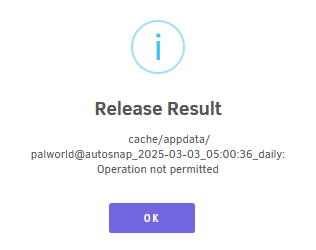
So i am able to destroy a dataset, but I am unable to release one. Doesn't matter what dataset i try to release it just gives the same message. I set everything up using SpaceInvaderOnes video so i think i did everything right. I might have tried to fix something and was try to fix permissions using the utility in tools, maybe that messed something up? I think it got to the ZFS pools, but it did nothing. unraidplex-syslog-20250304-2037.zip
-
I recently rebuilt my server with a Gigabyte MS03-CE0 motherboard but it will not see my Unraid USB device. I tried my old flash drive and recreated it with the utility tool on a brand new drive and nothing. But when i tried a Windows bootable device it works perfectly fine. Going through the manual page 41 i have everything enabled, can anyone help?
-
Updated recently and got the following error: Your data directory is invalid. Ensure there is a file called ".ocdata" in the root of the data directory. Your data directory is not writable. Permissions can usually be fixed by giving the web server write access to the root directory. See https://docs.nextcloud.com/server/27/go.php?to=admin-dir_permissions. How do I fix this?
-
Noticed today when i try to access my nextcloud that something was wrong, it generated a 1.3TB error message on my cache drive. 3987e7d2562f.7zAnyways i deleted the error file and started docker back up and it generated a new error file. Can someone look at this and help? I have a okay backup from 2 days ago that was still working, the backup file wasn't enormous. Can you restore a single docker form the CA Backup/Restore? or better yet if anyone can figure out what happened would be great. The database is only used for NextCloud and PhotoPrism. syslog-192.168.1.13.log
-
Sounds good, both servers are on 6.11.5, swapped them both. Will circle back if i see similar happens again. Thanks Thought maybe after stuffing 10gig nics in both server something was wrong with them, but then again i did only see this issue after i upgraded from 6.8
-
It happened again yesterday but i just IPMI reset the server, and same thing today. syslog-192.168.1.12.log It seems to happen when i am streaming plex, pause and walk away for extended periods of time, with whatever i am watching paused. Or atleast it seems. The GUI becomes unresponsive and i am unable to SSH into the server.
-
Ya i saw my mistake :X enabled it now and its working
-
unwejaton-diagnostics-20230108-0848.zipCan anyone look through the log and figure out why the server is becoming unresponsive, this has happened 2 times already this week? I am not sure what is happening. This server has a ZFS pool. When it hangs i can not SSH into server or anything, it just completely locks up. Only a reboot solves the issue. I think CA backup is causing it, lastnights backup is only 11GB vs usual 360GB. So i have the backup pointed to a ZFS share, is that bad? i only have a 512GB SSD in array since i mainly use this server as nextcloud/steam library/game servers on the ZFS pool. I could chuck a spinner in the array and just use it as the backup drive.......
-
Hi, I recently set up the container using SpaceInvaderOnes youtoube vod, with cloudflare ddns + swag. Everything is working great, heres the question. If i wanted to switch from swag to just using a cloudflare tunnel, is there something special that needs to be done? i tried switching and it makes the docker unnacessible from outside the network. I know i could just rebuild the docker and go through the setup but not sure what i am missing, assuming switching shouldnt be that hard?
-
Has anyone tried the LSI 9400-16 from this supplier on ebay? Usually I stay away from China sellers but this looks like a great deal if its real. I know the card should work out of box, I have a storinator Q30 i am rewiring from the Rocket 750 days and am in need of either 2 9305 or 9400 cards and just evaluating my choices. https://www.ebay.com/itm/143728524336?hash=item2176e33c30:g:zicAAOSwXrpfWP70
-
Yes it did.
-
I believe the docker got an update over the last few days, now when I try to look at recordings, only the current day shows. Nothing else is there. Anyone seen this behavior before? Got this in the error log when I try to recover the database under config 1562943122.591 2019-07-12 09:52:02.591/CDT: ERROR [uv.recording.sync] Unable to process: /media/recordings in RecordingSynchronizationTask 1562943122.588 2019-07-12 09:52:02.588/CDT: ERROR [uv.recording.sync] Unable to process: /media/camera in RecordingSynchronizationTask 1562942781.886 2019-07-12 09:46:21.886/CDT: ERROR [uv.db.svc] Failed to acquire client connection null in MongoDb-Connecting Strange if I try to to last week/month recordings show, but not specified times. Its almost like the indexing on recordings is not functional so I am assuming it has something to do with the MongoDB?. For now downgrading controller and cameras fixes the cant see recordings issue. If anyone has any ideas with regards to this, much appreciated. server.log
-
Thank you sir, didnt know you can do that. Ran into some other issues after BIOS update but that is all straightened out. So ya 6.7 does not work at all, 6.6.7 works perfect. My Adaptec 71605H is on latest firmware and so is the MOBO Z10PE-D16 WS. Thanks again..................virtual beer gifted
-
I do not want to mess anything up so could you be more specific, there is a folder called previous on the USB but its probably the 6.7 update, is there anywhere else I can get these files?
-
The rollback under Update OS only gives me option to 6.7, is there another way to revert back to a previous release?
-
Now that I might think about it I might have been on 6.6.6 i think and had a update pending and hit update again to 6.7.2 since the notification was up. Could that have done anything?
-
Anything I can do to get the array up and running? I tried reverting back to 6.7 but the same thing happens. It was running perfectly fine before the update.
-
What does that mean exactly, possible causes?
-
Updated to 6.7.2 and got the missing drive issue, was running 6.7 before this perfectly fine, tried reverting with nothing. Looking over boot the Adaptec HBA is loading fine during boot sequence but UnRaid is not seeing any drives. Can anyone help? Checked BIOS, drives are shown. unwejaton-diagnostics-20190701-0459.zip
-
That worked great, thanks. Now if Ubiquiti made it easy to re-add remote access to all user accounts it would be great.......
-
Did any other cameras work or are still in the Managing status?
-
If you can still log into the camera GUI or SSH into it, just point it to the controller or use the adaption token from the controller GUI, it should take it as long as the firmwares are compatible. I just learned that the hard way.......
-
it took me back to 3.9.7-beta on the controller and I had to downgrade way down to UVC-G3 4.2.59 and then it upgraded the cameras again to 4.3.9
