






TechMed
Members
-
Joined
-
Last visited
Everything posted by TechMed
-
Thanks for the suggestion. (for those that do not know where this is, it is under "EDIT", then change the STRICT_PORT_FORWARDING line to say "no" and your all set. I would restart all your relevant containers. It is not an ideal solution, but at least I can now (after almost a week) get back on!
-
Thanks! Works wunderbar!
-
Based on my readings before and after Roxedus' answer, I figured that was the case. However, it never hurts to get a second opinion/confirmation. 🙂 Thanks for taking the time to respond.
-
Hi @aptalca, Since you appear to have a deep understanding of Let's Encrypt, I am wondering if when you have time, you would take a look at this post from earlier? Either I am missing something obvious or I am not using the correct search parameters to find the answer because I have looked for a while now. Thanks!
-
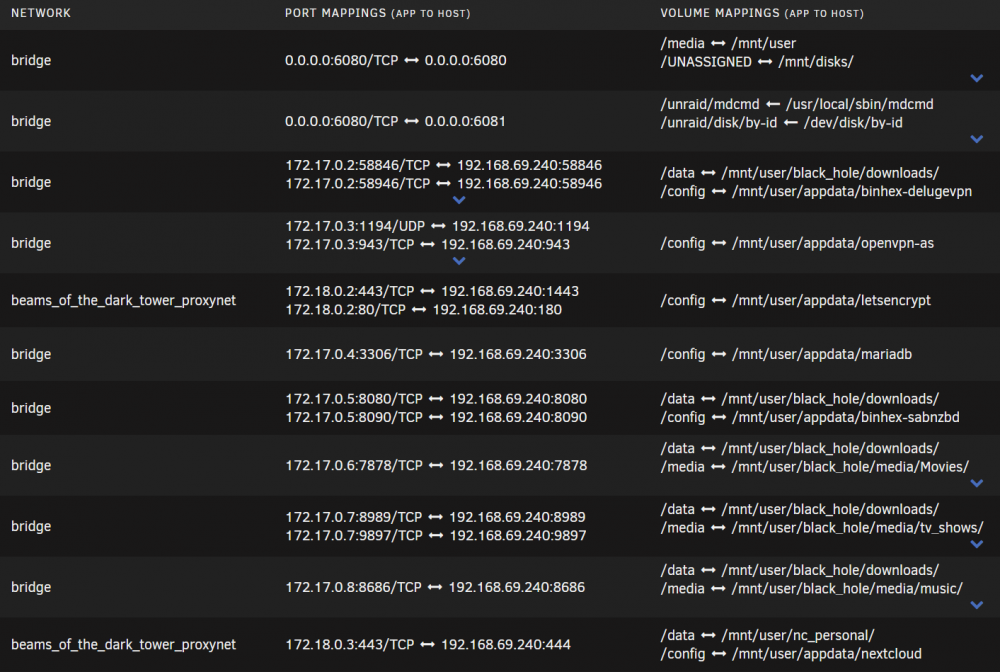
Edit: just realized I inserted my image over the text @jonathanm as directed LE and NC are on the self-created proxy network. However, they are all on the same IP which is that of the server. Is that what you mean?
-
@jonathanm 😉that's what I was trying to get at and teach at the same time. BTW... any chance you could shed any light on my question?
-
no problem; wish we could have solved it As Ed makes it pretty straightforward. good luck! maybe post your solution so others that run into the same issue can find an answer.
-
sorry, should have been from this point in the video... If the setup of DuckDNS (the actual DuckDNS container on your server) does not know "subdomain2" exists, it will not resolve and in turn throw a DNS error.
-
Okay... I understand now. Did you add in "subdomain2" to your DuckDNS container as Ed points out here?
-
If you are using his recommended "best" solution, then your mixing up your apples and oranges. The duckdns.org portion is only for pointing to your IP (at your office based on your comments). I am guessing it is setup like "my_office-name.duckdns.org" correct? Assuming you are using your office/company domain name ("best" solution), then you should be able to access your Nextcloud container via nextcloud.my_office_name.com So again, are you using a domain name? (www.my_office_name.com)
-
In keeping with Ed's (SpaceInvader One's) examples... Are you using your own domain name? This is where Ed talks about putting Sonarr and Nextcloud as subDOMAINs i.e. nextcloud.mydomain_name.com sonarr.mydomain_name.com Or Are you using subfolders off of your DuckDNS account? i.e. mymadeupname.duckdns.org/nextcloud mymadeupname.duckdns.org/sonarr
-
This is where I would go to; assuming your forwarding is setup on your router correctly. Most providers will assist you in getting the DNS (aka: CNAME) setup with a simple chat. I struggled initially with it too. I got on a chat with support and I was up and running in about 10 minutes (takes a few minutes for the DNS to propagate)
-
Does LE utilize a private macvlan? I am trying to figure out why other subnets and vlans cannot access the containers (namely Nextcloud) behind LE. If I understand macvlans correctly, this would explain why I cannot get them all to talk; unless there is a better answer or solution to my issue. Thanks!
-
Hi all, I am looking for documentation or directions (searched G and NC forum) on how to access (LSIO) Nextcloud from a vlan/subnet that is different from the server NC is running on. NC is behind (LSIO) Letsencrypt and works perfectly, both internally and externally, on the server subnet. Server: 192.168.69.xxx Vlan/Subnet: 192.168.169.xxx (note the ‘1”) Need to have the vlan/subnet 192.168.169.xxx be able to get to the NC server. (All other services work perfectly on the vlan/subnet 192.168.169.xxx). Thanks in advance for any direction/assistance.
-
Edit: 02/11/20 @binhex, just checking to see if you'll have any time this week to mess with this. No worrries if not, just checking in. Later... So yeah, I stumbled across them as factory refurb’s, < $200 each, direct from WD, and couldn’t pass them up. Caught six kinds of H@(( for spending the money, but… Plus, I do not have the overhead anymore like you do. Which reminds me, are ‘congrats’ in order yet? ☺️ Okay, I ran the 10TB again anyway, with the command discussed (adding the -A) and it just straight up disappeared at or around the end of the ‘zeroing’ phase. Disappeared meaning, I checked on it (via No VNC) before bed and it was at 86% ‘zeroing’ then I shutdown my desktop. Started up desktop next day expecting to be able to see the end results like before, but there was nothing! No logs, no errors, no nothing. It was as if I never even ran the disk through preclear. That was the morning of February 4. So, I collected diagnostics, drive logs, preclear logs and have them all zipped up and attached. Note: some of the logs include old data from the Preclear Plugin. I am not good enough yet to understand all of the error messages, but there appear to be a a number of them related to UD at the bottom of the “Disk Log Information” log. ****EDIT: It just dawned on me that I think there was an UD update that night. If UD updated, that would have hosed the preclear, wouldn't have it???*** Sorry, not sure I understand. Are you saying here to uninstall UD then run Preclear? Also, I am still not getting any notifications at all. I will try adding my email addy next go round but, Frank1940 had a good idea and asked me to test my SMTP settings, but they worked fine. Dunno? Let me know what you want me to try next and I will get it going using the 10TB. I will post preclear progress when I can; busy end of the week with better availability over the weekend. Diag Zip Files.zip
-
Absolutely no rush at all @binhex, I mean that. When you have the spare time, let me know on the below. Thanks again for all your hard work! ------------------------------------------------------------------------------------------------ Apologies for the delayed reply... Do you want me to use the 10TB drive(s) or something smaller? Yes. I have attached a screenshot of the Disk Settings anyway. Disksettings_01-20.pdf Via Chenbro NR40700 SAS backplane -- SAS connector and cable -- (from Tools >>> SysDevs) IOMMU group 43:[1000:005d] 01:00.0 RAID bus controller: Broadcom / LSI MegaRAID SAS-3 3108 [Invader] (rev 02) JIC you need to know, this MB is a SM X10DRH-CT V 1.1 - Dual Xeon E5-2620 V4 - 64GB - a mix of 14 WD and HGST drives - Crucial MX-500 Cache So, let me know if you want me to test the 10TB drive or something smaller. Also, Is this the command you want me to use?:: preclear_binhex.sh -f -c 1 -A -M 4 /dev/sdX
-
I am happy to assist. Just need a few to get some other things wrapped up. Talk soon...
-
I read this entire thread before starting and it was that post, about it showing up as "msdos" that made me question the result(s). So... just "format" them? Not sure I understand... sorry 🤔 Yup! Pretty anal about those sorts of things. Cool. Thanks for confirming.
-
Sorry for the misleading comment; the “62” was just exaggeration for illustration purposes. It was just that I was receiving an annoying amount of emails with the “Notices” via email also turned on. I was just trying to separate the email wheat from the chaff; I have since turned it back on. During my reading on the setup/configuration of the container, I noticed that Dynamix.cfg was being used and I checked it to make sure my smtp email info was in there, and it is. And yes, I did add the two additional Path’s as indicated in the instructions before starting the container and preclear process. I am under the impression that if an email addy is not specified in the preclear cmd line script, that it defaults to the system email, is that correct? Also, this was the output from the “Parted -l” for the two drives: Model: ATA WDC WD101XXXXXX (scsi) Disk /dev/sdp: 10.0TB Sector size (logical/physical): 512B/4096B Partition Table: msdos Disk Flags: Number Start End Size Type File system Flags Is this correct, particularly the “msdos” partition table? Finally, is this process like (way) back in the day when you had to run “fdisk” on a new drive before you could format it?
-
It works. Actually, it is because I was getting 62 emails a day that I trimmed what all sent emails in Notification Settings 😉. Here is the output from the Test: Event: Unraid Status Subject: Unraid SMTP Test Description: Test message received! Importance: alert
-
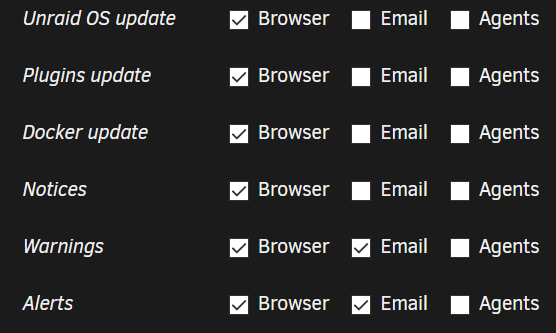
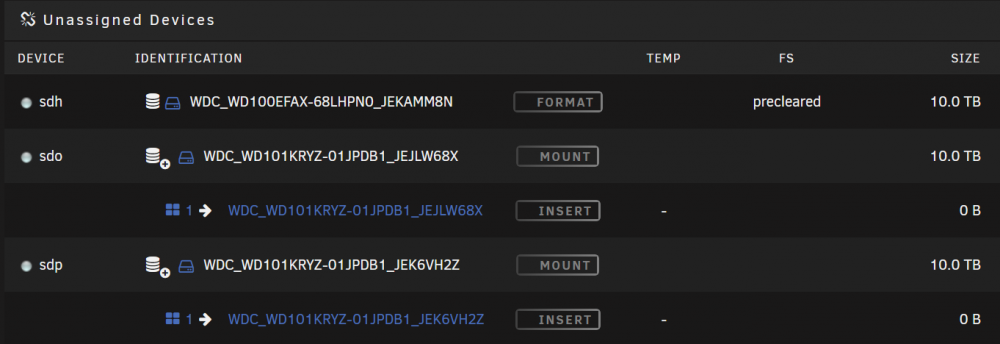
Awesome container @binhex! And, thanks @Frank1940 for the documentation! I cleared two 10Tb simultaneously (took a bit under 50 hours for a single pass) with the following command: preclear_binhex.sh -f -c 1 -M 4 /dev/sdo …(and sdp); ran great! Two questions: 1. I am pretty sure I already know the answer but I just want to be sure: I did not receive any emails, even with M 4 being set. I am betting it is because I have “Notices” turned off under Notification Settings, correct? 2. While the reports (I am ECSTATIC that we can go look at the results well after the fact) indicate the drives both “…[have] been successfully precleared,” it does not show that way in UD. The one showing as “Precleared” in the image below is from a previous run with the preclear PLUGIN, not this container. Thoughts? I am not concerned so long as the drive does not clear again when finally put into the array; not a deal breaker by any means though, just an ugh. So, GREAT job on the container, thank you, and when money for more drives permits, I give the mail option another try.
-
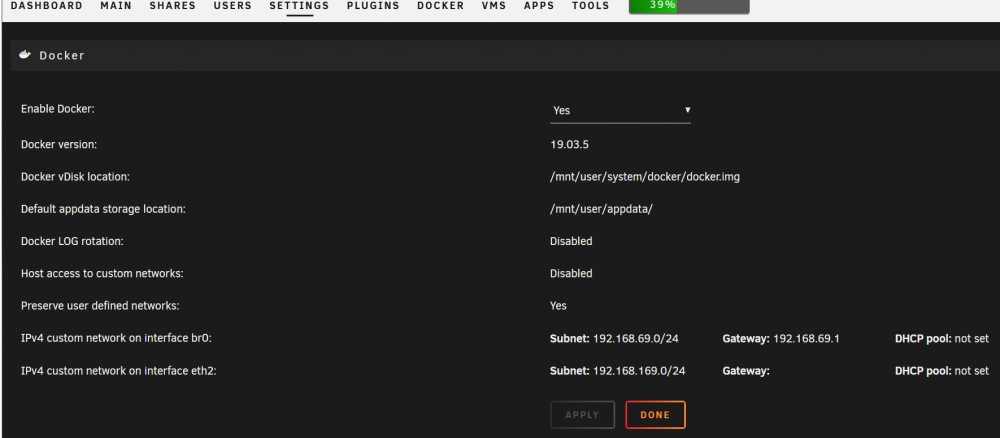
Hi All, This may be a “duh” question, but I am trying to learn and not hose this box’s dialed in setup in the process. So, my question is, should I just change the ip addy/subnet for the LetsEncrypt (LE) container? Background: br0: 192.168.69.0/24 eth2: 192.168.169.0/24 I originally installed LE using the bonded (br0) interface which is working perfectly. I have since added a small 10Gb second subnet (eth2) which includes my servers and one desktop. When I have the desktop on the original br0 subnet, I can access anything behind the LE proxy as expected. When I switch the desktop over to the new eth2 subnet I can do everything BUT access anything behind the LE proxy. Therefore, it seems to me that by simply changing the LE proxy’s subnet to that of the eth2 interface, I should be able to utilize my 10Gb interface on the desktop for everything, including those services behind the LE proxy. However, if I am overlooking a better way of doing this, I am open to suggestions and the ‘why’ so I understand for future needs and having the ability pay it forward. As a sample, here is info from the Nextcloud config.php file and the Docker network: Config.php snippet: 'trusted_domains' => array ( 0 => '192.168.69.xxx:aaa', 1 => 'daxxxxx.aaaaaa.bbbbbbbfe', ), 'dbtype' => 'mysql', 'version' => '17.0.2.1', 'overwrite.cli.url' => 'https://da daxxxxx.aaaaaa.bbbbbbbfe', 'overwritehost' => 'da daxxxxx.aaaaaa.bbbbbbbfe', 'overwriteprotocol' => 'https', 'dbname' => 'dbname', 'dbhost' => '192.168.69.xxx:aaaa', 'dbport' => '', 'dbtableprefix' => 'oc_', 'mysql.utf8mb4' => true, Docker: Thanks!!!
-
No problem at all 😊 @gfjardim. These are spares anyway. Enjoy your trip! Safe travels 👍
-
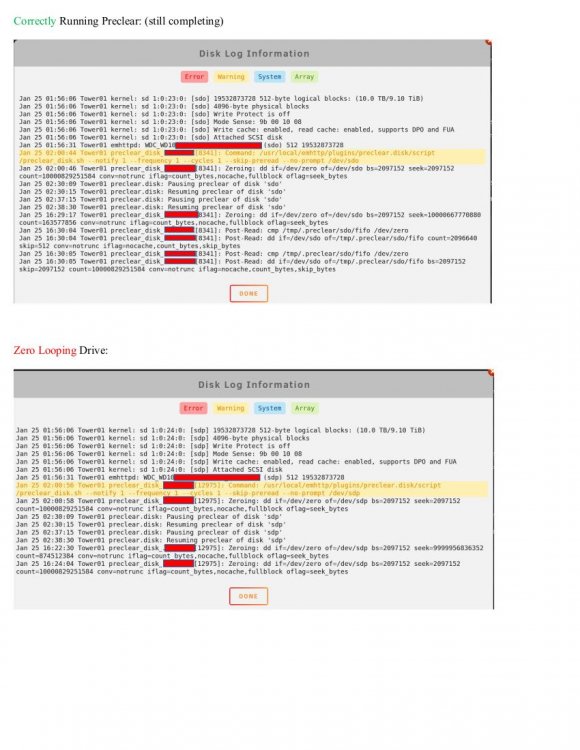
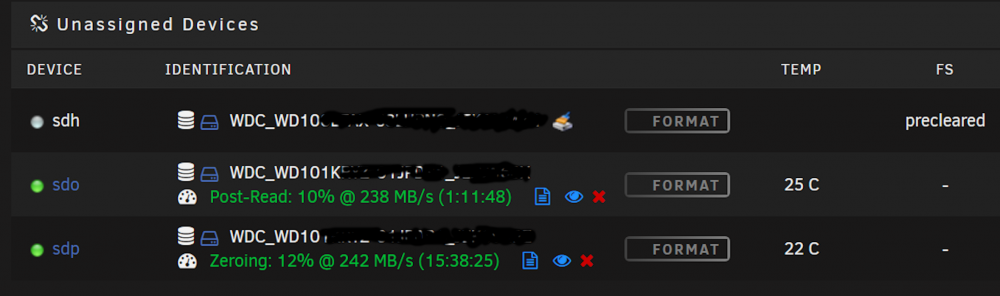
Hello - Having same issue of continuous "Zeroing" while pre-clearing a drive(s) - see attached logs. Notes: - had to pause process and sping down array for network issue. started array and preclear resumed as expected. - two - 10Tb WD sata drives (internal, not USB) - both drive preclear operations started at the same time - watched first drive switch from Zeroing to Post-read (NOTE: first drive initially showed it was starting the Zeroing process again, but then flipped to Post-read and continues to run correctly. Also, noted the following message "unraids signature on the master boot record is valid" when the first Zeroing finished and it started teh Post-read) - watched second drive finish first Zeroing process and start Zeroing all over again - stopped the process on this drive for now and pending feedback Any further thoughts on this? @gfjardim? Thanks!
-
@tazire - Check out CHBMB's post here for your answer. Hope this helps! Have a good rest of your day.


