






TechMed
Members
-
Joined
-
Last visited
Everything posted by TechMed
-
Actually, yes. Just not recently.
-
Awww D@#$%!!! I thought for sure I had it figured out... grrrr. Okay, so is there a 6.8.1 build?
-
PLEX throwing error at container startup - "Execution Error: Bad Parameter" d/t the expert tutelage of all of our fine community members (who also do not seem to need any form of sleep! 😴) I was able to figure this error out on my own, and decided to post the solution for others, JIC they run into the same error. Situation: Updated unRAID OS to 6.8.1 and received this error when trying to start the PLEX container: “execution error: bad parameter.” Background: Ran pre-upgrade “Update Assistant” under TOOLS, did everything form there and updated the OS with no OS upgrade issues. Assessment: Since the error indicated “bad parameter” that told me it has something to do with the Parameters set at install and subsequently used by the RUN command (thanks to Saarg for that education in particular). Since I had not changed anything in my PLEX setup, I was able to conclude I was missing something the RUN was looking for. Fix: The missing item was the Nvidia drivers (again!). Reinstalled them (6.8.0 version as there was none listed for 6.8.1) and voila, container is running and no more evil looks/texts from everyone using the Docker. Thanks again to the community for helping me quickly figure out, on my own, how to fix this error! Hope this post helps someone else.

-
Cool! Thanks for the quick response. Have a good day!
-
Thanks @gfjardim I was unaware of the terminal command; I will look into it shortly. I was more concerned about if I completely hosed up the currently running preclear/clear, despite their continuing to chug along nicely. And if the event might prove useful somehow. Based on my readings here this may need to be posted elsewhere, but it would be nice if the unRAID 'clearing' had feedback on the GUI like yours does. Just a thought. Thanks for your help and continuing to support the plug-in. So at this point in time, are we to use the plug-in, assuming we want to of course, or is it being shelved for a bit? From what I have been following here it seems to be still up in the air?
-
Not sure if this is relevant to the discussion, but yesterday I started preclearing two drives and did something stupid shortly after midnight… I updated the plugin in the middle of the process.; rookie move, I know. Needless to say, the preclear halted. So I figured, ‘what the heck, they are new drives’ and put one into the array (the second is being used for Parity so I wanted that thoroughly checked first). At this point I stopped the array, added one of the drives to array and started the array, knowing unRAID would 'clear' the drive for me. Well, the array would not start. Since I had already screwed up from being tired, I quit there and just left everything running as is until today. However, before I hit the sack I noticed that the second drive picked up the preclear process where it left off; array still showing ‘starting’; it is not though. Is this an expected chain of events? Now, looking at the event times it appears that the array did eventually start, but the time indicates it was after the second drive preclear had finished ‘zeroing’ and was starting the 'Post-Read'. Now that the array was finally started, the first drive I had added to the array began the unRAID ‘clearing’ process. To recap, preclearing two drives, updated preclear plugin during, hosed the preclear process, added one drive to array, array would not start, but second drive restarted the preclear process where it stopped (it is currently in Post-Read), first drive started ‘clearing’ about the time when second drive finished ‘zeroing’ and is continuing the unRAID clearing process at this time. As of right now, everything appears to be as it should; we’ll see later today. Should I just let it all finish and see what the end result is? I am posting all this in case there is useful info for anyone. Not sure if the logs are necessary, but attached them anyway. Thanks!!! 5000cca23b05c734.resume 5000cca23b063a1c.resume preclear.disk-2020.01.11b.md5 preclear.disk-2020.01.11b.txz tmux-3.0a-x86_64-1.txz thedarkvault-diagnostics-20200112-1006.zip
-
I read in Binhex's FAQ that the Docker which makes perfect sense. My ponder is if it is seasoned enough. I just need to read the posts about each for a bit. Like most of you, I will probably DL the Docker to my test machine and see how it does. Thing is, while I do not have any issues with using the CLI, there are those that do. Frank1940 made a great point about those that are not comfortable with it: This way folks could copy and paste, for the most part, and reduce the likelihood of trashing one of their existing data drives. Dunno... just need to 'give it a think' and play with it (Docker) for a while. The past couple of days have been a great educational conversation though!
-
Ya know, I wasn’t going to chime in here as I am just beginner. However, like Cybrnook I too There have been a number of occasions where I thank those of you (to an empty room or one of my other personalities 😊) who take the time to write these sorts of programs and keep them up to date. Unfortunately for me, just today I discovered there is a Docker for preclear. Now I need to figure out which to use… plugin or Docker. Does anyone know of thread discussing the pros and cons so I can make a decision on that? 🤔 Again, just my two cents about preclearing and a thanks to a great supportive Community.
-
Question about 'pre-clear' vs 'clearing'. Situation -a 'pre-cleared' drive is now 'clearing' after adding it to the array. Background - bought two ‘renewed’ drives so ran them through pre-clear; one failed “Post Read” while the other completed without error. Sending one back, kept the other Passed drive in the system. Pre-clear is up-to-date and running unRAID 6.8 stable. Question - curious why drive that completed full ‘pre-clear’ is now also doing a 12 hour “clearing’? BTW, I am asking as I have used the pre-clear method for a couple of years now and this is the first time I have come across just 'clearing' or read about it. So, why the ‘clear’ after ‘pre-clear’ and thoughts about whether or not I should be suspicious about the accuracy/longevity of the drive? Reports attached. Thanks all! 13117689437580.sreport.sent 16882006332408.sreport.sent 01-07-19_HGST_8TB_logging.pdf
-
Understood and appreciated (literally and figuratively). As systems start to get larger and more complex, the need for 'graceful' dismounts and shutdowns become greater. I for one am moving towards relying heavily on two of my boxes. I am big into automation, particularly as it relates to healthcare, so stability and reliability become exponentially more more important. Even though many use unRAID as a media storage/delivery platform, losing that data is a big deal as well; just look at some of the near panicked posts people have made because they think it has all gone to Byte Heaven! I have a few ( wink wink nudge nudge) TB myself and would be darn near inconsolable if it went away. Ergo, redundancy, backups, and application of Best Practices, as outlined in the earlier referenced post. Hopefully this info will help someone else in the future. Thanks again to everyone who contributed!
-
This was an informative read. It helped me achieve a better understanding of the subtleties of the shutdown process(es) – thanks for that. So, I updated the various timings as suggested and factored these into my current (pun intended) power outage/UPS shutdown timings. I am happy to report that it appears to have worked since we have had yet another outage (this is 2020 right?) and I had a graceful shutdown. Now it is time to dive into gracefully shutting down the network appliances and UPS devices. Thanks again for all the assistance. Happy New Year everyone!
-
This was a great and informative read. It helped polish the edges of some things I was not sure about. *Recommended Read* --------------------------------------------------------------------------- This is just a quick post to ‘close the loop’ as it were, on this sub. I have opted to go a different route than NC, as the only reason I was installing it was for the CalDav/CardDav capabilities. (It baffles me there isn’t a Docker for just xxxDAV). Anyway, a huge thank you to everyone to contributed, particularly SARRG and CHBMB, with their tireless efforts to help everyone. Irrespective of any one individual, kudos to you all as this is what makes the unRAID community so great. I hope the New Year is a safe, happy, and prosperous one for all! Thanks, everyone!
-
Thanks for the feedback; I have a total of four UPS devices. They work well and do what they are setup/intended to do, including the shutdown process. The previous post explains the details of where the shutdown hangs. So, plenty of devices to control/regulate/condition the power. Thanks.
-
Hi @dlandon, I hope your holiday season is going enjoyably! Apologies for the tag, but we went down this road once before and got it fixed, so... Also, I am on 6.8 stable, I do daily plug-in and docker updates, so all are also the latest. I read up to here from our last posts and geez, looks like all the new bits and pieces that have gone into the 6.8 release are keeping you crazy busy; sorry to pile on ☹ I’m having a situation again where the power went out and the primary server did not shut down again until I restarted the ancillary servers; all the details are the same as this previous link we worked. I have attached the logs for you to review at your convenience. Given the increased frequency of our power issues I do want to get this figured out, but no major rush. I truly appreciate all of your hard work; some of the minutia discussed here shows a high understanding on your part. Well done! Thanks! COMPLETE_tower01-diagnostics-20191227-1640.zip tower01-diagnostics-20191227-0533.zip
-
Happy Christmas Eve! Apparently, my attempt to lookup and understand and implement the ‘docker run’ command was ineffective; I wound up blowing up my configs. Fortunately, I am an avid backer-upper so I was able to restore the config(s) – shout out to Squid! Would you mind sharing the correct syntax for the usage of the command? docker run mariadb and docker run nextcloud most assuredly are not it 😊 Thanks! I will post results immediately afterwards. Appreciate it.
-
Unfortunately that did not work, same error. Sadly this one popped up as well: An exception occurred while executing 'UPDATE `oc_file_locks` SET `lock` = `lock` + 1, `ttl` = ? WHERE `key` = ? AND `lock` >= 0' with params [1577163023, "files\/7190a9b863f60ecb007e84a38723d83a"]: SQLSTATE[40001]: Serialization failure: 1213 Deadlock found when trying to get lock; try restarting transaction The file I tried to transfer is a 2.4 Gb .iso file. Are there any further potential fixes you might be aware of? Thanks again for your assistance.
-
Just to follow up: I have made the change but will not be able to test until much later tonight or tomorrow morning (US-EST). Thanks for the suggestions. Gotta run... J
-
I will; I changed it to the 10G based on some of the other posts/sites solutions that were out there. That line was originally set to '0'. Out of curiosity, and an attempt to understand, does setting it to zero basically make the value unlimited? Thanks again for your assistance!
-
A few months back, but I thought I removed everything out of the appdata folder. The new install(s) looked like a fresh install when installed a few days ago. I have attached all of the files. Looking at them it appears that the 'default' from Nextcloud does not have a date. So just for complete clarity your saying: stop the containers (LetsEncrypt, MariaDB, and Nextcloud), backup the files listed, DELETE the files listed above, restart the containers, and let those files rebuild themselves? default -from LetsEncrypt default -from Nextcloud nginx.conf proxy.conf ssl.conf
-
Hi @saarg, Thanks a bunch for replying. Fresh install - four days, maybe. These log files are just clips from from about the middle down. I can provide the entire file(s) if needed. Yes, it is the LSIO image; I am following Ed's install guide from his video's for installing Nextcloud and LetsEncrypt. Thanks again for replying! P.S. Do you have any links to follow for: - How to force delete a file and folder that will not delete from the GUI - (this may belong over in the LetsEncrypt thread) how to check on an Edgerouter that hairpin is actually working?
-
Hi All - I have read back over 15 pages of this thread along with hours of Googling and it seems like no one has found a solution (or posted if they did) to the “Error when assembling chunks, status code 504” error when transferring larger files. It seems like it occurs whenever the file is larger than about 2 Gb. Also, in order to clear the persistent ‘processing files’ after the 504 error, I just restart the Nextcloud container. I am running the latest LSIO containers of LetsEncrypt, MariaDB, and Nextcloud (shoutout to SpaceInvader One). I am using the container web GUI to ‘copy’ files from a Windows 10 box. While 80% of the files go across like their collective a$$es are on fire, some take quite a while to ‘uploading’ and ‘processing files’. I have found many posts indicating changing certain config files parameters, but other than two of them most don’t seem to exist in the container version; particularly the PHP changes suggested. So, I ask the Community at large if you have had any similar experiences and what, if any, resolutions they may have applied. I have attached chunks of the log files from LetsEncrypt and Nextcloud to show some of the recent errors. Thanks in advance for any assistance! Nextcloud – 17.0.2 PHP - Version: 7.3.12 NEXTCLOUND-PHP-error-log.txt NEXTCLOUND-Ngnix-error-log.txt LETSENCRYPT-Ngnix-access.log
-
I will do that. Thanks again for taking the time to drill-down into all this. I know for me, UD is becoming a greater necessity as I convinced some of my friends to cloud share their extra storage space. So there are many that appreciate your work. Take care and Happy Holidays to you and yours.
-
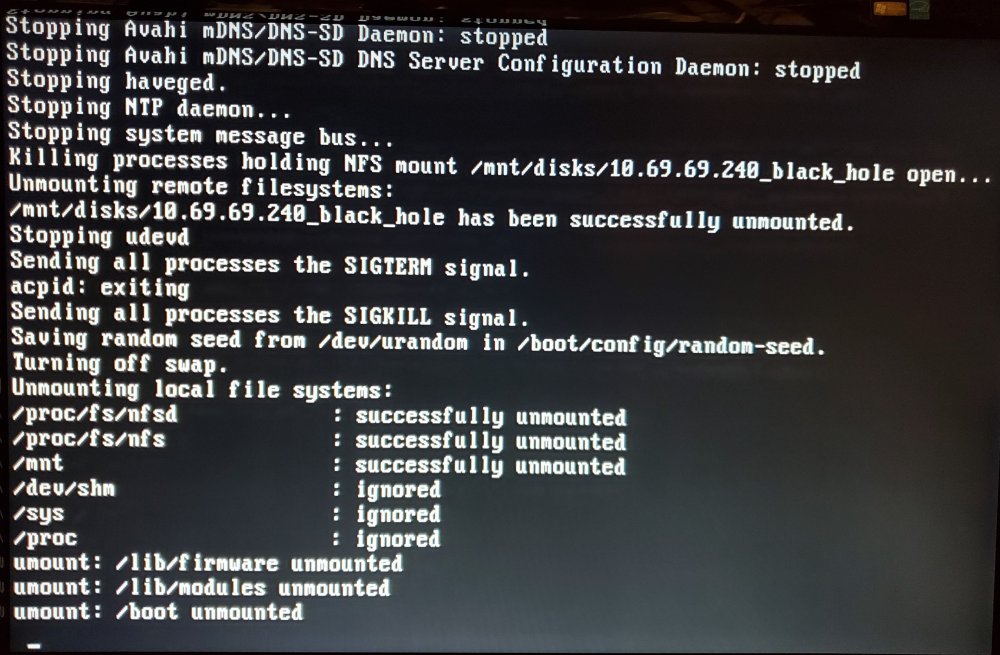
Hello @dlandon, Yes and no. 'No' in so much as when I restarted I did not have to do a parity check 👏. 'Yes' in that the server did not actually shutdown, I had press the power button; this has never happened before. The only reason this incomplete shutdown could be an issue is if I had a power outage, which is how this whole sub-thread got started. Thoughts? (Great job though! Thanks for the fixes!)
-
Hi @dlandon, Definitely a step closer. Got past the previous stop point, but now stops at: As requested I have attached Diags. Thanks! tower01-diagnostics-20191201-0232.zip
-
HI @FreeMan I am by no means a wiz with Rsync, but I think the easiest way to accomplish this is to not use the 'delete' flag. Maybe only use that command/flag once every six months or so to do some housecleaning. Hope that sparks some thought. Have a great weekend!

