





AnnabellaRenee87
Members
-
Joined
-
Last visited
Everything posted by AnnabellaRenee87
-
Hope things go well for you, I'll try out MOS to see what it's like. Been reading it for a bit, looks interesting.
-
I think I'm having an issue where some things aren't running yet and sometimes only one of the VFs will be there, having to run "/usr/local/sbin/vfio-pci >>/var/log/vfio-pci" again after having the scripts run it to get them all showing. The problem is after a reboot of the server, the system gives an error that here was an "vfio-pci-errors" error. (If I run "/usr/local/sbin/vfio-pci >>/var/log/vfio-pci again it fixes it") When I look at the logs for the script with the "sudo bash /boot/config/vfio-pci-bind.sh 15b3:1016 0000:02:01.2" in it, they're showing access denied. I'm on 7.2.2
-
Would a userscript running at boot; nvidia-smi --persistence-mode=ENABLED Be the same thing as; nvidia-persistenced ?
-
I turned it on, seems to have helped, will test for a bit, don't know if it will cause any performance issues or not. EDIT: it defaulted to Disabled, Changed it to Enabled.

-
I was hoping it would fix some of those memory errors, I just told the Fix Comon Problems plugin to igneore the errors, I've got 256 GB of RAM so I know I'm not running out of memeory. I've also got above 4G decoding and Resizable Bar enabled. I've also got this as an option, it's Disable right now. Not sure if that would help or not.
-
Don't suppose you could update the Open Source Driver to "590.44.01" (source: https://github.com/NVIDIA/open-gpu-kernel-modules/releases/tag/590.44.01) could ya? Also, been getting Out of Memory errors recently with the error referencing Nvidia.server-diagnostics-20251211-0351.zip
-
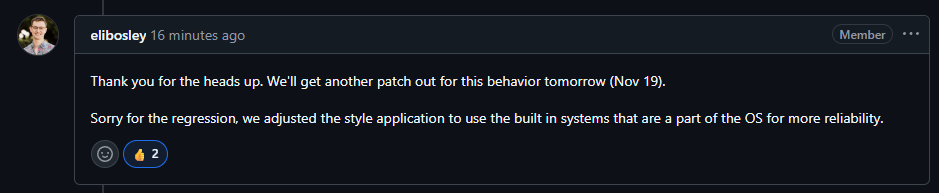
From the Connect GitHub;
-
I'm having the same issue too, I tried to reinstall it, rebooting between removal and reinstallation but I can't log back into it. server-diagnostics-20251118-1942.zip
-
Oh, I was asking to see if there's anything feature wise im missing out on being on the open-source drivers vs the closed ones. If there's no real differences from my perspective, then I should be fine.
-
Actually, does it matter if its closed or open source? I'm gonna be using it for transcoding, gaming and maybe AI with dockers. Yes steam link works with the dockered version of steam.
-
Please excuse me if I'm mistaken, but is this the Closed Source Driver and would this support the 5000 series? (just got the 5060Ti) https://www.nvidia.com/en-us/drivers/details/254665/
-
Just wondering, is the Dynamix Share Floor plugin still being supported? it's not really doing anytihng anymore.
-
After upgrading to Beta 2 (from prevous stable) I get the following on my Main tab. On the Dashbaord I'm seeing missing items like this.... Downgrading fixes it, I tried to look at the logs but seen this being spammed. I tried to pull Diagnostics but.... it never made them and then gave this in the logs. In Safe Mode I gete the drives loading up like this And the Dashboard is working like it should but..... I can't start the array because I have the plugin Dynamix SCSI Devices installed and the drives show up differently now. Suppose I could do a new config and make sure to put the drives back in the right places but.... wanna run it past you all first, I can supply a complete copy of my Flash again to Xenthis if needed on Discord since i can't get a Disgnostic dump, here's the Diagnostics from Safe Mode tho just in case there's somethning of use in there. Thanks! server-safemode-diagnostics-20250822-0007.zip EDIT: Going back to Stable for now.
-
At startup I'm having an issue where the system is stuck at "starting array" with it stuck on mounting the disk. If I downgrade things start to work again but upgrading sometimes works. I've attached my logs from when it was not working and the system had to force reboot and gather logs. syslog-previous server-diagnostics-20250803-2133.zip
-
I was testing with Plex on my phone while on 5G/LTE. I was also testing with Emby and JellyFin (Yes i have all 3 runing because I'm a nerd) Don't suppose you can keep the v565.77 drivers as legacy for the immedeate future? I ask because where Pascal is apparently going to be dropped at some point. I also need to find another single slot card (that I can afford) that can handle doing transcodes of a show from a totally legal place that may be in MP4 or AVI lol to H265.
-
So, I had the issue where my GPU would come alive for a moment then go back to sleep. (Again) The RTX 4060 would start to transcode for a moment then go back to sleep then everything would fall back to the CPU. I never got around to testing the P2000 but that cards dedicated to Tdarr for converting older formats to h265. I found that if i commented out "nvidia-persistenced" from my Go file then everything started working perfectly....... on the latest driver too. The 4060 is idling like it's suppoesd to but the P2000 keeps waking up and going back to sleep. It states it's only idling at 20 watts but I think it can do better? Is there a way to send "nvidia-persistenced" to just the P2000? EDIT, I commented out "nvidia-persistenced" because it's the only thing i could think of that was still poking at the driver.
-
So....... Figured it out, it was my user script for the power saving. Isn't there something I can put in the "go" file to do that? This is the script that was running. On mobile right now so formatting is bad #!/bin/bash #nvidia-smi --persistence-mode=1 nvidia-persistenced fuser -v /dev/nvidia* Isn't the "nvidia-persistenced" what we put in the go file? Edit, forgot to say, looking to move the server to an AMD EPYC or newer Xeon here sometime and UEFI and Resizable Bar is a requirement for that next server.
-
I don't do UEFI because it won't boot at all if I do that, even after I enable it in the BIOS and in UNRAID, it will do what OP had happen to them in this thread; I'm not upset with you in any way, shape or form, you're doing us a service. I reverted my "go" file back to stock, what was in there might have been from the original instasll from my old ProLiant. I just can't remember what it was for and might have been something for that system. (like 10 years ago) I can't reboot the server right now because I work from home and it's running the VM that has my OPNSense Firewall on it, so would lose internet if I did that now. I'll update you when I get off work.
-
The crazy thing is.... I was only testing the RTX 4060, the P2000 was never tested in these test with the newer drivers. My fear is if I stay on an older version, will I eventually not have access to any drivers?
-
Since version v570.X.X anything I try to Transcode will just failover back to the CPU. Plex was crashing when trying to Transcode. Emby and Jellyfin failover to the CPU. Plex is now failing over to the CPU. If i downgrade back to v565.77 the issue goes away, all 3 dockes start working as designed again and the GPU transcode correctly. I have two GPUs in the system, a P2000 dedicated to Tdarr and an RTX 4060 dedicated to Plex, Emby and Jellyfin. I use Tdarr/P2000 to turn anything that's not H265 to that and the 4060 is used for media because of AV1 support and load balancing where Tdarr will use 100% of the GPU while others are trying to watch something. I tried to follow the information at; but it didn't help and I got the same issues. I don't know what else to try, I even tried removing "--runtime=nvidia" from the Plex docker and re-added it but it didn't do anything either. Here's my logs of where things were messed up, I have since reverted the driver and rebooted to be back up and running. EDIT: Unraid 7.1 Beta 1, did it on 7.0.0 and 7.0.1 too. server-diagnostics-20250318-2054.zip
-
Starting today, I noted in the newer updater that it's only showing the options for "Stable" and "Next", but the third option for beta isn't there anymore, is this normal?
-
Was running the latest version of the plugin as of writting this post, If I manually invoked the Mover it would just gray the button out and not actually move the files over to the array. I had to go to the Media Share (that's the share that was being updated) and hit Move in there and it cancled the move in progress, I did this like 2 or 3 times and it would never move, I removed the Plugin and found that after removing it the files are moving again, i'm on the latest UNRAID 7 Beta 2 and here's my logs if they can help. server-diagnostics-20240730-0755.zip
-
Yes, I would like it to advertise IPv4 on eth0.
-
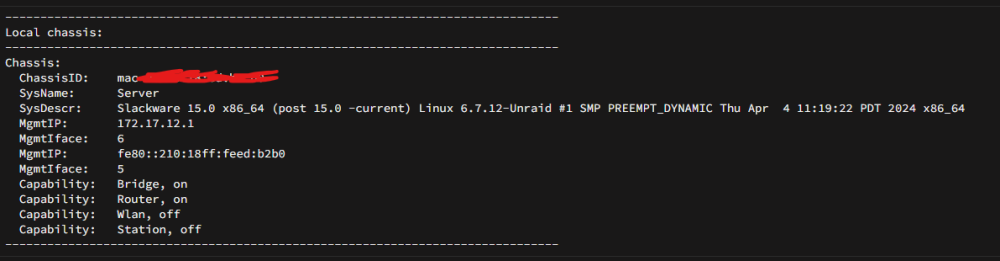
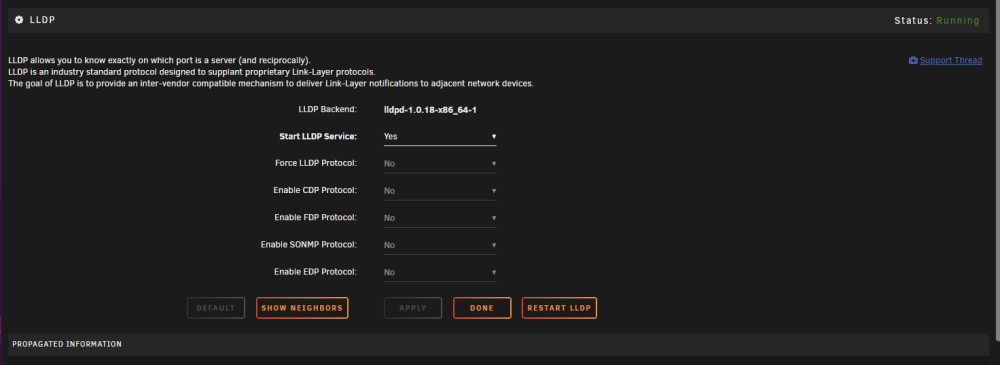
Weird problem, LLDP on the server looks to only be seeing my other LAN port on the server that's unplugged, I need it to be on the other one, It's only seeing eth1, not eth0. If that makes sense. Screenshots attached of what's being detected and what the settings are. server-diagnostics-20240430-0759.zip PS, Here's my Routing Table if it's needed.

-
Could this be added? https://github.com/intel/pcm Doing some investigations into this. https://stackoverflow.com/questions/72005787/how-to-monitor-numa-interconnection-qpi-upi-bandwidth-usage-of-a-process-in-li




