AnnabellaRenee87
Members
-
Joined
-
Last visited
Everything posted by AnnabellaRenee87
-
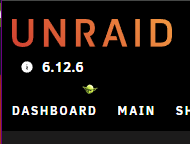
I know this may be not super important but.... After the recent Unraid Connect update the Local Master Icon (Yoda) is dropping to another line after the version number. I legit don't know what information you would need for this. It's just a visual thing, otherwise it works fine.
-
Can you add "vtop"? Sent from my SM-S908U using Tapatalk
-
I was able to kill the process, here's the logs. Edit 1, Also, forgot the name but it ended in a .php for the process. Edit 2, looks like it didn't kill the process and it's just eating up space now, Gonna reboot and delete the backup. ab.debug.log Edit 3, So had to force shutdown with the power button, that was fun (she lied) lol, hope my info helps get things working, love the plugin!

-
Same here, Cant grab logs with it in progress.
-
Can iftop and ipmitool be added?
-
For anyone looking for the file, here it is, I think it's just named differently from https://github.com/ipmitool/ipmitool, this is the one from NerdPack which is the same version number. ipmitool-1.8.18-x86_64-1.txz
-
Odd problem with the V Rising Docker, I have to remove the Steam ID I made just for this container for it to pull updates, originally it wouldn't even pull the client until i removed the Steam ID. If I remove the Steam ID and start it, it will update then I can add it back. Is that normal?
-
So, with unRAID 6.10.0, in Settings, User Preferences, after the Nerd Pack link it adds to extra "spaces?" And when using the Dynamix "Grey" theme it puts two spaces in and makes it look like the following, if I switch it to White "Default theme" you can tell it's still there just not as noticable. I removed Nerd Pack and the issue went away, put it back and the issue came back. Sent from my SM-S908U using Tapatalk
-
I was able to get it working, is there a way to password protect the VNC session? If I can password protect it, that would be perfect! Sent from my SM-S908U using Tapatalk
-
I can't find how to add those, am I adding them as a port or a Variable and putting the name like, SOMETHING_SOMETHING= Then the variable as "1234"
-
For anyone looking for this in the future, I had to modify the formatting of the script to be the following. #!/bin/bash nvidia-smi --persistence-mode=1 nvidia-persistenced fuser -v /dev/nvidia* @SimpleDino and @SpaceInvaderOne Can you all confirm on a system on 6.10.0 RC4?
-
I'm unsure what's causing this crash but every 4-10 days I'm getting a system crash with the following on the screen of the server itself. I legit don't know what causes it, here's the logs but please note that this is after a reboot as I don't have internet (PFSense VM) until i reboot. I also couldn't even SSH into the server. server-diagnostics-20211129-0208.zip
-
Thanks for the info, I disabled the one NFS share I had (Wasn't using it anyways) and since then things seem to be good.
-
The past two days, I've had my User Shares all go away, i got to the web interface and on the Shares tab, they're all gone. I rebooted the first time and fund that they came back, 20ish days latter, I had the same issue which brings us to yesterday. I have started using Tdarr to transcode all my media over to H265. When I wake up I find that the server has all of it's User Shares gone again. I grabbed the logs, rebooted and all was working again, I started talking with AgentXXL on Discord. Today I woke up again (I work night shift so that's the reasons for the times I'm noticing things) and it was doing it again. I grabbed some logs after trying to Stopping the Array, Disable the User Shares in the settings and re-enabling them and restarted the array but it didn't bring them back, I had to do a reboot to get the shares back. When it fails like this, even in SSH i can't get into /mnt/user. I think it could be related to Tdarr running while Mover is running based off the thread at "https://forums.unraid.net/topic/90506-683-user-directory-colored-red/" but it's only a hypothesis. In the logs me and AgentXXL noticed these happening exactly when this happens. Oct 28 13:26:42 Server shfs: shfs: ../lib/fuse.c:1451: unlink_node: Assertion `node->nlookup > 1' failed. Oct 28 13:26:42 Server smbd[4309]: [2021/10/28 13:26:42.934791, 0] ../../source3/smbd/service.c:168(chdir_current_service) Oct 28 13:26:42 Server smbd[4309]: chdir_current_service: vfs_ChDir(/mnt/user/media) failed: Transport endpoint is not connected. Current token: uid=1000, gid=100, 4 groups: 100 3003 3004 3005 With the errors I'm assuming that it's because Mover started running while Tdarr was doing things, I legit don't know though. Could someone help look into this please? server-diagnostics-20211028-1813.zip
-
So, looked at your logs, it's not seeing the card on the buss at all, can you confirm it's (the video card) working in another system? Also you said you removed it's fan, some vendors disable the card from initializing if they can't detect their fan. Edit, are you also plugging in the 12 volt power cables on the card it's self? Sent from my SM-G975U using Tapatalk
-
Same issue here. server-diagnostics-20210809-1910.zip
-
Got an odd problem. I can login with the local IP Address:port. But if i try to login with my WAN Address (Using a Reverse Proxy and a Subdomain) it just accepts the password loads for a second and brings up the password screen again. I've made sure the Daemon "Allow Remote Connections" is enabled and triple checked it in core.conf. I want to add that this had been working for years. I tried it on several browsers, thought it was a DNS issue, tried another PC because i was too lazy to flush the DNS on my main computer. Went to Cloudflare tried toggling proxied off, made sure the IP Address was going directly to my WAN Address, same thing. Turned proxying back because I"m about 99.9999999999% sure that's not the issue. I mean, the interface loads up but it just won't let me login when trying to login with my reverse proxy. Other containers let me login like your "binhex-sabnzbdvpn" Docker. SAB works fine. Any ideas or know of anything else I can try?
-
Not working for me for some reason, I'm on PFSense with UPnP turned on for the Servers IP. Here's the logs it generated. Command timeout 12 stdbuf -o0 upnpc -m br0 -l 2>&1 Status 0 Results upnpc : miniupnpc library test client, version 2.1. (c) 2005-2018 Thomas Bernard. Go to http://miniupnp.free.fr/ or https://miniupnp.tuxfamily.org/ for more information. List of UPNP devices found on the network : desc: http://10.0.0.2:8096/dlna/9b902c51-b640-4805-9413-713cac1323ab/description.xml st: urn:schemas-upnp-org:device:MediaServer:1 desc: http://10.0.0.2:8096/dlna/9b902c51-b640-4805-9413-713cac1323ab/description.xml st: uuid:9b902c51-b640-4805-9413-713cac1323ab desc: http://10.0.0.2:8096/dlna/9b902c51-b640-4805-9413-713cac1323ab/description.xml st: upnp:rootdevice desc: http://10.0.128.114:9080 st: upnp:rootdevice desc: http://10.0.128.123:9080 st: upnp:rootdevice desc: http://10.0.1.11:80/plugin/discovery/discovery.xml st: upnp:rootdevice desc: http://10.0.1.10:80/plugin/discovery/discovery.xml st: upnp:rootdevice desc: http://192.168.122.1:34400/device.xml st: upnp:rootdevice UPnP device found. Is it an IGD ? : http://10.0.0.2:8096/ Trying to continue anyway Local LAN ip address : unset GetConnectionTypeInfo failed. GetStatusInfo failed. GetLinkLayerMaxBitRates failed. GetExternalIPAddress failed. (errorcode=-3) i protocol exPort->inAddr:inPort description remoteHost leaseTime GetGenericPortMappingEntry() returned -3 (UnknownError) Determination ->gateway is [10.0.0.1] ->No IGD device found ->UPnP not available on this network.
-
Updated to 6.9.2 as well, my HP branded Seagate drives aren't spinning down either but the Hitachi drives are. Here's logs in case you all need them. server-diagnostics-20210408-1550.zip
-
Will I need Internet to do that? I won't have internet if I can't do the RMRR patch for my PFSense VM.
-
I'm sorry to ask a dumb question, but Is the Unraid-Kernel-Helper not on CA right now? I'm still on 6.9 RC2.
-
@doron you should add a donation link to your signature, I totally wanna buy you a coffee or beer for this plugin. My system uses a mixture of SAS and SATA drives and with how inexpensive SAS drives are on the retired server parts market I've got more SAS than SATA, I just hated how they never spun down. You have helped me save money in electric (can see that I'm saving about 100 watts of power on average now), so the last I can do is throw you a few dollars ❤️
-
So I've been crazy sick the last week, I was diagnosed with COVID-19, I just decided to try nuking out all the folders in the plugins folder except the theme folder with my backed up appdata folder and now it's working. I could have swore I tested that yesterday. I blame the fever I've been having on and off yesterday and today. I'm sorry, carry on! Ignore the ramblings of the sick girl!!!! lol
-
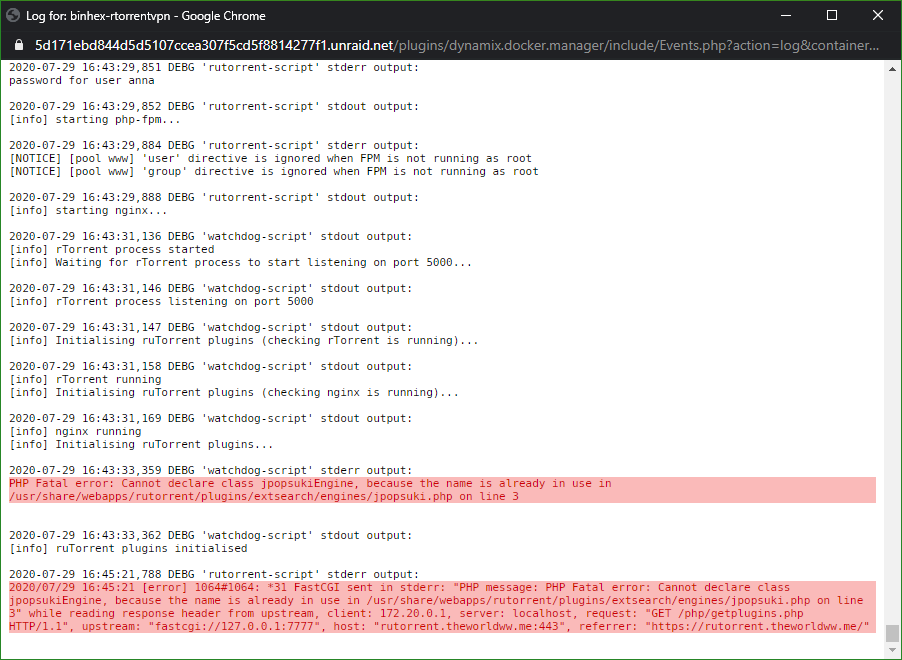
The plugin isn't there, if i go through the appdata share and look in the same folder I can literally take everything out of it and it will still put that file back at /usr/share/webapps/rutorrent/plugins/extsearch/engines/. I even tried removing the Docker, it's Image, going stock, it will launch the first time just fine completely stock (yes, I removed the ~/appdata/binhex-rtorrentvpn directory) and it will do it on the second start.
-
So a LOT of debugging later I figured out what's giving the error; If I go in to the docker via the shell and go to /usr/share/webapps/rutorrent/plugins/extsearch/engines/ I see that for some reason I have JPopsuki.php and jpopsuki.php. If I manually remove the lowercase one (rm jpopsuki.php) and go to the site for my rtorrent and hit F5 the interface loads up normally. If I restart the docker it will auto re-create the file and I will be in the same situation again. I manually created the Uppercase version from https://github.com/Novik/ruTorrent/blob/master/plugins/extsearch/engines/JPopsuki.php Is there a way to keep it from auto creating that upon startup?