




wayner
Members
-
Joined
-
Last visited
Everything posted by wayner
-
By bad RAM, do you mean bad RAM in the NVME SSD, or bad RAM in terms of the PC's DRAM memory?
-
Looking at the error message a little more closely it looks like the drive with errors is the nvme drive which is my cache drive. Why would it start throwing serious errors after an upgrade of the unRAID OS? Is this just a coincidence? When I do an extended SMART test it finishes immediately. Is that because it is an SSD? Here is the SMART test output: smartctl 7.3 2022-02-28 r5338 [x86_64-linux-6.1.49-Unraid] (local build) Copyright (C) 2002-22, Bruce Allen, Christian Franke, www.smartmontools.org === START OF INFORMATION SECTION === Model Number: WDC WDS500G2B0C Serial Number: 21305D807219 Firmware Version: 211210WD PCI Vendor/Subsystem ID: 0x15b7 IEEE OUI Identifier: 0x001b44 Total NVM Capacity: 500,107,862,016 [500 GB] Unallocated NVM Capacity: 0 Controller ID: 1 NVMe Version: 1.4 Number of Namespaces: 1 Namespace 1 Size/Capacity: 500,107,862,016 [500 GB] Namespace 1 Formatted LBA Size: 512 Namespace 1 IEEE EUI-64: 001b44 8b41b6d08e Local Time is: Sat Sep 2 11:17:19 2023 EDT Firmware Updates (0x14): 2 Slots, no Reset required Optional Admin Commands (0x0017): Security Format Frmw_DL Self_Test Optional NVM Commands (0x005f): Comp Wr_Unc DS_Mngmt Wr_Zero Sav/Sel_Feat Timestmp Log Page Attributes (0x1e): Cmd_Eff_Lg Ext_Get_Lg Telmtry_Lg Pers_Ev_Lg Maximum Data Transfer Size: 128 Pages Warning Comp. Temp. Threshold: 80 Celsius Critical Comp. Temp. Threshold: 85 Celsius Namespace 1 Features (0x02): NA_Fields Supported Power States St Op Max Active Idle RL RT WL WT Ent_Lat Ex_Lat 0 + 3.50W 2.10W - 0 0 0 0 0 0 1 + 2.40W 1.60W - 0 0 0 0 0 0 2 + 1.90W 1.50W - 0 0 0 0 0 0 3 - 0.0250W - - 3 3 3 3 3900 11000 4 - 0.0050W - - 4 4 4 4 5000 39000 Supported LBA Sizes (NSID 0x1) Id Fmt Data Metadt Rel_Perf 0 + 512 0 2 1 - 4096 0 1 === START OF SMART DATA SECTION === SMART overall-health self-assessment test result: PASSED SMART/Health Information (NVMe Log 0x02) Critical Warning: 0x00 Temperature: 33 Celsius Available Spare: 100% Available Spare Threshold: 10% Percentage Used: 3% Data Units Read: 11,332,177 [5.80 TB] Data Units Written: 44,540,222 [22.8 TB] Host Read Commands: 77,074,211 Host Write Commands: 531,724,132 Controller Busy Time: 737 Power Cycles: 78 Power On Hours: 14,728 Unsafe Shutdowns: 64 Media and Data Integrity Errors: 0 Error Information Log Entries: 1 Warning Comp. Temperature Time: 0 Critical Comp. Temperature Time: 0 Error Information (NVMe Log 0x01, 16 of 256 entries) No Errors Logged
-
Yesterday I upgraded my server from 6.11.5 to 6.12.4. Everything appeared to go well. But after a few hours I noticed that my dockers weren't running. When I tried to restart one I get Execution Error. I rebooted the system. Overnight the problem re-occurred. The system crashed some time after 1:17am. Anyone have any idea on what the issue is and how to fix? Are BTRFS errors related to my boot USB drive? Do I need to replace that drive? Could this be a bug or issue in 6.12.4? Is it just a coincidence that this occurred after upgrading? Should I restore back to 6.11.5? Here are the logs that were in red from the time that I think the problem occurred. Diagnostics are attached.portrush-diagnostics-20230902-0915.zip
-
Thanks for your help. All updated and all is well - at least so far!
-
That makes sense. Should I always wait until you have updated the plugin before updating to the latest OS version? It would be bad news for me if I updated and couldn't use my TV tuners.
-
Thanks - it wants me to update DVB-Driver. Does it do any harm if I update DVB-Driver but don't get around to updating the OS in the short term? In other words can I run the latest version of this plugin with bit of an older OS?
-
I am currently using this plugin and am on unRAID 6.11.5. I am going to upgrade to the latest unRAID version - 6.12.4. What is the recommended process for the sequence of upgrading the OS and the DVB-Driver plugin. Should I upgrade unRAID first and then upgrade the plugin, or the other way around? I am on the 2022-07-20 version of DVB-Driver.
-
I guess, you are correct, parity would be valid once the rebuild is complete. I thought it would have to start over from scratch, but I guess was wrong. My bad.
-
My array has a data drive (disk 2) that has failed (SMART tests say "A mandatory SAMRT command failed: exiting. To continue, add one or more '-T permissive' options"), but it seems that the data is still good as it is emulated thanks to the parity drive. When I remove this drive from the array and put in a new drive 2, and then start the array, will it automatically rebuild the data on disk 2? But will it then start automatically rebuilding the parity drive? I am replacing a 4TB with another drive of the same size. This isn't clear from the docs (https://docs.unraid.net/unraid-os/manual/storage-management/#replacing-faileddisabled-disks)
-
I am trying to use this docker with the br0 setting and changing the webui port to 80. But for some reason it stays at 9080, no matter what I do. I have disabled almost everything else for now, but this still happens. Here is the docker run command: docker run -d --name='binhex-rtorrentvpn' --net='br0' --ip='192.168.1.243' --privileged=true -e TZ="America/New_York" -e HOST_OS="Unraid" -e HOST_HOSTNAME="Portrush" -e HOST_CONTAINERNAME="binhex-rtorrentvpn" -e 'TCP_PORT_5000'='5000' -e 'TCP_PORT_9080'='80' -e 'TCP_PORT_9443'='9443' -e 'TCP_PORT_8118'='8118' -e 'VPN_ENABLED'='no' -e 'VPN_USER'='vpn username' -e 'VPN_PASS'='vpn password' -e 'VPN_PROV'='pia' -e 'VPN_CLIENT'='openvpn' -e 'VPN_OPTIONS'='' -e 'STRICT_PORT_FORWARD'='yes' -e 'ENABLE_PRIVOXY'='no' -e 'ENABLE_AUTODL_IRSSI'='no' -e 'ENABLE_RPC2'='no' -e 'ENABLE_RPC2_AUTH'='no' -e 'ENABLE_WEBUI_AUTH'='no' -e 'RPC2_USER'='admin' -e 'RPC2_PASS'='' -e 'WEBUI_USER'='webui username' -e 'WEBUI_PASS'='webui password' -e 'LAN_NETWORK'='192.168.1.0/24' -e 'NAME_SERVERS'='84.200.69.80,37.235.1.174,1.1.1.1,37.235.1.177,84.200.70.40,1.0.0.1' -e 'VPN_INPUT_PORTS'='' -e 'VPN_OUTPUT_PORTS'='' -e 'DEBUG'='false' -e 'PHP_TZ'='UTC' -e 'UMASK'='000' -e 'PUID'='99' -e 'PGID'='100' -l net.unraid.docker.managed=dockerman -l net.unraid.docker.webui='http://[IP]:[PORT:9080]/' -l net.unraid.docker.icon='https://raw.githubusercontent.com/binhex/docker-templates/master/binhex/images/rtorrent-icon.png' -v '/mnt/user/media/torrents':'/data':'rw' -v '/mnt/user/appdata/binhex-rtorrentvpn':'/config':'rw' --sysctl="net.ipv4.conf.all.src_valid_mark=1" 'binhex/arch-rtorrentvpn' 94329f8da75053c1cbc4a041453ab0f0b81ca2d58f8af3ef3661715xxxxxx But in the docker page of the webui it shows this for ports: 192.168.1.243:49160/TCP192.168.1.243:49160 192.168.1.243:49170/TCP192.168.1.243:49170 192.168.1.243:5000/TCP192.168.1.243:5000 192.168.1.243:8118/TCP192.168.1.243:8118 192.168.1.243:9080/TCP192.168.1.243:9080 192.168.1.243:9443/TCP192.168.1.243:9443
-
Those SageTV threads were all under Windows and Sage works under Linux as well - and there is a docker version that works very well. I am trying to figure out how to do this from within the SageTV application, but I have yet to figure that out. When I ran SageTV in Windows in the past I used to run a CLI program that increased the volume. So I am trying to see if I can do that from within the SageTV docker on unRAID.
-
Firewire drivers are now included in this plugin, and I use them in a SageTV docker to change channels on my cable set top boxes that have a Firewire port. Is there any documentation on these drivers? I would like to send some commands to increase the volume on these boxes as the volume occasionally resets to a low level. edit - In an ideal world I would like so send a command like "fwcommand -c volup -d box1" where c is the command and d is the Firewire device.
-
No, I am using the OG config file. I will try that and see if it helps.
-
I changed the hop distance from 2 to 1 but that does not help, I still cannot access my br0 dockers.
-
I will try changing that. I was copying what I saw from someone else's configuration.
-
Here is the Wireguard config. Should that Local tunnel firewall setting be changed? Here are my settings for Wireguard, my static route on my Unifi router and my docker config.
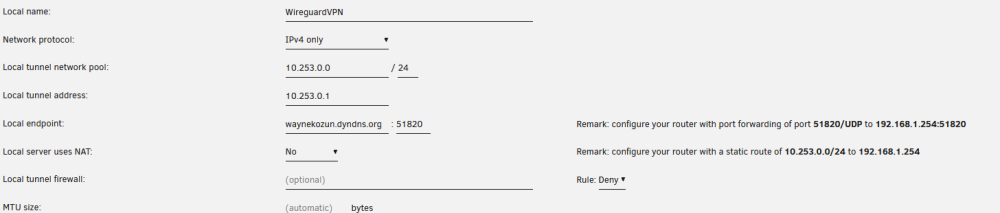
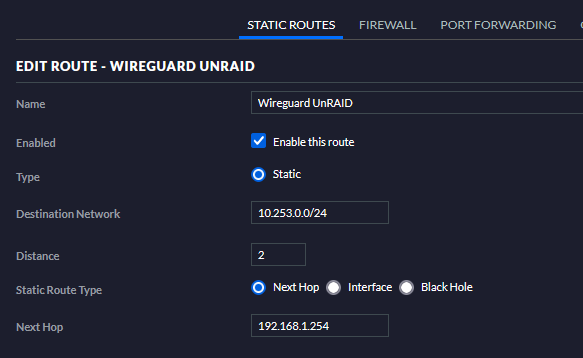
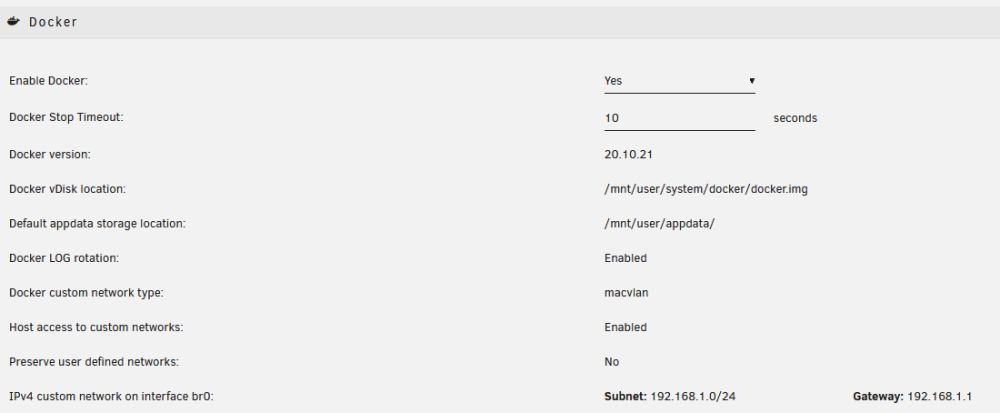
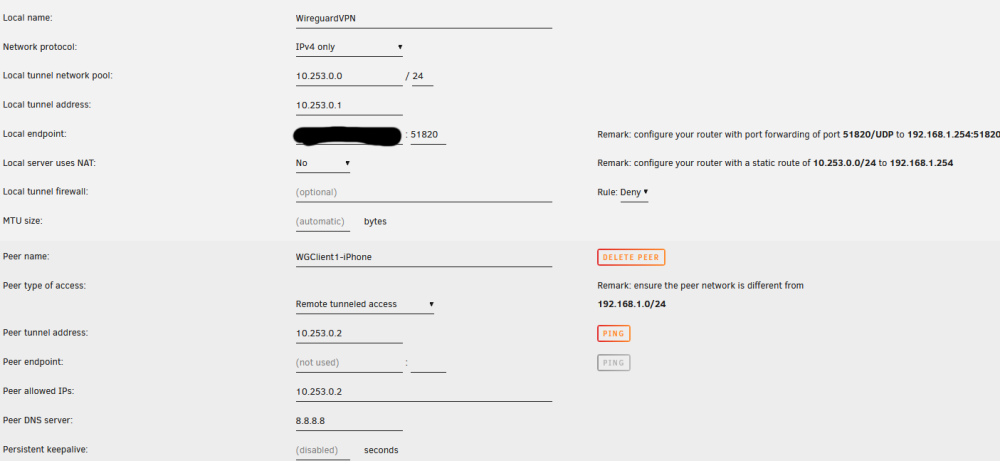
-
I am trying to use Wireguard with a "complex" network where I have dockers running with a br0 network type. Wireguard is working, I can access most of my LAN via VPN, but I cannot access these dockers, like Pi-Hole. I have followed these directions: "With "Use NAT" = No and "Host access to custom networks" = enabled and static route " - the last item being creating a static route on my Unifi USG router through the Unifi Controller software. Any advice on how to troubleshoot this problem?
-
To answer my own question - On the web UI under the Settings page there is a tab called Teleporter. That allows you to export and import settings. Not an obvious name, at least not to me, but it appears to work well once you find it.
-
How do I migrate PiHole to a docker on a new server? I have an older unRAID server and a newer server. I am migrating dockers, etc to the new server. I don't see any sort of an export settings function in the PiHole web UI - how do I export my settings and whitelist to my new docker? Dockers on both machines are running PiHole 5.14.2.
-
It appears to be a capture device that take an AV signal coming into an HDMI port and presents a video stream via USB - that video stream could be viewed on a PC or, presumably, written to a file. To be honest, it seems somewhat similar to a Hauppauge HD-PVR device which I have been using on unRAID/DVB for years to capture video from my cable boxes. The Hauuapuge HD-PVR device captures video on component or HDMI inputs so it isn't technically a TV capture card either, you need a cable or satellite box to decode the TV signal and provide it as video.
-
I have two unRAID servers. I have been running the Unifi controller in a docker for many years on the old server. I want to move it over to the new server and I am looking for advice. Right now I am running 6.5.55 and haven't upgraded in a while. What version controller should I use? It seems like 7.2.95 is a version that works well and doesn't have known issues. Should I upgrade my old controller docker to this version first? I think that seems like a good idea. When I create the docker on the new version should I give the docker the br0 network type so that it is on its own IP address? I often prefer this rather than potentially running into port conflict issues. But is there any reason not to this with the Unifi controller? In terms of actually migrating the controller, this web page seems to have pretty good info and it recommends that you do the export site and import site method rather than a backup and restore. Can anyone comment on that?
-
In addition to my main unRAID server which is running 6.11.5, I have an older server which hasn't been upgraded in a few years that is running 6.4.1. To upgrade do you need to do anything special given the large difference in OS releases? I know that certain things will be deprecated, like DVB Drivers which now has a plugin, but is there anything else I should be aware of? Or is this not that big of a deal since it is only one major release from 6.4.X to 6.5.X?
-
Thanks, but I you sure it is under VPN? Firewire isn't relate to VPN, is it?
-
FYI to anyone who has the same error. Delete the plugins from the error page and then reinstall the DVB Drivers plugin. The Firewire plugin is now included within the DVB Drivers.
-
Help! I just upgraded to 6.11.5 and I no longer have the DVB plugin or firewire plugin. They both show up under the plugin file install errors. What do I do? Delete them from this error page and reinstall from scratch?



