





dyker
Members
-
Joined
-
Last visited
Everything posted by dyker
-
Is it possible to have "FixCommonProblems" plug-in scan for any dmesg errors or warnings and if found, surface them? See this thread for reference. Or, if there is a better plug-in for that, feel free to enlighten me. Thanks!
-
Thanks for your help. Sorry I edited the post when you were replying. Is there a way to surface those communication errors? I'm guessing "no" unless I scan the logs myself? I'll do that for a few weeks.
-
I do have system notifications enabled. I did get notifications about the parity errors end of June, but never any message about the SATA cable communication issues from early June as indicated a few posts above in the log. Is there a different setting to get those surfaced proactively?
-
Thank you for the reply! I found that ata7 is my parity drive. disk:0 description: ATA Disk product: WDC WD60EFAX-68J vendor: Western Digital physical id: 0 bus info: scsi@7:0.0.0 <<< THIS IS ATA 7, SCSI @ 7 logical name: /dev/sde version: 0A82 serial# : MATCHES PARITY DRIVE size: 5589GiB (6001GB) Replaced the cable. Also replaced the SATA card (it was on a daughter card and part of my planned upgrade was replacing a 2-port SATA card with a 4-port SATA card so I just went ahead and did it). Now what. Run parity check again? With writing Correction? Also is there a reason Unraid didn't tell me about all these errors? I mean, I guess it did in the log, but it seems like that should have been raised at a higher level to make it obvious to me somehow. Want to know if I should have a setting somewhere to make errors more obvious. Should I manually scan the logs for a few weeks and hope not to see errors?
-
I also see this in my logs... errors, not sure how to interpret, or if it is related, but tons of "failed" errors on ata7. not sure which disk is ata7, if I should be concerned about this, and if it is a problem how would I get Unraid to tell me about it earlier? In my log (see first post) these ATA7 errors go way back to JUNE 1 when the last parity check happened. So some of these ata7 errors predate the beginning of the parity errors. Jul 1 09:09:33 VDUnraid kernel: ata7.00: cmd 60/40:f8:d0:a9:bc/05:00:c6:01:00/40 tag 31 ncq dma 688128 in Jul 1 09:09:33 VDUnraid kernel: res 40/00:f8:d0:a9:bc/00:00:c6:01:00/40 Emask 0x10 (ATA bus error) Jul 1 09:09:33 VDUnraid kernel: ata7.00: status: { DRDY } Jul 1 09:09:33 VDUnraid kernel: ata7: hard resetting link Jul 1 09:09:40 VDUnraid kernel: ata7: SATA link up 1.5 Gbps (SStatus 113 SControl 310) Jul 1 09:09:40 VDUnraid kernel: ata7.00: configured for UDMA/33 Jul 1 09:09:40 VDUnraid kernel: ata7: EH complete Jul 1 09:10:05 VDUnraid kernel: ata7.00: exception Emask 0x10 SAct 0x1 SErr 0x10002 action 0xe frozen Jul 1 09:10:05 VDUnraid kernel: ata7.00: irq_stat 0x00400000, PHY RDY changed Jul 1 09:10:05 VDUnraid kernel: ata7: SError: { RecovComm PHYRdyChg } Jul 1 09:10:05 VDUnraid kernel: ata7.00: failed command: READ FPDMA QUEUED Jul 1 09:10:05 VDUnraid kernel: ata7.00: cmd 60/58:00:68:b1:07/01:00:c7:01:00/40 tag 0 ncq dma 176128 in Jul 1 09:10:05 VDUnraid kernel: res 40/00:00:68:b1:07/00:00:c7:01:00/40 Emask 0x10 (ATA bus error) Jul 1 09:10:05 VDUnraid kernel: ata7.00: status: { DRDY } Jul 1 09:10:05 VDUnraid kernel: ata7: hard resetting link Jul 1 09:10:12 VDUnraid kernel: ata7: SATA link up 1.5 Gbps (SStatus 113 SControl 310) Jul 1 09:10:12 VDUnraid kernel: ata7.00: configured for UDMA/33 Jul 1 09:10:12 VDUnraid kernel: ata7: EH complete Jul 1 09:11:11 VDUnraid kernel: ata7: SATA link up 1.5 Gbps (SStatus 113 SControl 310) Jul 1 09:11:11 VDUnraid kernel: ata7.00: configured for UDMA/33 Jul 1 09:11:42 VDUnraid kernel: ata7: SATA link up 1.5 Gbps (SStatus 113 SControl 310) Jul 1 09:11:42 VDUnraid kernel: ata7.00: configured for UDMA/33 Jul 1 09:25:15 VDUnraid kernel: ata7.00: exception Emask 0x10 SAct 0x300 SErr 0x10002 action 0xe frozen Jul 1 09:25:15 VDUnraid kernel: ata7.00: irq_stat 0x00400000, PHY RDY changed Jul 1 09:25:15 VDUnraid kernel: ata7: SError: { RecovComm PHYRdyChg } Jul 1 09:25:15 VDUnraid kernel: ata7.00: failed command: READ FPDMA QUEUED Jul 1 09:25:15 VDUnraid kernel: ata7.00: cmd 60/b8:40:e8:d0:e6/03:00:d0:01:00/40 tag 8 ncq dma 487424 in Jul 1 09:25:15 VDUnraid kernel: res 40/00:40:e8:d0:e6/00:00:d0:01:00/40 Emask 0x10 (ATA bus error) Jul 1 09:25:15 VDUnraid kernel: ata7.00: status: { DRDY } Jul 1 09:25:15 VDUnraid kernel: ata7.00: failed command: READ FPDMA QUEUED Jul 1 09:25:15 VDUnraid kernel: ata7.00: cmd 60/88:48:a0:d4:e6/01:00:d0:01:00/40 tag 9 ncq dma 200704 in Jul 1 09:25:15 VDUnraid kernel: res 40/00:40:e8:d0:e6/00:00:d0:01:00/40 Emask 0x10 (ATA bus error) Jul 1 09:25:15 VDUnraid kernel: ata7.00: status: { DRDY } Jul 1 09:25:15 VDUnraid kernel: ata7: hard resetting link Jul 1 09:25:21 VDUnraid kernel: ata7: SATA link up 1.5 Gbps (SStatus 113 SControl 310) Jul 1 09:25:21 VDUnraid kernel: ata7.00: configured for UDMA/33 Jul 1 09:25:21 VDUnraid kernel: ata7: EH complete Here are a few more from June 28 before the parity check: Jun 28 15:15:48 VDUnraid kernel: ata7.00: status: { DRDY } Jun 28 15:15:48 VDUnraid kernel: ata7.00: failed command: READ FPDMA QUEUED Jun 28 15:15:48 VDUnraid kernel: ata7.00: cmd 60/40:e8:90:ed:75/05:00:1a:00:00/40 tag 29 ncq dma 688128 in Jun 28 15:15:48 VDUnraid kernel: res 40/00:00:18:f5:75/00:00:1a:00:00/40 Emask 0x10 (ATA bus error) Jun 28 15:15:48 VDUnraid kernel: ata7.00: status: { DRDY } Jun 28 15:15:48 VDUnraid kernel: ata7.00: failed command: READ FPDMA QUEUED Jun 28 15:15:48 VDUnraid kernel: ata7.00: cmd 60/48:f0:d0:f2:75/02:00:1a:00:00/40 tag 30 ncq dma 299008 in Jun 28 15:15:48 VDUnraid kernel: res 40/00:00:18:f5:75/00:00:1a:00:00/40 Emask 0x10 (ATA bus error) Jun 28 15:15:48 VDUnraid kernel: ata7.00: status: { DRDY } Jun 28 15:15:48 VDUnraid kernel: ata7: hard resetting link Jun 28 15:15:53 VDUnraid kernel: ata7: SATA link up 1.5 Gbps (SStatus 113 SControl 310) Jun 28 15:15:54 VDUnraid kernel: ata7.00: configured for UDMA/33 Jun 28 15:15:54 VDUnraid kernel: ata7: EH complete Jun 28 15:16:49 VDUnraid kernel: ata7.00: exception Emask 0x10 SAct 0xff00 SErr 0x10002 action 0xe frozen Jun 28 15:16:49 VDUnraid kernel: ata7.00: irq_stat 0x00400000, PHY RDY changed Jun 28 15:16:49 VDUnraid kernel: ata7: SError: { RecovComm PHYRdyChg } Jun 28 15:16:49 VDUnraid kernel: ata7.00: failed command: READ FPDMA QUEUED Jun 28 15:16:49 VDUnraid kernel: ata7.00: cmd 60/40:40:f0:8a:5f/05:00:1b:00:00/40 tag 8 ncq dma 688128 in Jun 28 15:16:49 VDUnraid kernel: res 40/00:48:30:90:5f/00:00:1b:00:00/40 Emask 0x10 (ATA bus error) Jun 28 15:16:49 VDUnraid kernel: ata7.00: status: { DRDY } Jun 28 15:16:49 VDUnraid kernel: ata7.00: failed command: READ FPDMA QUEUED Jun 28 15:16:49 VDUnraid kernel: ata7.00: cmd 60/38:48:30:90:5f/02:00:1b:00:00/40 tag 9 ncq dma 290816 in Jun 28 15:16:49 VDUnraid kernel: res 40/00:48:30:90:5f/00:00:1b:00:00/40 Emask 0x10 (ATA bus error) Jun 28 15:16:49 VDUnraid kernel: ata7.00: status: { DRDY } Jun 28 15:16:49 VDUnraid kernel: ata7.00: failed command: READ FPDMA QUEUED Jun 28 15:16:49 VDUnraid kernel: ata7.00: cmd 60/b8:50:68:92:5f/01:00:1b:00:00/40 tag 10 ncq dma 225280 in Jun 28 15:16:49 VDUnraid kernel: res 40/00:48:30:90:5f/00:00:1b:00:00/40 Emask 0x10 (ATA bus error) Jun 28 15:16:49 VDUnraid kernel: ata7.00: status: { DRDY }
-
Version: 6.11.5 I've had Unraid since 2017 and have ran monthly parity checks without problems. I have a 3 drive array. I've replaced the drives to upgrade once or twice so the drives aren't too old. On June 28 I popped off my case because I wanted to replace a drive with a larger drive. First I ran a parity check. I left the case off because I've not had a problem running with the case off before but apparently I also haven't ran a parity check with the case off? The drives warmed up to 49-50C during the parity check. I didn't bother looking at the results when it was done with the parity check, because I got busy with the weekend. But apparently there were 3 errors. Then, on July 1 (a few days later) my system ran it's monthly parity check... case still off. Yep, I just ran everything with the case off and forgot about it while I enjoyed the weekend. And apparently 2 more errors. These are literally the first errors I've had on Parity since going with Unraid, dates below are when they completed: Parity-Check 2023-07-01, 15:06:21 (Saturday)6 TB 15 hr, 6 min, 19 sec 110.4 MB/sOK 2 ERRORS Parity-Check 2023-06-29, 05:10:01 (Thursday)6 TB 14 hr, 23 min, 24 sec 115.8 MB/sOK 3 ERRORS Parity-Check 2023-06-01, 14:00:56 (Thursday)6 TB 14 hr, 55 sec 118.9 MB/sOK 0 ERRORS (AND ALL PRIOR CHECKS ALL THE WAY BACK TO 2017 ZERO ERRORS) So apparently DURING THE PARITY CHECK I also got emails saying my drives were hot: Event: Unraid Disk 2 temperature Subject: Warning [VDUNRAID] - Disk 2 is hot (47 C) Event: Unraid Parity disk temperature Subject: Warning [VDUNRAID] - Parity disk is hot (46 C) I later received emails that the drives returned to normal temperatures. I didn't see any of the emails until today, because, like I said, I got busy this weekend and didn't look at the server or any email. Well, do I have a problem now? Was the the heat to blame for the parity errors? What should I do now? All drives show healthy SMART. I actually am building a 2nd Unraid server and was going to put on a new SATA controller on this config and move this SATA controller to the one I'm building. So I'm glad to see the problems now before I started all the changes, but really need advice. I've not rebooted in 6 months. I just started a new parity check, but unchecked the "fix errors" button to see if I get a clean parity check.... Oh, with the case on so I should get good air flow. If anyone can provide advice or insight, I've attached the log, and would be grateful. Should I just say "OK, they are fixed, glad the parity errors are fixed" and just watch things? Thank you in advance! vdunraid-diagnostics-20230702-1704.zip
-
Maybe I'm not understanding things quite right, but I don't see Java 17 and I'm on the latest version according to unraid. I'm trying to create and run a 1.18 world.
.thumb.png.62d9acc0bce05476752e1218bb54fd1a.png)
-
TLDR: Check you Windows 10 Driver to ensure you have the up-to-date from manufacturer and NOT the rando Microsoft NIC driver. Found this thread through a web search as I was having same error code when transferring a 100GB file. Tried all the things then finally looked at my driver on my Windows 10 Dell system. It's a Realtek PCIeGbE Family controller. And guess what the driver loaded on my win 10 rig was provided by Microsoft dated 2015. Well I run Dell's support Assist monthly and this software is SUPPOSED to keep my drivers fresh (and often does) but apparently it ignores the NIC driver. Because when I visited https://support.dell.com for my system I found a driver provided by Realtek on the support page for my system (dated 8/11/2017). After loading this driver the error went away and also the transfer rate stays solid... doesn't fizzle to nothing looking like an occasional heart-beat. This is a dynamic issue however in my case it definitely was a problem on the Windows 10 side of the house not the Unraid side of the house.
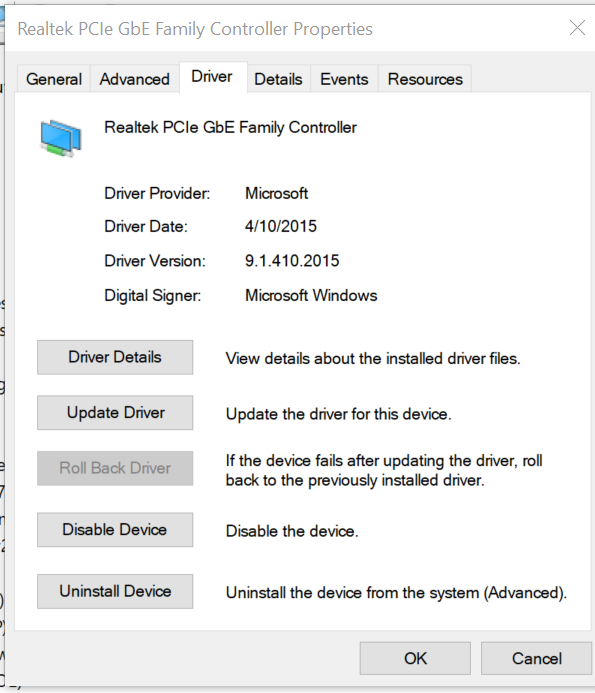
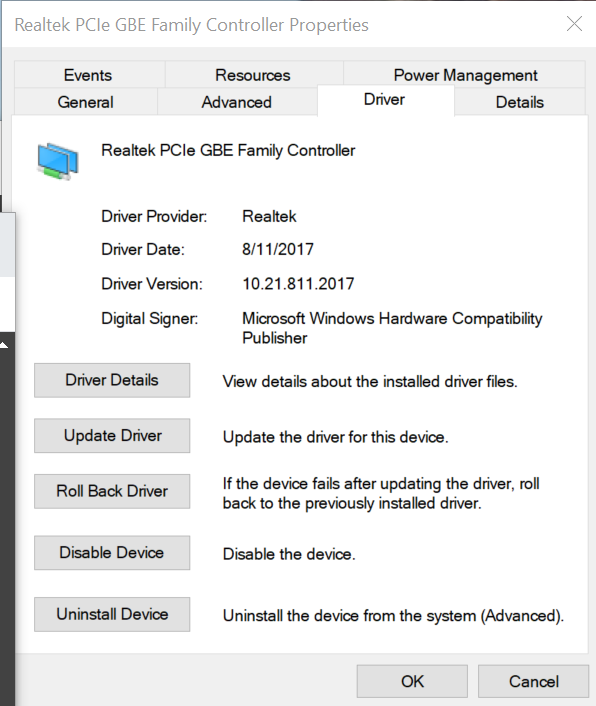
-
Cool thanks for your help. Working now. Used different port. Appreciate your help.
-
Thank you, - Attached.
-
ug 26 08:21:15 UnraidServer kernel: docker0: port 2(veth13e8777) entered blocking state Aug 26 08:21:15 UnraidServer kernel: docker0: port 2(veth13e8777) entered disabled state Aug 26 08:21:15 UnraidServer kernel: device veth13e8777 entered promiscuous mode Aug 26 08:21:15 UnraidServer kernel: IPv6: ADDRCONF(NETDEV_UP): veth13e8777: link is not ready Aug 26 08:21:15 UnraidServer kernel: docker0: port 2(veth13e8777) entered blocking state Aug 26 08:21:15 UnraidServer kernel: docker0: port 2(veth13e8777) entered forwarding state Aug 26 08:21:15 UnraidServer kernel: docker0: port 2(veth13e8777) entered disabled state Aug 26 08:21:15 UnraidServer kernel: docker0: port 2(veth13e8777) entered disabled state Aug 26 08:21:15 UnraidServer kernel: device veth13e8777 left promiscuous mode Aug 26 08:21:15 UnraidServer kernel: docker0: port 2(veth13e8777) entered disabled state
-
Had installed as docker before but haven't ran in a long time. So I REMOVED it. Went to appdata, and deleted zoneminder and subdirectories to completely remove. Reinstalled Zoneminder docker. Now getting same error as another here "Execution error Server error" Any advice appreciated.
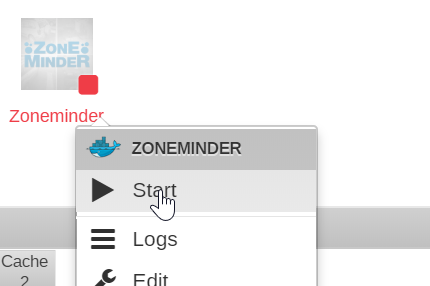

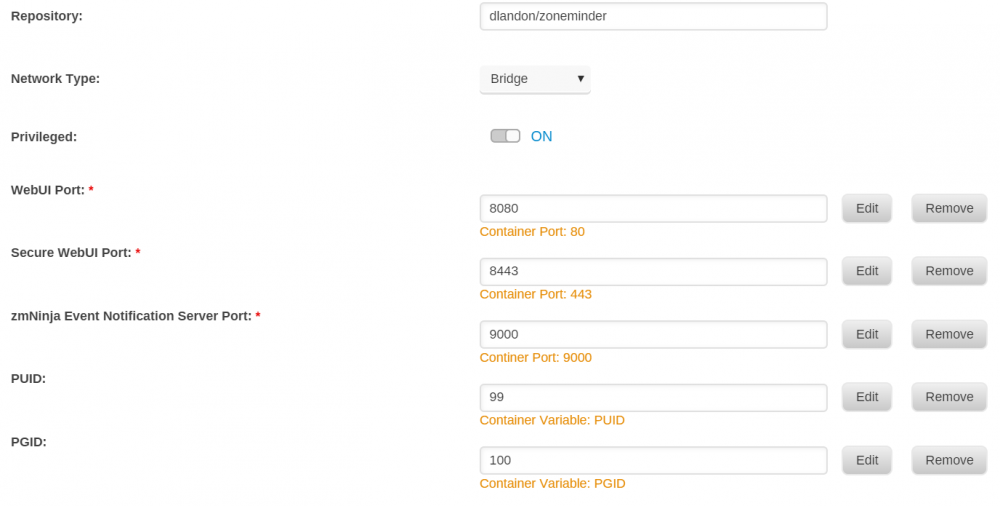
-
is it username: mc password: minecraft ?
-
Anyone ever able to update this docker? Or, should I re-post this question to a new thread somewhere else? Thanks.
-
On my Unraid server, on the docker tab, The mineos-docker says "update ready".... But when I hit the link to update I get: Pulling image: hexparrot/mineos-docker:latest TOTAL DATA PULLED: 0 B Error: Error: image hexparrot/mineos-docker:latest not found Is the problem on my server, or something else? Did the docker get renamed so it no longer pulls from hexparrot/mineos-docker but instead is just hexparrot/mineos (remove -docker)
-
OK I am posting further here in the hopes of helping someone someday avoid what I went through. My server was backing up automatically to archives under a *.GZ file. I was loading those *.GZ files to the import directory. They all showed up, but I couldn't actually load the worlds. Spent several hours screwing around trying to figure out why etc. Finally loaded my worlds on a windows machine unzipping them using 7zip. They all worked from windows. So I re-zipped them using 7-zip to a *.ZIP file (not GZ) and placed in the import directory and the newly zipped files were able to import fine. I'm running now AFAICT. Not sure why I needed to un-zip and re-zip but that's what I needed to do in order to get the world importable.
-
OK I'm really sorry to bug everyone again, but I have it sort of working I think. I can run MineOS, create a new world just fine. Kids can connect to a new 1.12 world. I've copied my worlds (1.11.2 GZ archives) in the import directory using windows 10 and they show up under "Import a server" in the MineOS docker. BUT!! When I click "create server from Archive" on one of the imports, it asks for the world name and I've put the original name, and then... nothing happens. The worlds are not being created. No servers actually are created. Help! I can create a brand new server fine, but the imports are not importing. I'm stuck! At your mercy. If anyone knows how I can proceed to get my archives imported please advise. It feels like a "rights" or user ID issue. But I'm not sure.
-
Thanks for your help everyone!! @DZMM Your screen print definitely helped me. I think I had two issues: 1. I had the host path 1 = /var/games/minecraft. I replaced that with your text: mnt/cache/appdata/minecraft <--(I think this was a big deal, right?) 2. I had the port 8443. I changed to 8444 like yours. <--does this really make a difference? After clicking webui after making these changes, I still couldn't access. However, this time when I physically add https:// then it give me an except saying "not safe" which I ignore, and after ignoring it starts mineOS (yay!!). Is there a way that I can have it automatically go to https:// when I click on webui because when it simply opens up 192.168.1.99:8444 it doesn't work at all. when I manually ad https://192.168.1.99:8444 in front I get "insecure site" and I can bypass and it works. Or... am I missing something? I think I'm working now but I want to understand, and I want it set up right
-
Hi Squid, thanks for your help. I'm still having trouble: 1. I uninstalled my existing Mine OS docker. 2. Followed your instructions getting additional results and searched hexparrot and get more results from dockerhub. 3. Picked hexparrot's mineos-docker Note: I couldn't create it at first because I needed a "Host Path 1" (it was blank) so I put in /var/games/minecraft as the text suggested. Then it loaded up but wouldn't start saying it needed a password (according to log). 4. So I edited the docker and added a variable USER_PASSWORD and gave it a password. Now under my Unraid server "dashboard" I have "mineos-docker with a green run arrow so I assume it is running. 5. But when I go to the WebUI and it tries to open the minecraft port on my unraid IP I get "this page isn't working. 192.168.x.x:XXXX didn't send any data. ERR_EMPTY_RESPONSE. Note: I can start and stop the docker just fine. Just can't get to the WebUI. Not sure what to do next. Or is that a separate docker? Log: Created user: mc (uid: 1000) Generating Self-Signed SSL... Generating a 1024 bit RSA private key .......++++++ .++++++ writing new private key to '.tmpkey.pem' ----- writing RSA key 2017-06-10 18:11:13,131 CRIT Supervisor running as root (no user in config file) 2017-06-10 18:11:13,131 WARN Included extra file "/etc/supervisor/conf.d/mineos.conf" during parsing 2017-06-10 18:11:13,137 INFO RPC interface 'supervisor' initialized 2017-06-10 18:11:13,137 CRIT Server 'unix_http_server' running without any HTTP authentication checking 2017-06-10 18:11:13,138 INFO supervisord started with pid 1 2017-06-10 18:11:14,139 INFO spawned: 'mineos' with pid 31 2017-06-10 18:11:15,518 INFO success: mineos entered RUNNING state, process has stayed up for > than 1 seconds (startsecs) 2017-06-10 18:11:20,716 WARN received SIGTERM indicating exit request 2017-06-10 18:11:20,716 INFO waiting for mineos to die 2017-06-10 18:11:20,718 INFO stopped: mineos (terminated by SIGTERM) mc already exists. 2017-06-10 18:11:21,264 CRIT Supervisor running as root (no user in config file) 2017-06-10 18:11:21,264 WARN Included extra file "/etc/supervisor/conf.d/mineos.conf" during parsing 2017-06-10 18:11:21,270 INFO RPC interface 'supervisor' initialized 2017-06-10 18:11:21,271 CRIT Server 'unix_http_server' running without any HTTP authentication checking 2017-06-10 18:11:21,271 INFO supervisord started with pid 1 2017-06-10 18:11:22,274 INFO spawned: 'mineos' with pid 9 2017-06-10 18:11:23,616 INFO success: mineos entered RUNNING state, process has stayed up for > than 1 seconds (startsecs)
-
Hi everyone, fantastic you have it working! Can someone help a noob? Right now I have the MineOS docker. @DZMM or anyone, Do I uninstall my current docker and is it simple enough to install the one referenced above via community applications (CA)? If I open CA and search for Minecraft I'm not sure what to pick? Or where to put in that link above? Would it be under "docker" tab then "add container" and if so I'm not clear how to move forward. I would greatly appreciate any help. Can someone give a noob a step-by-step. You may safely assume my maps are backed up and safe already. Or... will there shortly be an update to this MineOS docker to fix things? I'd like some direction please My kids want to use the new color features of 1.12.
-
@DZMM Ditto. same exact problem. Well pretty much the same. Mine says "Started" in the little box on the lower RH corner but the server itself doesn't actually start. Same thing I tried a new test server and it didn't work. So take comfort that you're not alone. At least it comforts me I spent 90 minutes dorking around until I looked here. I'll add this. The minecraft_server.1.12.jar file I'm using I downloaded from here: https://minecraft.net/en-us/download/server That page says "Please note: This server setup is only compatible with Minecraft for PC/Mac." Which made me wonder if there is a jar file specifically for linux? I didn't think so. If you get your working please ping back. Monitoring the thread thanks!
-
Yohan460, I ended up doing the following: opening a terminal to my Unraid box changed directory to mnt/user/appdata/minecraftos/ ran chmod -R 777 import My windows machine could write files to import now. So I placed my zipped up World from my windows networked machine into \\tower\appdata\minecraftos\import I imported the map fine, but couldn't connect. Found out it was a port issue and switched to another number that was working. I'm completely new to Unraid and green with Unix. I don't want to do stupid stuff. So hopefully this was an OK approach. Baby steps
-
How do I use this with my pre-existing maps? I wanted to load my own world. I am unable to create any file or copy in my existing world into /mnt/user/appdata/minecraftos/import. I get "access denied". In fact I can't place files in any of the sub-directories under minecraftos. Although I seem to be able to read them just fine. I can also create a brand new empty world and host it just fine. Just can't copy up my own existing world. Is there something I need to do to grant rights to this share so I can copy my world into it and use the "Create server from archive" feature, which look in the "import" directory? 1. Do I need to put my existing world in this directory? If so how do I get access to write files there? 2. If there is another way to use your own world just let me know. Thanks in advance.
.png.e7efb6de1c6e7d209b5be3c9eb106ab6.png)
