





ceyo14
Members
-
Joined
-
Last visited
Everything posted by ceyo14
-
Still same issue, here's what I got... Linux 4.19.107-Unraid. root@NAS:~# docker run --rm jlesage/firefox [s6-init] making user provided files available at /var/run/s6/etc...exited 0. [s6-init] ensuring user provided files have correct perms...exited 0. [fix-attrs.d] applying ownership & permissions fixes... [fix-attrs.d] done. [cont-init.d] executing container initialization scripts... [cont-init.d] 00-app-niceness.sh: executing... [cont-init.d] 00-app-niceness.sh: exited 0. [cont-init.d] 00-app-script.sh: executing... [cont-init.d] 00-app-script.sh: exited 0. [cont-init.d] 00-app-user-map.sh: executing... [cont-init.d] 00-app-user-map.sh: exited 0. [cont-init.d] 00-clean-logmonitor-states.sh: executing... [cont-init.d] 00-clean-logmonitor-states.sh: exited 0. [cont-init.d] 00-clean-tmp-dir.sh: executing... [cont-init.d] 00-clean-tmp-dir.sh: exited 0. [cont-init.d] 00-set-app-deps.sh: executing... [cont-init.d] 00-set-app-deps.sh: exited 0. [cont-init.d] 00-set-home.sh: executing... [cont-init.d] 00-set-home.sh: exited 0. [cont-init.d] 00-take-config-ownership.sh: executing... [cont-init.d] 00-take-config-ownership.sh: exited 0. [cont-init.d] 00-xdg-runtime-dir.sh: executing... [cont-init.d] 00-xdg-runtime-dir.sh: exited 0. [cont-init.d] 10-certs.sh: executing... [cont-init.d] 10-certs.sh: exited 0. [cont-init.d] 10-cjk-font.sh: executing... [cont-init.d] 10-cjk-font.sh: exited 0. [cont-init.d] 10-nginx.sh: executing... [cont-init.d] 10-nginx.sh: exited 0. [cont-init.d] 10-vnc-password.sh: executing... [cont-init.d] 10-vnc-password.sh: exited 0. [cont-init.d] 10-web-index.sh: executing... [cont-init.d] 10-web-index.sh: exited 0. [cont-init.d] check-snd.sh: executing... [cont-init.d] check-snd.sh: sound not supported: device /dev/snd not exposed to the container. [cont-init.d] check-snd.sh: exited 0. [cont-init.d] firefox-set-prefs-from-env.sh: executing... [cont-init.d] firefox-set-prefs-from-env.sh: exited 0. [cont-init.d] firefox.sh: executing... [cont-init.d] firefox.sh: exited 0. [cont-init.d] done. [services.d] starting services [services.d] starting s6-fdholderd... [services.d] starting certsmonitor... [services.d] starting nginx... [services.d] starting xvfb... [nginx] starting... [certsmonitor] disabling service: secure connection not enabled. [xvfb] starting... The XKEYBOARD keymap compiler (xkbcomp) reports: > Internal error: Could not resolve keysym XF86FullScreen Errors from xkbcomp are not fatal to the X server [services.d] starting logmonitor... [services.d] starting statusmonitor... [services.d] starting openbox... [logmonitor] starting... [statusmonitor] starting... [openbox] starting... The XKEYBOARD keymap compiler (xkbcomp) reports: > Internal error: Could not resolve keysym XF86FullScreen Errors from xkbcomp are not fatal to the X server WARNING: Firefox lacks of shared memory. Firefox is likely to crash because of the lack of shared memory. Size of shared memory needs to be increased. See the documentation of the Docker container to find out how this can be done. WARNING: Firefox requires the membarrier system call. Firefox is likely to crash because it requires the membarrier system call. See the documentation of this Docker container to find out how this system call can be allowed. [services.d] starting x11vnc... [services.d] starting app... [x11vnc] starting... [app] starting Firefox... [services.d] done. 12/08/2020 15:30:15 passing arg to libvncserver: -rfbport 12/08/2020 15:30:15 passing arg to libvncserver: 5900 12/08/2020 15:30:15 passing arg to libvncserver: -rfbportv6 12/08/2020 15:30:15 passing arg to libvncserver: -1 12/08/2020 15:30:15 passing arg to libvncserver: -httpportv6 12/08/2020 15:30:15 passing arg to libvncserver: -1 12/08/2020 15:30:15 passing arg to libvncserver: -desktop 12/08/2020 15:30:15 passing arg to libvncserver: Firefox 12/08/2020 15:30:15 x11vnc version: 0.9.14 lastmod: 2015-11-14 pid: 1023 12/08/2020 15:30:15 Using X display :0 12/08/2020 15:30:15 rootwin: 0x43 reswin: 0x600001 dpy: 0x30e9db00 12/08/2020 15:30:15 12/08/2020 15:30:15 ------------------ USEFUL INFORMATION ------------------ 12/08/2020 15:30:15 X DAMAGE available on display, using it for polling hints. 12/08/2020 15:30:15 To disable this behavior use: '-noxdamage' 12/08/2020 15:30:15 12/08/2020 15:30:15 Most compositing window managers like 'compiz' or 'beryl' 12/08/2020 15:30:15 cause X DAMAGE to fail, and so you may not see any screen 12/08/2020 15:30:15 updates via VNC. Either disable 'compiz' (recommended) or 12/08/2020 15:30:15 supply the x11vnc '-noxdamage' command line option. 12/08/2020 15:30:15 X COMPOSITE available on display, using it for window polling. 12/08/2020 15:30:15 To disable this behavior use: '-noxcomposite' 12/08/2020 15:30:15 12/08/2020 15:30:15 Wireframing: -wireframe mode is in effect for window moves. 12/08/2020 15:30:15 If this yields undesired behavior (poor response, painting 12/08/2020 15:30:15 errors, etc) it may be disabled: 12/08/2020 15:30:15 - use '-nowf' to disable wireframing completely. 12/08/2020 15:30:15 - use '-nowcr' to disable the Copy Rectangle after the 12/08/2020 15:30:15 moved window is released in the new position. 12/08/2020 15:30:15 Also see the -help entry for tuning parameters. 12/08/2020 15:30:15 You can press 3 Alt_L's (Left "Alt" key) in a row to 12/08/2020 15:30:15 repaint the screen, also see the -fixscreen option for 12/08/2020 15:30:15 periodic repaints. 12/08/2020 15:30:15 GrabServer control via XTEST. 12/08/2020 15:30:15 12/08/2020 15:30:15 Scroll Detection: -scrollcopyrect mode is in effect to 12/08/2020 15:30:15 use RECORD extension to try to detect scrolling windows 12/08/2020 15:30:15 (induced by either user keystroke or mouse input). 12/08/2020 15:30:15 If this yields undesired behavior (poor response, painting 12/08/2020 15:30:15 errors, etc) it may be disabled via: '-noscr' 12/08/2020 15:30:15 Also see the -help entry for tuning parameters. 12/08/2020 15:30:15 You can press 3 Alt_L's (Left "Alt" key) in a row to 12/08/2020 15:30:15 repaint the screen, also see the -fixscreen option for 12/08/2020 15:30:15 periodic repaints. 12/08/2020 15:30:15 12/08/2020 15:30:15 XKEYBOARD: number of keysyms per keycode 7 is greater 12/08/2020 15:30:15 than 4 and 51 keysyms are mapped above 4. 12/08/2020 15:30:15 Automatically switching to -xkb mode. 12/08/2020 15:30:15 If this makes the key mapping worse you can 12/08/2020 15:30:15 disable it with the "-noxkb" option. 12/08/2020 15:30:15 Also, remember "-remap DEAD" for accenting characters. 12/08/2020 15:30:15 12/08/2020 15:30:15 X FBPM extension not supported. Xlib: extension "DPMS" missing on display ":0". 12/08/2020 15:30:15 X display is not capable of DPMS. 12/08/2020 15:30:15 -------------------------------------------------------- 12/08/2020 15:30:15 12/08/2020 15:30:15 Default visual ID: 0x21 12/08/2020 15:30:15 Read initial data from X display into framebuffer. 12/08/2020 15:30:15 initialize_screen: fb_depth/fb_bpp/fb_Bpl 24/32/5120 12/08/2020 15:30:15 12/08/2020 15:30:15 X display :0 is 32bpp depth=24 true color 12/08/2020 15:30:15 12/08/2020 15:30:15 Listening for VNC connections on TCP port 5900 12/08/2020 15:30:15 12/08/2020 15:30:15 Xinerama is present and active (e.g. multi-head). 12/08/2020 15:30:15 Xinerama: number of sub-screens: 1 12/08/2020 15:30:15 Xinerama: no blackouts needed (only one sub-screen) 12/08/2020 15:30:15 12/08/2020 15:30:15 fb read rate: 1023 MB/sec 12/08/2020 15:30:15 fast read: reset -wait ms to: 10 12/08/2020 15:30:15 fast read: reset -defer ms to: 10 12/08/2020 15:30:15 The X server says there are 10 mouse buttons. 12/08/2020 15:30:15 screen setup finished. 12/08/2020 15:30:15 The VNC desktop is: 98915f3fdc09:0 PORT=5900 ****************************************************************************** Have you tried the x11vnc '-ncache' VNC client-side pixel caching feature yet? The scheme stores pixel data offscreen on the VNC viewer side for faster retrieval. It should work with any VNC viewer. Try it by running: x11vnc -ncache 10 ... One can also add -ncache_cr for smooth 'copyrect' window motion. More info: http://www.karlrunge.com/x11vnc/faq.html#faq-client-caching Mozilla Firefox 79.0 This is the log... [s6-init] making user provided files available at /var/run/s6/etc...exited 0. [s6-init] ensuring user provided files have correct perms...exited 0. [fix-attrs.d] applying ownership & permissions fixes... [fix-attrs.d] done. [cont-init.d] executing container initialization scripts... [cont-init.d] 00-app-niceness.sh: executing... [cont-init.d] 00-app-niceness.sh: exited 0. [cont-init.d] 00-app-script.sh: executing... [cont-init.d] 00-app-script.sh: exited 0. [cont-init.d] 00-app-user-map.sh: executing... [cont-init.d] 00-app-user-map.sh: exited 0. [cont-init.d] 00-clean-logmonitor-states.sh: executing... [cont-init.d] 00-clean-logmonitor-states.sh: exited 0. [cont-init.d] 00-clean-tmp-dir.sh: executing... [cont-init.d] 00-clean-tmp-dir.sh: exited 0. [cont-init.d] 00-set-app-deps.sh: executing... [cont-init.d] 00-set-app-deps.sh: exited 0. [cont-init.d] 00-set-home.sh: executing... [cont-init.d] 00-set-home.sh: exited 0. [cont-init.d] 00-take-config-ownership.sh: executing... [cont-init.d] 00-take-config-ownership.sh: exited 0. [cont-init.d] 00-xdg-runtime-dir.sh: executing... [cont-init.d] 00-xdg-runtime-dir.sh: exited 0. [cont-init.d] 10-certs.sh: executing... [cont-init.d] 10-certs.sh: exited 0. [cont-init.d] 10-cjk-font.sh: executing... [cont-init.d] 10-cjk-font.sh: exited 0. [cont-init.d] 10-nginx.sh: executing... [cont-init.d] 10-nginx.sh: exited 0. [cont-init.d] 10-vnc-password.sh: executing... [cont-init.d] 10-vnc-password.sh: exited 0. [cont-init.d] 10-web-index.sh: executing... [cont-init.d] 10-web-index.sh: exited 0. [cont-init.d] check-snd.sh: executing... [cont-init.d] check-snd.sh: sound not supported: device /dev/snd not exposed to the container. [cont-init.d] check-snd.sh: exited 0. [cont-init.d] firefox-set-prefs-from-env.sh: executing... [cont-init.d] firefox-set-prefs-from-env.sh: exited 0. [cont-init.d] firefox.sh: executing... Error: unsupported file format [cont-init.d] firefox.sh: exited 1. [services.d] stopping services [services.d] stopping s6-fdholderd... [cont-finish.d] executing container finish scripts... [cont-finish.d] done. [s6-finish] syncing disks. [s6-finish] sending all processes the TERM signal. [s6-finish] sending all processes the KILL signal and exiting.
-
FYI if you have the unassigned devices plugin, you can easily tell which is a parity drive as it wont have a file system and can't be mounted. If you have 2 and cant remember just assign and rebuild parity. which as stated before you will always have to sync at least parity 2. if not both... just don't assign one with a file-system to parity slot and your good.
-
I had the issue before reinstalling. removed appdata image and even the template, reinstalled and same error.
-
anyone else having issues with this? [s6-init] making user provided files available at /var/run/s6/etc...exited 0. [s6-init] ensuring user provided files have correct perms...exited 0. [fix-attrs.d] applying ownership & permissions fixes... [fix-attrs.d] done. [cont-init.d] executing container initialization scripts... [cont-init.d] 00-app-niceness.sh: executing... [cont-init.d] 00-app-niceness.sh: exited 0. [cont-init.d] 00-app-script.sh: executing... [cont-init.d] 00-app-script.sh: exited 0. [cont-init.d] 00-app-user-map.sh: executing... [cont-init.d] 00-app-user-map.sh: exited 0. [cont-init.d] 00-clean-logmonitor-states.sh: executing... [cont-init.d] 00-clean-logmonitor-states.sh: exited 0. [cont-init.d] 00-clean-tmp-dir.sh: executing... [cont-init.d] 00-clean-tmp-dir.sh: exited 0. [cont-init.d] 00-set-app-deps.sh: executing... [cont-init.d] 00-set-app-deps.sh: exited 0. [cont-init.d] 00-set-home.sh: executing... [cont-init.d] 00-set-home.sh: exited 0. [cont-init.d] 00-take-config-ownership.sh: executing... [cont-init.d] 00-take-config-ownership.sh: exited 0. [cont-init.d] 00-xdg-runtime-dir.sh: executing... [cont-init.d] 00-xdg-runtime-dir.sh: exited 0. [cont-init.d] 10-certs.sh: executing... [cont-init.d] 10-certs.sh: exited 0. [cont-init.d] 10-cjk-font.sh: executing... [cont-init.d] 10-cjk-font.sh: exited 0. [cont-init.d] 10-nginx.sh: executing... [cont-init.d] 10-nginx.sh: exited 0. [cont-init.d] 10-vnc-password.sh: executing... [cont-init.d] 10-vnc-password.sh: exited 0. [cont-init.d] 10-web-index.sh: executing... [cont-init.d] 10-web-index.sh: exited 0. [cont-init.d] check-snd.sh: executing... [cont-init.d] check-snd.sh: sound not supported: device /dev/snd not exposed to the container. [cont-init.d] check-snd.sh: exited 0. [cont-init.d] firefox-set-prefs-from-env.sh: executing... [cont-init.d] firefox-set-prefs-from-env.sh: exited 0. [cont-init.d] firefox.sh: executing... Error: unsupported file format [cont-init.d] firefox.sh: exited 1. [services.d] stopping services [services.d] stopping s6-fdholderd... [cont-finish.d] executing container finish scripts... [cont-finish.d] done. [s6-finish] syncing disks. [s6-finish] sending all processes the TERM signal. [s6-finish] sending all processes the KILL signal and exiting.
-
ok, so I have Host Access to custom networks Enabled, but for some reason it doesn't work all the time... I was trying to access Nitwarden and it would not ping from terminal and Nginx Proxy Manager was giving me a 502 error, I restarted both and the issue was still the same, I remembered I had to disable and enable the option for it to work a while back, was going to try it yesterday but I was using NPM to access the Unraid GUI so I couldn't... I did this now and it fixed my issue again... What can I do the prevent this from happening again? is there a script I can run that would replicated this disabling and enabling? or make a seperate vlan for this manually? if so how?
-
Hey, I just installed Graylog but can't seem to login to it, says invalid credential. I installed but didn't do anything else with MongoDB or Elasticsearch... Do I have to do something with them? I am trying using admin with the (16 character) password specified in the Graylog Docker config... changed it and removed special characters but still not working...
-
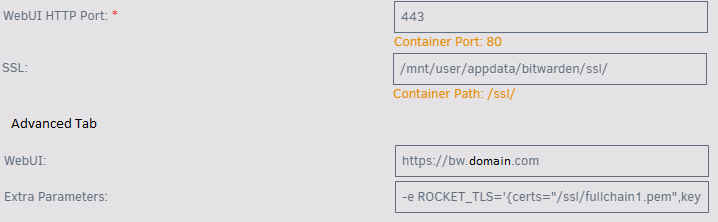
ok, So for anyone else who might want to do this how I did it, I was able to setup Rocket TLS with only the following on the Extra Parameters in the advanced tab Extra Parameters: -e ROCKET_TLS='{certs="/data/ssl/fullchain.pem",key="/data/ssl/privkey.pem"}' -e ROCKET_PORT=443 Then in unraid Terminal I typed the following to copy the corresponding Letsencrypt Certs from Nginx Proxy Manager (update the port [443] and scheme [https] on NPM too): scp /mnt/user/appdata/NginxProxyManager/letsencrypt/live/npm-14/fullchain.pem /mnt/user/appdata/bitwarden/ssl/ scp /mnt/user/appdata/NginxProxyManager/letsencrypt/live/npm-14/privkey.pem /mnt/user/appdata/bitwarden/ssl/ Then make sure to change your WebUI HTTP Port to 443 and I also changed the WebUI Link for when you right click on the Dashboard and want to be taken to Bitwarden. I guess I would need to make sure bitwarden copies the cert files on a schedule so when the certs change they are update... not sure how to do this one yet... Any ideas? Also @Roxedus what I forgot earlier is that on the emails I get the Reverse Proxies IP instead of the actual IP, I read somewhere that NPM supports the X-Real-IP $remote_addr; stuff, but I am not sure if it does or what needs to be fixed....
-
Just tried this but still a no go... I am reverting and trying the Rocket TLS things... Apart from this I had another question, but I'll update about this when I remember...
-
But how? My DNS (pihole) and or router (untangle) know my domain and automatically resolve it. I erased static DNS Entries and it still resolves to local. Flushed DNS too...
-
Ok so try this for local... Can I keep the rest how it is for external and it should work right?
-
Straight to local. Nslookup bw.mydomain.com returns 192.168.2.15. Tracert to bw.mydomain.com only 192.168.2.15 is shown. Does not go to router or reverse proxy first... So app cant login locally because it expects 443 but docker is only 80...
-
It resolves to BW local IP... If I do nslookup my DNS replies the local IP which only supports HTTP... and app only looks for HTTPS... Externally obviously it works fine. But if I am at home on WiFi its offline only...
-
I am at a loss with using the app on WiFi... I am using Ngonx Proxy Manager and can reach bitwarden externally... I can reach BW using IP locally on port 80. But if I try to login using the app it looks for port 443 by default and I cant login if connected to WiFi... How come the docker only uses port 80 and not both? What can I do to fix this...?
-
OMG... so simple yet I've spent so much time on trying to see what is wrong here..... I thought it was either my router or a DNS issue..... (I'm using pi-hole and Untangle) Damn Hidden Advanced Setting, I always forget to open them...
-
Can you specify what you did. I believe it is exactly my scenario...
-
I wasn't sure how to add it, part of the reason why I dismissed it when I first read it and I thought the appropriate command was something else. but just read how the go file works and just added both lines to the bottom as if I would have wrote it on the terminal. Just rebooted and all good, thanks!
-
I have to do this more times than I want to, and its always the same 2 disks, how can I automate this on startup?
-
As I mentioned. I reinstalled after deleting everything and still won't start...
-
This seems to have stopped working with 6.7.0, I have deleted everything and reinstalled and still not working. states: standard_init_linux.go:207: exec user process caused "no such file or directory"
-
Is there a way this can have support to view thumbnail? at least for pictures. I was trying to read the github, it appears it can do it but needs some dependencies... not sure if this is correct though...
-
I think the CA-bundle looks like that... I will try later and let you know.
-
I dont know. I have a .key file, a .crt file, a .pb7 file and a CA-bundle
-
[services.d] starting nginx... [services.d] starting app... [app] starting Nginx Proxy Manager... [nginx] starting... [services.d] done. [2019-4-11] [16:32:05] [Migrate ] › ℹ info Current database version: 20190227065017 [2019-4-11] [16:32:05] [IP Ranges] › ℹ info Fetching IP Ranges from online services... [2019-4-11] [16:32:05] [IP Ranges] › ℹ info Fetching https://ip-ranges.amazonaws.com/ip-ranges.json [2019-4-11] [16:32:06] [IP Ranges] › ℹ info Fetching https://www.cloudflare.com/ips-v4 [2019-4-11] [16:32:06] [IP Ranges] › ℹ info Fetching https://www.cloudflare.com/ips-v6 [2019-4-11] [16:32:06] [SSL ] › ℹ info Let's Encrypt Renewal Timer initialized [2019-4-11] [16:32:06] [IP Ranges] › ℹ info IP Ranges Renewal Timer initialized [2019-4-11] [16:32:06] [Global ] › ℹ info PID 957 listening on port 8181 ... [2019-4-11] [16:39:56] [Express ] › ⚠ warning Certificate is not valid (Command failed: openssl x509 -in /tmp/ebed01b0-60a4-4272-93a8-864c0e7a8e1a/tmp -subject -noout unable to load certificate 22406402014156:error:0906D06C:PEM routines:PEM_read_bio:no start line:pem_lib.c:697:Expecting: TRUSTED CERTIFICATE ) [2019-4-11] [16:41:49] [Express ] › ⚠ warning Certificate is not valid (Command failed: openssl x509 -in /tmp/e455c0ff-b77a-4bbf-9b86-85d315518d9c/tmp -subject -noout unable to load certificate 22560350043084:error:0906D06C:PEM routines:PEM_read_bio:no start line:pem_lib.c:697:Expecting: TRUSTED CERTIFICATE ) [2019-4-11] [17:01:20] [Nginx ] › ℹ info Reloading Nginx [2019-4-11] [17:04:49] [Nginx ] › ℹ info Reloading Nginx [2019-4-11] [22:32:06] [IP Ranges] › ℹ info Fetching IP Ranges from online services... [2019-4-11] [22:32:06] [IP Ranges] › ℹ info Fetching https://ip-ranges.amazonaws.com/ip-ranges.json [2019-4-11] [22:32:07] [IP Ranges] › ℹ info Fetching https://www.cloudflare.com/ips-v4 [2019-4-11] [22:32:07] [IP Ranges] › ℹ info Fetching https://www.cloudflare.com/ips-v6 [2019-4-11] [22:32:08] [Nginx ] › ℹ info Reloading Nginx
-
hey Djoss, I am trying to install a custom namecheap certificate, but the GUI keeps showing upload failed... I see this is a bug apparently? https://github.com/jc21/nginx-proxy-manager/issues/52 How or where do I add my custom cert? Do I add it to the nextcloud docker? or can I add it to NPM and use it from there?
-
How can I change the Hostname for pihole? the farthest I got was using sysctl kernel.hostname but I get an error...
