






GilbN
Community Developer
-
Joined
-
Last visited
Everything posted by GilbN
-
It's for serving php web pages. Don't reverse proxy the unraid gui, use a VPN instead.. 1000x more secure.
-
can I ask why you are trying to proxy the apache webserver when you already have a better webserver running?
-
Easier to just use basic auth then. Fail2ban is already pre configured to ban failed auths with basic http authentication. Or if you want to get "fancy", lock it behind organizr server auth and setup fail2ban on organizr.
-
Worked adding the server manually with SSL now
-
So I tried turning SSL off again, and It worked. I saw in the settings that timeout was set to 1, changed it to 1000.
-
I've already tried that. Didn't work.
-
Great!
-
Using 11.4
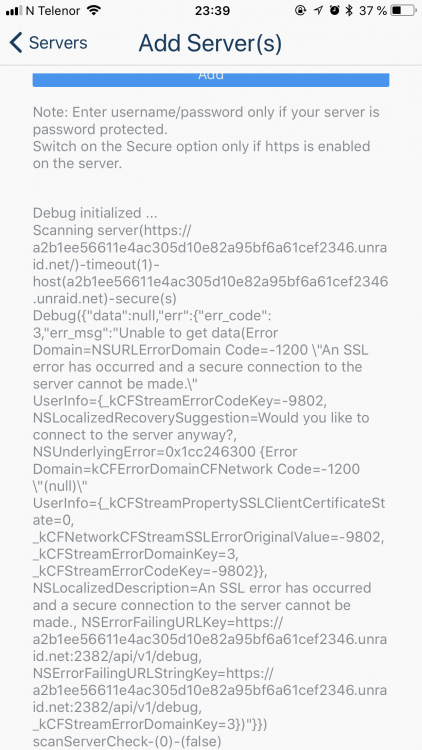
-
Nope only ip, no scheme.
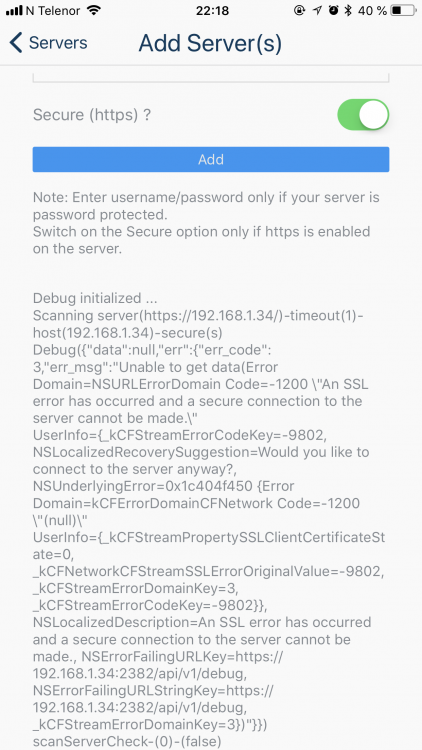
-
Yes, correct. Just tried to connect using the home network. Cant connect, and discover didn't work. Tried on port 80 and 443 with and without secure checked. Tried with SSL/TLS on Auto and Yes. Tried to turn of SSL. Here is the log root@Nostromo:/boot/logs# nano controlr.log GNU nano 2.9.4 controlr.log I: 2018/06/22 08:52:27 app.go:57: controlr v2.9.2-371-b91fc11-v2018.03.21 starting ... I: 2018/06/22 08:52:27 app.go:65: No config file specified. Using app defaults ... I: 2018/06/22 08:52:27 core.go:73: starting service Core ... I: 2018/06/22 08:52:27 core.go:269: Created ipmi sensor ... I: 2018/06/22 08:52:27 core.go:287: Created apc ups ... I: 2018/06/22 08:52:27 server.go:70: Starting service Server ... I: 2018/06/22 08:52:27 server.go:89: Serving files from /usr/local/emhttp/plugins/controlr I: 2018/06/22 08:52:27 server.go:140: Server started listening https on :2378 I: 2018/06/22 08:52:27 api.go:46: Starting service Api ... I: 2018/06/22 08:52:27 api.go:90: Api started listening https on :2382 I: 2018/06/22 08:52:27 app.go:85: Press Ctrl+C to stop ... I: 2018/06/22 18:49:23 app.go:89: Received signal: (terminated) ... shutting down the app now ... I: 2018/06/22 18:49:23 api.go:105: stopped service Api ... I: 2018/06/22 18:49:23 server.go:157: stopped service Server ... I: 2018/06/22 18:49:23 core.go:141: stopped service Core ... I: 2018/06/22 18:49:23 app.go:57: controlr v2.9.2-371-b91fc11-v2018.03.21 starting ... I: 2018/06/22 18:49:23 app.go:65: No config file specified. Using app defaults ... I: 2018/06/22 18:49:23 core.go:73: starting service Core ... I: 2018/06/22 18:49:23 core.go:269: Created ipmi sensor ... I: 2018/06/22 18:49:23 core.go:296: No ups detected ... I: 2018/06/22 18:49:23 server.go:70: Starting service Server ... I: 2018/06/22 18:49:23 server.go:89: Serving files from /usr/local/emhttp/plugins/controlr I: 2018/06/22 18:49:23 server.go:151: Server started listening http on :2378 I: 2018/06/22 18:49:23 api.go:46: Starting service Api ... I: 2018/06/22 18:49:23 api.go:99: Api started listening http on :2382 I: 2018/06/22 18:49:23 app.go:85: Press Ctrl+C to stop ... I: 2018/06/22 18:50:18 app.go:89: Received signal: (terminated) ... shutting down the app now ... I: 2018/06/22 18:50:18 api.go:105: stopped service Api ... I: 2018/06/22 18:50:18 server.go:157: stopped service Server ... I: 2018/06/22 18:50:18 core.go:141: stopped service Core ... I: 2018/06/22 18:51:02 app.go:57: controlr v2.9.2-371-b91fc11-v2018.03.21 starting ... I: 2018/06/22 18:51:02 app.go:65: No config file specified. Using app defaults ... I: 2018/06/22 18:51:02 core.go:73: starting service Core ... I: 2018/06/22 18:51:02 core.go:269: Created ipmi sensor ... I: 2018/06/22 18:51:02 core.go:287: Created apc ups ... I: 2018/06/22 18:51:02 server.go:70: Starting service Server ... I: 2018/06/22 18:51:02 server.go:89: Serving files from /usr/local/emhttp/plugins/controlr I: 2018/06/22 18:51:02 server.go:151: Server started listening http on :2378 I: 2018/06/22 18:51:02 api.go:46: Starting service Api ... I: 2018/06/22 18:51:02 api.go:99: Api started listening http on :2382 I: 2018/06/22 18:51:02 app.go:85: Press Ctrl+C to stop ... I: 2018/06/22 18:51:48 core.go:180: Getting users ... I: 2018/06/22 18:51:48 core.go:182: Got 2 users I: 2018/06/22 18:51:48 core.go:183: Getting apps ... I: 2018/06/22 18:51:48 core.go:185: Got 64 apps I: 2018/06/22 18:53:04 core.go:180: Getting users ... I: 2018/06/22 18:53:04 core.go:182: Got 2 users I: 2018/06/22 18:53:04 core.go:183: Getting apps ... I: 2018/06/22 18:53:04 core.go:185: Got 64 apps I: 2018/06/22 18:53:06 core.go:180: Getting users ... I: 2018/06/22 18:53:06 core.go:182: Got 2 users I: 2018/06/22 18:53:06 core.go:183: Getting apps ... I: 2018/06/22 18:53:06 core.go:185: Got 64 apps I: 2018/06/22 18:53:06 core.go:180: Getting users ... I: 2018/06/22 18:53:06 core.go:182: Got 2 users I: 2018/06/22 18:53:06 core.go:183: Getting apps ... I: 2018/06/22 18:53:06 core.go:185: Got 64 apps I: 2018/06/22 18:53:19 core.go:180: Getting users ... I: 2018/06/22 18:53:19 core.go:182: Got 2 users I: 2018/06/22 18:53:19 core.go:183: Getting apps ... I: 2018/06/22 18:53:19 core.go:185: Got 64 apps I: 2018/06/22 18:53:22 core.go:180: Getting users ... I: 2018/06/22 18:53:22 core.go:182: Got 2 users I: 2018/06/22 18:53:22 core.go:183: Getting apps ... I: 2018/06/22 18:53:22 core.go:185: Got 64 apps I: 2018/06/22 18:53:24 core.go:180: Getting users ... I: 2018/06/22 18:53:24 core.go:182: Got 2 users I: 2018/06/22 18:53:24 core.go:183: Getting apps ... I: 2018/06/22 18:53:24 core.go:185: Got 64 apps I: 2018/06/22 18:53:25 core.go:180: Getting users ... I: 2018/06/22 18:53:25 core.go:182: Got 2 users I: 2018/06/22 18:53:25 core.go:183: Getting apps ... I: 2018/06/22 18:53:25 core.go:185: Got 64 apps
-
Will try when I get home. Thanks. Tried ip,443,secure checked didn't work.
-
Hi, just bought the app and installed the companion plugin. I'm trying to connect via a vpn connection. I can access unraid just fine using safari but nothing happens in the app. No error messages or anything. Tried on port 80 and 443. Tried with and without https check. tried with IP and the custom unraid dns.
-
I'm guessing it fails because you are trying to add www.duckdns.org
-
I made this guide using Viaduct's script. https://technicalramblings.com/blog/setting-grafana-influxdb-telegraf-ups-monitoring-unraid/ It's not perfect as I would really like it to update influxdb more often than every minute.
-
Have you seen this? https://github.com/Tensai75/plpp/blob/master/README.md
-
Have you figured this out yet?
-
Yes it's possible. But it's not secure at all. You should use a VPN much safer. But if you absolutely want to. ```nginx ##UNRAID INTERFACE ## https://lime-technology.com/forums/topic/49997-reverse-proxy-unraid-dashboard-and-others/ # ## REDIRECT HTTP TRAFFIC TO https://domain.com #server { # listen 80; # server_name unraid.domain.com; # return 301 https://$host$request_uri; # } # #server { # listen 443 ssl http2; # server_name unraid.domain.com; # include /config/nginx/strong-ssl.conf; # # location / { # include /config/nginx/basicauth.conf; # include /config/nginx/proxy.conf; # # proxy_pass http://int.ern.al.ip/; # # # unraid logs do not work if buffering is enabled # proxy_buffering off; # # # see http://shairosenfeld.blogspot.com/2011/03/authorization-header-in-nginx-for.html # proxy_set_header Authorization "Basic redactedbase64code"; # https://www.base64decode.org # # # If you are proxying unRAID 6.4+, uncomment the following lines to support WebSockets # proxy_set_header Upgrade $http_upgrade; # proxy_set_header Connection "upgrade"; # } #}
-
For ombi you need version 3.0.2165 or later. Are you sure the ombi api key is correct? And did you try and add the url base if you use that? You did add it to custom html and not css right? For Organizr support I highly recommend joining the discord. https://organizr.us/discord much easier to support live ?
-
Domain.com/ombi was just an example. Ombi.domain.com works just fine. Adding.htpasspw will make users have to log in twice yes. Using organizr they will only log in once with their plex credentials.
-
Pretty obvious error. failed (2: No such file or directory Sure the .htpasspw is not in /config/nginx/.htpasswd ?
-
For Ombi you can setup .htpasswd and have fail2ban ban the ip after x amount of failed logins. Fail2ban is already setup to do that with [nginx-http-auth]. I would add ignoreip = x.x.x.x/24 so you don't ban yourself. Like this. [nginx-http-auth] enabled = true filter = nginx-http-auth port = http,https logpath = /config/log/nginx/error.log ignoreip = 192.168.1.0/24 Or you could setup Organizr and use server authentication so that only users that are logged in to organizr can access domain.com/ombi. And setup fail2ban on the organizr login page. With Organizr users that log in will automatically be logged into ombi/plex using SSO. https://imgur.com/a/rcwq6rg You can also setup geoblocking, that will block any country of your choosing.
-
I don't either, I was just pointing it out to wgstarks
-
There are two. One for linuxserver and one that is the offical Tautulli container. (Based on linuxserver) The support thread link for the official one is a link to discord, so there isn't a support thread on the unraid-forums for it. I'm not sure who has created the unraid template for the official one, but I'm guessing its the CA devs?
-
Sure its not really hard to work around, but its not really much work to edit the template so it just works "out of the box" either
-
I think I found an error in the Tautulli template in CA. It uses container path /plex_logs instead of /logs . https://github.com/Tautulli/Tautulli-Docker here they say use /logs.




