





Maticks
Members
-
Joined
-
Last visited
Everything posted by Maticks
-
I am running on 6.11.5 after some stability issues with BTRFS read only problems i see .2 has come out i might try upgrade again to 6.12.2 see if its better than .1. The issue seems to be the new version of Nvidia Drivers on 6.11.5 with Plex is created some problems filling tmpfs with this. I can't work out how to get rid of it just keeps looping till it fills the log to 31M. {"level":"info","msg":"Running with config:\n{\n \"AcceptEnvvarUnprivileged\": true,\n \"NVIDIAContainerCLIConfig\": {\n \"Root\": \"\"\n },\n \"NVIDIACTKConfig\": {\n \"Path\": \"nvidia-ctk\"\n },\n \"NVIDIAContainerRuntimeConfig\": {\n \"DebugFilePath\": \"/dev/null\",\n \"LogLevel\": \"info\",\n \"Runtimes\": [\n \"docker-runc\",\n \"runc\"\n ],\n \"Mode\": \"auto\",\n \"Modes\": {\n \"CSV\": {\n \"MountSpecPath\": \"/etc/nvidia-container-runtime/host-files-for-container.d\"\n },\n \"CDI\": {\n \"SpecDirs\": null,\n \"DefaultKind\": \"nvidia.com/gpu\",\n \"AnnotationPrefixes\": [\n \"cdi.k8s.io/\"\n ]\n }\n }\n },\n \"NVIDIAContainerRuntimeHookConfig\": {\n \"SkipModeDetection\": false\n }\n}","time":"2023-07-01T08:49:53+10:00"} {"level":"info","msg":"Using low-level runtime /usr/bin/runc","time":"2023-07-01T08:49:53+10:00"} {"level":"info","msg":"Running with config:\n{\n \"AcceptEnvvarUnprivileged\": true,\n \"NVIDIAContainerCLIConfig\": {\n \"Root\": \"\"\n },\n \"NVIDIACTKConfig\": {\n \"Path\": \"nvidia-ctk\"\n },\n \"NVIDIAContainerRuntimeConfig\": {\n \"DebugFilePath\": \"/dev/null\",\n \"LogLevel\": \"info\",\n \"Runtimes\": [\n \"docker-runc\",\n \"runc\"\n ],\n \"Mode\": \"auto\",\n \"Modes\": {\n \"CSV\": {\n \"MountSpecPath\": \"/etc/nvidia-container-runtime/host-files-for-container.d\"\n },\n \"CDI\": {\n \"SpecDirs\": null,\n \"DefaultKind\": \"nvidia.com/gpu\",\n \"AnnotationPrefixes\": [\n \"cdi.k8s.io/\"\n ]\n }\n }\n },\n \"NVIDIAContainerRuntimeHookConfig\": {\n \"SkipModeDetection\": false\n }\n}","time":"2023-07-01T08:49:59+10:00"} {"level":"info","msg":"Using low-level runtime /usr/bin/runc","time":"2023-07-01T08:49:59+10:00"} {"level":"info","msg":"Running with config:\n{\n \"AcceptEnvvarUnprivileged\": true,\n \"NVIDIAContainerCLIConfig\": {\n \"Root\": \"\"\n },\n \"NVIDIACTKConfig\": {\n \"Path\": \"nvidia-ctk\"\n },\n \"NVIDIAContainerRuntimeConfig\": {\n \"DebugFilePath\": \"/dev/null\",\n \"LogLevel\": \"info\",\n \"Runtimes\": [\n \"docker-runc\",\n \"runc\"\n ],\n \"Mode\": \"auto\",\n \"Modes\": {\n \"CSV\": {\n \"MountSpecPath\": \"/etc/nvidia-container-runtime/host-files-for-container.d\"\n },\n \"CDI\": {\n \"SpecDirs\": null,\n \"DefaultKind\": \"nvidia.com/gpu\",\n \"AnnotationPrefixes\": [\n \"cdi.k8s.io/\"\n ]\n }\n }\n },\n \"NVIDIAContainerRuntimeHookConfig\": {\n \"SkipModeDetection\": false\n }\n}","time":"2023-07-01T08:50:04+10:00"} {"level":"info","msg":"Using low-level runtime /usr/bin/runc","time":"2023-07-01T08:50:04+10:00"}
-
i had this same issue twice after upgrading from 6.11.5 to 6.12 and 6.12.1. BTRFS on my cache drive threw a ton of errors like this went into read only and crashed the unraid server. rolled back now seems stable again.
-
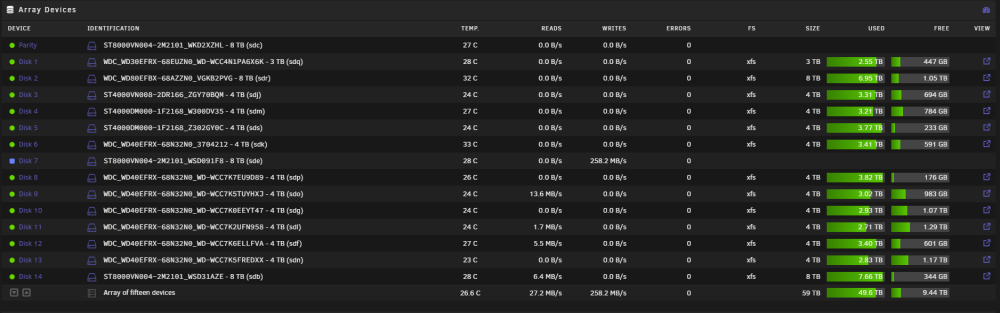
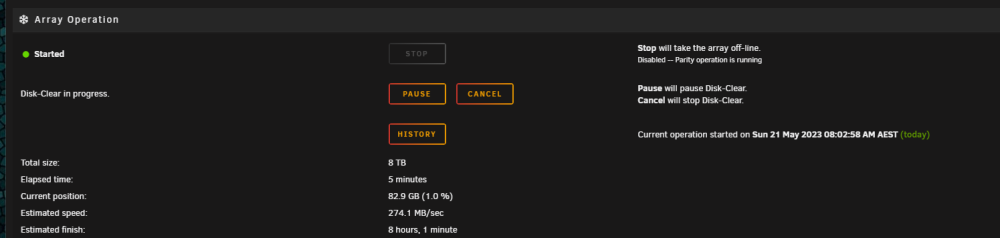
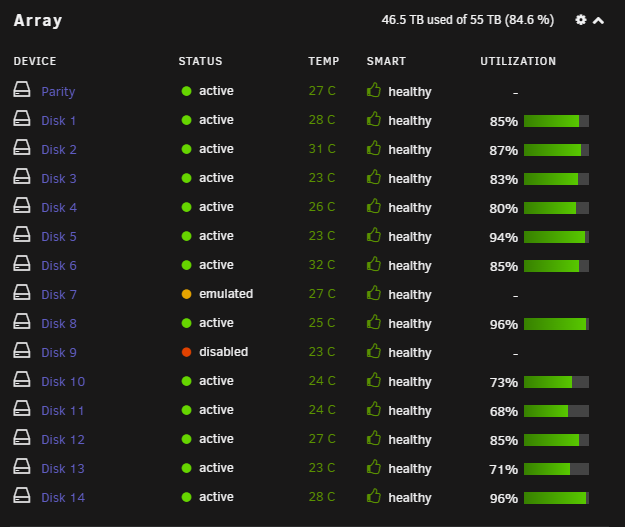
i managed to get Disk 9 back operational and marked the Parity as being correct but i can't seem to kick off disk7 rebuilding. its doing something not sure what it is doing though doesn't say. My data on Disk 9 looks good now just need to somehow bring disk 7 back to life.
-
tower-diagnostics-20230521-0733.zip
-
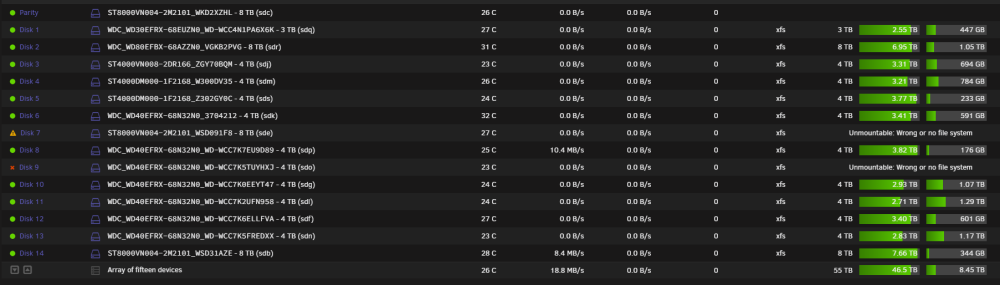
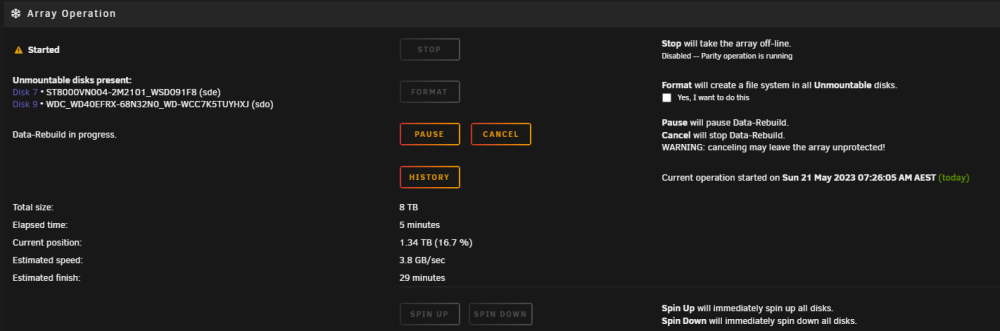
My disk 7 died so i RMA'd the disk and put in a replacement drive. it started Rebuilding and my disk 8 started throwing some UDMA Errors and it was going up in the hundreds so i shutdown my system. Replace my SATA cabling for Disk 9 when i booted it up i was shocked to see disk 9 is now disabled but i can see the temp on the disk. Starting the array i see this I am confused it is rebuilding but it isn't rebuilting. Not sure how to get disk 9 back online? How do I fix this mess?
-
6.11.5
-
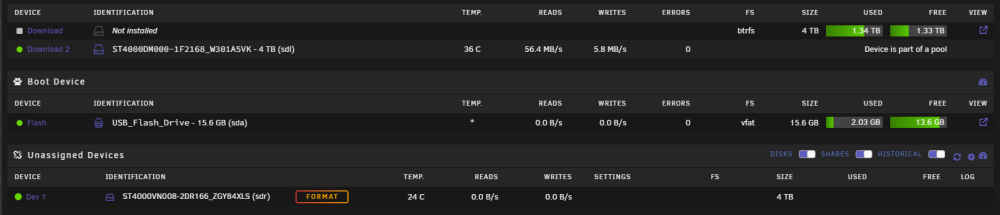
I had to change the second disk as Download then added in the new disk to Download 2 then it worked. Think it is just a UI Bug. Balancing Raid 1 now.
-
I have a second cache pool and one of the disks have failed in the pool set. I have a fresh installed disk to add to the cache pool but when i select the new disk it doesnt say it will be formated when i start the array so i haven't added it. Is there some other trick here? Only Download 2 survived in the cache pool the primary disk in the pool was the one that is dead.
-
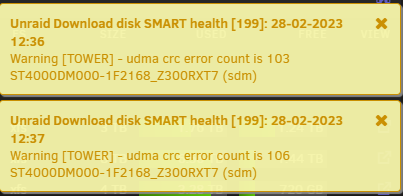
I am now seeing UDMA CRC errors not sure if it is a cable issue now its on that same drive i was seeing the reallocated sectors on before.
-
Can anyone help we work through these error problems. I have 16 Data Disks and 2 Parity disks before I did the case move one disk Z300RXT7 was doing udma crc error every now and then i assumed it was the SAS to SATA cable. So i've rebuilt it in a new case with new cables for all the drives. I had some read errors and UDMA CRC Errors on one drive WCC7K5FREDXX doing a party check after so i changed out the cable assuming it was faulty. That seem to get rid of the errors messages. but shortly afterward i started seeing reallocated sector ct on one of my disks ZGY04GN9 went from 1000 to 14000 within an hour or two so replaced it with a new disk and rebuilt the array. That disk is now stable. But overnight the disk i mentioned that was doing the udma crc error is now on fresh cabling and now doing reallocated sector and the odd offline uncorrectable and current pending sector label Z300RXT7. This disk unlike others is part of a cache pool so wasn't under stress when i was rebuilding my array. Is all this a coincidence and moving the system and drives around for some these 4 year+ drives just too much and they have died? Or is there a possibility of something more and the disks are actually fine? tower-diagnostics-20230227-0920.zip
-
On my day to day of operation i have no errors but it's been a few months since i did a party check so i decided to kick one off today. Haven't had any Parity Check Errors but i had one drive early on throw some errors which was a two year old drive. Then another disk which was a five year old drive. Now one of my recent drives is seeing some errors. Maybe it's the stress i am putting on the HBA controllers? Can anyone see anything here alarming i do have a fan pointed at the two controller heatsink. I am noticing the speed on the reads is going from 2.2Gbps to 1.1Gbps then back up to 2.2Gbps. tower-diagnostics-20230204-1704.zip
-
If you stop the array and go into settings network down the bottom you can add in a static ip and select br0 from the dropdown. as for ram filling with syslog this can happen rebooting is a fix to clear it but you need to findout what is logging to syslog so much
-
I am curious about other peoples feedback here but I bought some desktop drives 7-8 years ago. Followed by some wd red drives followed by some seagate nas drives. I have 7 really old desktop drives going strong get 3-4 years out of nas drives. The fact Unraid spins down disks has me wondering are desktop drive better suited to Unraid? i did hear people saying nas disks are designed to stay spinning not spinning up and down and the head parking all the time. replacing what would be my 9th nas disk only to find my oldest I want to die being desktop drives keep trucking along anyone else noticed this?
-
Anyone have a working version of Autoremove plus and which docker 2.X image to pull down. Been trying for a few days can't seem to get the plugin to work, seems to load but doesn't remove files.
-
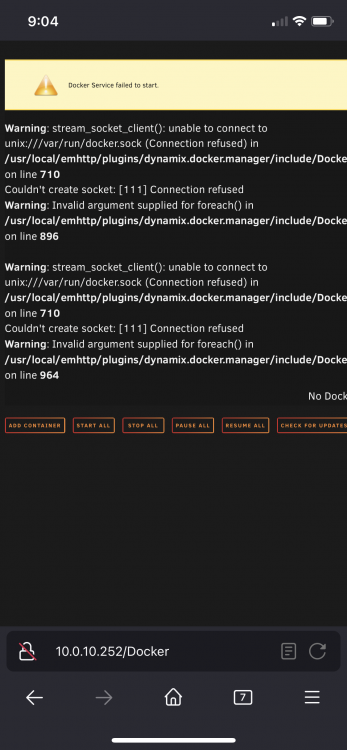
This was in the docker section when i went to the page. before the system crashed.
-
My docker failed randomly, i thought it was my usb flash drive as i had some input/output errors on the following boot and the webui wouldn't start. I have replaced my USB drive with a new one and restored from a backup but my docker still will not start. my array is mounted and my disks all look fine. Any suggestions? I see these errors in syslog Jul 25 05:29:42 Tower avahi-dnsconfd[3624]: Successfully connected to Avahi daemon. Jul 25 05:29:42 Tower emhttpd: shcmd (626): /usr/local/sbin/mount_image '/mnt/user/system/docker/docker.img' /var/lib/docker 50 Jul 25 05:29:42 Tower root: '/mnt/user/system/docker/docker.img' is in-use, cannot mount Jul 25 05:29:42 Tower emhttpd: shcmd (626): exit status: 1 Jul 25 05:29:43 Tower avahi-daemon[3615]: Server startup complete. Host name is Tower.local. Local service cookie is 3466694824. Jul 25 05:29:43 Tower avahi-daemon[3615]: Service "Tower" (/services/ssh.service) successfully established. Jul 25 05:29:43 Tower avahi-daemon[3615]: Service "Tower" (/services/smb.service) successfully established. Jul 25 05:29:43 Tower avahi-daemon[3615]: Service "Tower" (/services/sftp-ssh.service) successfully established. And this in the docker.log failed to start daemon: lstat /var/lib/docker/image/btrfs/layerdb/sha256/879bc71e199bc7a441949238d32c2a7779020ba3cbce6297c88d3489abfc8579: input/output error hoping there is someway to repair it as i don't remember my docker app settings i remember reinstalling an app a few months ago doesn't have the templates dropdown like it use too. tower-diagnostics-20220725-2231.zip
-
The housing The fan sits in requires the standard head connector. Looks like be quiet has made these look nice but I don’t think they will fit in the housing.
-
Hi Community, I moved from a project lots of disks in a case to a proper chassis Logic Case SC-4024. The reason i went with the case is so i could change out the fans since they are 4pin 120MM fans. https://www.logic-case.com/products/rackmount-chassis/4u/4u-server-case-w-24x-35-hot-swappable-satasas-drive-bays-6gbs-minisas-sc-4024/ Not sure if anyone has this case or seen any articles on changing the fans i have done some searched and haven't turned up much. The fans drop onto a board that has plugs off it for PWM i have plugged those into my motherboard PWM headers directly. When i set any of the fans below 2000RPM it pretty much stops the fan. They are pretty loud i am not sure if the board itself is stopping the fan or not. I also tried plugging them into a fan controller but it was 3 min and it started randomly surging the fans without my input i could hear a clicking like there is some kind of brain on this PCB. I am guessing if i can find some fans that are good for high static pressure that can spin at over 2000RPM and not sound like the air is being torn apart that would be nice. Anyone have any suggestions, i am not seeing overheating issues at all but i have it in a space that is 20C.
-
ive just removed it from the internal USB port to the external USB port on the back and it seems to be happy now. I thought it would be no different to use the internal one on the motherboard but i guess it is very different.
-
I moved to a new server chassis and getting a heap of errors. I have no idea what has gone wrong all my disks are here but the array won't start or stop. It's the same USB key as i had before and it boots off it fine i just moved it to the port in the inside of the motherboard instead of using it on the outside. vault-diagnostics-20220723-0940.zip
-
i found a fix i found an additonal tab in plugins at the top Installed Plugins/Install Plugin and i think the third one was errored plugins. inside that tab there was an old version of nvidia-plugin i removed it there. rebooted the server. Now i can use --runtime=nvidia in the docker. Plex is back up and running for me.
-
I rebooted my unraid server and the Nvidia Plugin was no longer installed. I reinstalled the Nvidia plugin and i can see my GPU in it but my plex docker wouldn't start. All i get is this error from the Plex Docker "docker: Error response from daemon: Unknown runtime specified nvidia." I removed --runtime=nvidia and now its working without the GPU. Anyone know how to fix this? It's been working without any issues before? I've tried an old version of plex and a new version also another build that wasnt the official version. Any help appreciated vault-diagnostics-20220629-1629.zip
-
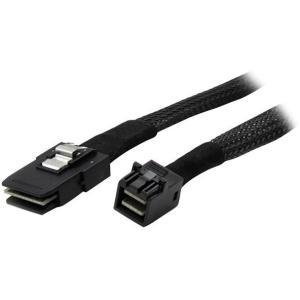
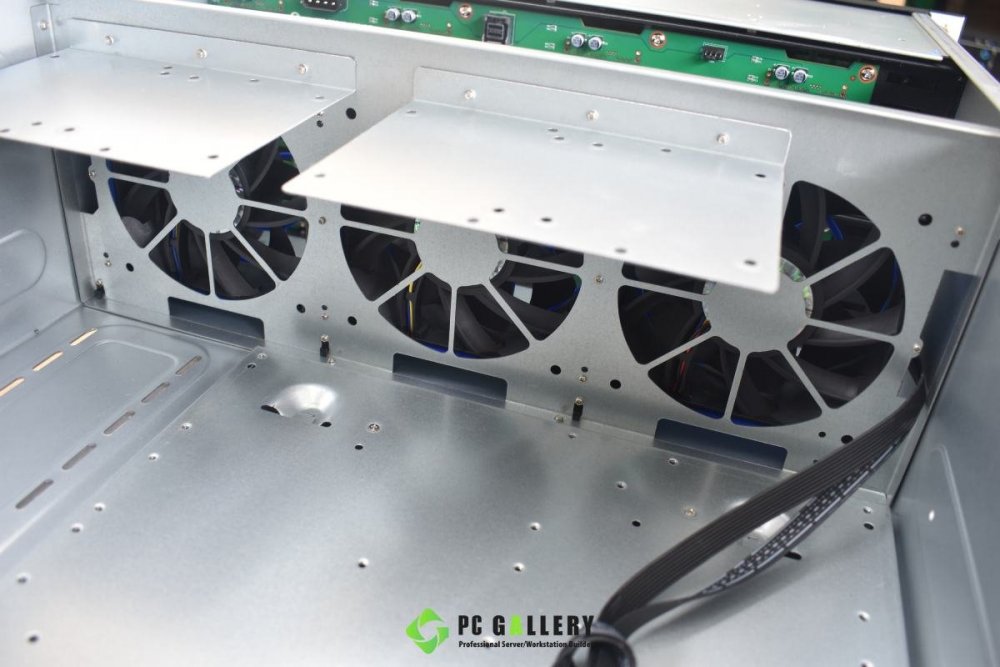
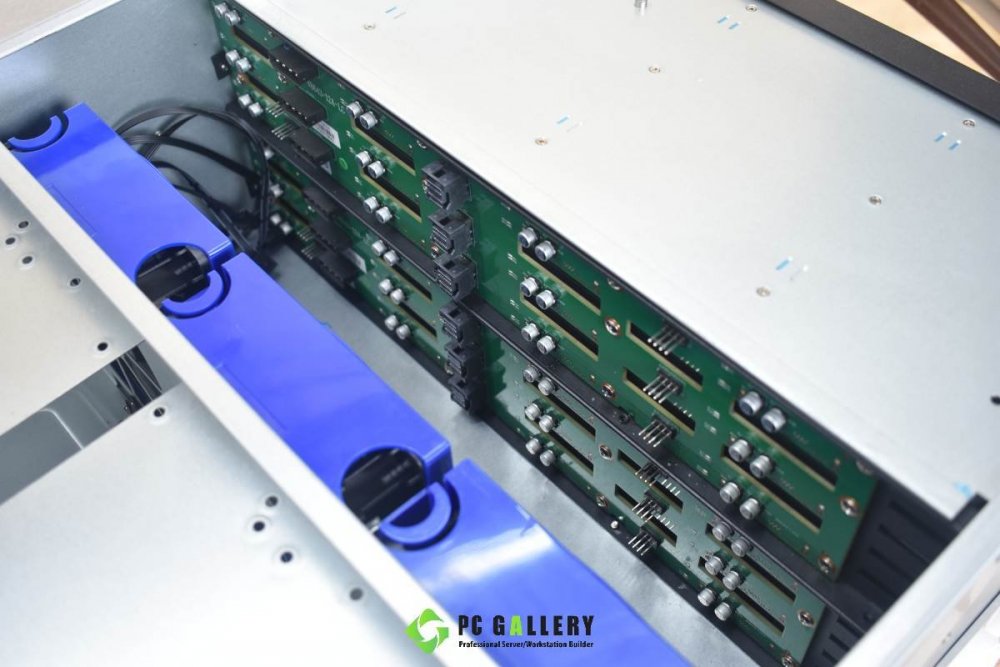
I have never had experience doing this and i am not sure if its going to work or not. I have an LSI 9211 and 9201 card with 8087 interfaces. I have bought this server chassis https://www.pcgallery.co.th/product/4u-tgc-dh-4024-12gb-02/ it has a 8643 Backplane. And i've found these cables https://www.i-tech.com.au/1m-sff-8087-to-sff-8643-cable-sas87431m.html SFF-8643 to SAS SFF-8087 Is this actually going to work i know its not 12Gbps throughput speed but will it function?
-
Looks like the lsi 9211 don’t work in 6.10 rolled back to 6.9 works fine.
-
Diag attached. vault-diagnostics-20220426-1703.zip





