





RParkerMU
Members
-
Joined
-
Last visited
-
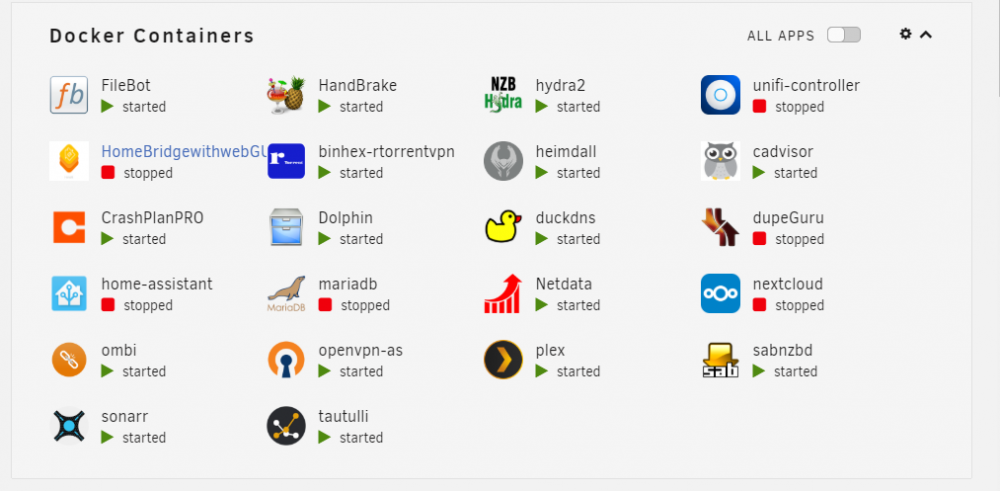
Upgraded from 6.6.1 to 6.7 and haven't noticed any major issues. I did notice one minor UI issue, with the name of the HomeBridgewithwebGUI name being partially covered.
-
I recently upgraded to 6.6.1 from 6.5.3. After upgrading I begun using the GUI CPU Pinning and Isolation located in the Settings tab. It appears that only one core is being utilized, when I have several cores pinned for a container. For example, I have cores 2/10 & 3/11 pinned, however I noticed 100% utilized on core 2 and little to no usage on the others. Prior to 6.6.1, I hadn't used CPU Isolation, so I haven't previously seen this issue. Removing CPU Isolation and rebooting seems to fix the issue:
-
Thanks for adding the arrows. I feel like an idiot for completely missing those check boxes.
-
@1812 Any idea why cores 3, 5 & 12 are not being utilized?
-
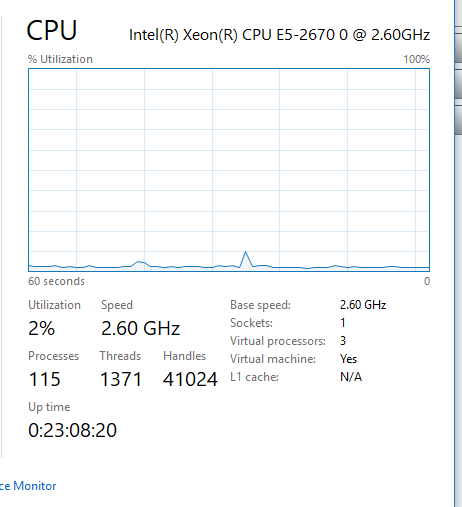
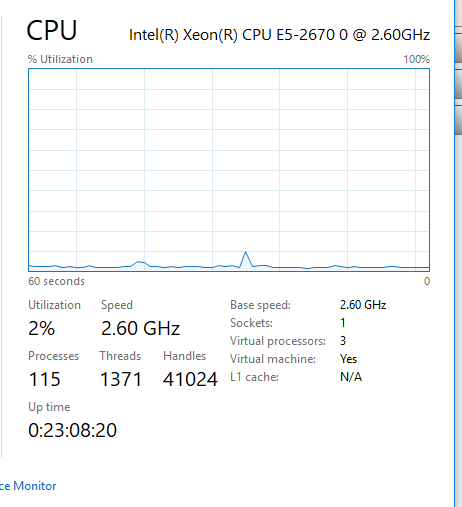
Below is a copy of my XML. It doesn't appear as if Windows is seeing the other cores. The attached screenshot is from task manager on the VM, which shows 3 virtual CPUs and no logical cores. Advanced options of msconfig also only show 3 processors. <domain type='kvm'> <name>Media-VM</name> <uuid>f462ab30-bd7b-879b-98f9-12fd29a6febf</uuid> <metadata> <vmtemplate xmlns="unraid" name="Windows 10" icon="windows.png" os="windows10"/> </metadata> <memory unit='KiB'>4194304</memory> <currentMemory unit='KiB'>2097152</currentMemory> <memoryBacking> <nosharepages/> </memoryBacking> <vcpu placement='static'>3</vcpu> <cputune> <vcpupin vcpu='0' cpuset='11'/> <vcpupin vcpu='1' cpuset='4'/> <vcpupin vcpu='2' cpuset='13'/> </cputune> <os> <type arch='x86_64' machine='pc-i440fx-2.11'>hvm</type> <loader readonly='yes' type='pflash'>/usr/share/qemu/ovmf-x64/OVMF_CODE-pure-efi.fd</loader> <nvram>/etc/libvirt/qemu/nvram/f462ab30-bd7b-879b-98f9-12fd29a6febf_VARS-pure-efi.fd</nvram> </os> <features> <acpi/> <apic/> <hyperv> <relaxed state='on'/> <vapic state='on'/> <spinlocks state='on' retries='8191'/> <vendor_id state='on' value='none'/> </hyperv> </features> <cpu mode='host-passthrough' check='none'> <topology sockets='1' cores='3' threads='1'/> </cpu> <clock offset='localtime'> <timer name='hypervclock' present='yes'/> <timer name='hpet' present='no'/> </clock> <on_poweroff>destroy</on_poweroff> <on_reboot>restart</on_reboot> <on_crash>restart</on_crash> <devices> <emulator>/usr/local/sbin/qemu</emulator> <disk type='file' device='disk'> <driver name='qemu' type='raw' cache='writeback'/> <source file='/mnt/user/domains/Media-VM/vdisk1.img'/> <target dev='hdc' bus='virtio'/> <boot order='1'/> <address type='pci' domain='0x0000' bus='0x00' slot='0x06' function='0x0'/> </disk> <disk type='file' device='cdrom'> <driver name='qemu' type='raw'/> <source file='/mnt/user/isos/Windows/Windows 10 (1803) x64.iso'/> <target dev='hda' bus='sata'/> <readonly/> <boot order='2'/> <address type='drive' controller='0' bus='0' target='0' unit='0'/> </disk> <disk type='file' device='cdrom'> <driver name='qemu' type='raw'/> <source file='/mnt/user/isos/virtio-win-0.1.141.iso'/> <target dev='hdb' bus='ide'/> <readonly/> <address type='drive' controller='0' bus='0' target='0' unit='1'/> </disk> <controller type='usb' index='0' model='ich9-ehci1'> <address type='pci' domain='0x0000' bus='0x00' slot='0x07' function='0x7'/> </controller> <controller type='usb' index='0' model='ich9-uhci1'> <master startport='0'/> <address type='pci' domain='0x0000' bus='0x00' slot='0x07' function='0x0' multifunction='on'/> </controller> <controller type='usb' index='0' model='ich9-uhci2'> <master startport='2'/> <address type='pci' domain='0x0000' bus='0x00' slot='0x07' function='0x1'/> </controller> <controller type='usb' index='0' model='ich9-uhci3'> <master startport='4'/> <address type='pci' domain='0x0000' bus='0x00' slot='0x07' function='0x2'/> </controller> <controller type='pci' index='0' model='pci-root'/> <controller type='ide' index='0'> <address type='pci' domain='0x0000' bus='0x00' slot='0x01' function='0x1'/> </controller> <controller type='sata' index='0'> <address type='pci' domain='0x0000' bus='0x00' slot='0x04' function='0x0'/> </controller> <controller type='virtio-serial' index='0'> <address type='pci' domain='0x0000' bus='0x00' slot='0x05' function='0x0'/> </controller> <interface type='bridge'> <mac address='52:54:00:24:e9:5f'/> <source bridge='br0'/> <model type='virtio'/> <address type='pci' domain='0x0000' bus='0x00' slot='0x03' function='0x0'/> </interface> <serial type='pty'> <target type='isa-serial' port='0'> <model name='isa-serial'/> </target> </serial> <console type='pty'> <target type='serial' port='0'/> </console> <channel type='unix'> <target type='virtio' name='org.qemu.guest_agent.0'/> <address type='virtio-serial' controller='0' bus='0' port='1'/> </channel> <input type='tablet' bus='usb'> <address type='usb' bus='0' port='1'/> </input> <input type='mouse' bus='ps2'/> <input type='keyboard' bus='ps2'/> <graphics type='vnc' port='-1' autoport='yes' websocket='-1' listen='0.0.0.0' keymap='en-us'> <listen type='address' address='0.0.0.0'/> </graphics> <video> <model type='qxl' ram='65536' vram='65536' vgamem='16384' heads='1' primary='yes'/> <address type='pci' domain='0x0000' bus='0x00' slot='0x02' function='0x0'/> </video> <memballoon model='virtio'> <address type='pci' domain='0x0000' bus='0x00' slot='0x08' function='0x0'/> </memballoon> </devices> </domain>
-
Edited my response to logical cores.
-
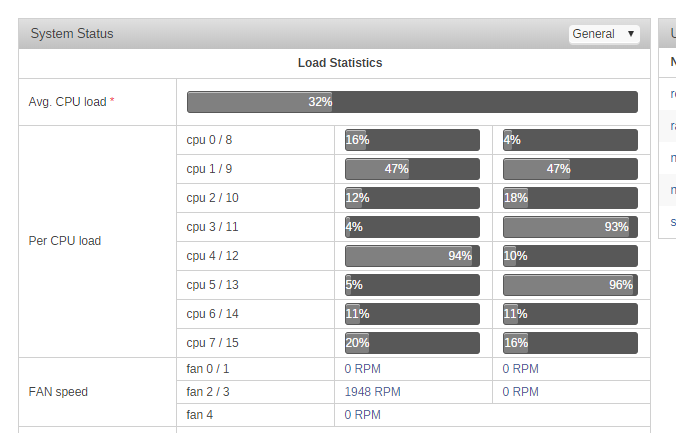
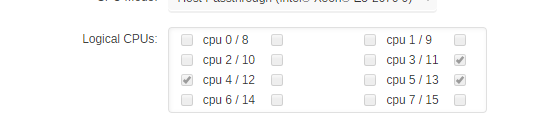
I'm hoping someone can assist me with this issue. I've pinned a VM to 6 (logical) cores, but only 3 cores appear to be actively used. How would I go about fixing this? CPU is: E5-2670
-
I'm not sure what happened but, I rebooted my server and it started working again. I'll keep this in mind for the future.
-
I believe this is the docker run command. I exactly sure how where to grab the command from so I removed and recreated the container. /usr/local/emhttp/plugins/dynamix.docker.manager/scripts/docker run -d --name='tautulli' --net='bridge' -e TZ="America/Chicago" -e HOST_OS="unRAID" -e 'PUID'='99' -e 'PGID'='100' -p '8181:8181/tcp' -v '/mnt/user/appdata/plex/Library/Application Support/Plex Media Server/Logs/':'/logs':'ro' -v '/mnt/user/appdata/tautulli':'/config':'rw' 'linuxserver/tautulli' b73a2b9552815e3bd85567ba72b326a76a01bc99a4ea22be44e7ca946efb7e06
-
I even tried in Incognito mode and on a different browser. On the page that loads, the error is connection refused.
-
I'm now having some trouble with this container. It was working fine last night, but I can't get to the WebUI today. I've tried completely deleting everything and recreating with no success. Output from the log file is attached. tautulli_log.txt
-
@Djoss Edit: I figured out it. I was able to create a file via the touch command, but had to use the /output folder. When trying to convert the files, I was trying to use /mnt/user/Videos/_Video Conversion/Converted/ instead of output.
-
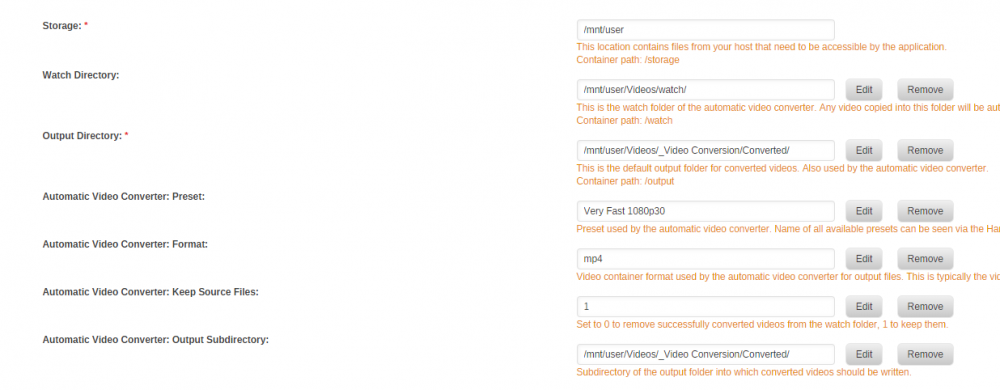
I can't seem to get my write issue sorted out. I'm hoping someone can assist. I'm able to open the source but when attempting to add to queue or start encoding I get the "Can not read or write the directory error". The attached image shows my mappings.
-
CyberMew, I'm getting an Avahi error with the container from adair21. Did you have to do anything special to get this working?
-
Thanks for the suggestion, that actually fixed my issue.


