





RParkerMU
Members
-
Joined
-
Last visited
Everything posted by RParkerMU
-
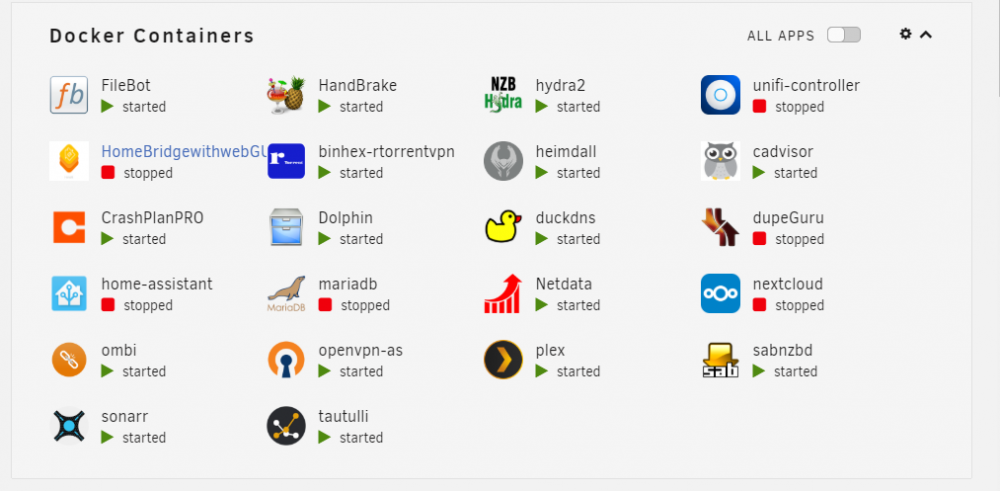
Upgraded from 6.6.1 to 6.7 and haven't noticed any major issues. I did notice one minor UI issue, with the name of the HomeBridgewithwebGUI name being partially covered.
-
I recently upgraded to 6.6.1 from 6.5.3. After upgrading I begun using the GUI CPU Pinning and Isolation located in the Settings tab. It appears that only one core is being utilized, when I have several cores pinned for a container. For example, I have cores 2/10 & 3/11 pinned, however I noticed 100% utilized on core 2 and little to no usage on the others. Prior to 6.6.1, I hadn't used CPU Isolation, so I haven't previously seen this issue. Removing CPU Isolation and rebooting seems to fix the issue:
-
Thanks for adding the arrows. I feel like an idiot for completely missing those check boxes.
-
@1812 Any idea why cores 3, 5 & 12 are not being utilized?
-
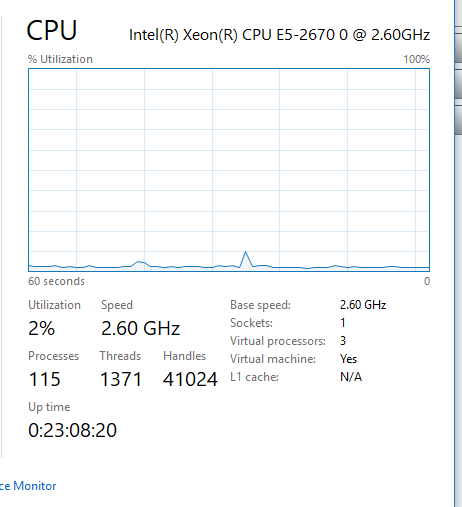
Below is a copy of my XML. It doesn't appear as if Windows is seeing the other cores. The attached screenshot is from task manager on the VM, which shows 3 virtual CPUs and no logical cores. Advanced options of msconfig also only show 3 processors. <domain type='kvm'> <name>Media-VM</name> <uuid>f462ab30-bd7b-879b-98f9-12fd29a6febf</uuid> <metadata> <vmtemplate xmlns="unraid" name="Windows 10" icon="windows.png" os="windows10"/> </metadata> <memory unit='KiB'>4194304</memory> <currentMemory unit='KiB'>2097152</currentMemory> <memoryBacking> <nosharepages/> </memoryBacking> <vcpu placement='static'>3</vcpu> <cputune> <vcpupin vcpu='0' cpuset='11'/> <vcpupin vcpu='1' cpuset='4'/> <vcpupin vcpu='2' cpuset='13'/> </cputune> <os> <type arch='x86_64' machine='pc-i440fx-2.11'>hvm</type> <loader readonly='yes' type='pflash'>/usr/share/qemu/ovmf-x64/OVMF_CODE-pure-efi.fd</loader> <nvram>/etc/libvirt/qemu/nvram/f462ab30-bd7b-879b-98f9-12fd29a6febf_VARS-pure-efi.fd</nvram> </os> <features> <acpi/> <apic/> <hyperv> <relaxed state='on'/> <vapic state='on'/> <spinlocks state='on' retries='8191'/> <vendor_id state='on' value='none'/> </hyperv> </features> <cpu mode='host-passthrough' check='none'> <topology sockets='1' cores='3' threads='1'/> </cpu> <clock offset='localtime'> <timer name='hypervclock' present='yes'/> <timer name='hpet' present='no'/> </clock> <on_poweroff>destroy</on_poweroff> <on_reboot>restart</on_reboot> <on_crash>restart</on_crash> <devices> <emulator>/usr/local/sbin/qemu</emulator> <disk type='file' device='disk'> <driver name='qemu' type='raw' cache='writeback'/> <source file='/mnt/user/domains/Media-VM/vdisk1.img'/> <target dev='hdc' bus='virtio'/> <boot order='1'/> <address type='pci' domain='0x0000' bus='0x00' slot='0x06' function='0x0'/> </disk> <disk type='file' device='cdrom'> <driver name='qemu' type='raw'/> <source file='/mnt/user/isos/Windows/Windows 10 (1803) x64.iso'/> <target dev='hda' bus='sata'/> <readonly/> <boot order='2'/> <address type='drive' controller='0' bus='0' target='0' unit='0'/> </disk> <disk type='file' device='cdrom'> <driver name='qemu' type='raw'/> <source file='/mnt/user/isos/virtio-win-0.1.141.iso'/> <target dev='hdb' bus='ide'/> <readonly/> <address type='drive' controller='0' bus='0' target='0' unit='1'/> </disk> <controller type='usb' index='0' model='ich9-ehci1'> <address type='pci' domain='0x0000' bus='0x00' slot='0x07' function='0x7'/> </controller> <controller type='usb' index='0' model='ich9-uhci1'> <master startport='0'/> <address type='pci' domain='0x0000' bus='0x00' slot='0x07' function='0x0' multifunction='on'/> </controller> <controller type='usb' index='0' model='ich9-uhci2'> <master startport='2'/> <address type='pci' domain='0x0000' bus='0x00' slot='0x07' function='0x1'/> </controller> <controller type='usb' index='0' model='ich9-uhci3'> <master startport='4'/> <address type='pci' domain='0x0000' bus='0x00' slot='0x07' function='0x2'/> </controller> <controller type='pci' index='0' model='pci-root'/> <controller type='ide' index='0'> <address type='pci' domain='0x0000' bus='0x00' slot='0x01' function='0x1'/> </controller> <controller type='sata' index='0'> <address type='pci' domain='0x0000' bus='0x00' slot='0x04' function='0x0'/> </controller> <controller type='virtio-serial' index='0'> <address type='pci' domain='0x0000' bus='0x00' slot='0x05' function='0x0'/> </controller> <interface type='bridge'> <mac address='52:54:00:24:e9:5f'/> <source bridge='br0'/> <model type='virtio'/> <address type='pci' domain='0x0000' bus='0x00' slot='0x03' function='0x0'/> </interface> <serial type='pty'> <target type='isa-serial' port='0'> <model name='isa-serial'/> </target> </serial> <console type='pty'> <target type='serial' port='0'/> </console> <channel type='unix'> <target type='virtio' name='org.qemu.guest_agent.0'/> <address type='virtio-serial' controller='0' bus='0' port='1'/> </channel> <input type='tablet' bus='usb'> <address type='usb' bus='0' port='1'/> </input> <input type='mouse' bus='ps2'/> <input type='keyboard' bus='ps2'/> <graphics type='vnc' port='-1' autoport='yes' websocket='-1' listen='0.0.0.0' keymap='en-us'> <listen type='address' address='0.0.0.0'/> </graphics> <video> <model type='qxl' ram='65536' vram='65536' vgamem='16384' heads='1' primary='yes'/> <address type='pci' domain='0x0000' bus='0x00' slot='0x02' function='0x0'/> </video> <memballoon model='virtio'> <address type='pci' domain='0x0000' bus='0x00' slot='0x08' function='0x0'/> </memballoon> </devices> </domain>
-
Edited my response to logical cores.
-
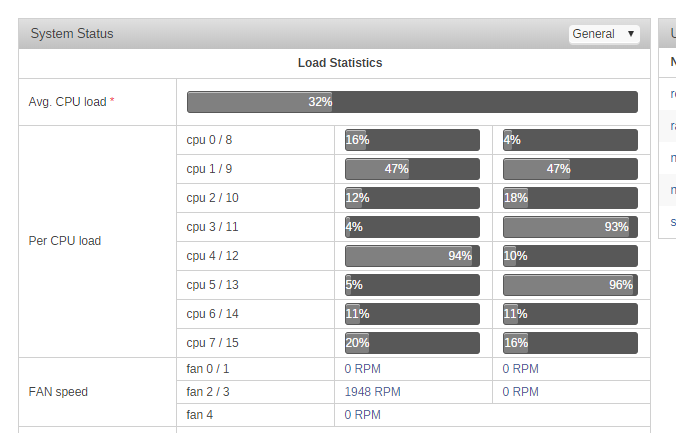
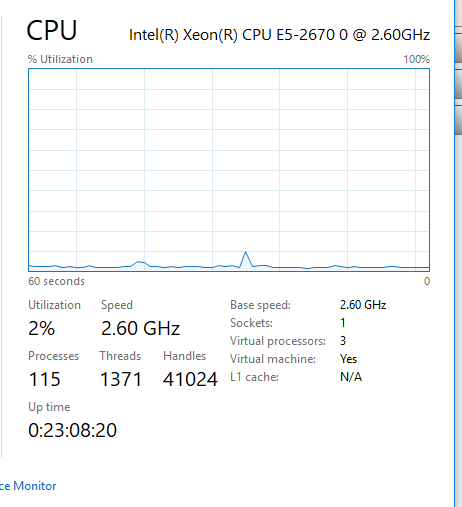
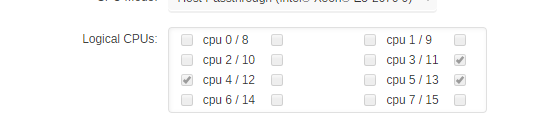
I'm hoping someone can assist me with this issue. I've pinned a VM to 6 (logical) cores, but only 3 cores appear to be actively used. How would I go about fixing this? CPU is: E5-2670
-
I'm not sure what happened but, I rebooted my server and it started working again. I'll keep this in mind for the future.
-
I believe this is the docker run command. I exactly sure how where to grab the command from so I removed and recreated the container. /usr/local/emhttp/plugins/dynamix.docker.manager/scripts/docker run -d --name='tautulli' --net='bridge' -e TZ="America/Chicago" -e HOST_OS="unRAID" -e 'PUID'='99' -e 'PGID'='100' -p '8181:8181/tcp' -v '/mnt/user/appdata/plex/Library/Application Support/Plex Media Server/Logs/':'/logs':'ro' -v '/mnt/user/appdata/tautulli':'/config':'rw' 'linuxserver/tautulli' b73a2b9552815e3bd85567ba72b326a76a01bc99a4ea22be44e7ca946efb7e06
-
I even tried in Incognito mode and on a different browser. On the page that loads, the error is connection refused.
-
I'm now having some trouble with this container. It was working fine last night, but I can't get to the WebUI today. I've tried completely deleting everything and recreating with no success. Output from the log file is attached. tautulli_log.txt
-
@Djoss Edit: I figured out it. I was able to create a file via the touch command, but had to use the /output folder. When trying to convert the files, I was trying to use /mnt/user/Videos/_Video Conversion/Converted/ instead of output.
-
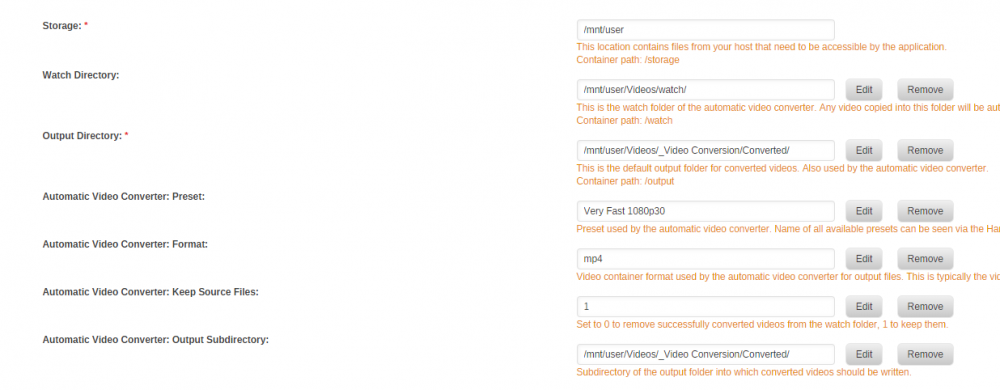
I can't seem to get my write issue sorted out. I'm hoping someone can assist. I'm able to open the source but when attempting to add to queue or start encoding I get the "Can not read or write the directory error". The attached image shows my mappings.
-
CyberMew, I'm getting an Avahi error with the container from adair21. Did you have to do anything special to get this working?
-
Thanks for the suggestion, that actually fixed my issue.
-
I'm also having an issue connecting. Not exactly sure what the next step should be. I'm attempting to use the Texas PIA server. Attached is my supervisord.log with my username and password removed. With VPN_ENABLED set to know, I'm able to access the web UI with no issue. supervisord.log
-
Maybe this will help???
-
Pm'd
-
False alarm


