





TODDLT
Members
-
Joined
-
Last visited
Everything posted by TODDLT
-
I used to use cache dirs long ago in unraid ver 5, and don't remember for certain when it dropped. I've been having some large hesitations in the navigation of my Plex directories and thought perhaps caching folders again may help. It seemed like certain functions were hesitating for drives to spin up. After turning cache dirs (folder caching), drives are spun up seemingly often even though changes aren't being made, and while CPU usage certainly isn't pegged it runs from 15-40% pretty consistently. I've just been using the default settings, is there some way to control this? I would rather it not scan unless it knows something has changed, or maybe once a day outside of known changes. ** note, while typing this I went and added "app data, dockers etc" to the exclusion list on the thought that perhaps Plex constantly doing it's thing may be triggering cache dirs to re-scan. I'll keep an eye on it to see if things change.
-
Does anyone have any thoughts on why this is happening to me?
-
I've been using miniDLNA for some time and only using it for sharing one folder of 6 channel flac music files. The only issue I have is I have to restart the app just before I go use it or it doesn't show up for the client. If I then listen long enough, the music will drop and I have to once again restart the app for it to be found again. I've never time this but I"m guessing it's 30 minutes ish or less. Any thoughts on what would be causing this or how to troubleshoot?
-
Is there a way with this app to limit the folders or shares that are made available to DLNA, and for "over the web" access? Can they be controlled separately? I haven't installed yet but if there was a way to control this it wasn't readily apparent from the information I looked at, and I didn't see a host path that looked like it controlled or designated this. Thanks for any help.
-
Once I turned on Destructive Mode, the format button opened up and allowed me to start the format. The disk name would not allow me to click or open it, so I never saw a "preclear file" to delete. It did let me format and mount both disks. It "appears" to be working at the moment. The first 3 times I ran the script to spin the drives down, one didn't or it did briefly and then spun right back up. The 4th time, they both seem to have stayed spun down. I'll keep an eye here and post again if it continues to be an issue. Thanks for the help.
-
OK tried that tonight but no luck. I even clicked both the mount and share switches but they still spin back up. The only difference is these aren't formatted. I would format XFS for later use, but the "format" button is grayed out (see image). How do I get to where they can be formatted and mounted? I think the one that is currently shared was formatted on a PC NTFS, not via unRAID. Thanks.

-
Thanks. I did recently turn on notifications for the first time. I'll test it tonight but that is probably it. Is there any way to counter this, or a change that can be made to eliminate the problem? It's interesting that it doesn't affect the drive UD has mounted and shared. I wonder if I mount but don't share the other drives, will that allow them to stay spun down. Thanks again.
-
I posted about an issue I was having with keeping drives spin down a few weeks back. https://forums.lime-technology.com/topic/44104-unassigned-devices-managing-disk-drives-outside-of-the-unraid-array/?page=54&tab=comments#comment-577816 I thought I had the problem solved, following some suggestions to use User Scripts to spin the drives down and set the spin down parameters. This seemed to work. However now what I've found is while the script does initially work. for some reason the two drives which ARE NOT mounted, spin down and then spin back up within 15-30 minutes. The single drive that is mounted and shared by UD actually stays spun down and doesn't spin back up on it's own. Does anyone have an idea how or why this would happen? Can I enter the script lines at the device level using UD and would that help? (see right hand side of UD window has a "script" button for each drive).

-
-
So Plex, rather than having an extremely large database hog of a file, is saving all the image files used for the cover art etc in individual files and then referencing those locations in the database. correct?? Do I need to add both switches as they are written? or is this an either / or situation? I looked at the CA backup and if I can handle this in a single line for Rclone I'll do it. If not I'll go investigate the settings I need to learn in CA Backup.
-
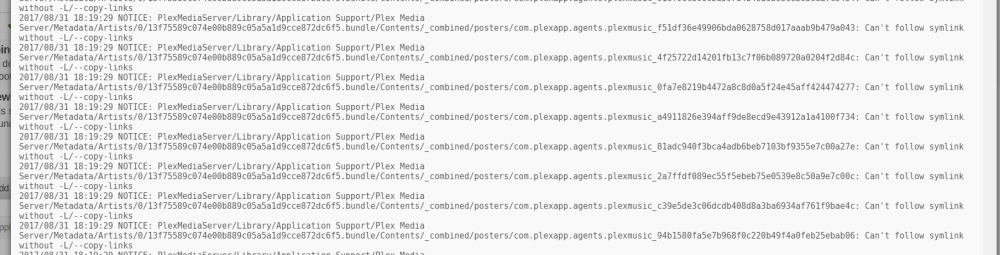
Not knowing what "symlinks" are or being familiar with the -L or --copy-links , I didn't want to go add swtiches into the script without checking first. I'll see if I can find explanations of the switches on the Rclone page this evening but any help with symlinks or what this really means is appreciated.
-
I decided to try and use RClone to backup my appdata, which contains the Plex database. A large portion of it is copying but also it looks like it doesn't like some file types and has a large number of the following errors: Any advice on why or what to do with this? I see there is an appdata backup that is part of community applications and may just try to go that route.
-
I was able to set up the script in user.scrips using the same commands I had in my go script. In doing so I figured out what at least part of my trouble was. The command lines were 1st spinning down the drive, and then 2nd setting the spin down time frame used in case it ever got spun up for any reason. The problem is line 2 was spinning the drive back up. Now why it would not honor the spin down time of 10 minutes I don't know. That being said, once I reversed the command lines in user.scripts, it all worked fine. Thanks for the help. This turns out not to be a UD issue or solution, so sorry for cluttering the page unnecessarily.
-
thanks, hopefully someone else has seen it or can confirm what is going on.
-
Have any other RClose unRAID users seen this behavior?
-
Added to the above: This script: rclone sync "/mnt/disk 1/Media/Music (uncat)" "/mnt/disks/Data_Backup_1/Music (uncat)" Produces this error: 2017/07/23 18:10:43 ERROR : Local file system at /mnt/disks/Data_Backup_1/Music (uncat): not deleting files as there were IO errors2017/07/23 18:10:43 ERROR : Attempt 1/3 failed with 0 errors and: error reading source directory "": directory not found2017/07/23 18:10:43 ERROR : Local file system at /mnt/disks/Data_Backup_1/Music (uncat): not deleting files as there were IO errors2017/07/23 18:10:43 ERROR : Attempt 2/3 failed with 0 errors and: error reading source directory "": directory not found2017/07/23 18:10:43 ERROR : Local file system at /mnt/disks/Data_Backup_1/Music (uncat): not deleting files as there were IO errors2017/07/23 18:10:43 ERROR : Attempt 3/3 failed with 0 errors and: error reading source directory "": directory not found2017/07/23 18:10:43 Failed to sync: error reading source directory "": directory not found This script: rclone sync "/mnt/user/Media/Music (uncat)" "/mnt/disks/Data_Backup_1/Music (uncat)" Works The reason I was going to use disk shares was in hopes of extra drives not being spun up that didn't need to be. I can make it work with user shares obviously, but curious if this is by design or if I still have something not right.
-
Thanks, that is working but still have run into another question. The first script I ran had the source path setup from a user share. It worked fine and once complete copying the 180+ GB I moved on to the next folder to be backed up. The second attempt I tried using a disk share, and that failed. I changed the disk share to navigating via a user share and now it works. It's running right now or I'd get the exact language, but it was something along the lines of a source not found error. Is there a reason it works via user but not disk? Is it supposed to be like that? I checked my pathway twice and it looked right.
-
Thanks, but this is what was returned when I ran this script. S That comment about 2 arguments maximum is what is making me think the "space" is making RClone see a 3rd argument. Not certain about that, am I missing something?
-
A little help with some syntax please: I just installed RClone last night and need a little help with my application. I'm not working with any online cloud services. All I want to do is maintain a backup of a couple unRAID shares on one "outside the array" drive mounted via Unassigned Devices. Most of my folders needing to be backed up are grouped in a single folder to make it easier to designate them for backup. First: I believe I don't need to run a "mount" script because I'm already only working with locally attached drives that are already mounted in unRAID. Correct? Second: I found this syntax on the RClone.org website: rclone sync source:path dest:path So I thought this would be the correct script line: rclone sync source:/mnt/user/Backup Items dest:/mnt/disks/Data_Backup_ 1 However, that didn't work. Looking at it now, I'm wondering if my User Share "Backup Items" is a problem for the syntax because of the space? Do I need to change that to a "_"? I've seen a few examples that designated "local path" in the syntax and not sure if I'm missing something like that in the above. Thanks much all.
-
Are you saying this is native to unRAID not a UD issue? unRAID used to have a way to spin down an uassigned drive manually with a button on the main page. Is there any fuction with UD to do this? (I still need to go figure out how to write the script as mentioned above, will do this weekend if i can).
-
Any idea why the 10 minute timer on this command doesn't work now that UD is installed? It runs in my go-script, so even though the drive spins back up it should spin back down to, correct? hdparm -S120 /dev/sdp
-
Thanks, I'll try and find my way through on one of those two options tonight. Any thoughts on why the hdparm command that is supposed to set a time limit on spinning the drive down no longer works either? I think it was about 2 or 3 minutes.
-
New Unassigned drives user here. The ability to spindown / standby a drive seems to have gone away or at least is eludes me. I even have go script commands to standby two specific drives with immediate commands and timers to spin them back down. However the drives are still spun up after booting, do not spin down based on the timer, and I can't find a button to click on like there used to be on the main page. The only way I've been able spin them down is by manually entering the same hdparm command used in the go script from a command prompt. Am I missing the button somewhere? Thanks.
-
Well I got from the Plex Forums that Linode and Amazon house the Plex System Servers, so that answers a big part of this. I'm still not sure why a single movie file is stream out there, and keeping a media drive spun up in read mode.
-
Here is another tidbit. I disabled remote access, and it still shows the "active streams." In a way that would tell me this is part of Plex's operation somehow, but I'm not sure how the video file would show up as a stream if this were just normal operation. Can someone have a look at Actives Streams while running Plex and see if they have anything similar to this? I'm turning it back off for today and going to post something in the Plexforums this morning. If anyone has any info, please let me know.


