





ajgriglak
Members
-
Joined
-
Last visited
Everything posted by ajgriglak
-
A huge thanks to everyone involved in the past 3 pages or so... I think I grabbed something from each of you to get my Nextcloud container working again.
-
Not sure this will ever get fixed... It's been like this for at least a year if not much longer. Easy fix is to just restart the container hourly. That's what I do, and haven't had to think about it since then.
-
Tried some of the things in this thread but didn't work... Found this, which DID work and was quick and easy:
-
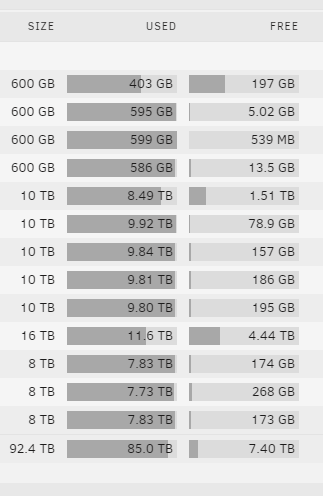
Jumping into the party here... I just bought 2 more drives that will bump me above 100 TB. Going to take 2 of the 10TB drives out of this rig and build a second UnRAID server for backup purposes and put it at my buddy's house. Yea, I have 100 TB, but only 10-15TB of it is considered irreplaceable. Been down the road of Crashplan screwing us, and more recently the Google Screw of "unlimited" space. So, I decided to make my own backup. Thought of a few alternatives, but what's better than another UnRAID setup at a different location? So, here's my current drives, but will be pulling 2 of the 10TBs and replacing them with more 2 x 16TB drives. Then, the 2 x 10TB will be integrated into a new server to be put at my buddy's house. Oh, and those measly 600 GB drives are 3.5's built into the server and will be a fortune to replace. So, they're staying put.
-
Thank you so much for this write up! Worked perfectly - and agreed, it's one of the few things I was missing.
-
I believe I'm still having the issue, but I've been restarting the docker hourly and that is a sufficient workaround for now. I'm quietly following this thread for updates, however.
-
Agreed. I switched back to the "latest" Repository and run the restart script hourly - it's working fine. I started to see a lot of failures unpacking and missing PAR files with binhex/arch-nzbget:19.1-1-02. Since I'm back to the latest I haven't noticed as many.
-
Thanks for your reply. I download directly to a 1TB Unassigned Drive (not SSD). Your mention of parity got me thinking... I was also in the middle of a parity check, so maybe that had something to do with it. The parity check is now done, and it has been running overnight. It's now fluctuating between 15 and 30 MBps, so definitely more acceptable. I just thought maybe there was some tweaks that could be done when the queue is so large.
-
I just tried looking for mine, and there is no scripts folder in my setup (I don't use scripts, though). Maybe you need to manually create it?
-
Hey guys... this container has been rock solid since I installed it! Thanks, Binhex... I finally resolved my slow internet speed and went from 30 MBps to 320 MBps. To celebrate, I decided to hit the "Search All Missing" button in Sonarr. Now I have about 600 items downloading. When the queue was lower, like 50 and less, I could get downloads in unlimited speed limit at about 30 MBps. Now that the queue is huge, it's slowed down to about 5 MBps. Has anyone seen this issue? Any tweaks in container setup or NZBGet settings to alleviate the throttling?
-
I just came across this as well... It may not be an 'issue,' but I'd say if nothing else, it should be an FAQ.
-
Hey, all: So, I'm trying to migrate from a dedicated Ubuntu 16.04 Plex Server into this Docker. I've migrated all my files into the new path on the Docker and let the permissions run by deleting the perms.txt - that took 12 hours to complete. Plex clients can connect and see all the artwork, files, movies, etc. - but all movies are unavailable. I go into the Library settings and try to change to the new path as necessary, but I'm getting "The changes cannot be saved" errors. So, it appears I have some permission issues... My current permissions on the /config are all set to nobody:users, prior permissions on the old server were different. How can I get this working? By the way, LOVE all the binhex Dockers! Thanks in advance.
-
Yes, sorry - plugin, not docker.
-
Hey guys. Looks like this docker hasn't been updated in quite a while and there hasn't been any activity in the thread. If I'm coming in fresh now, is this still a viable Unraid <> Google Drive sync tool? Is there anything better / newer?
