Dazza1
Members
-
Joined
-
Last visited
Everything posted by Dazza1
-
Hi hope someone can help if had on of problems with the GUI display sometimes it has worked but for the longest whllile it hasn’t I have booted into safe mode gui without plugins it just shows the curser after booting into unraid I’ve disable UEFI, CMS in the bios still doesn’t work I’ve pulled my Quattro card out but still no dice now my system seems to be locking me out ie unable to get in from lan unless I reboot I need to see what is going on so the gui would be good to have. Got in and managed to get diagnostics so hope it helps zeus-diagnostics-20230607-0003.zip
-
Just to open up the sensors like humidity on the thermostat and protect or motion that's on the protects. So maybe when the temp inside gets too high or humid you can automate the HVAC or motion sensors. Ive just setup a Raspberry pie now so i can get onto version 4 and updates are coming out almost daily. And the best thing after so long I've finally managed to get my RingDoorBell to work with Homekit. I don't think the plugin for unraid had the necessary elements to make it work, But with the PI it works soo well! But without a question this plugging for the unraid server was a life bacon.
-
Short answer yes, Advantage over homebridge is hoobs is a lot more solid especially if your running nest plugin, I use to hate updating it, I ended up nearly having to rebuild homebridge after every update to that plug in it was so annoying. Reliability is what you gain over Homebridge the only real use is Siri to change temp have Siri tell you what the temp is in the house and to have it in HomeKit how it should have been. I had problems with homebridge on the MacBook and also on the server that’s why I moved to hoobs Hope this helps
-
Turns out mine was 3.29 repository so just changed it over to hoobs/hoobs repository now on 3.65 still a little way behind but a lot better than before, I’ve used homebridge and every update is a bum clincher almost every update broke the nest thermostats it was annoying I’m glad I found Hoobs I may get a raspberry pie to so maintenance is easier but the jury is still out on that at the minute.
-
Wow its quite a few versions behind, would love an update to V4
-
I just use an Apple TV or iPad to use stuff outside of my home WiFi range
-
Hi mate Use Krusader and delete everything in these to folders Persist and Accessories unless you removed the Hoobs folder in Unraid then the deletion of the image only deletes the app it leaves in place the folder and everything thing from previous. PS in the Home App make sure everything thing that was running on the Hoobs server was deleted from the Home app. Let us know how it goes!
-
So finally got sorted, but you will need to Rebuild it from SCRATCH kind of. 1 Delete it from the HomeApp 2 Go into Hoobs go to settings then go to advance backup your config file as you will need it. 3 Remove the Hoobs image from Unraid 4 Then redownload it again it should be 3.29, 5 Use Krusader to go into your app data folder on Unraid find Hoobs go into it delete everything apart from node_modules, ect and backups. 6 Go into the ect folder delete everything Apart from the two folders Persist and Accessories. 7 Go into the Persist folder delete everything in there. 8 Go into the Accessories folder and delete everything in there. 9 Go to the Hoobs UI and start re downloading all of your plugins. 10 Use your saved Config file to rebuild your Hoobs Config 11 It should be up and running now that the Config file for your plugins has been Hope That helps!
-
so finally got it to load back the accessories but it still doesn't run, I have deleted it from the home app but can't re add it as the bridge doesn't run. Edit: contained setup pin so deleted move to below post for a fix for this
-
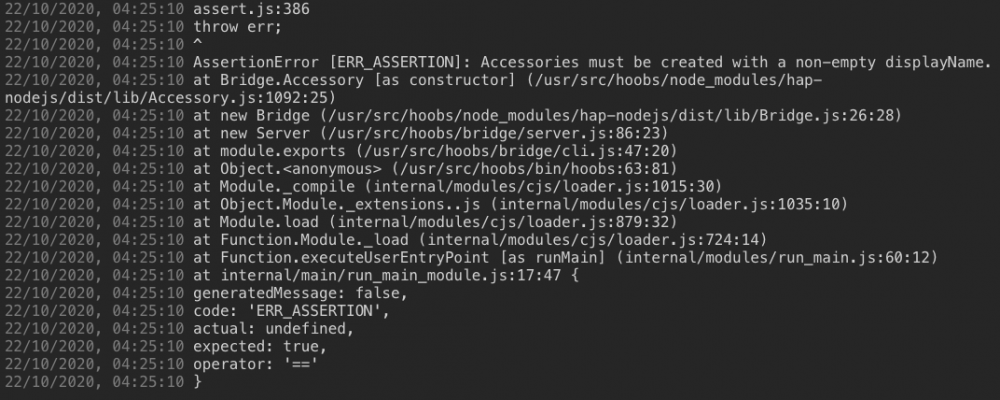
Im having the same issue but i deleted my configs to see if it was that which it isn't so i would stay fast for an update. Now I've got to rebuild my config. This is too stable until this update man I'm annoyed. Any help please
-
look at this vid this guy can help you out more than i can as this is who i normally use
-
Hi I struggled like mad to find those files on there site it’s not the best I have no idea where they have that one is hiding Yep think I have to open my eye it’s been a long night but where do you install it in root terminal of unraid as you can’t bash into any of the containers as they are can’t spin up. AND BREATH I've sorted it thanks found this! reverse proxy doesn't seem to work with Sonnar so i can route it through the container anymore need to figure out how to get that working again and if i can find a bitcoin wallet that doesn't charge a fee to spend and that i can put say a £5 a month (Anyone Offer Help on the bitcoin front?) info below has downloads working thanks to the person that made this template. Mullvad VPN for Unraid 0) Go to https://mullvad.net/en/download/#linux <-- Latest Link when I made this guide or just go to your mullvad account page 1) Download your mullvad VPN files by clicking "GenerateOpenVPN configuration files" . Make sure to keep "Use IP addresses" and "Connect via our bridges" left unchecked 2) Unzip the downloaded file. 3) Move all four files (you should have four) to appdata/deluge/openvpn 3a) change the file extension of mullvad_<whatever region you selected>.conf to mullvad_<whatever region you selected>.ovpn 3b) Open mullvad_<whatever region you selected>.ovpn with a text editor and add the following lines to the bottom: pull-filter ignore "route-ipv6" pull-filter ignore "ifconfig-ipv6" 3c) save the file. 4) In your deluge container, edit the following settings: 4a) Key 1 (VPN_ENABLED) should be set to "yes" 4b) Key 2 (VPN_USER) should be your Mullvad account number; a 16 digit number you received when you set up your Mullvad account which also can be found in mullvad_userpass.txt. 4b+)Do not include the "m" as shown in the .txt file, just the 16 digit account number. 4c) Key 3 (VPN_PASS) same account number as Key 2, no "m". 4d) Key 4 (VPN_PROV) set to "custom" 4e) Key 6 (STRICT_PORT_FORWARD) set to "yes" 4f) Key 8 (LAN_NETWORK) put the first 3 numbers of your routers IP (most likely 192.168.1) followed by .0/24 (example "192.168.1.0/24") 5) Apply and restart deluge For faster Downloads, Mullvad supports port forwarding. This can be done by: 6) Go to the mullvad.net homepage, and under your account, you'll see "Manage Ports and Wireguard keys" 6a) It was this link when I created the guide: https://mullvad.net/en/account/ports/ 7) Click "add port" and then copy the port that it spits out. Go to the deluge UI and under preferences / network, change "Incoming Port" to: 8a) Uncheck "Use Random Port" and put in the port you copied. 9) You're done
-
Hi i need a liitle help please have copied the files (update-resolv-conf) (mullvad_ca.crt) (mullvad_fr_par.conf) and (mullvad_userpass.txt) into the delugeVPN\openvpn folder but i get this, No OpenVPN config file located in /config/openvpn/ (ovpn extension), please download from your VPN provider and then restart this container, exiting... I keep trying to rename the openvpn folder to openvpn.ovpn but it just say the above. But i guess its not the folder that i have to rename but I'm at a loss of what i have to do now. Any help please
-
Update: Fresh install done just need to set it up again.(ignoreAnyone know how to get back to the delugeVPN webUI I changed the income and our going ports in the webUI to try and setup AirVPN now I can’t get back to the webUI I’ve deleted the image and the docker but it reinstalls what I messed up)
-
Thanks I've done it and restarted the containers a couple of time still no dice. Sat Apr 4 21:41:13 2020 UDP link local: (not bound) Update: Well finally done only managed to get it working through Switzerland. I may look at AirVPN as suggested above as getting this thing to take was a pain even with new certs and deleting the configs
-
Struggling to find the certs as i guess they have used new ones which would render my old cert void
-
I’m trying France on their app and there is no connection at all I did get this from them though 🤷🏾♂️🤦🏾♂️ Thank you for reaching out to us here at PIA Customer Support. I'm sorry to hear that you're having issues connecting to our Port forwarding servers. I would like to let you know that our DevOps team is aware of the issue and are working toward implementing a solution to correct this. However, we don't have a time frame yet when it will be fixed. No worries, I'm very positive that it'll be fixed as soon as possible. Thank you very much for your kind understanding and please do not hesitate to contact us if you have any other questions. Best Regards,
-
Everyone of PIA’s portforwarding sites seems down, I’ve tried all the countries closest in Europe with there phone app and it’s not connecting at all. I’m due to renew in 3months what or who provide a better VPN port forwarding service? As I may be sacking PIA after this.
-
Unfortunately no, is there anything I can do to fix it?
-
Is it only me every single upgrade from 6.7.0 has seen my server not connect to the App Store or pull any update it keeps banging on about DNS, it set to static on the router and on the server but when ever I upgrade it doesn’t work, when I down grade it works but I think I’m truly stuffed now as I can’t see the previous OS to downgrade now, so server is a massive paper weight 🤦🏾♂️ Nics are built into the board which has 3 not all three are being used though help please. zeus-diagnostics-20190625-2224.zip
-
Ok thanks
-
Is it only me every single upgrade from 6.7.0 has seen my server not connect to the App Store or pull any update it keeps banging on about DNS, it set to static on the router and on the server but when ever I upgrade it doesn’t work, when I down grade it works but I think I’m truly stuffed now as I can’t see the previous OS to downgrade now, so server is a massive paper weight 🤦🏾♂️ Nics are built into the board which has 3 not all three are being used though help please.
-
Hi thanks it has been on static since day one, I think I’ll leave it on 6.6.7 rather than muck up a working server, I’ll just have to wait till they fix it in an update hopefully!🤷🏾♂️
-
I upgraded from 6.6.7 to 6.7 and now the docker doesn’t update, it can’t find a network, it wants me to change the DNS of the router to 8.8.8.8 when ever I roll it back to 6.6.7 it works perfectly with my routers config, someone said the problem was with the network.cfg file where do I find this to alter it so I can actually update to 6.7 help please
-
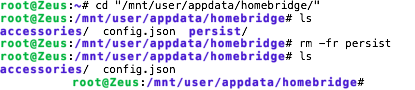
Sorted deleted the persist folder as it was retaining somethings that i didn't want to now the install is clean. I do fine this a little fragile compaired to it running in terminal on the OSX VM but then again its saved me 10% of Ram so not at bad trade off just got to be careful what plugins you install. Any way to help others that may be in the same boat as i was code for terminal is below, LS shows you whats in the folder, rm -fr Is the command to delete a folder just put its name once you are in the same directory root@Zeus:~# cd "/mnt/user/appdata/homebridge/" root@Zeus:/mnt/user/appdata/homebridge# ls accessories/ config.json persist/ root@Zeus:/mnt/user/appdata/homebridge# rm -fr persist root@Zeus:/mnt/user/appdata/homebridge# ls accessories/ config.json root@Zeus:/mnt/user/appdata/homebridge#