





karldonteljames
Members
-
Joined
-
Last visited
Everything posted by karldonteljames
-
Morning All, I assume this has been asked in the past, but I'm unable to find any information on it, I have a PC in my house that I use as a media server, would it be possible to monitor this machine under the same instance in this container? Is there a plugin, or equivalent windows service?
-
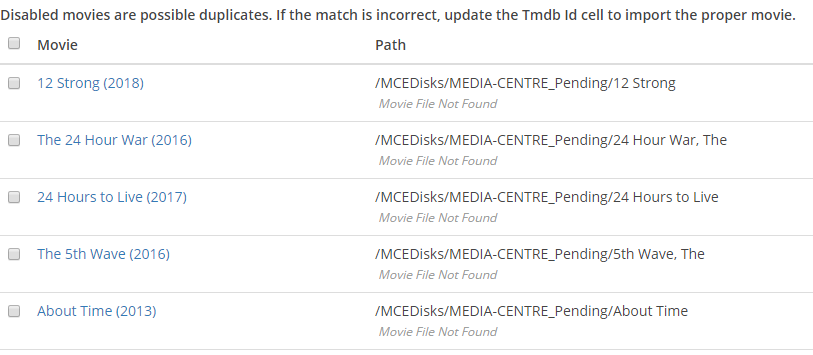
I'm trying to import my movies into radarr, It is showing the folders, but saying movie file not found.. any idea? The only movie it found in the folder was mama mia 2, file and folder permissions are applied at the share level, so they are all the same. Thanks.
-
Morning. Is it possible to host WordPress with apache-php and influxdb? If so how could one go about doing so? I already have lets-encrypt installed, and influx being fed information from my home assistant. I currently host a simple on a server 2012 VM in unraid, but it consumes far too many resources, so ideally I'd like to use dockers. I think i know how to migrate from one to another, but I need help with configuring apache first. - Many Thanks.
-
I've got some episodes of a couple of series that downloaded before I switched Sonarr, Is there a way of getting Sonarr to manually sort these into the correct places? EDIT: Wanted > Manual Import, I think I've got it. - Sorry.
-
Thanks. using these settings I can hide the Unraid shares like this, but the windows shares are still "browseable", but the windows shares are now visible. Never mind. Really appreciate the help. Linux really isn't something I'm familiar with.
-
This is a shame. Thanks for the help though. I've got it working, but don't like the fact that the shares are now not only visible on my media server, but also on unraid too. I don't like shares "easily visible" it's just too easy for my 7/10/11 year olds to stumble across them. Thanks.
-
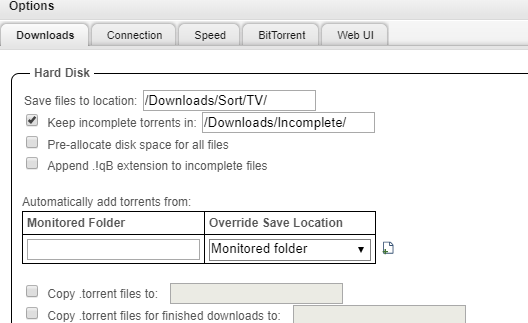
It's me again!! I'm getting this message in the sonarr log: Import failed, path does not exist or is not accessible by Sonarr: /downloads/Sort/TV/The.Circus.S03E12.HDTV.x264-aAF[rarbg] My docker paths look like this: This is how qbit is setup. Thanks EDIT: I changed my share from "Downloads" to "downloads" remapped everything in sonarr, and in qbit, and changed the /media to /downloads in the sonarr container and my media is being sorted now, i do now see this in sonarr though.


-
I've renamed some shares, but I have children with laptops, so ideally don't want all of my shares open. Thanks for the help.
-
DW. Just being Stupid apparently.
-
Sorry, but how do I do this part?
-
That is how windows hides shares. Is there no way of mounting the share with the "$" in it?
-
Thanks, Squid. Just posted it, checked the system logs, and it seems to be the hidden part "$" it doesn't like.
-
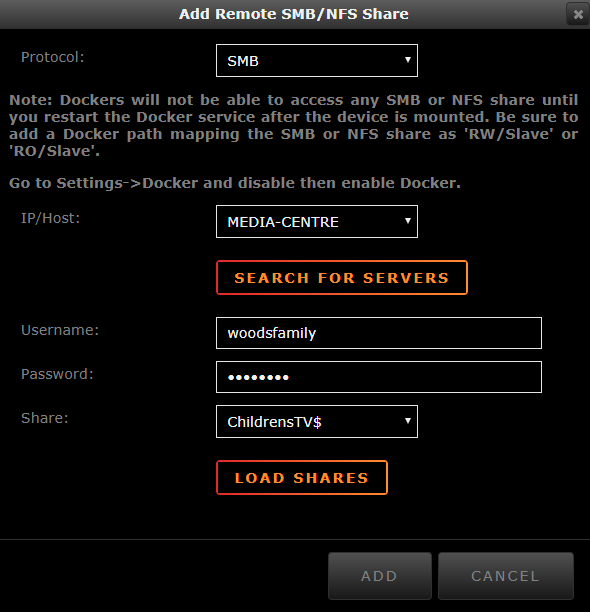
ROFL! That would make sense! Why didn't I think of that? (No seriously?) Nov 2 14:08:02 Maximus unassigned.devices: Share '//MEDIA-CENTRE/ChildrensTV$' contains a '$' character.#011It cannot be mounted. Are hidden shares not mountable?
-
Afternoon all. I'm trying to attach my unraid machine to a windows share however when i try and add the share: It takes me back to this page, and it is still blank. Any ideas? Many Thanks.

-
Thanks Squid, Appreciated. I already had the unassigned drives plugin installed. Just trying to add them now, however. When I click add, it takes me back to this page, but nothing has been added.
-
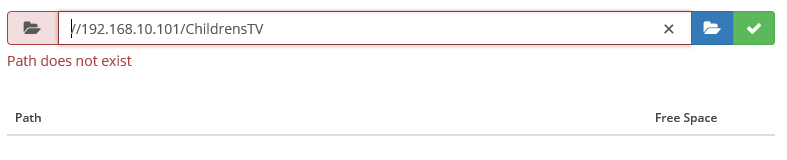
I still can't seem to connect to the UNC share of a windows machine. I've moved it to the same vlan, but cannot connect, even to an "unhidden" share Thanks.

-
Also trying to add UNC path for windows shared folder: //192.168.10.101/grownuptv\$ is that format wrong for unix? I get the error path does not exist.
-
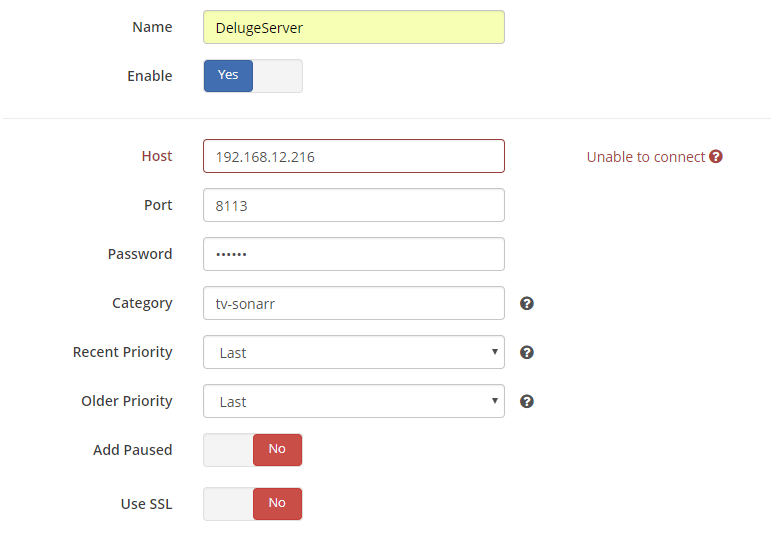
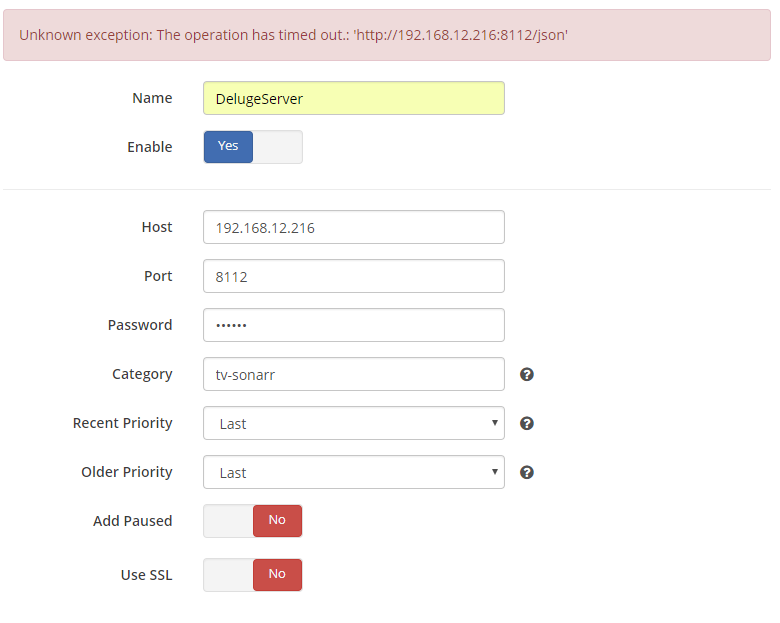
Thanks again binhex, am I correct in assuming that it is not recommended to run it as root? I'm now trying to connect your sonarr to both qBit and deluge, however, I'm getting a timeout. each of the dockers is running on their own IP address, all within the same VLAN. I am able to ping deluge and qbit from the sonarr docker. IP of the sonarr is 192.168.12.218 deluge: 216 qbit: 217 Deluge: one.Common.Http.Dispatchers.ManagedHttpDispatcher.GetResponse (NzbDrone.Common.Http.HttpRequest request, System.Net.CookieContainer cookies) [0x000ca] in C:\BuildAgent\work\5d7581516c0ee5b3\src\NzbDrone.Common\Http\Dispatchers\ManagedHttpDispatcher.cs:58 --- End of inner exception stack trace --- one.Common.Http.Dispatchers.ManagedHttpDispatcher.GetResponse (NzbDrone.Common.Http.HttpRequest request, System.Net.CookieContainer cookies) [0x0019e] in C:\BuildAgent\work\5d7581516c0ee5b3\src\NzbDrone.Common\Http\Dispatchers\ManagedHttpDispatcher.cs:92 at NzbDrone.Common.Http.Dispatchers.FallbackHttpDispatcher.GetResponse (NzbDrone.Common.Http.HttpRequest request, System.Net.CookieContainer cookies) [0x000b5] in C:\BuildAgent\work\5d7581516c0ee5b3\src\NzbDrone.Common\Http\Dispatchers\FallbackHttpDispatcher.cs:53 at NzbDrone.Common.Http.HttpClient.ExecuteRequest (NzbDrone.Common.Http.HttpRequest request, System.Net.CookieContainer cookieContainer) [0x0007e] in C:\BuildAgent\work\5d7581516c0ee5b3\src\NzbDrone.Common\Http\HttpClient.cs:121 at NzbDrone.Common.Http.HttpClient.Execute (NzbDrone.Common.Http.HttpRequest request) [0x00008] in C:\BuildAgent\work\5d7581516c0ee5b3\src\NzbDrone.Common\Http\HttpClient.cs:57 at NzbDrone.Core.Download.Clients.Deluge.DelugeProxy.AuthenticateClient (NzbDrone.Common.Http.JsonRpcRequestBuilder requestBuilder, NzbDrone.Core.Download.Clients.Deluge.DelugeSettings settings, System.Boolean reauthenticate) [0x0005b] in C:\BuildAgent\work\5d7581516c0ee5b3\src\NzbDrone.Core\Download\Clients\Deluge\DelugeProxy.cs:274 at NzbDrone.Core.Download.Clients.Deluge.DelugeProxy.BuildRequest (NzbDrone.Core.Download.Clients.Deluge.DelugeSettings settings) [0x0006d] in C:\BuildAgent\work\5d7581516c0ee5b3\src\NzbDrone.Core\Download\Clients\Deluge\DelugeProxy.cs:187 at NzbDrone.Core.Download.Clients.Deluge.DelugeProxy.ProcessRequest[TResult] (NzbDrone.Core.Download.Clients.Deluge.DelugeSettings settings, System.String method, System.Object[] arguments) [0x00000] in C:\BuildAgent\work\5d7581516c0ee5b3\src\NzbDrone.Core\Download\Clients\Deluge\DelugeProxy.cs:194 at NzbDrone.Core.Download.Clients.Deluge.DelugeProxy.GetVersion (NzbDrone.Core.Download.Clients.Deluge.DelugeSettings settings) [0x00000] in C:\BuildAgent\work\5d7581516c0ee5b3\src\NzbDrone.Core\Download\Clients\Deluge\DelugeProxy.cs:51 at NzbDrone.Core.Download.Clients.Deluge.Deluge.TestConnection () [0x00000] in C:\BuildAgent\work\5d7581516c0ee5b3\src\NzbDrone.Core\Download\Clients\Deluge\Deluge.cs:210 2018-10-31 13:37:46,681 DEBG 'sonarr' stdout output: [Warn] NzbDroneErrorPipeline: Invalid request Validation failed: qBitTorrent [v2.0.0.5252] NzbDrone.Core.Download.Clients.DownloadClientUnavailableException: Failed to connect to qBittorrent, please check your settings. ---> System.Net.WebException: The operation has timed out.: 'http://192.168.12.217:8080/login' ---> System.Net.WebException: The operation has timed out. at System.Net.HttpWebRequest.GetRequestStream () [0x0000e] in /build/mono/src/mono/mcs/class/System/System.Net/HttpWebRequest.cs:912 one.Common.Http.Dispatchers.ManagedHttpDispatcher.GetResponse (NzbDrone.Common.Http.HttpRequest request, System.Net.CookieContainer cookies) [0x000ca] in C:\BuildAgent\work\5d7581516c0ee5b3\src\NzbDrone.Common\Http\Dispatchers\ManagedHttpDispatcher.cs:58 --- End of inner exception stack trace --- one.Common.Http.Dispatchers.ManagedHttpDispatcher.GetResponse (NzbDrone.Common.Http.HttpRequest request, System.Net.CookieContainer cookies) [0x0019e] in C:\BuildAgent\work\5d7581516c0ee5b3\src\NzbDrone.Common\Http\Dispatchers\ManagedHttpDispatcher.cs:92 at NzbDrone.Common.Http.Dispatchers.FallbackHttpDispatcher.GetResponse (NzbDrone.Common.Http.HttpRequest request, System.Net.CookieContainer cookies) [0x000b5] in C:\BuildAgent\work\5d7581516c0ee5b3\src\NzbDrone.Common\Http\Dispatchers\FallbackHttpDispatcher.cs:53 at NzbDrone.Common.Http.HttpClient.ExecuteRequest (NzbDrone.Common.Http.HttpRequest request, System.Net.CookieContainer cookieContainer) [0x0007e] in C:\BuildAgent\work\5d7581516c0ee5b3\src\NzbDrone.Common\Http\HttpClient.cs:121 at NzbDrone.Common.Http.HttpClient.Execute (NzbDrone.Common.Http.HttpRequest request) [0x00008] in C:\BuildAgent\work\5d7581516c0ee5b3\src\NzbDrone.Common\Http\HttpClient.cs:57 at NzbDrone.Core.Download.Clients.QBittorrent.QBittorrentProxy.AuthenticateClient (NzbDrone.Common.Http.HttpRequestBuilder requestBuilder, NzbDrone.Core.Download.Clients.QBittorrent.QBittorrentSettings settings, System.Boolean reauthenticate) [0x000a4] in C:\BuildAgent\work\5d7581516c0ee5b3\src\NzbDrone.Core\Download\Clients\QBittorrent\QBittorrentProxy.cs:286 --- End of inner exception stack trace --- at NzbDrone.Core.Download.Clients.QBittorrent.QBittorrentProxy.AuthenticateClient (NzbDrone.Common.Http.HttpRequestBuilder requestBuilder, NzbDrone.Core.Download.Clients.QBittorrent.QBittorrentSettings settings, System.Boolean reauthenticate) [0x000f4] in C:\BuildAgent\work\5d7581516c0ee5b3\src\NzbDrone.Core\Download\Clients\QBittorrent\QBittorrentProxy.cs:300 at NzbDrone.Core.Download.Clients.QBittorrent.QBittorrentProxy.ProcessRequest (NzbDrone.Common.Http.HttpRequestBuilder requestBuilder, NzbDrone.Core.Download.Clients.QBittorrent.QBittorrentSettings settings) [0x00000] in C:\BuildAgent\work\5d7581516c0ee5b3\src\NzbDrone.Core\Download\Clients\QBittorrent\QBittorrentProxy.cs:227 at NzbDrone.Core.Download.Clients.QBittorrent.QBittorrentProxy.ProcessRequest[TResult] (NzbDrone.Common.Http.HttpRequestBuilder requestBuilder, NzbDrone.Core.Download.Clients.QBittorrent.QBittorrentSettings settings) [0x00000] in C:\BuildAgent\work\5d7581516c0ee5b3\src\NzbDrone.Core\Download\Clients\QBittorrent\QBittorrentProxy.cs:220 at NzbDrone.Core.Download.Clients.QBittorrent.QBittorrentProxy.GetVersion (NzbDrone.Core.Download.Clients.QBittorrent.QBittorrentSettings settings) [0x00012] in C:\BuildAgent\work\5d7581516c0ee5b3\src\NzbDrone.Core\Download\Clients\QBittorrent\QBittorrentProxy.cs:48 at NzbDrone.Core.Download.Clients.QBittorrent.QBittorrent.TestConnection () [0x00000] in C:\BuildAgent\work\5d7581516c0ee5b3\src\NzbDrone.Core\Download\Clients\QBittorrent\QBittorrent.cs:197 2018-10-31 14:13:13,250 DEBG 'sonarr' stdout output: [Warn] NzbDroneErrorPipeline: Invalid request Validation failed: -- Unknown exception: Failed to connect to qBittorrent, please check your settings. EDIT: I have just noted that if i change the port or IP address, I get a response straight away of "unable to connect" but get a timeout issue if use the correct ipaddress:port details. EDIT: Step forward, if I disable the built-in VPN for both Deluge and qBit it Sonarr will connect without an issue. EDIT: I didn't realise I wasn't on the latest version of unraid (6.6.3) and was running 6.5.x (can't remember which) it looks like deluge and qBittorrent will now connect with Sonarr, but I cannot access the WebUI from my laptop. I am getting an error that says "couldn't save naming settings" now though.
-
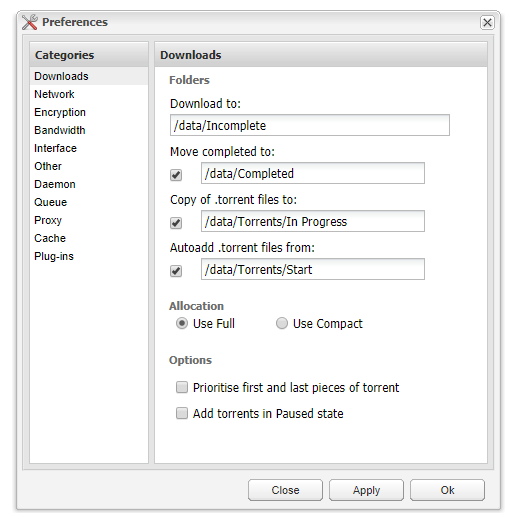
Good Morning, My UMASK is set to 000, All files are now showing as permission for "node" what do i need to set the umask to for root? I'm a windows user primarily! I currently organise my files as follows: Downloads: -->Incomplete -->Completed Torrents: -->In Progress -->Completed -->Start What changes do I need to make to deluge to continue to use the current folder structure? is this correct?
-
Not to worry. I spoke to purevpn and it turns out that they had the wrongs files on their website!!! i got the latest certificate and the latest server details and it started working!! Thanks for your help though!
-
thanks for your help binhex. Very much appreciated!!
-
Not to worry. I spoke to purevpn and it turns out that they had the wrongs files on their website!!! I got the latest certificate and the latest server details and it started working!! Thanks for your help though!
-
Is it possible that pfsense is stopping the OpenVPN traffic from getting out? These are the rules I have setup on my DMZ, but it doesn't look like the TCP port 80 rule is catching any traffic, the UDP rule was going up quite quickly, but there was no connection - shown in the error log above . When I use UDP, taken abot one minute after restarting the service:


-
I replaced the files with config to run on UDP rather than TCP, and I have the following errors: 2018-10-30 20:13:55,372 DEBG 'start-script' stdout output: Tue Oct 30 20:13:55 2018 TCP/UDP: Preserving recently used remote address: [AF_INET]213.X.X.X:53 Tue Oct 30 20:13:55 2018 UDP link local: (not bound) Tue Oct 30 20:13:55 2018 UDP link remote: [AF_INET]213.X.X.X:53 2018-10-30 20:13:57,694 DEBG 'start-script' stdout output: Tue Oct 30 20:13:57 2018 VERIFY ERROR: depth=0, error=CA signature digest algorithm too weak: C=HK, ST=HK, L=HongKong, O=PureVPN, OU=IT, CN=PureVPN, name=PureVPN, [email protected] Tue Oct 30 20:13:57 2018 OpenSSL: error:1416F086:SSL routines:tls_process_server_certificate:certificate verify failed 2018-10-30 20:13:57,694 DEBG 'start-script' stdout output: Tue Oct 30 20:13:57 2018 TLS_ERROR: BIO read tls_read_plaintext error Tue Oct 30 20:13:57 2018 TLS Error: TLS object -> incoming plaintext read error Tue Oct 30 20:13:57 2018 TLS Error: TLS handshake failed Tue Oct 30 20:13:57 2018 SIGHUP[soft,tls-error] received, process restarting 2018-10-30 20:13:57,696 DEBG 'start-script' stdout output: Tue Oct 30 20:13:57 2018 WARNING: file 'Wdc.key' is group or others accessible 2018-10-30 20:13:57,697 DEBG 'start-script' stdout output: Tue Oct 30 20:13:57 2018 WARNING: file 'credentials.conf' is group or others accessible Tue Oct 30 20:13:57 2018 OpenVPN 2.4.6 x86_64-pc-linux-gnu [SSL (OpenSSL)] [LZO] [LZ4] [EPOLL] [PKCS11] [MH/PKTINFO] [AEAD] built on Apr 24 2018 Tue Oct 30 20:13:57 2018 library versions: OpenSSL 1.1.0h 27 Mar 2018, LZO 2.10
-
I seem to be getting the same no matter which endpoint I use. I downloaded the files yesterday. I'm using purevpn, and i've tried the Netherlands, Belgium, and Romania. ErrorWarningSystemArrayLogin auth-retry interact ifconfig-nowarn ca ca.crt tls-auth Wdc.key 2018-10-30 19:04:13,643 DEBG 'start-script' stdout output: [info] Default route for container is 192.168.12.254 2018-10-30 19:04:13,645 DEBG 'start-script' stdout output: [info] Adding 209.222.18.222 to /etc/resolv.conf 2018-10-30 19:04:13,646 DEBG 'start-script' stdout output: [info] Adding 37.235.1.174 to /etc/resolv.conf 2018-10-30 19:04:13,648 DEBG 'start-script' stdout output: [info] Adding 1.1.1.1 to /etc/resolv.conf 2018-10-30 19:04:13,650 DEBG 'start-script' stdout output: [info] Adding 8.8.8.8 to /etc/resolv.conf 2018-10-30 19:04:13,652 DEBG 'start-script' stdout output: [info] Adding 209.222.18.218 to /etc/resolv.conf 2018-10-30 19:04:13,653 DEBG 'start-script' stdout output: [info] Adding 37.235.1.177 to /etc/resolv.conf 2018-10-30 19:04:13,655 DEBG 'start-script' stdout output: [info] Adding 1.0.0.1 to /etc/resolv.conf 2018-10-30 19:04:13,656 DEBG 'start-script' stdout output: [info] Adding 8.8.4.4 to /etc/resolv.conf 2018-10-30 19:04:13,788 DEBG 'start-script' stdout output: [info] Remote VPN endpoint resolves to the following A record(s)... 213.X.X.X 2018-10-30 19:04:13,814 DEBG 'start-script' stdout output: [debug] Show name servers defined for container 2018-10-30 19:04:13,816 DEBG 'start-script' stdout output: nameserver 209.222.18.222 nameserver 37.235.1.174 nameserver 1.1.1.1 nameserver 8.8.8.8 nameserver 209.222.18.218 nameserver 37.235.1.177 nameserver 1.0.0.1 nameserver 8.8.4.4 2018-10-30 19:04:13,816 DEBG 'start-script' stdout output: [debug] Show name resolution for VPN endpoint nl1-ovpn-tcp.pointtoserver.com 2018-10-30 19:04:13,966 DEBG 'start-script' stdout output: ;; ->>HEADER<<- opcode: QUERY, rcode: NOERROR, id: 9795 ;; flags: qr rd ra ; QUERY: 1, ANSWER: 2, AUTHORITY: 0, ADDITIONAL: 0 ;; QUESTION SECTION: ;; nl1-ovpn-tcp.pointtoserver.com. IN A ;; ANSWER SECTION: nl1-ovpn-tcp.pointtoserver.com. 100 IN CNAME nl-ovpn-tcp.pointtoserver.com. nl-ovpn-tcp.pointtoserver.com. 100 IN A 213.X.X.X ;; AUTHORITY SECTION: ;; ADDITIONAL SECTION: ;; Query time: 145 msec ;; SERVER: 37.235.1.174 ;; WHEN: Tue Oct 30 19:04:13 2018 ;; MSG SIZE rcvd: 90 2018-10-30 19:04:13,967 DEBG 'start-script' stdout output: [debug] Show contents of hosts file 2018-10-30 19:04:13,969 DEBG 'start-script' stdout output: 127.0.0.1 localhost ::1 localhost ip6-localhost ip6-loopback fe00::0 ip6-localnet ff00::0 ip6-mcastprefix ff02::1 ip6-allnodes ff02::2 ip6-allrouters 192.168.12.16 27db7cfdb07d 213.X.X.X nl1-ovpn-tcp.pointtoserver.com 2018-10-30 19:04:13,982 DEBG 'start-script' stdout output: [info] Adding 192.168.10.0/24 as route via docker eth0 2018-10-30 19:04:13,985 DEBG 'start-script' stdout output: [info] ip route defined as follows... -------------------- 2018-10-30 19:04:13,988 DEBG 'start-script' stdout output: default via 192.168.12.254 dev eth0 192.168.10.0/24 via 192.168.12.254 dev eth0 192.168.12.0/24 dev eth0 proto kernel scope link src 192.168.12.16 2018-10-30 19:04:13,988 DEBG 'start-script' stdout output: -------------------- [debug] Modules currently loaded for kernel 2018-10-30 19:04:13,994 DEBG 'start-script' stdout output: Module Size Used by tun 32768 2 xt_CHECKSUM 16384 0 iptable_mangle 16384 1 ipt_REJECT 16384 0 nf_reject_ipv4 16384 1 ipt_REJECT ebtable_filter 16384 0 ebtables 32768 1 ebtable_filter ip6table_filter 16384 0 ip6_tables 24576 1 ip6table_filter macvlan 20480 0 veth 16384 0 xt_nat 16384 45 ipt_MASQUERADE 16384 3 nf_nat_masquerade_ipv4 16384 1 ipt_MASQUERADE iptable_nat 16384 12 nf_conntrack_ipv4 16384 51 nf_defrag_ipv4 16384 1 nf_conntrack_ipv4 nf_nat_ipv4 16384 1 iptable_nat iptable_filter 16384 2 ip_tables 24576 3 iptable_mangle,iptable_filter,iptable_nat nf_nat 24576 3 xt_nat,nf_nat_masquerade_ipv4,nf_nat_ipv4 xfs 630784 6 md_mod 49152 6 bonding 106496 0 e1000e 172032 0 igb 159744 0 ptp 20480 2 igb,e1000e pps_core 16384 1 ptp i2c_algo_bit 16384 1 igb x86_pkg_temp_thermal 16384 0 intel_powerclamp 16384 0 coretemp 16384 0 crct10dif_pclmul 16384 0 crc32_pclmul 16384 0 crc32c_intel 24576 0 ghash_clmulni_intel 16384 0 pcbc 16384 0 aesni_intel 184320 0 aes_x86_64 20480 1 aesni_intel crypto_simd 16384 1 aesni_intel glue_helper 16384 1 aesni_intel cryptd 20480 3 crypto_simd,ghash_clmulni_intel,aesni_intel intel_cstate 16384 0 intel_uncore 102400 0 ahci 36864 10 intel_rapl_perf 16384 0 libahci 28672 1 ahci mxm_wmi 16384 0 wmi_bmof 16384 0 wmi 20480 2 wmi_bmof,mxm_wmi video 40960 0 i2c_i801 24576 0 i2c_core 36864 3 i2c_algo_bit,igb,i2c_i801 backlight 16384 1 video acpi_pad 20480 0 button 16384 0 2018-10-30 19:04:14,000 DEBG 'start-script' stdout output: iptable_mangle 16384 1 ip_tables 24576 3 iptable_mangle,iptable_filter,iptable_nat 2018-10-30 19:04:14,000 DEBG 'start-script' stdout output: [info] iptable_mangle support detected, adding fwmark for tables 2018-10-30 19:04:14,007 DEBG 'start-script' stdout output: [debug] Docker interface defined as eth0 2018-10-30 19:04:14,010 DEBG 'start-script' stdout output: [debug] Docker IP defined as 192.168.12.16 2018-10-30 19:04:14,014 DEBG 'start-script' stdout output: [debug] Docker netmask defined as 255.255.255.0 2018-10-30 19:04:14,020 DEBG 'start-script' stdout output: [info] Docker network defined as 192.168.12.0/24 2018-10-30 19:04:14,153 DEBG 'start-script' stdout output: [info] iptables defined as follows... -------------------- 2018-10-30 19:04:14,155 DEBG 'start-script' stdout output: -P INPUT DROP -P FORWARD ACCEPT -P OUTPUT DROP -A INPUT -i tun0 -j ACCEPT -A INPUT -s 192.168.12.0/24 -d 192.168.12.0/24 -j ACCEPT -A INPUT -i eth0 -p tcp -m tcp --sport 80 -j ACCEPT -A INPUT -i eth0 -p tcp -m tcp --dport 8112 -j ACCEPT -A INPUT -i eth0 -p tcp -m tcp --sport 8112 -j ACCEPT -A INPUT -s 192.168.10.0/24 -i eth0 -p tcp -m tcp --dport 58846 -j ACCEPT -A INPUT -s 192.168.10.0/24 -d 192.168.12.0/24 -i eth0 -p tcp -j ACCEPT -A INPUT -p icmp -m icmp --icmp-type 0 -j ACCEPT -A INPUT -i lo -j ACCEPT -A OUTPUT -o tun0 -j ACCEPT -A OUTPUT -s 192.168.12.0/24 -d 192.168.12.0/24 -j ACCEPT -A OUTPUT -o eth0 -p tcp -m tcp --dport 80 -j ACCEPT -A OUTPUT -o eth0 -p tcp -m tcp --dport 8112 -j ACCEPT -A OUTPUT -o eth0 -p tcp -m tcp --sport 8112 -j ACCEPT -A OUTPUT -d 192.168.10.0/24 -o eth0 -p tcp -m tcp --sport 58846 -j ACCEPT -A OUTPUT -s 192.168.12.0/24 -d 192.168.10.0/24 -o eth0 -p tcp -j ACCEPT -A OUTPUT -p icmp -m icmp --icmp-type 8 -j ACCEPT -A OUTPUT -o lo -j ACCEPT 2018-10-30 19:04:14,156 DEBG 'start-script' stdout output: -------------------- 2018-10-30 19:04:14,157 DEBG 'start-script' stdout output: [debug] OpenVPN command line:- /usr/bin/openvpn --daemon --reneg-sec 0 --mute-replay-warnings --auth-nocache --setenv VPN_PROV 'custom' --setenv DEBUG 'true' --setenv VPN_DEVICE_TYPE 'tun0' --setenv VPN_REMOTE 'nl1-ovpn-tcp.pointtoserver.com' --script-security 2 --up /root/openvpnup.sh --up-delay --up-restart --writepid /root/openvpn.pid --remap-usr1 SIGHUP --log-append /dev/stdout --pull-filter ignore 'up' --pull-filter ignore 'down' --pull-filter ignore 'route-ipv6' --pull-filter ignore 'ifconfig-ipv6' --pull-filter ignore 'tun-ipv6' --pull-filter ignore 'persist-tun' --pull-filter ignore 'reneg-sec' --remote 213.X.X.X 80 tcp-client --remote-random --keepalive 10 60 --auth-user-pass credentials.conf --cd /config/openvpn --config '/config/openvpn/Netherlands-Amsterdam-TCP.ovpn' 2018-10-30 19:04:14,157 DEBG 'start-script' stdout output: [info] Starting OpenVPN... 2018-10-30 19:04:14,166 DEBG 'start-script' stdout output: Tue Oct 30 19:04:14 2018 WARNING: file 'Wdc.key' is group or others accessible Tue Oct 30 19:04:14 2018 WARNING: file 'credentials.conf' is group or others accessible 2018-10-30 19:04:14,166 DEBG 'start-script' stdout output: Tue Oct 30 19:04:14 2018 OpenVPN 2.4.6 x86_64-pc-linux-gnu [SSL (OpenSSL)] [LZO] [LZ4] [EPOLL] [PKCS11] [MH/PKTINFO] [AEAD] built on Apr 24 2018 Tue Oct 30 19:04:14 2018 library versions: OpenSSL 1.1.0h 27 Mar 2018, LZO 2.10 2018-10-30 19:04:14,166 DEBG 'start-script' stdout output: Tue Oct 30 19:04:14 2018 WARNING: No server certificate verification method has been enabled. See http://openvpn.net/howto.html#mitm for more info. Tue Oct 30 19:04:14 2018 NOTE: the current --script-security setting may allow this configuration to call user-defined scripts 2018-10-30 19:04:14,167 DEBG 'start-script' stdout output: [info] OpenVPN started [debug] Waiting for valid IP address from tunnel... 2018-10-30 19:04:14,167 DEBG 'start-script' stdout output: Tue Oct 30 19:04:14 2018 TCP/UDP: Preserving recently used remote address: [AF_INET]213.X.X.X:80 2018-10-30 19:04:14,168 DEBG 'start-script' stdout output: Tue Oct 30 19:04:14 2018 Attempting to establish TCP connection with [AF_INET]213.X.X.X:80 [nonblock] 2018-10-30 19:04:15,168 DEBG 'start-script' stdout output: Tue Oct 30 19:04:15 2018 TCP connection established with [AF_INET]213.X.X.X:80 Tue Oct 30 19:04:15 2018 TCP_CLIENT link local: (not bound) Tue Oct 30 19:04:15 2018 TCP_CLIENT link remote: [AF_INET]213.X.X.X:80 2018-10-30 19:04:15,169 DEBG 'start-script' stdout output: Tue Oct 30 19:04:15 2018 WARNING: Bad encapsulated packet length from peer (18516), which must be > 0 and <= 1626 -- please ensure that --tun-mtu or --link-mtu is equal on both peers -- this condition could also indicate a possible active attack on the TCP link -- [Attempting restart...] Tue Oct 30 19:04:15 2018 Connection reset, restarting [0] Tue Oct 30 19:04:15 2018 SIGHUP[soft,connection-reset] received, process restarting 2018-10-30 19:04:15,170 DEBG 'start-script' stdout output: Tue Oct 30 19:04:15 2018 WARNING: file 'Wdc.key' is group or others accessible 2018-10-30 19:04:15,170 DEBG 'start-script' stdout output: Tue Oct 30 19:04:15 2018 WARNING: file 'credentials.conf' is group or others accessible Tue Oct 30 19:04:15 2018 OpenVPN 2.4.6 x86_64-pc-linux-gnu [SSL (OpenSSL)] [LZO] [LZ4] [EPOLL] [PKCS11] [MH/PKTINFO] [AEAD] built on Apr 24 2018 Tue Oct 30 19:04:15 2018 library versions: OpenSSL 1.1.0h 27 Mar 2018, LZO 2.10 2018-10-30 19:04:20,170 DEBG 'start-script' stdout output: Tue Oct 30 19:04:20 2018 WARNING: No server certificate verification method has been enabled. See http://openvpn.net/howto.html#mitm for more info. Tue Oct 30 19:04:20 2018 NOTE: the current --script-security setting may allow this configuration to call user-defined scripts 2018-10-30 19:04:20,172 DEBG 'start-script' stdout output: Tue Oct 30 19:04:20 2018 TCP/UDP: Preserving recently used remote address: [AF_INET]213.X.X.X:80 Tue Oct 30 19:04:20 2018 Attempting to establish TCP connection with [AF_INET]213.X.X.X:80 [nonblock] 2018-10-30 19:04:21,173 DEBG 'start-script' stdout output: Tue Oct 30 19:04:21 2018 TCP connection established with [AF_INET]213.X.X.X:80 Tue Oct 30 19:04:21 2018 TCP_CLIENT link local: (not bound) Tue Oct 30 19:04:21 2018 TCP_CLIENT link remote: [AF_INET]213.X.X.X:80 2018-10-30 19:05:21,659 DEBG 'start-script' stdout output: Tue Oct 30 19:05:21 2018 [UNDEF] Inactivity timeout (--ping-restart), restarting 2018-10-30 19:05:21,660 DEBG 'start-script' stdout output: Tue Oct 30 19:05:21 2018 SIGHUP[soft,ping-restart] received, process restarting 2018-10-30 19:05:21,661 DEBG 'start-script' stdout output: Tue Oct 30 19:05:21 2018 WARNING: file 'Wdc.key' is group or others accessible Tue Oct 30 19:05:21 2018 WARNING: file 'credentials.conf' is group or others accessible Tue Oct 30 19:05:21 2018 OpenVPN 2.4.6 x86_64-pc-linux-gnu [SSL (OpenSSL)] [LZO] [LZ4] [EPOLL] [PKCS11] [MH/PKTINFO] [AEAD] built on Apr 24 2018 2018-10-30 19:05:21,661 DEBG 'start-script' stdout output: Tue Oct 30 19:05:21 2018 library versions: OpenSSL 1.1.0h 27 Mar 2018, LZO 2.10 2018-10-30 19:05:26,661 DEBG 'start-script' stdout output: Tue Oct 30 19:05:26 2018 WARNING: No server certificate verification method has been enabled. See http://openvpn.net/howto.html#mitm for more info. Tue Oct 30 19:05:26 2018 NOTE: the current --script-security setting may allow this configuration to call user-defined scripts 2018-10-30 19:05:26,662 DEBG 'start-script' stdout output: Tue Oct 30 19:05:26 2018 TCP/UDP: Preserving recently used remote address: [AF_INET]213.X.X.X:80 Tue Oct 30 19:05:26 2018 Attempting to establish TCP connection with [AF_INET]213.X.X.X:80 [nonblock] 2018-10-30 19:05:27,662 DEBG 'start-script' stdout output: Tue Oct 30 19:05:27 2018 TCP connection established with [AF_INET]213.X.X.X:80 Tue Oct 30 19:05:27 2018 TCP_CLIENT link local: (not bound) Tue Oct 30 19:05:27 2018 TCP_CLIENT link remote: [AF_INET]213.X.X.X:80 2018-10-30 19:05:33,850 DEBG 'start-script' stdout output: Tue Oct 30 19:05:33 2018 WARNING: Bad encapsulated packet length from peer (18516), which must be > 0 and <= 1626 -- please ensure that --tun-mtu or --link-mtu is equal on both peers -- this condition could also indicate a possible active attack on the TCP link -- [Attempting restart...] Tue Oct 30 19:05:33 2018 Connection reset, restarting [0] 2018-10-30 19:05:33,850 DEBG 'start-script' stdout output: Tue Oct 30 19:05:33 2018 SIGHUP[soft,connection-reset] received, process restarting 2018-10-30 19:05:33,851 DEBG 'start-script' stdout output: Tue Oct 30 19:05:33 2018 WARNING: file 'Wdc.key' is group or others accessible 2018-10-30 19:05:33,852 DEBG 'start-script' stdout output: Tue Oct 30 19:05:33 2018 WARNING: file 'credentials.conf' is group or others accessible Tue Oct 30 19:05:33 2018 OpenVPN 2.4.6 x86_64-pc-linux-gnu [SSL (OpenSSL)] [LZO] [LZ4] [EPOLL] [PKCS11] [MH/PKTINFO] [AEAD] built on Apr 24 2018 Tue Oct 30 19:05:33 2018 library versions: OpenSSL 1.1.0h 27 Mar 2018, LZO 2.10 2018-10-30 19:05:38,852 DEBG 'start-script' stdout output: Tue Oct 30 19:05:38 2018 WARNING: No server certificate verification method has been enabled. See http://openvpn.net/howto.html#mitm for more info. Tue Oct 30 19:05:38 2018 NOTE: the current --script-security setting may allow this configuration to call user-defined scripts 2018-10-30 19:05:38,854 DEBG 'start-script' stdout output: Tue Oct 30 19:05:38 2018 TCP/UDP: Preserving recently used remote address: [AF_INET]213.X.X.X:80 Tue Oct 30 19:05:38 2018 Attempting to establish TCP connection with [AF_INET]213.X.X.X:80 [nonblock] 2018-10-30 19:05:39,854 DEBG 'start-script' stdout output: Tue Oct 30 19:05:39 2018 TCP connection established with [AF_INET]213.X.X.X:80 Tue Oct 30 19:05:39 2018 TCP_CLIENT link local: (not bound) Tue Oct 30 19:05:39 2018 TCP_CLIENT link remote: [AF_INET]213.X.X.X:80 2018-10-30 19:06:40,118 DEBG 'start-script' stdout output: Tue Oct 30 19:06:40 2018 [UNDEF] Inactivity timeout (--ping-restart), restarting 2018-10-30 19:06:40,119 DEBG 'start-script' stdout output: Tue Oct 30 19:06:40 2018 SIGHUP[soft,ping-restart] received, process restarting 2018-10-30 19:06:40,120 DEBG 'start-script' stdout output: Tue Oct 30 19:06:40 2018 WARNING: file 'Wdc.key' is group or others accessible Tue Oct 30 19:06:40 2018 WARNING: file 'credentials.conf' is group or others accessible Tue Oct 30 19:06:40 2018 OpenVPN 2.4.6 x86_64-pc-linux-gnu [SSL (OpenSSL)] [LZO] [LZ4] [EPOLL] [PKCS11] [MH/PKTINFO] [AEAD] built on Apr 24 2018 Tue Oct 30 19:06:40 2018 library versions: OpenSSL 1.1.0h 27 Mar 2018, LZO 2.10 2018-10-30 19:06:45,120 DEBG 'start-script' stdout output: Tue Oct 30 19:06:45 2018 WARNING: No server certificate verification method has been enabled. See http://openvpn.net/howto.html#mitm for more info. Tue Oct 30 19:06:45 2018 NOTE: the current --script-security setting may allow this configuration to call user-defined scripts 2018-10-30 19:06:45,123 DEBG 'start-script' stdout output: Tue Oct 30 19:06:45 2018 TCP/UDP: Preserving recently used remote address: [AF_INET]213.X.X.X:80 Tue Oct 30 19:06:45 2018 Attempting to establish TCP connection with [AF_INET]213.X.X.X:80 [nonblock] 2018-10-30 19:06:46,124 DEBG 'start-script' stdout output: Tue Oct 30 19:06:46 2018 TCP connection established with [AF_INET]213.X.X.X:80 Tue Oct 30 19:06:46 2018 TCP_CLIENT link local: (not bound) Tue Oct 30 19:06:46 2018 TCP_CLIENT link remote: [AF_INET]213.X.X.X:80 qbit.log




