





NeoMatrixJR
Members
-
Joined
-
Last visited
-
Did you ever get this working?
-
I'm moving urbackup backups that got stuck on my cache drive off to my array using unbalanced. (unRAID 7.0.1) It's not clearing out the folders entirely. I'm moving subfolders of a share a few at a time otherwise it can't seem to complete a plan. When it's "done" moving a group of subfolders the original folder is still there and *most* of the content is moved. The folder remains with a `.symlink_Content` file still in it. Any idea what's going on here? source folder after already moving/scattering: UPDATE: Got all major files moved via unBALANCE, mover handled the rest.

-
shouldn't it just move to /mnt/user0/<share>? doesn't the mount take care of distributing files instead of the mover doing it in the script?
-
What were your findings on this? I've been noticing slowness on my R730XD as well. I just haven't had time to dig into it and right now I'm having USB issues. Would be curious what you found and if I see similar results.
-
Were you able to eventually recover this or were the drives just shot? Were you just doing dd -> cache disks and testing speed or checking errors in logs? Did you pull them and test them outside of unraid? Thankfully I have a spare set of 2.5" SSDs that are nearly the same size....I could move my cache to these for now if I need to....just curious what you did to determine how bad they were and what your thresholds were. I think this is the first time I've truly faced potential SSD death. Any other SSD I've outgrown and handed down to be a USB drive or...actually, these I think were hand-me-down drives years ago.... One was...the other was bought to match so I'd get RAID 1. Uh...this don't look great... repeated cycles of `exception Emask...`, `failed command`, and `hard resetting link` Mar 15 01:10:45 THECONSTRUCT emhttpd: #011 /dev/sdg1 ONLINE 0 0 0 Mar 15 01:15:12 THECONSTRUCT kernel: ata14.00: exception Emask 0x0 SAct 0x80000 SErr 0x0 action 0x6 frozen Mar 15 01:15:12 THECONSTRUCT kernel: ata14.00: failed command: READ FPDMA QUEUED Mar 15 01:15:12 THECONSTRUCT kernel: ata14.00: cmd 60/08:98:80:55:2f/00:00:3b:00:00/40 tag 19 ncq dma 4096 in Mar 15 01:15:12 THECONSTRUCT kernel: ata14.00: status: { DRDY } Mar 15 01:15:12 THECONSTRUCT kernel: ata14: hard resetting link Mar 15 01:15:13 THECONSTRUCT kernel: ata14: SATA link up 6.0 Gbps (SStatus 133 SControl 300) Mar 15 01:15:13 THECONSTRUCT kernel: ata14.00: configured for UDMA/133 Mar 15 01:15:13 THECONSTRUCT kernel: ata14: EH complete Mar 15 02:44:07 THECONSTRUCT kernel: ata14.00: exception Emask 0x0 SAct 0x80000000 SErr 0x0 action 0x6 frozen Mar 15 02:44:07 THECONSTRUCT kernel: ata14.00: failed command: WRITE FPDMA QUEUED Mar 15 02:44:07 THECONSTRUCT kernel: ata14.00: cmd 61/10:f8:e8:4e:c0/00:00:1c:00:00/40 tag 31 ncq dma 8192 out Mar 15 02:44:07 THECONSTRUCT kernel: ata14.00: status: { DRDY } Mar 15 02:44:07 THECONSTRUCT kernel: ata14: hard resetting link Mar 15 02:44:08 THECONSTRUCT kernel: ata14: SATA link up 6.0 Gbps (SStatus 133 SControl 300) Mar 15 02:44:08 THECONSTRUCT kernel: ata14.00: configured for UDMA/133 Mar 15 02:44:08 THECONSTRUCT kernel: ata14: EH complete Mar 15 02:44:20 THECONSTRUCT root: /mnt/cache: 191 GiB (205107937280 bytes) trimmed on /dev/sdg1, /dev/sdf1 Mar 15 17:26:01 THECONSTRUCT kernel: ata14.00: exception Emask 0x0 SAct 0x8 SErr 0x0 action 0x6 frozen Mar 15 17:26:01 THECONSTRUCT kernel: ata14.00: failed command: WRITE FPDMA QUEUED Mar 15 17:26:01 THECONSTRUCT kernel: ata14.00: cmd 61/30:18:98:79:b0/00:00:0c:00:00/40 tag 3 ncq dma 24576 out Mar 15 17:26:01 THECONSTRUCT kernel: ata14.00: status: { DRDY } Mar 15 17:26:01 THECONSTRUCT kernel: ata14: hard resetting link Mar 15 17:26:01 THECONSTRUCT kernel: ata14: SATA link up 6.0 Gbps (SStatus 133 SControl 300) Mar 15 17:26:01 THECONSTRUCT kernel: ata14.00: configured for UDMA/133 Mar 15 17:26:01 THECONSTRUCT kernel: ata14: EH complete Mar 15 17:30:14 THECONSTRUCT kernel: ata14.00: exception Emask 0x0 SAct 0x20000000 SErr 0x0 action 0x6 frozen Mar 15 17:30:14 THECONSTRUCT kernel: ata14.00: failed command: WRITE FPDMA QUEUED Mar 15 17:30:14 THECONSTRUCT kernel: ata14.00: cmd 61/38:e8:d8:9c:b6/00:00:0c:00:00/40 tag 29 ncq dma 28672 out Mar 15 17:30:14 THECONSTRUCT kernel: ata14.00: status: { DRDY } Mar 15 17:30:14 THECONSTRUCT kernel: ata14: hard resetting link Mar 15 17:30:15 THECONSTRUCT kernel: ata14: SATA link up 6.0 Gbps (SStatus 133 SControl 300) Mar 15 17:30:15 THECONSTRUCT kernel: ata14.00: configured for UDMA/133 Mar 15 17:30:16 THECONSTRUCT kernel: ata14: SATA link up 6.0 Gbps (SStatus 133 SControl 300) Mar 15 17:30:16 THECONSTRUCT kernel: ata14.00: configured for UDMA/133 Mar 15 17:30:16 THECONSTRUCT kernel: ata14: EH complete Mar 15 17:43:23 THECONSTRUCT kernel: ata14.00: exception Emask 0x0 SAct 0x2000000 SErr 0x0 action 0x6 frozen Mar 15 17:43:23 THECONSTRUCT kernel: ata14.00: failed command: WRITE FPDMA QUEUED Mar 15 17:43:23 THECONSTRUCT kernel: ata14.00: cmd 61/48:c8:c8:80:02/00:00:35:00:00/40 tag 25 ncq dma 36864 out Mar 15 17:43:23 THECONSTRUCT kernel: ata14.00: status: { DRDY } Mar 15 17:43:23 THECONSTRUCT kernel: ata14: hard resetting link Mar 15 17:43:23 THECONSTRUCT kernel: ata14: SATA link up 6.0 Gbps (SStatus 133 SControl 300) Mar 15 17:43:23 THECONSTRUCT kernel: ata14.00: configured for UDMA/133 Mar 15 17:43:23 THECONSTRUCT kernel: ata14: EH complete Mar 15 18:20:55 THECONSTRUCT kernel: ata14.00: exception Emask 0x0 SAct 0x1 SErr 0x0 action 0x6 frozen Mar 15 18:20:55 THECONSTRUCT kernel: ata14.00: failed command: WRITE FPDMA QUEUED Mar 15 18:20:55 THECONSTRUCT kernel: ata14.00: cmd 61/20:00:20:df:00/00:00:22:00:00/40 tag 0 ncq dma 16384 out Mar 15 18:20:55 THECONSTRUCT kernel: ata14.00: status: { DRDY } Mar 15 18:20:55 THECONSTRUCT kernel: ata14: hard resetting link Mar 15 18:20:56 THECONSTRUCT kernel: ata14: SATA link up 6.0 Gbps (SStatus 133 SControl 300) Mar 15 18:20:56 THECONSTRUCT kernel: ata14.00: configured for UDMA/133 Mar 15 18:20:56 THECONSTRUCT kernel: ata14: EH complete Mar 16 02:41:34 THECONSTRUCT root: /mnt/cache: 189 GiB (203010412544 bytes) trimmed on /dev/sdg1, /dev/sdf1
-
Did you ever find anything more on this? I'm experiencing similar slowness. Wondering what tests you ran on your cache pool and what you found?
-
First time seeing this....just need some info on what I'm looking for. theconstruct-diagnostics-20250225-1940.zip
-
It looks like the options to use ZFS's features are built around specifically storing to a strictly ZFS array device. I'm guessing if I'm storing everything on my unRAID XFS array in the end I should just ignore the zfs stuffs?
-
What's your recommended method for installing the client on unRAID? Do you just do this from terminal? `With Docker (web interface accessible from client)` - Is there any issue setting up containers this way on unRAID?
-
Sorry, but I'm confused on this. Is the ZFS support for Client or Server and what does it do? My cache pool is formatted ZFS, but my array (where the data will live) is xfs.... Shouldn't it all just store as files either way...why does it care what the backing file system is?
-
Still getting this...updates aren't helping...anyone have ANY ideas?
-
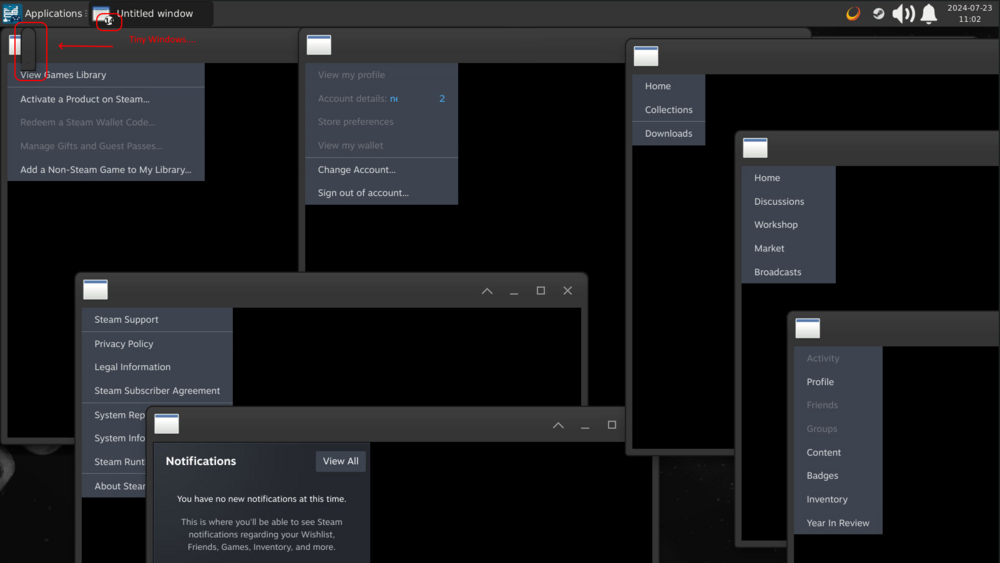
So...changing to have the appdata folder on a cache array seems to allow steam to launch....but for me it's launching a TON (13-14) "Untitled Window" windows with the menu over a black background. These come up stacked...I'm spreading some of them out to show what it's doing... also, some of the windows are absolutely TINY....
-
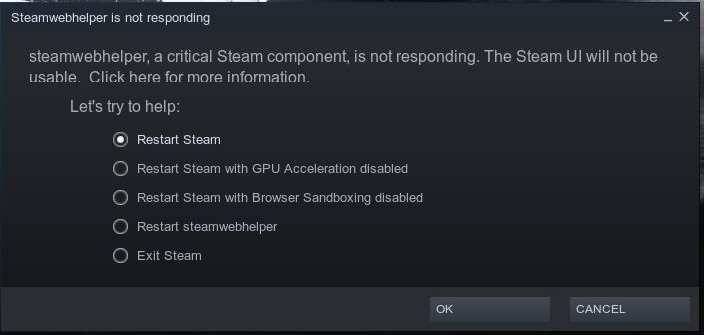
Can't launch steam... Constantly launches to "Steamwebhelper is not responding" logs: WARNING: Unable to locate/open X configuration file. **** Generate NVIDIA xorg.conf **** - Configure container as primary the X server - Enabling evdev input class on pointers, keyboards, touchpads, touch screens, etc. - Configuring X11 with GPU ID: 'GPU-ef6ca7ad-5c3a-64d2-45d4-2c4c21612460' - Configuring X11 with PCI bus ID: 'PCI:130:0:0' - Writing X11 config with Modeline "1600x900R" 201.00 1600 1648 1680 1760 900 903 908 953 +hsync -vsync Option "ProbeAllGpus" "False" added to Screen "Screen0". Option "BaseMosaic" "False" added to Screen "Screen0". Option "AllowEmptyInitialConfiguration" "True" added to Screen "Screen0". New X configuration file written to '/etc/X11/xorg.conf' DONE [ /etc/cont-init.d/80-configure_flatpak.sh: executing... ] **** Configure Flatpak **** - Flatpak configured for running inside a Docker container DONE [ /etc/cont-init.d/90-configure_neko.sh: executing... ] **** Configure Neko **** - Disable Neko server DONE [ /etc/cont-init.d/90-configure_steam.sh: executing... ] **** Configure Steam **** - Enable Steam auto-start script DONE [ /etc/cont-init.d/90-configure_sunshine.sh: executing... ] **** Configure Sunshine **** - Enable Sunshine server DONE [ /etc/cont-init.d/90-configure_vnc.sh: executing... ] **** Configure VNC **** - Configure VNC service port '32036' - Configure pulseaudio encoded stream port '32037' - Enable VNC server - Disable audio stream - Disable audio websock DONE [ /etc/cont-init.d/95-setup_wol.sh: executing... ] **** Configure WoL Manager **** - Disable WoL Manager service. **** Starting supervisord **** - Logging all root services to '/var/log/supervisor/' - Logging all user services to '/home/default/.cache/log/' 2024-06-14 12:25:52,793 INFO Included extra file "/etc/supervisor.d/dbus.ini" during parsing 2024-06-14 12:25:52,793 INFO Included extra file "/etc/supervisor.d/desktop.ini" during parsing 2024-06-14 12:25:52,793 INFO Included extra file "/etc/supervisor.d/neko.ini" during parsing 2024-06-14 12:25:52,793 INFO Included extra file "/etc/supervisor.d/pulseaudio.ini" during parsing 2024-06-14 12:25:52,793 INFO Included extra file "/etc/supervisor.d/steam.ini" during parsing 2024-06-14 12:25:52,793 INFO Included extra file "/etc/supervisor.d/sunshine.ini" during parsing 2024-06-14 12:25:52,794 INFO Included extra file "/etc/supervisor.d/udev.ini" during parsing 2024-06-14 12:25:52,794 INFO Included extra file "/etc/supervisor.d/vnc-audio.ini" during parsing 2024-06-14 12:25:52,794 INFO Included extra file "/etc/supervisor.d/vnc.ini" during parsing 2024-06-14 12:25:52,794 INFO Included extra file "/etc/supervisor.d/wol-power-manager.ini" during parsing 2024-06-14 12:25:52,794 INFO Included extra file "/etc/supervisor.d/xorg.ini" during parsing 2024-06-14 12:25:52,794 INFO Included extra file "/etc/supervisor.d/xvfb.ini" during parsing 2024-06-14 12:25:52,794 INFO Set uid to user 0 succeeded 2024-06-14 12:25:52,801 INFO RPC interface 'supervisor' initialized 2024-06-14 12:25:52,801 CRIT Server 'unix_http_server' running without any HTTP authentication checking 2024-06-14 12:25:52,802 INFO supervisord started with pid 1 2024-06-14 12:25:53,806 INFO spawned: 'dbus' with pid 254 2024-06-14 12:25:53,809 INFO spawned: 'udev' with pid 255 2024-06-14 12:25:53,813 INFO spawned: 'xorg' with pid 256 2024-06-14 12:25:53,817 INFO spawned: 'frontend' with pid 257 2024-06-14 12:25:53,821 INFO spawned: 'pulseaudio' with pid 259 2024-06-14 12:25:53,826 INFO spawned: 'x11vnc' with pid 262 2024-06-14 12:25:53,829 INFO spawned: 'desktop' with pid 265 2024-06-14 12:25:53,833 INFO spawned: 'sunshine' with pid 268 PULSEAUDIO: Starting pulseaudio service 2024-06-14 12:25:54,102 INFO reaped unknown pid 307 (exit status 0) 2024-06-14 12:25:54,103 INFO reaped unknown pid 305 (exit status 0) 2024-06-14 12:25:54,854 INFO success: dbus entered RUNNING state, process has stayed up for > than 1 seconds (startsecs) 2024-06-14 12:25:54,855 INFO success: udev entered RUNNING state, process has stayed up for > than 1 seconds (startsecs) 2024-06-14 12:25:54,855 INFO success: xorg entered RUNNING state, process has stayed up for > than 1 seconds (startsecs) 2024-06-14 12:25:54,855 INFO success: frontend entered RUNNING state, process has stayed up for > than 1 seconds (startsecs) 2024-06-14 12:25:54,855 INFO success: pulseaudio entered RUNNING state, process has stayed up for > than 1 seconds (startsecs) 2024-06-14 12:25:54,855 INFO success: x11vnc entered RUNNING state, process has stayed up for > than 1 seconds (startsecs) 2024-06-14 12:25:54,855 INFO success: desktop entered RUNNING state, process has stayed up for > than 1 seconds (startsecs) 2024-06-14 12:25:54,855 INFO success: sunshine entered RUNNING state, process has stayed up for > than 1 seconds (startsecs) 2024-06-14 12:25:54,855 INFO reaped unknown pid 348 (exit status 1) 2024-06-14 12:25:57,100 INFO reaped unknown pid 304 (exit status 1) 2024-06-14 12:26:58,001 INFO reaped unknown pid 860 (exit status 0) 2024-06-14 12:27:08,004 INFO reaped unknown pid 695 (exit status 0)
-
So...I did two things to get mine working. 1.) change the "Config File" mapping from /romm/config.yml = /some/mnt/path/appdata/romm/config.yml to /romm = /some/mnt/path/appdata/romm 2.) That initial config generated an empty FOLDER [...]/appdata/romm/config.yml/ -- DELETE THIS FOLDER, and copy the contents from here: https://github.com/zurdi15/romm/blob/release/examples/config.example.yml into a new config.yml FILE That at least started up....now to explore from there!
-
Second this...I could have sworn I used TCPDump on my unRAID server before....can we get this added back?

