





mathgoy
Members
-
Joined
-
Last visited
Everything posted by mathgoy
-
So do you think it's because my docker image is on the cache pool?
-
Here you go! Thx maximus-diagnostics-20230114-1623.zip
-
Hi guys, Sorry I am late for the party but I experience the same. Dockers are extremely fast to download but then it; s the chekcing and extracting phases that are very slow. I didnt experience that before I updated to the latest version of Unraid. Any idea?
-
Hi All, For some few days, I noticed that pulling dockers is now very long on my unraid server. It looks like the downloading process is going very fast but then, when it comes to checksum and extracting, it is taking ages. Also, during that process, the rest of the unraid GUI becomes unresponsive. Note that my dockers and VMs are still running fine and remain responsive. I don't know if it is a coincidence but it looks like this issue happened after I updated to the latest version of unraid. I attach my diagnostics file. Should you have any further questions to help me, please let me know! Thanks maximus-diagnostics-20230110-1058.zip
-
Hi Sarge, Sorry to come that late but i am experiencing the exact same thing these days. It takes ages to pull and extract a single docker container. During all that process, the rest of the interface is simply unresponsive. I understand you uninstalled the plugins but it sounds unrelated to the network. Any further information about that?
-
Tried to upgrade. Still the problem with the eth0 that cant be found. This time adding a blank tg3.conf file didn't make the trick
-
Hi, I would love to migrate to focalboard but the docker won't work. Did anyone managed to make it work? It looks like the docker should connect to a database but there is nothing in the template for that. Thanks!!!
-
Gents, I am using a script which is supposed to delete old footage from my CCTV cameras. The footage are stored in a folder named "/mnt/cctv/reolink/JardinHD" where "JardinHD" is the name of my camera. However, the camera will create some subfolders in there. 1 per yere, 1 per month and 1 per day. Therefore, the following script that I found on that thread doesn't seem to work: #!/bin/bash #name=Remove old surveillance recordings #description=Removes old files and folders from cam1 and cam2 folder #arrayStarted=true find /mnt/cctv/reolink/JardinHD -type f -mtime +1 -delete find /mnt/cctv/reolink/JardinHD -type d -empty -delete To run the test, I am trying to delete all footage older than 1 day. So how could I adapt that piece of script so it will handle the subfolders the camera is creating? Thanks!!!
-
Oh that was it. Thanks
-
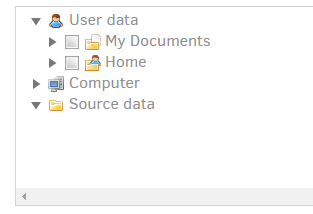
Hi gents, I just setup duplicati but and setup the /source path as being my /mnt/usr folder so I can see all of it and unfortunately, the Duplicati GUI won' t show any of my folders: Any idea what would be the fix? Thanks
-
Hi, thanks for the feedback I increased the size the way you proposed it @ghost82 and it worked right away (using the one single command) Didn't have to reallocate the 10GB I added. No idea why.
-
Looks like I might run out of space: image: /mnt/user/domains/Hassos/hassos_ova-5.13.qcow2 file format: qcow2 virtual size: 32 GiB (34359738368 bytes) disk size: 31.4 GiB cluster_size: 65536 Format specific information: compat: 1.1 compression type: zlib lazy refcounts: false refcount bits: 16 corrupt: false How can I increase the size?
-
Hi, Thanks for your feedback. I found out that topic as well. However, it doesnt work. Keep looping (just like the video posted by one of the users)
-
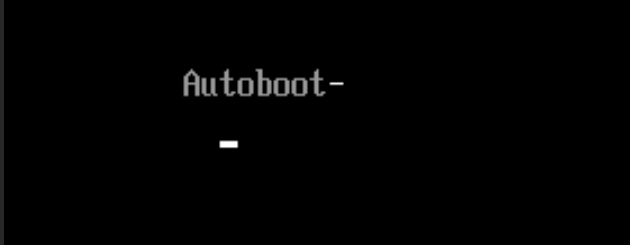
Hi all, I have Home Assistant running on a VM for 18months and today, as I rebooted it, it won't start again. Here is what I will show when booting: It will stay like that forever and load the CPU to 100%. The log is the following: -uuid 07a513e2-aa45-6f97-a9b0-1b827a3465e5 \ -no-user-config \ -nodefaults \ -chardev socket,id=charmonitor,fd=31,server,nowait \ -mon chardev=charmonitor,id=monitor,mode=control \ -rtc base=utc,driftfix=slew \ -global kvm-pit.lost_tick_policy=delay \ -no-hpet \ -no-shutdown \ -boot strict=on \ -device pcie-root-port,port=0x13,chassis=4,id=pci.4,bus=pcie.0,addr=0x2.0x3 \ -device pcie-root-port,port=0x14,chassis=5,id=pci.5,bus=pcie.0,addr=0x2.0x4 \ -device pcie-root-port,port=0x10,chassis=1,id=pci.1,bus=pcie.0,multifunction=on,addr=0x2 \ -device pcie-root-port,port=0x11,chassis=2,id=pci.2,bus=pcie.0,addr=0x2.0x1 \ -device pcie-root-port,port=0x12,chassis=3,id=pci.3,bus=pcie.0,addr=0x2.0x2 \ -device ich9-usb-ehci1,id=usb,bus=pcie.0,addr=0x7.0x7 \ -device ich9-usb-uhci1,masterbus=usb.0,firstport=0,bus=pcie.0,multifunction=on,addr=0x7 \ -device ich9-usb-uhci2,masterbus=usb.0,firstport=2,bus=pcie.0,addr=0x7.0x1 \ -device ich9-usb-uhci3,masterbus=usb.0,firstport=4,bus=pcie.0,addr=0x7.0x2 \ -device virtio-serial-pci,id=virtio-serial0,bus=pci.2,addr=0x0 \ -blockdev '{"driver":"file","filename":"/mnt/user/domains/Hassos/hassos_ova-5.13.qcow2","node-name":"libvirt-1-storage","cache":{"direct":false,"no-flush":false},"auto-read-only":true,"discard":"unmap"}' \ -blockdev '{"node-name":"libvirt-1-format","read-only":false,"cache":{"direct":false,"no-flush":false},"driver":"qcow2","file":"libvirt-1-storage","backing":null}' \ -device virtio-blk-pci,bus=pci.3,addr=0x0,drive=libvirt-1-format,id=virtio-disk2,bootindex=1,write-cache=on \ -netdev tap,fd=33,id=hostnet0 \ -device virtio-net,netdev=hostnet0,id=net0,mac=52:54:00:fa:6c:5e,bus=pci.1,addr=0x0 \ -chardev pty,id=charserial0 \ -device isa-serial,chardev=charserial0,id=serial0 \ -chardev socket,id=charchannel0,fd=35,server,nowait \ -device virtserialport,bus=virtio-serial0.0,nr=1,chardev=charchannel0,id=channel0,name=org.qemu.guest_agent.0 \ -device usb-tablet,id=input0,bus=usb.0,port=1 \ -vnc 0.0.0.0:0,websocket=5700 \ -k fr \ -device qxl-vga,id=video0,ram_size=67108864,vram_size=67108864,vram64_size_mb=0,vgamem_mb=16,max_outputs=1,bus=pcie.0,addr=0x1 \ -device usb-host,hostbus=1,hostaddr=10,id=hostdev0,bus=usb.0,port=2 \ -device virtio-balloon-pci,id=balloon0,bus=pci.4,addr=0x0 \ -sandbox on,obsolete=deny,elevateprivileges=deny,spawn=deny,resourcecontrol=deny \ -msg timestamp=on 2022-05-12 09:38:51.150+0000: Domain id=5 is tainted: high-privileges 2022-05-12 09:38:51.150+0000: Domain id=5 is tainted: host-cpu char device redirected to /dev/pts/0 (label charserial0) Any idea? Thanks
-
EDIT I didn't read correctly and I just launched a RAID-1 conversion
-
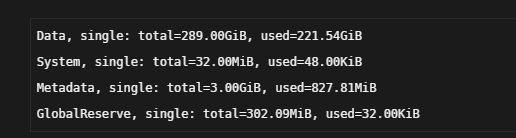
HI guys, Here is my cache pool How can I check what kind of pool it is (Raid0 or Raid1). Having a look at its size, it looks like it is a Raid0 Pool. Then, should it be a Raid0 Pool, How can I convert it into a Raid1 THanks for your much appreciated support!


-
I uninstalled the plugin since I would like to revert back so I can access my server with the good old local ip address. I went through the unstinstallation process but when I type in my local ip adress in my browser, it is still going through the DNS. What did I miss? Thanks!
-
Hi All, I am running Nodered as a docker container and for some reason, it's not in the same timezone as my Unraid server. It looks like the issue happened since the last time we moved clocks. Any idea how I can solve that issue? Thanks
-
No worries mate. I had to scratch my head a bit but eventually, I could work it out!
-
So it looks like I found the solution. In the Extra Parameters of the Docker template, I added --shm-size=1G So the overall Extra Parameters field looks like: --runtime=nvidia --shm-size=1G

-
Hi, having the following error since I updated to 0.9 Fatal Python error: Fatal Python error: Bus error When I looked for some solution, I figured out it's probably related to the shm-size like explained here So I added the following variable into my docker template but it didn't solve the issue. After 10 to 60min, the error pops up in the log and my camera turn white. I am pretty sure this shm-size can't be set for each docker container and should be setup for Docker itself but I have no idea how to do that. Any idea? Thanks
-
Looks like it's all good Thank you so much
-
When I don't use the nvidia hardware decode, you are right, the docker will stop when it crashes and won't disappear after a reboot. However, with the nvidia integration, any crash will delete the docker. Even stopping the docker or rebooting the server will delete the docker.
-
hi @yayitazale, any news about the docker that goes orphan after a reboot?crash when using nvidia? Thanks mate
-
Just some further inputs: If you use the "regular" docker and manually add the nvidia GPU support, the whole container will be marked as oprhan when it crashes too. Also, when you reboot your server, the container will also disappear.



